To set up a multiplayer party, choose how everyone will connect, make sure the game and mode support the group, add or find one another, then have a host create a lobby and invite or admit the others. Agree on race settings and start once everyone is ready. Exact menu names, player limits, cross-play rules, and controller needs depend on the game, platform, and mode.
Choose how the group will connect
First decide whether everyone will play on one console, on nearby consoles, or over the internet. These are different arrangements, and a game may offer only some of them:
- Same-console play: Two or more players share one system and need enough compatible controllers.
- Local wireless: Nearby consoles connect wirelessly using the game’s local-play mode.
- Wired LAN: Consoles connect over a shared local network, typically through a router.
- Online play: Players connect through the game or platform’s online service, whether nearby or remote.
Choose the matching option in the game rather than assuming that “local,” “LAN,” and “online” mean the same thing. For example, Nintendo’s Mario Kart 8 Deluxe LAN instructions require all participating consoles to connect to the same router. Its online instructions instead describe friends joining a host’s room.
Check access, compatibility, and capacity
Before inviting everyone, confirm that each player can access the same game and the specific multiplayer mode you plan to use. If players are on different platforms, verify that the game supports cross-play for that mode and that it is enabled for everyone. EA says an EA Connect lobby invite can fail if either player has cross-play disabled or the selected mode does not support it; EA Connect is a feature in supported games, not a universal racing-game menu. See EA’s EA Connect instructions.
Quick wins for a faster PC:
Scan for outdated or missing drivers - takes under a minuteDriver Scan →Clear out junk files and repair common Windows errorsFree Scan →Fix the driver behind crashes, sound loss and screen glitchesFind Drivers →#1 Best Overall

- Career mode progress through the Feeder series (xtreme dirt, gander trucks and xfinity series) to reach the NASCAR Cup series or jump right in and start at the top
- Improved stats track your progress through the career with more detailed and improved statistics offering far more insight
- Gameplay enhancements improved AI, more player camera options and dnfs
- Brand new testing mode perfect your racing lines and experiment to find the best car setup for each track
- Challenge mode brand new online challenge mode gives you unique race scenarios to complete with a variety of gameplay. Official tracks 34 Officially licensed tracks for you to race on across the various series, including Daytona international Speedway, Indianapolis motor Speedway and talladega Super speed way, plus five fictional dirt tracks.Multiplayer Race online with up to 40 players or enjoy local split screen multiplayer with a friend.eSports support Take part in the EN as car Heat Pro League qualifiers for a chance to race for a real life NASCAR team.Paint booth even more enhancements, including new number fonts and schemes
Use the game’s stated player limit, and check whether it changes by platform or mode. The official Gran Turismo 7 online manual lists multiplayer for up to four players, or up to two players on PlayStation 4. Nintendo Support says Mario Kart 8 Deluxe LAN play supports up to 12 players. Those are game-specific examples, not general limits for racing games.
Account for equipment only for the setup you chose. For two people sharing a Nintendo Switch console, Nintendo lists Joy-Con or compatible Switch Pro Controllers. Its wired LAN setup may require Ethernet cables, a suitable dock, and a wired router; a network switch may be needed if the router does not have enough ports. These LAN items are not requirements for ordinary online play. Consult Nintendo’s LAN guide and local or online play guide for the relevant setup.
Rank #2

- With the return of classic cars, iconic tracks, and fan-favourite modes like GT Simulation and Sport Mode - Gran Turismo 7 is the complete Real Driving Simulator, 25 years in the making.
- Find your line. Whether you're a racer, collector, tuner, designer, photographer or arcade fan - immerse yourself in the facets of automotive culture that matter most to you.
- Connect and compete. Join an international community of drivers to share race strategies, tuning tips, livery designs and photos, before taking to the track to go head-to-head.
Find one another and create a lobby
Use the game’s friend list, platform network, or supported invite feature to make the group visible to one another. Usually one player acts as host: they create a room and choose its initial settings, while the other players join that room. The exact menu path and whether a room is visible, invite-only, or joined another way vary by game.
Example: Mario Kart 8 Deluxe online
Nintendo’s online flow has Player 1 create a room and choose race or battle options. Friends find the host under Friends and join; once everyone is in the lobby, the host confirms. Players then choose characters and karts before selecting preferred courses. Follow Nintendo’s Mario Kart 8 Deluxe online instructions for the game’s current steps.
Rank #3

- READY, SET, WARP! Race across 24 tracks and warp to 15 CrossWorlds with Travel Rings, a unique gameplay mechanic that transports the iconic characters from the Sonic and SEGA universes into new dimensions. Use unpredictability to your advantage as you change the landscape of each race!
- RACE WITH THE BEST! Choose from 23 iconic Sonic characters, the largest roster of any Sonic racing game!
- MAKE IT YOURS: Mix and match between 45 unique original vehicles and 70 different gadgets to trick out your ride, level up your kart, and create the ultimate machine to match your racing style.
- GAIN THE ADVANTAGE WITH POWERFUL ITEMS! Dominate your opponents with 23 different items including returning favorites and all-new items like the Monster Truck!
- MULTIPLE WAYS TO PLAY: Gather with friends and play local split-screen in Grand Prix and the new party mode Race Park, compete against a community of players from around the world with up to 12 players online in World Match, or test your driving skills in Time Trials.
Example: EA Connect invitations
In a game that supports EA Connect, EA’s instructions say to open Friends, select an online friend, and choose “Invite to lobby.” An invited player can accept by choosing “Join lobby.” Available features vary by game, and cross-play must be enabled on both sides when required by the game and mode. See EA’s guide to EA Connect.
Agree on settings and start the race
Before starting, have the host confirm the options the game provides, such as race or battle type, teams, items, and number of races. Once players have joined and the host confirms the lobby, everyone can select characters, vehicles, and courses as the game allows. For a wired LAN room in Mario Kart 8 Deluxe, Nintendo likewise directs the host to select the game type and settings after others join, then confirm the group before players choose their characters, karts, and tracks. The precise sequence depends on the game’s mode.
Rank #4

- Kids Friendly Design: This P30S handheld game console is specially designed for kids. It has a stylish arcade - like appearance. The body fits a child's hand, and the game settings also cater to kids psychology, thus being very attractive.
- Excellent Gaming Experience: Equipped with a 3.0 - inch high - definition screen and excellent speaker sound, it provides an excellent visual and auditory experience for video games. This handheld game console is small and lightweight, convenient for kids to use and carry. Its ergonomic design ensures a comfortable grip, allowing children to fully enjoy the games.
- Rich Collection of Classic Games: This retro handheld game console contains 220 interesting kids video games, including various types such as entertainment, sports, and adventure games, just like those found in many retro game consoles. While playing these games, kids can cultivate skills such as hand - eye coordination, thinking, and problem - solving.
- Convenient Rechargeable and Long - lasting Battery: The video game console is equipped with an 860mAh lithium - ion battery. It ensures that kids can play games without interruption, because there is no need for frequent battery replacement, which is very suitable for playing portable games outdoors. It is a great addition to the world of handheld games for children and can bring more fun to them.
- Absolutely Surprising Gift: Our handheld game toy is a surprising gift for kids, teenagers, and even adults. It is the best gift for birthdays, Christmas, Halloween, and Thanksgiving. Customer satisfaction is our top priority. Our customer support team will serve you wholeheartedly.
If someone cannot join
- The player cannot see the room: Check that everyone selected the same connection type and game mode, then confirm that the host’s lobby is open to friends or that an invitation was sent.
- An invitation fails across platforms: Verify that the game and selected mode support cross-play and that each player has enabled it where required.
- The lobby is full: Check the mode’s player cap and any platform-specific limit before trying to add more players.
- A LAN setup does not connect: Confirm that every console is connected to the same router and that the required wired network equipment is connected correctly.
- A shared-console player has no input: Check that each player has a controller supported by the console and game.
For exact button presses, eligibility rules, and online-service requirements, use the current official instructions for your racing game and platform.
Quick Recap
Best Value
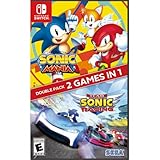
- Experience two games in one with this Sonic Mania + Team Sonic Racing Double Pack
- Sonic Mania is a true, classic Sonic experience: Gorgeous pixel graphics featuring a variety of new Zones with iconic favorites from Sonic 1, 2, 3, Sonic & Knuckles
- Team Racing – Race as a team, win as a team. Use various team moves to assist your teammates, knock out opponents and unleash your Team Ultimate
Product prices and availability are accurate as of the date/time indicated and are subject to change. Any price and availability information displayed on Amazon at the time of purchase will apply.
What’s actually slowing this PC down?
Pick the symptom - the matching free tool is one click away.



