The Tool Desk
Outbyte Driver Updater FREEFix the driver behind crashes, sound loss and screen glitchesFind Drivers →Outbyte PC Repair FREEClear out junk files and repair common Windows errorsFree Scan →Equip a Pictos to get both its stat bonuses and passive effect. Keep it equipped through four victories to master that passive, then assign the learned effect as a Lumina without wearing the Pictos. The trade-off: a Lumina costs points and grants no Pictos stats. Each character can equip up to three Pictos.
How do Pictos and Lumina work?
A Pictos is equipment with two benefits: its listed stat bonuses and a passive effect. A character can equip up to three Pictos. After mastering one, its passive becomes available as a Lumina, which can be assigned separately from the Pictos.
| # | Preview | Product | Price | |
|---|---|---|---|---|
| 1 |

|
Clair Obscur Expedition 33 PS5 | $45.00 | Buy on Amazon |
| 2 |

|
Clair Obscur: Expedition 33 (PS5) | $41.74 | Buy on Amazon |
| 3 |

|
Clair Obscur: Expedition 33 - For PS5 | $45.68 | Buy on Amazon |
| 4 |
![Clair Obscur Expedition 33 [Korean Edition] for PS5](https://m.media-amazon.com/images/I/51aLPXPHeFL._SL160_.jpg)
|
Clair Obscur Expedition 33 [Korean Edition] for PS5 | $69.99 | Buy on Amazon |
| 5 |
|
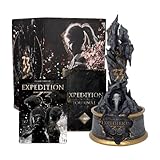
Clair Obscur: Expedition 33 Monolith Set Collector's Edition | $550.00 | Buy on Amazon |
A learned Lumina carries over only the passive—not the source Pictos’ stats. Assigning it uses Lumina Points, so it competes with other learned effects for a character’s capacity. Keeping the Pictos equipped gives its stats and passive without spending capacity to assign that same passive as a Lumina.
How to master a Pictos and equip its Lumina
- Equip the Pictos. Open the character’s Pictos menu and choose one of the available slots. Make sure the character will take part in battles if you want to progress its mastery.
- Win four battles with it equipped. Xbox Wire’s April 23, 2025 guide describes mastery as four wins. The updated Fullclear guide specifies that the wearer must participate, so a character who stays benched does not progress mastery in battles they do not enter. Xbox Wire; Fullclear.
- Assign the learned effect. Once mastered, open the character’s Lumina assignment menu and select the passive, provided the character has enough Lumina Points. The learned effect is available to the party; each character needs sufficient capacity to equip it.
- Check the cost against the benefit. A Lumina uses points but frees a Pictos slot. If the Pictos’ stats are valuable or the passive has a high point cost, keeping the Pictos equipped may be preferable. If the stats matter less and the cost fits, assign the Lumina separately.
How Lumina Points and Colours of Lumina work
Lumina Points are a capacity budget for learned passives. Each Lumina has its own cost; costs vary, rather than following one fixed value. Xbox Wire gives examples ranging from one to ten points, while Gamer Guides describes a broader cost range, so check the cost displayed for the specific effect you want to use.
#1 Best Overall
- Reactive Turn-based Combat: Craft unique builds for your Expeditioners that fit your playstyle via gear, stats, skills, and &character synergies
- Dodge, parry, and counter in real time, chain combos by mastering attack rhythms, and target enemy weak points using a free aim system
- With only one year left to live, join Gustave, Maelle, & fellow Expeditioners as they embark on a desperate quest to break Paintress’ cycle of death
- Explore an enchanting realm populated by adversaries; Wander through breathtaking landscapes, from Island of Visages to the Forgotten Battlefield
- Experience the debut game from Sandfall Interactive, fully realized in Unreal Engine 5 with stunning graphics and a heartbreaking soundtrack
Characters gain Lumina capacity as they level. Gamer Guides also says each Colour of Lumina assigned adds one point. To use one, go to camp and speak with the Curator after completing Flying Waters, following the instructions in the Gamer Guides instructions.
Choosing between a Pictos and its Lumina
Make the choice based on the build, not a universal best setup. Compare the stat bonuses, the passive effect, the character’s three Pictos slots, and the Lumina’s point cost against available capacity.
Rank #2
- Reactive Turn-based Combat - In this evolution of JRPGs, real-time actions enhance the heart of turn-based combat. Build your party and level up six characters. Craft unique builds for your expeditioners that fit your playstyle via gear, stats, skills, and character synergies. Open an active dimension in combat - dodge, parry, and counter in real time, chain combos by mastering attack rhythms, and target enemy weak points using a free-aim system.
- “Tomorrow Comes” - With only one year left to live, join Gustave, Maelle, and their fellow Expeditioners as they embark upon a desperate quest to break the Paintress’ cycle of death. Follow the trail of previous expeditions and discover their fate. Get to know the members of Expedition 33 as they learn to work together against impossible odds.
- A Hauntingly Beautiful World - Explore an enchanting realm populated by surreal adversaries. Wander through breathtaking landscapes, from the Island of Visages to the Forgotten Battlefield, discovering secrets and hidden quests along the way. Find allies of fortune in creatures of legend and recruit a special companion who can access new travel methods and secret areas in the World Map.
- Experience the debut game from Sandfall Interactive, fully realized in Unreal Engine 5 with stunning graphics and a heartbreaking soundtrack.
- European/ UK version
| Choice | What you get | What it uses |
|---|---|---|
| Keep the Pictos equipped | Its stats and passive effect | One of the character’s three Pictos slots |
| Equip its learned Lumina | The passive effect only; no source Pictos stats | Lumina Points, but not the Pictos slot |
For a passive you strongly want but whose Pictos stats you do not need, the Lumina can preserve a gear slot. For a useful stat package or a costly passive, the Pictos itself may be the better use of the slot.
Independent reader supportYour contribution helps us test, update, and keep practical guides available for everyone.Where to find the menus
Use the in-game Pictos and Luminas menus to equip gear and assign learned effects. The exact controls and menu labels can vary by platform and input method; the available guides do not verify button-by-button instructions for every setup.
Free tools Windows power users keep installed
One-click scans. No signup required.
Rank #3
- Engaging Storyline: Dive into a rich, narrative-driven adventure with unexpected twists.
- Complex Puzzles: Test your problem-solving skills with challenging puzzles.
- Immersive World: Explore a visually stunning alien planet with breathtaking details and treacherous terrain.
Patch 1.5.0 added build-management features described by Fullclear’s guide, updated July 19, 2026. The core distinction remains the same: a Pictos provides stats and a passive while equipped, while its mastered Lumina provides only the passive and spends capacity.
Quick Recap
Best Value
- COLLECTOR'S EDITION SET: Premium Monolith Set for Clair Obscur: Expedition 33 featuring an exclusive collectible statue, expedition journal, and decorative outer box for fans and collectors
- DETAILED MONOLITH STATUE: Intricately designed collectible statue featuring the iconic Expedition 33 monolith with weathered stone textures, gold accents, and atmospheric detailing that captures the game's dark fantasy aesthetic
- EXPEDITION JOURNAL: Exclusive hardcover journal with themed artwork and design elements from the game, perfect for notes, sketches, or as a display piece alongside the statue
- PREMIUM PACKAGING: Comes in a striking collector's box featuring dramatic character artwork with rose petal effects and distressed design elements that reflect the game's mysterious atmosphere
- PERFECT FOR DISPLAY: The monolith statue serves as an impressive centerpiece for any gaming collection or display shelf, celebrating the unique world of Clair Obscur: Expedition 33
Rank #4
- This is KOEAN VERSION released in South Korea. Region Free title so you can play it on your system.
- Language: Korean, English, Japanese, Chinese, French, German, Italian, Polish, Portuguese, Russian, Spanish
Product prices and availability are accurate as of the date/time indicated and are subject to change. Any price and availability information displayed on Amazon at the time of purchase will apply.



