Warframe.Market helps you find and contact players who want to buy or sell items; it does not complete trades for you. After agreeing on the item and price, meet in Warframe and exchange them through the game’s Trading Interface. Before confirming, check the offer carefully: Digital Extremes says a completed trade cannot be reversed.
What Warframe.Market does—and what it doesn’t
Warframe.Market is a third-party listing and contact service. Players post buy or sell orders, and other players use those listings to find a trading partner. The actual exchange of items and Platinum takes place in Warframe, not on the website.
The site’s [Terms of Service] distinguish between a lister, who creates an order, and a contactor, who initiates contact. Its [API documentation] describes buy and sell orders and listing details. A listing is an offer to arrange a trade—not a guarantee that the other player is available or will respond. The API’s visible-order behavior includes users whose last-seen status is recent or missing; an offline player may still appear.
How to buy an item
- Search for the exact item. Open Warframe.Market and search the item you want. Review the sell orders and compare price, quantity, availability, and relevant details such as variant, rank, or charges. Make sure the listing fits your platform and crossplay context.
- Contact the seller. Use the listing’s contact option or copy its message into Warframe chat. If you are on console and cannot copy and paste, message the listed username directly. A community [Warframe.Market guide] describes this buyer workflow, though site controls can change.
- Agree on the trade before meeting. Confirm the precise item, quantity, and Platinum amount with the seller. Do not assume a listing alone settles any ambiguity.
- Meet at a trading location in Warframe. The official [Warframe game guide] identifies a Clan Dojo with a Trading Post and Maroo’s Bazaar as trade locations. Select the agreed items and Platinum in the Trading Interface.
- Review the final offer and confirm only if it matches. If any item or amount changes, stop and inspect the updated offer before accepting. Cancel if it is not what you agreed to.
How to sell an item
- Create or sign in to an account. Find the item on Warframe.Market and create a sell order with its price and quantity. The site’s [order documentation] describes fields including item, order type, price, quantity, and visibility.
- Set your availability honestly. A community guide describes “Online in game” as ready for an in-game trade soon, “Online” as available to respond but not currently in game, and “Invisible” as unavailable. Its suggested response windows are guidance, not guaranteed service levels.
- Respond to contacts and honor your terms. Warframe.Market’s [Terms of Service] say listers must honor the listed price at contact, subject to stated exceptions for obvious listing errors. The terms also prohibit requiring unrelated extra trades or tasks.
- Complete the exchange in Warframe. Meet the buyer in a Dojo with a Trading Post or at Maroo’s Bazaar, then check the items and Platinum in the trade window before confirmation.
- Update or remove the order afterward. Once the item is sold, update or remove the listing so it does not mislead the next player. The site’s exact listing-management controls may change.
Check eligibility before arranging a trade
Digital Extremes’ [Trading FAQ & Safe Trading Tips] says players need Mastery Rank 2 or higher and TennoGuard 2FA enabled to trade. The support article lists categories that can be traded, including purchased Platinum, many mods, certain unused Baro Ki’Teer and Syndicate weapons, Arcanes, Prime blueprints and weapon components, normal Focus Lenses, keys and Relics, Archwing weapon parts, Landing Craft blueprints, pet imprints, and some legacy items.
#1 Best Overall
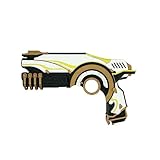
- Lex Prime Warframe
- No moving parts
That list is not proof that a particular item is tradable. Crafted items generally are not interchangeable with their blueprints or components, and the precise rules depend on the item. Check the in-game trade interface and the official support article before making an offer. Only purchased Platinum can be traded; trades for non-game goods or services outside the interface violate the rules.
Independent reader supportYour contribution helps us test, update, and keep practical guides available for everyone.How to compare listings and choose a price
Compare equivalent offers rather than choosing on price alone. Check that you are looking at the same item and variant, rank or charges where relevant, quantity, platform or crossplay context, and seller availability. The API supports platform- and crossplay-aware order lookups and records details such as rank and charges for supported items. A listed price is a player’s offer, not an official valuation.
Rank #2

- Born with the soul of a dragon, the Dovahkiin are tasked with defeating the powerful dragon, Alduin – it’s an even harder task as a miniature cosplaying duck! This Skyrim protagonist is 50% smaller than a regular TUBBZ, meaning the Dovahkiin Mini TUBBZ will need all of their Dragonborn skills to succeed.
- At 50% smaller than standard TUBBZ, these mini figures are ideal for collectors with limited space and are the perfect gift for the Skyrim fan in your life!
- This officially licensed gift is part of the TUBBZ range, a highly collectable series pop culture characters in duck form - perfect for jeep ducking
- Collect all of your favourite characters from games, movies, TV shows, comic books, and popular music as they come to life as rubber duck vinyls
- Approximately 5 centimeters (2 inches) tall when outside of tub display stand (some may vary)
If you are selling, a community guide suggests looking at a 90-day average-price curve alongside current seller listings and pricing near the lowest active seller if you want a quicker sale. That is community advice, not a guaranteed benchmark or rule. Check live listings for your item and platform rather than relying on a static price.
You can also compare a seller’s current offer with buy orders. A lower-priced sell order may be available sooner, while a higher buy order may take longer—or may never—be filled. Listings show what players are offering; whether a trade happens depends on the players involved.
Free tools Windows power users keep installed
One-click scans. No signup required.
Quick Recap
Best Value

- Incredibly detailed, highly decorated 1:12 scale posed figure based on the global phenomenon WORLD OF WARCRAFT game
- NIGHT ELF: DRUID/ROGUE comes 2 weapons, 2 interchangeable armor pieces, extra head and environmental base.
- Also includes a mystery weapon
- Collect all McFARLANE TOYS World of Warcraft figures
Rank #4

- Incredibly detailed, highly decorated 1:12 scale posed figure based on the global phenomenon WORLD OF WARCRAFT game
- UNDEAD: PRIEST/WARLOCK includes 3 weapons, 2 interchangeable armor pieces,extra hand, extra head and display base
- Also includes a mystery weapon
- Collect all McFARLANE TOYS World of Warcraft figures
Rank #3

- THIS ITEM IS NOT INTENDED FOR USERS UNDER 14 YEARS OLD.
- Safe and dourable: All our products are made of PVC material, making sure they are not only fun but also safe for our customers.
- Handmade: Using environmentally friendly materials, it will not cause harm to the human body, and it is a very worthwhile animation model decoration series.
- Gifts for Anime Fans: This is an ideal gift for family and friends who love anime. It is easy to attract people's likes.
- Home Decoration: Ideal table decoration, living room, office decoration, it is easy to attract people's attention and love it.
Trade safely
- Verify the trade window. Check every item and the exact Platinum amount immediately before accepting. Digital Extremes says the interface flags changes that require another review.
- Ignore claims of a Platinum glitch. The amount displayed in the trade interface is the amount you receive, regardless of promises made in chat.
- Keep exchanges in-game. Do not trade items for cash, account access, or other goods and services outside Warframe. Digital Extremes says exchanging in-game items for non-game items violates its Terms of Use/EULA and may lead to a ban.
- Be cautious with suspicious Platinum offers. Digital Extremes warns that Platinum from illegitimate sources can be removed after investigation.
- Cancel rather than accept a changed or incorrect offer. Digital Extremes’ [safe-trading guidance] states: “Please be aware that once the trade has been completed, it cannot be reversed.”
Product prices and availability are accurate as of the date/time indicated and are subject to change. Any price and availability information displayed on Amazon at the time of purchase will apply.



