What’s actually slowing this PC down?
Pick the symptom - the matching free tool is one click away.
Some links on this page are affiliate links: if you buy through them we may earn a commission, at no extra cost to you.
Lenovo announced two Android tablets at MWC in Barcelona on March 2, 2026, but they are aimed at different jobs. The 13-inch Idea Tab Pro Gen 2 is built around studying, reading, note-taking and keyboard-assisted work; the compact 8.8-inch Legion Tab Gen 5 is designed for mobile gaming, with a 165Hz display, flagship Snapdragon processor and dedicated cooling features. Lenovo’s estimated European starting prices were €549 and €999, respectively, with availability originally forecast for March and April 2026. Those are regional launch estimates, not confirmed U.S. prices or proof of current local stock.
What Lenovo announced
Lenovo introduced the Idea Tab Pro Gen 2 and Legion Tab (8.8″, 5) as separate Android tablet products at MWC 2026. Lenovo’s U.S. retail page calls the latter the Legion Tab Gen 5 (8.8″ Snapdragon); this article uses Legion Tab Gen 5 for brevity. The announcement positioned the Idea Tab as a large-screen study and productivity device and the Legion as a portable gaming tablet—not as two sizes or performance tiers of one tablet line.
Lenovo estimated European starting prices at €549 for the Idea Tab Pro Gen 2 and €999 for the Legion Tab Gen 5. The company forecast availability beginning in March 2026 and April 2026, respectively. Those estimates do not establish U.S. retail prices, shipping status, or what accessories are included in a specific regional package. As of August 18, 2026, Lenovo’s U.S. Idea Tab page was still labeled “coming soon” in indexed material; the U.S. Legion page listed specifications but did not establish a public price there. Check the relevant Idea Tab U.S. page and Legion Tab U.S. page for local status.
How the tablets compare
| Feature | Idea Tab Pro Gen 2 | Legion Tab Gen 5 |
|---|---|---|
| Intended use | Study, reading, notes and productivity | Portable Android gaming |
| Display | 13-inch, 3.5K PureSight Pro; Dolby Vision | 8.8-inch, 3040 × 1904; up to 165Hz and 480Hz touch sampling |
| Processor | Snapdragon 8s Gen 4 | Snapdragon 8 Elite Gen 5 |
| Battery capacity | 10,200mAh; 45W charging | 9,000mAh |
| Weight | Under 600g | Approximately 360g |
| Memory and storage | Configuration varies by market; check Lenovo’s specification material | Up to 16GB LPDDR5T and 512GB UFS 4.1 Pro; market configurations vary; microSD support up to 2TB |
| Software emphasis | Lenovo Qira and announced AI reading, notes and transcription tools | Legion Space, Game Assistant and gaming-focused controls |
| Announced European estimate | From €549; March 2026 availability forecast | From €999; April 2026 availability forecast |
Specifications and software can vary by country and configuration. Battery capacity is not a runtime comparison: display size, brightness, workload and software all affect actual endurance. Neither the 165Hz panel nor the larger Idea Tab battery, by itself, establishes real-world gaming frame rates or battery life.
#1 Best Overall

- LEVEL UP – Synergize your work and play with the Lenovo Idea Tab Pro. It’s lightweight, jam-packed with battery life, and has the AI-enhanced smarts to make studying a breeze. “Google and Gemini are trademarks Google LLC. Check responses. Compatibility and availability varies.
- NEXT-GEN PERFORMANCE – Perform at your best with the super-efficient MediaTek Dimensity 8300 processor. Supported by Wi-Fi-6E, get ready for smooth multitasking and lightning-quick downloads.
- IMMERSIVE VISUALS AND RICH SOUND – Whether you’re streaming lectures or decompressing after class, the glittering 12.7” 3K LCD display supported by quad JBL Dolby Atmos speakers makes your media crystal clear.
- GAME LIKE A PRO – Get ready to up your game; the Lenovo Idea Tab Pro is PUBG certified for FPS excellence. It’s kitted out with a super-responsive 360Hz touch sampling rate and lightning-fast 90fps so you’re always a step ahead of the action.
- CHARGE LESS TO EXPERIENCE MORE – Leave battery-anxiety back at the dorm with 11 hours of unplugged video streaming. For long days out, the 45W quick charge gets you back in the action fast.
Idea Tab Pro Gen 2: the large-screen study tablet
Display and everyday hardware
The Idea Tab’s 13-inch 3.5K PureSight Pro display is the more spacious option for reading, split-screen use and documents. Lenovo lists Dolby Vision support and an optional matte display treatment with anti-glare and constant-contrast technology. The tablet uses Qualcomm’s Snapdragon 8s Gen 4, has a 10,200mAh battery and supports 45W rapid charging. It is about 6.20mm thick and weighs less than 600g. Four JBL speakers tuned with Dolby Atmos round out its media features.
Lenovo lists Luna Grey, Cloud Grey and Jelly Mint finishes. A folio, keyboard pack and Lenovo Tab Pen Plus are optional or market-dependent, so check the exact SKU and box contents rather than assuming the pictured accessories are bundled. The Idea Tab datasheet and Lenovo’s regional listing are the appropriate references for configuration details.
Rank #2
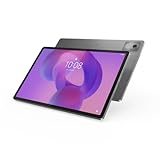
- AI-powered: Yes
- Combined Processor Core: Octa-core
- Processor Manufacturer: ARM
- Processor Type: Cortex A715
- Processor Speed: 3.35 GHz
What the announced AI tools do
Lenovo says the Idea Tab Pro Gen 2 will be its first tablet to feature Lenovo Qira, which is planned to arrive later in 2026. Announced functions include Smarter Reader, which can summarize or explain selected passages; Lenovo AI Notes, for organizing key points and continuing written notes; and live transcription for lectures or conversations. Smart AI Input, activated with a dedicated Smart Key on the keyboard pack, is described as supporting natural-language text generation and translation. Lenovo also describes integration with Lenovo Notepad and the Tab Pen Plus.
Free tools Windows power users keep installed
One-click scans. No signup required.
These are announced capabilities, not evidence that every tool is available in every market or at initial sale. Rollout timing, language support, account requirements, internet access and app availability can affect use. Lenovo’s product information should be checked for current regional details.
Rank #3

- A VIBRANT, SLIMMER BUILD FOR SHARPER MINDS – Engage in AI-powered smart learning on the stylish Lenovo Idea Tab Plus. The svelte tablet packs a powerful punch with quad speakers, sharp graphics, and all-day battery life.
- CARRY LIGHT, FEEL BRIGHT – Weighing just over a pound, the Idea Tab Plus is light enough to carry from morning to night and thin enough to easily slip between your notebooks. The Luna Grey color is soft, fresh, and designed to feel just right anywhere.
- CIRCLE TO SEARCH – Stay focused and use your Lenovo Tab Pen or fingertip to circle items for instant search results or to translate other languages without switching apps. Circle to Search is powered by Google.
- LET YOUR LEARNING CLICK – Write, organize, sketch, and calculate with four learning apps built to match your flow. Lenovo Notepad, Squid, Nebo, and MyScript Calculator help you stay clear, focused, and ready for every study session.
- MORE TO SEE, MORE TO ENJOY – The 12.1″ 2.5K display delivers rich color and sharp detail. With TÜV Rheinland Low Blue Light and up to 800 nits brightness, the display keeps every frame clear in any light.
Who it suits
The Idea Tab is the more natural fit for students and readers who want space for notes, documents and media, especially if a keyboard and pen are part of the plan. It may work as a lightweight school companion, but it remains an Android tablet: app compatibility and multitasking behavior matter, and it should not be assumed to replace a Windows or macOS laptop for desktop-specific workflows. Lenovo’s emphasis is productivity and learning, not dedicated gaming controls or Legion gaming software. Its processor and display alone do not establish sustained gaming performance.
Legion Tab Gen 5: the compact Android gaming tablet
Screen, performance and portability
The Legion Tab Gen 5 pairs an 8.8-inch 3K LCD panel (3040 × 1904) with a maximum 165Hz refresh rate and up to 480Hz touch sampling. Lenovo lists 99% DCI-P3 coverage, 600 nits typical brightness and up to 800 nits in high-brightness mode on its U.S. specification, plus Dolby Vision support. Its Snapdragon 8 Elite Gen 5 platform targets demanding Android games. The tablet is about 360g and 7.59mm thick, a substantially smaller handheld footprint than the Idea Tab.
Rank #4

- POWER YOUR STUDY, FUEL YOUR PLAY – Discover smarter learning with the Lenovo Idea Tab. Stay campus-ready with all-day battery life, AI-powered apps to enhance your work, and sharp graphics for tv marathons with friends.
- SMOOTH, POWERFUL, IMMERSIVE – The MediaTek Dimensity 6300 processor is more powerful than ever, with the AI-enhanced multitasking you need to stay ahead.
- CIRCLE IT, SEARCH IT – Use your Lenovo Tab Pen or fingertip to circle items for instant search results or to translate other languages without switching apps. Circle to Search with Google ensures answers are only a circle away.
- SHARP VIEW, CLEAR SOUND – Experience sharp visuals and immersive sound for study sessions and streaming breaks. With 72% NTSC and quad Dolby Atmos-tuned speakers you can enjoy your study breaks with vivid videos and crystal-clear sound.
- LEVEL UP YOUR STUDY – Write, organize, sketch, and calculate with four learning apps built to match your flow. Lenovo AI Note, Squid, Nebo, and MyScript Calculator help you stay clear, focused, and ready for every study session.
Lenovo’s broader specification material lists configurations up to 16GB LPDDR5T memory and 512GB UFS 4.1 Pro storage, as well as microSD expansion up to 2TB. The U.S. product page lists a 12GB/256GB configuration; buyers should not assume that every market sells both options. A microSD card can add room for media and some game data, but it is not necessarily a substitute for the speed of internal storage. Other listed hardware includes Wi-Fi 7, Bluetooth 6.0, two USB-C ports, a 9,000mAh battery, a 50MP autofocus rear camera, an 8MP front camera and Dolby Atmos speakers. Lenovo lists Eclipse Black and Glacier White, subject to regional availability. See the official PSREF for configuration-dependent details.
Do these 3 things before closing this tab:
1Repair Windows errors before they cause bigger problems2Fix the driver behind crashes, sound loss and screen glitches3Clear out junk files and repair common Windows errorsCooling and gaming software
Legion Space provides performance, power and thermal controls, while Game Assistant offers adjustments during play. Lenovo also cites Legion AI Engine+ features for audio enhancement, noise cancellation and touch-sensitivity tuning. Legion Coldfront vapor cooling, bypass charging while connected to power, Ultra-wide Gaming View for changing a game’s frame ratio and RGB synchronization with compatible Legion devices are among the announced gaming features.
Best Value

- POWER YOUR STUDY, FUEL YOUR PLAY – Discover smarter learning with the Lenovo Idea Tab. Stay campus-ready with all-day battery life, AI-powered apps to enhance your work, and sharp graphics for tv marathons with friends.
- SMOOTH, POWERFUL, IMMERSIVE – The MediaTek Dimensity 6300 processor is more powerful than ever, with the AI-enhanced multitasking you need to stay ahead.
- CIRCLE IT, SEARCH IT – Use your Lenovo Tab Pen or fingertip to circle items for instant search results or to translate other languages without switching apps. Circle to Search with Google ensures answers are only a circle away.
- SHARP VIEW, CLEAR SOUND – Experience sharp visuals and immersive sound for study sessions and streaming breaks. With 72% NTSC and quad Dolby Atmos-tuned speakers you can enjoy your study breaks with vivid videos and crystal-clear sound.
- LEVEL UP YOUR STUDY – Write, organize, sketch, and calculate with four learning apps built to match your flow. Lenovo AI Note, Squid, Nebo, and MyScript Calculator help you stay clear, focused, and ready for every study session.
Lenovo claims the Gen 5’s heat-dissipation efficiency is up to 32% higher than the previous-generation Legion Tab. That is Lenovo’s internal comparison, not an independently verified benchmark or a promise of a particular frame-rate gain. A 165Hz screen likewise does not mean every game runs at 165 frames per second: supported frame rates depend on the game, graphics settings, thermals and software optimization. Real sustained performance and battery life under gaming loads require testing.
Gaming tablet, not handheld PC
The Legion runs Android; it is not a Windows handheld PC. Android games, controllers, streaming and remote-play services can make it useful for portable play, but they do not turn it into a device for native PC games. It can also handle general Android tasks, browsing, video calls and documents, but the 8.8-inch screen offers much less room for long documents or split-screen work than the Idea Tab. USB-C ports and Lenovo Smart Connect do not confer a desktop operating system. Pen support and accessory availability should be checked by SKU and market.
Independent reader supportYour contribution helps us test, update, and keep practical guides available for everyone.Which one makes more sense?
- Choose the Idea Tab Pro Gen 2 if a large screen, reading, note-taking, keyboard work and the announced study tools matter more than handheld gaming ergonomics. Its lower announced European starting estimate may also suit buyers prioritizing entry price, though local retail pricing must be checked.
- Choose the Legion Tab Gen 5 if compact size, high-refresh gaming, touch responsiveness, cooling controls and a flagship mobile platform are the priorities. It is the more purpose-built gaming product, but its announced European estimate is substantially higher.
- Consider neither as a laptop replacement by default. If work depends on desktop applications, extensive file workflows or native PC games, compare a Windows 2-in-1 or laptop instead; if Android apps meet the need, evaluate the specific apps and accessories you rely on.
The key trade-off is workspace versus handheld play, not a simple contest over which tablet is “better.” The Idea Tab’s bigger display and keyboard/pen-oriented approach serve desk, class and reading use; the Legion’s smaller body and gaming controls serve play in the hands. The LCD-based PureSight panels are not OLED, so buyers seeking OLED contrast and black levels should account for that difference.
Quick wins for a faster PC:
Clear out junk files and repair common Windows errorsFree Scan →Scan for outdated or missing drivers - takes under a minuteDriver Scan →Repair Windows errors before they cause bigger problemsFix Now →What the launch announcement does not establish
- Independent game benchmarks, sustained frame rates, thermal behavior or battery runtime under specific workloads.
- Stylus latency or a tested writing experience on the Idea Tab.
- Whether every announced Qira and AI application feature is available at launch, in a buyer’s language or country, or without an account or internet connection.
- Final U.S. prices, shipping dates, included chargers, accessory bundles or color selection for a specific retailer SKU.
- Whether higher Legion memory capacity improves a particular game; performance also depends on processor, cooling, storage, settings and optimization.
Lenovo’s official MWC announcement, Legion specifications and regional product pages describe the announced hardware and intended uses; they are not substitutes for market-specific sales terms or independent performance testing.
Quick Recap
Product prices and availability are accurate as of the date/time indicated and are subject to change. Any price and availability information displayed on Amazon at the time of purchase will apply.

