Outdated Drivers Are Slowing You Down
One free scan finds every outdated or missing driver and matches the right update for your exact hardware.Free scan · exact hardware matchWindows Errors? Fix Them Before They Spread
Repair common Windows errors and clear accumulated junk for a smoother, more stable PC - no reinstall needed.Free scan · no reinstallSome links on this page are affiliate links: if you buy through them we may earn a commission, at no extra cost to you.
LG’s India launch was in July 2024, not a new August 2026 announcement. The confirmed launch wave comprised the 27GS95QE-B and 34GS95QE-B on July 8, followed by the 39GS95QE-B on July 22. These OLED gaming monitors combine a 240Hz maximum refresh rate with LG’s “Anti-Glare / Low Reflection” surface treatment. LG India now also lists related models such as the 32GS95UE-B and 45GS95QE-B, but its launch terms do not establish that they were part of the same July promotion.
Quick answer
The 27GS95QE-B is the most balanced choice for competitive QHD gaming. The 34GS95QE-B, 39GS95QE-B and 45GS95QE-B are curved 21:9 ultrawides at 3,440 × 1,440 and 240Hz, with progressively larger footprints. The 32GS95UE-B is a separate 32-inch 4K OLED that can switch between 4K at 240Hz and Full HD at 480Hz.
All quoted response times and brightness figures below are LG specifications, not independent measurements. A 240Hz panel only helps when your PC can render high frame rates, and anti-glare reduces reflections without making the screen reflection-proof.
Do these 3 things before closing this tab:
1Clear out junk files and repair common Windows errors2Scan for outdated or missing drivers - takes under a minute3Repair Windows errors before they cause bigger problemsWhat launched in India, and when?
| Model | LG-confirmed India launch | Configuration |
|---|---|---|
| 27GS95QE-B | July 8, 2024 | 27-inch, QHD OLED, 240Hz |
| 34GS95QE-B | July 8, 2024 | 34-inch, 21:9 Ultra-WQHD OLED, 240Hz |
| 39GS95QE-B | July 22, 2024 | 39-inch, 21:9 Ultra-WQHD OLED, 240Hz |
These dates come from LG India’s launch terms. The associated launch promotion ended on July 30, 2024; its bundle gifts should not be treated as current offers.
#1 Best Overall

- Thanks to VizoBlueX thousands of Americans protect their Eyes and enjoy their computers with Better Sleep and reduced Headaches
- 100% Multi-Layer protection - Eliminates Hazardous UV spectrum and Blocks Harmful HEV light. This is NOT Anti Glare or Privacy screen that distorts picture
- For 23 to 24 inch monitor - measure only your screen Diagonal without the plastic frame. Product dimensions: W21.5"/ H13"
- Fits Apple iMac 24 Retina & iMac All-in-one 24 and All 16:9 Monitors: Samsung LG Dell HP Lenovo Asus Acer BenQ ViewSonic Philips NEC etc...Prevents eye strain, CVS, headaches, chronic injuries to the eyes, eye fatigue, soreness and more serious eye related conditions. Improves sleeping patterns
- Quick Install: Maintains the full visible Colors of your LCD or LED Monitor. Just peel the protective film from BOTH SIDES and hang the protector on your monitor
The current LG India OLED overview also lists the 32GS95UE-B and 45GS95QE-B. They should be checked model by model for present stock, warranty and price rather than assumed to share the original launch date.
Model comparison
| Model | Size / aspect | Resolution | Refresh | Curve | Notable specifications |
|---|---|---|---|---|---|
| 27GS95QE-B | 27-inch, 16:9 | 2,560 × 1,440 | 240Hz | Not applicable | 0.03ms GtG (LG rating), DisplayHDR True Black 400, DCI-P3 98.5% typical, anti-glare/low reflection |
| 34GS95QE-B | 34-inch, 21:9 | 3,440 × 1,440 | 240Hz | 800R | Ultrawide OLED for gaming and multitasking |
| 39GS95QE-B | 39-inch, 21:9 | 3,440 × 1,440 | 240Hz | 800R | 0.03ms GtG, True Black 400, DCI-P3 98.5% typical, MLA+ brightness technology listed by LG |
| 45GS95QE-B | 45-inch, 21:9 | 3,440 × 1,440 | 240Hz | 800R | 275 cd/m² typical and up to 1,300 nits peak under specified conditions; DP 1.4 with DSC, HDMI and USB |
| 32GS95UE-B | 32-inch, 16:9 | 3,840 × 2,160 or 1,920 × 1,080 | 240Hz or 480Hz | — | 4K/240Hz or Full HD/480Hz dual mode, Pixel Sound with DTS Virtual:X |
Model-by-model details
27GS95QE-B
The 27GS95QE-B uses a 27-inch QHD OLED panel with a 240Hz maximum refresh rate. LG lists 0.03ms GtG, DisplayHDR True Black 400, typical DCI-P3 coverage of 98.5%, HDMI 2.1 support for QHD at 240Hz, NVIDIA G-SYNC Compatible and AMD FreeSync Premium Pro. QHD at 240Hz is generally the easiest combination in this family to exploit on a high-end gaming PC.
34GS95QE-B
The 34GS95QE-B is a 3,440 × 1,440, 21:9 OLED ultrawide with a pronounced 800R curve and 240Hz refresh. It adds horizontal game space and multitasking room, but requires compatible ultrawide game support and more desk width than a 16:9 monitor.
Rank #2

- 【PRIVACY FILTER DIMENSIONS】- Width: 20 15/16" (532 mm), Height: 11 13/16" (299 mm), Diagonal: 24" (609.6 mm) - Peslv Dark 24 inch Privacy Screen Filter is engineered to be compatible with 24in Dell, HP, Samsung, Lenovo, LG, Acer, ASUS, Toshiba, ViewSonic, Aoc, Sceptre, PHILIPS, ViewSonic and other brands monitors with 16:9 aspect ratio. Please verify your computer screen's width and height measurements before ordering. It is not recommended to select a size based solely on the diagonal.
- 【HIGH-CLASS PRIVACY ABLE】Peslv collected suggestions from more than 2000 computer users and performed 22188 anti-peep angle corrections on the micro-blind optical technology to ensure that any line of sight beyond +-30° facing the screen will be shielded. With a Peslv computer privacy screen 24 inch, Protect the privacy of your computer monitor screen and no longer leak any confidential data.
- 【2 MOUNTING OPTIONS FOR EASY INSTALLATION】The Peslv 24 inch privacy screen for monitor supply 2 installation options, Various installation options, are Compatible with both 24" computer monitors with raised bezels and full-screen 24" computer monitors without raised bezels, and convenient installation allows you to complete the installation in 9 seconds. NOTE: Monitors without raised bezels are only available with mounting option 2.
- 【EXCLUSIVE DOUBLE-SIDED TECHNOLOGY】24-inch monitor privacy filter has a double-sided surface technology developed by Peslv. Matte or Glossy. With the matte surface facing outward, you can experience the advanced AG anti-glare technology from Germany while maintaining a 30-degree privacy angle, softening the strong light outdoors, and making the screen content clearly visible. With the glossy side facing outward, you can get a super anti-peeping effect with a privacy angle of 26 degrees.
- 【PROTECT SCREEN ALSO EYES】Filtering optical materials imported from Japan can reduce 92% of blue light and 98% of UV light, and filter all harmful light emitted from the screen to protect your eyes. The high-transparent and reinforced built-in protective layer not only presents high-definition picture quality but also protects your screen from scratches. Hurry up and place an order, own a privacy screen for a computer monitor 24 inch, and protect your monitor screen and your eyes.
39GS95QE-B
The 39GS95QE-B keeps the same Ultra-WQHD resolution and 800R curvature while expanding the panel to 39 inches. LG lists 0.03ms GtG, True Black 400, 98.5% typical DCI-P3 coverage and MLA+ brightness technology. At this size, 3,440 × 1,440 is immersive but less pixel-dense than 32-inch 4K.
45GS95QE-B
The 45GS95QE-B is the largest option: a 45-inch, 800R, 21:9 OLED at 240Hz. LG quotes 275 cd/m² typical brightness and up to 1,300 nits peak in specified conditions. It supports DisplayPort 1.4 with DSC, HDMI, USB and headphone connectivity. Measure the stand footprint and viewing distance carefully; its physical scale is substantial.
32GS95UE-B: the dual-mode exception
The 32GS95UE-B is a 32-inch 4K OLED with two alternative modes: 3,840 × 2,160 at 240Hz or 1,920 × 1,080 at 480Hz. The 480Hz setting is not an extra 4K capability; it trades away resolution for esports-focused frame rate. LG also lists Pixel Sound with DTS Virtual:X, adaptive sync and G-SYNC compatibility.
Rank #3
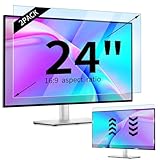
- 【Compatible Models】24-inch Blue Light Screen Filter for Monitor Displays - 16:9 aspect ratio. Width: 20 15/16 inch (20.9 inches/532 mm), Height: 11 13/16 inch (11.8 inches/300 mm), Diagonal: 24 inches (609.6 mm) The 24-inch blue light screen protector has been carefully designed to be compatible with HP, Dell, Samsung, Lenovo, LG, Acer, ASUS, Viewsonic and other monitor brands. Please just check your screen size before purchasing. Note: Don't include the bezel in your measurement. [Supporting Curved Monitor]
- 【Anti Blue Light and Harmful Light】Our computer screen blue light blocker filters out up to 98% of blue light and up to 99% of UV rays in the 380~460nm range, and filter all harmful light emitted by the screen helping to reduce eye fatigue and related discomfort. It also has an anti-glare function that prevents digital eyestrain and headaches. Whether it is children elderly or pregnant women, students, suitable for most other people.
- 【Reduce Glare and Scratch Prevention】The computer anti blue light glare cover 24-inch monitor adopts light filtering optical materials imported from Japan, which can reduce 95% glare and reflective light. You can see a crystal-clear monitor screen even when you're working next to sunlight or bright light.The highly transparent and highly powerful protective layer not only presents high-definition picture quality, but also resists scratches from cat claws and sharp objects, and keeps dust at bay.
- 【EASY TO INSTALL】This blue light screen protector 24 inch monitor comes with a 16:9 aspect ratio. No more plastic tabs or tape to hold the blue light screen protector in place. Allows for quick and easy installation with no air bubbles and no staining residue! Of course, our product is removable and washable. After being covered in dust over time, it can be and cleaned and restored to a like-new condition.
- 【High-Definition Display】The IPROKKO blue light monitor screen protector adds an extra layer of AR Ultra HD light transmission compared to others, which won't put any burden on your computer. This computer anti blue light glare protector is all-encompassing, ensuring image clarity without reducing screen brightness, not to mention pixelation, maximizing the life of your monitor. Buy with confidence, we offer a 1-year warranty.
What 240Hz means in practice
A 240Hz display can refresh up to 240 times per second, but it cannot create missing frames. QHD 240Hz is considerably easier to drive than 4K 240Hz. Reaching 240fps at 4K normally requires a powerful current-generation GPU and game settings tuned for performance; even then, demanding games may run below the panel maximum. The 32GS95UE’s 480Hz mode is aimed at competitive titles that can produce very high frame rates at Full HD.
Quick wins for a faster PC:
Scan for outdated or missing drivers - takes under a minuteDriver Scan →Clear out junk files and repair common Windows errorsFree Scan →Check the exact model’s input limits. LG states that high-refresh operation can depend on DisplayPort, HDMI 2.1 and the connected resolution. A laptop dock, adapter or older cable can become the bottleneck even when the monitor itself supports 240Hz.
Anti-glare versus glossy OLED
LG calls the finish Anti-Glare / Low Reflection. It diffuses and reduces the visibility of windows, lamps and overhead lights; it does not eliminate reflections. In a bright room, that trade-off can be more comfortable than a mirror-like glossy panel. In controlled, dim lighting, glossy OLED often looks clearer and can give highlights and blacks a more immediate, glass-like appearance.
Rank #4

- Ideal Fit: Blue light screen for monitor fits screens sizes of 23"-24" (23", 23.6", 23.8", 24"). Actual filter size: Width: 21.2 inches (540mm), Height: 13.4 inches (340mm). Ideally compatible with HP, Samsung, Dell, ASUS, LG, Huawei, MSI, and other monitor and laptop brands
- Eye Comfort: Blue light screen protector reduces eye strain by filtering up to 61% of blue light and 99% of UV light. This blue light screen protector doesn’t have an Anti-Glare function
- Patent Pending: US and international patent rights reserved, Enjoy Improved Eye Protection function. Blue light blocking screen protector educing blue light from 420-460 nm and ensuring image clarity
- Lifetime Replacement Policy: Blue light filter extends screen longevity by shielding against scratches, dirt, and dust. Damaged screen - Free replacement
- Quick Setup: Computer screen protector mounts easily! Just peel the matte protective film from both sides and position it over the monitor top.
Matte treatments can introduce a slight haze or grain compared with glossy surfaces. They do not improve OLED black levels: ambient light can still lift perceived blacks. Choose based on room lighting and your tolerance for reflected objects, not on the assumption that “anti-glare” guarantees a better image.
OLED benefits and ownership trade-offs
- Strengths: pixel-level blacks, very high contrast, fast pixel response, wide color gamut and strong HDR potential.
- Burn-in consideration: static taskbars, desktop windows and repeated HUDs can contribute to image retention over time. Use screen savers, taskbar hiding, varied content and the monitor’s panel-care routines where provided.
- Brightness behavior: OLED protection and content-dependent brightness can make full-screen white areas less bright than small highlights. LG warns that brighter operating settings can increase power use and that burn-in may occur in brighter modes.
- Productivity: an OLED 240Hz monitor is not automatically superior to a sharp, bright LCD for all-day office work. Text density, sustained brightness and static-content habits matter.
Which model fits which buyer?
| Buyer | Best starting point | Why |
|---|---|---|
| Competitive QHD PC gamer | 27GS95QE-B | Balanced 27-inch size, QHD and 240Hz |
| Ultrawide gamer with limited space | 34GS95QE-B | 21:9 workspace without 39- or 45-inch scale |
| Immersive ultrawide player | 39GS95QE-B | Large 800R display at 240Hz |
| Maximum cinematic immersion | 45GS95QE-B | Largest panel, but lowest pixel density among these ultrawides |
| High-end 4K gamer | 32GS95UE-B | 4K 240Hz option |
| Esports player with suitable hardware | 32GS95UE-B | Full HD 480Hz mode when resolution is secondary |
| Gaming plus text-heavy work | 32GS95UE-B or 34GS95QE-B | 4K is sharper; ultrawide provides more horizontal workspace |
GPU, cable and desk checklist
- Match the monitor to your GPU and the games you actually play; do not buy a 240Hz panel solely for its headline number.
- Verify DisplayPort and HDMI versions, DSC support and the exact resolution-refresh combination for your model.
- Use the supplied or a reputable certified cable. A premium cable cannot add a missing GPU, laptop or dock capability.
- For 39- and 45-inch 800R models, measure desk width, depth, viewing distance and stand clearance. Check the VESA pattern and arm weight rating before mounting.
- Laptop owners should confirm that USB-C carries DisplayPort video; USB ports on the monitor do not necessarily mean USB-C video input.
If 240Hz does not appear
Connect through the appropriate DisplayPort or HDMI input, select the monitor’s native resolution first, then choose the refresh rate in Windows and your GPU control panel. Try the supplied/certified cable, update graphics drivers and monitor firmware where available, and remove a bandwidth-limiting dock or adapter. If the link is unstable, disable incompatible display modes before blaming the panel.
If the image looks hazy or retention appears
Haze may be the expected anti-glare texture rather than a defect. Compare the screen in controlled lighting, check scaling and chroma output, and clean only according to LG’s instructions—never polish off the factory coating. For temporary retention, run the built-in panel-care cycle, avoid interrupting it and reduce prolonged static content. These measures lower risk but do not guarantee permanent burn-in prevention.
Best Value

- 【BEFORE ORDERING】1. Measure monitor diagonal size without edges. 2. Please check the size chart to confirm the correct variation you need.3. The width and height of computer blue light blocking screen protector 27 inch is width 612.6 mm * height 356 mm. (NOT FOR IMAC screen) Compatible for curved monitors
- 【ANTI BLUE RAY/UV/RADIATION】The computer blue light blocking screen protector adopted Japanese Fujimori nano-optical stacking technology, effectively blocking blue light ≥90%, anti UV ≥98%, blocks other harmful lights ≥99%. Recommended by ophthalmologists: computer screen filter for eye strain
- 【PREMIUM QUALITY】Desktop computer screen protector for eyes protection with 8H reinforced acrylic materials, 5 layers of optical engineering protection with a high resolution view, real colors, scratch resistance, anti-fingerprint, Ultra-thin 2mm, explosion-proof
- 【APPLICATION】Easy to use with hanging type, computer screen blue light blocker fitting on working, learning, playing games, watching TV and so on. Reducing eye strain, preventing myopia & dryness, hyperemia and so on, focusing on what you do, effectively improving your work and kid's learning
- 【PROFESSIONAL SERVICE】Removing computer protective films on both sides before installing the blue light filter for computer monitor. Welcome to contact us if any problem troubles you, Answer and solution you got in first time
India price and availability
LG India product pages currently expose specifications and, for some models, “Contact us” or availability pathways rather than a dependable public price. Prices and stock are volatile, so check the live LG page or an authorised Indian retailer on the day you buy. Confirm the exact “-B” suffix, India warranty, dead-pixel policy, seller status, return window and whether a listing is new, imported, open-box or refurbished. Also check whether any protection plan explicitly covers burn-in; generic warranties often exclude image retention.
Do not confuse the newer GS95QE models with older GR95QE products such as the 45GR95QE-B and 27GR95QE-B.
Alternatives to consider
Glossy QD-OLED monitors can look clearer in controlled lighting but reflect more. High-refresh IPS LCDs generally avoid OLED burn-in concerns and can cost less, though their blacks and pixel response are different. A 4K 144Hz/165Hz display may be the better match for a GPU that cannot sustain 240fps. Large OLED televisions can deliver impressive size and contrast, but ergonomics, pixel density, ports, latency and warranty terms differ from dedicated monitors.
The Tool Desk
Outbyte PC Repair FREERepair Windows errors before they cause bigger problemsFix Now →Outbyte Driver Updater FREEScan for outdated or missing drivers - takes under a minuteDriver Scan →The Bottom Line
Bottom line: LG’s India UltraGear OLED launch was a staggered July 2024 release, led by three 240Hz models. Choose QHD 27-inch for competitive balance, 32-inch 4K/dual-mode for detail or esports flexibility, and the 34-, 39- or 45-inch ultrawides for immersion. Before paying the OLED premium, make sure your GPU and connections can use the target refresh rate, your desk fits the curve, and the anti-glare finish and burn-in precautions suit your room and daily workload.
Quick Recap
Product prices and availability are accurate as of the date/time indicated and are subject to change. Any price and availability information displayed on Amazon at the time of purchase will apply.

