Crashes, No Sound, or Screen Glitches?
Random freezes, missing sound and display glitches usually trace back to one bad driver. Find and replace yours safely.Free scan · under a minuteWindows Errors? Fix Them Before They Spread
Repair common Windows errors and clear accumulated junk for a smoother, more stable PC - no reinstall needed.Free scan · no reinstallIf your Nintendo Switch is frozen on a solid orange screen, Nintendo treats it as an unresponsive solid-color-screen issue—not as proof of any one failed part. Force the console off, restart it, and check for a system update if it becomes usable. If the screen stays orange, Nintendo’s guidance is to arrange service.
What an orange screen means
Nintendo’s US support guidance for a screen that is orange, blue, or another solid color and will not respond groups the symptom under a solid-color screen issue. It does not identify the underlying cause. The color alone therefore does not establish that the display, motherboard, or any other specific component has failed.
The US article covers Nintendo Switch, Nintendo Switch Lite, and Nintendo Switch – OLED Model. Nintendo has separate US instructions for Nintendo Switch 2; the core troubleshooting steps are similar.
How to troubleshoot a solid orange screen
1. Force the console off
For the original Switch family under Nintendo’s US instructions, press and hold the POWER button for at least 20 seconds. Release it, then press POWER again to turn the console on. Nintendo’s US Switch 2 instructions also specify holding POWER for at least 20 seconds before restarting.
What’s actually slowing this PC down?
Pick the symptom - the matching free tool is one click away.
#1 Best Overall

- 【Compatible – Check Your Console Model】Suitable for Nintendo Switch HAC-001 V1 and HAC-001(-01) V2.This is a full LCD + touch screen assembly – touch is fully functional. Does NOT fit Switch Lite or Switch OLED. Please check your model in System Settings before ordering.
- 【What This Fixes – LCD + Touch Together】Replaces both cracked LCD and broken touch at once. Fixes: cracked screen, dead pixels, touch not working, unresponsive touch, display issues, wrong colors, frozen screen. One assembly restores full display + touch function.
- 【Installation Warning – Read Before You Start】⚠️ Test before final mounting – connect the new screen first without mounting accessories. Confirm display and touch work. Do not bend the LCD cable over 90°. Professional installation recommended if you lack experience. Watch a YouTube tutorial before starting.
- 【What‘s in the Box – No Hidden Costs】Includes: 1x LCD + Touch Screen Assembly for Switch HAC-001 V1 / HAC-001(-01) V2, 1x Tempered Glass Screen Protector, 1x Repair Tool Kit (screwdrivers, pry tools, etc.), 1x Mounting Accessories. Everything you need – open the box and start.
- 【Warranty & Support】All screens are fully tested before shipment. 6-month warranty for manufacturing defects (non-man-made damage). 24/7 customer support via Amazon message – we reply within 24 hours.
There is a regional difference: Nintendo’s UK guidance for the original Switch family specifies holding POWER for at least 12 seconds. Follow the official support page for your region and console model rather than mixing instructions.
2. Check for a system update if the console responds
If the restart gets you to the HOME Menu and you can navigate, open System Settings > System > System Update and check for an available update. This step applies only once the console is usable.
Rank #2
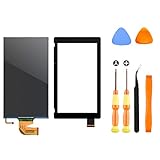
- √【COMPATIBILITY】: Compatible with Nintendo Switch 2017, replace your broken Nintendo Switch screen. (Warning: its the 2017 LCD replacement not for 2019 Switch, not for switch lite or switch OLED).
- √【STRICT QUALITY CONTROL】: We tested every NS Screen before shipment, make sure the screen has no scratches or spots.(Remove The 2 Sides Film Before Installation)
- √【EASY INSTALLATION】: Installing this replacement screen is simple and easy. It comes with an installation kit and can also be installed in Youtube with the video. Need professional skills.
- √【PACKAGE INCLUDE】: 1 X LCD screen, 1 X Digitizer, 2 X warp tabs,1*Y Screwdriver, 1*+ Screwdriver, 1* Tweezer, 1* Opener
- ❤【WORRY-FREE-AFTER SALES】: If you have any dissatisfaction after purchasing the product, please feel free to contact us by email, we will do our best to solve your problem and 7*24 hours waiting for you.
3. Arrange service if the screen remains solid orange
If the solid-color screen persists after the forced shutdown and restart, Nintendo directs owners to service or repair. The cited support guidance does not provide a diagnosis, repair price, warranty decision, or turnaround estimate, so those details need to be confirmed with Nintendo for your location and console.
Independent reader supportYour contribution helps us test, update, and keep practical guides available for everyone.Make sure this is the right troubleshooting case
Solid orange handheld screen with no response
The steps above apply to a handheld console showing a solid orange screen and not responding, as described in Nintendo’s solid-color support articles.
Free tools Windows power users keep installed
One-click scans. No signup required.
Rank #3

- NOTICE*: Please Remove the film before installation. Not for Switch Lite
- GOOD COMPATIBILITY : The LCD Screen is Compatible with NS (Switch) HAC-001/HAC-001(-01). Not for Switch Lite(Touch Screen Digitizer is not included).
- VALUABLE PACKAGE : Come with 1pc LCD Screen. Great collocations to repair your NS Switch controller. (Touch screen digitizer is not included).
- INSTALLATION NOTICES : Very convenient and portable, good replacement for your damaged LCD screen. But needs to be professional skill and very careful to replace the screen. We are not responsible for any damage to the switch during repair.(Instructions manual, installation tool sets, adhesive are not included).
- AFTER SALE SERVICE : With one year quality satisfaction service, if you have any request or problem please contact us asap, we will offer you the best solution.
No image on a TV while docked
A blank television while a Switch or Switch – OLED Model is docked is a different issue. Nintendo’s TV troubleshooting guidance addresses TV output, including the dock, AC adapter, HDMI cable, and TV setup. Nintendo Switch Lite does not support TV mode. Those accessory checks do not diagnose a frozen orange handheld display.
Partial discoloration or visible screen damage
Cracks, blotches, runny colors, yellow tint, or discoloration affecting only parts of the screen are not the same as a solid, unresponsive orange display. Nintendo’s guidance for screen discoloration or damage includes different steps, such as powering off, removing a screen protector if present, updating, or adjusting brightness or theme. Use that guidance for those symptoms, not as a substitute for the solid-color procedure.
Quick Recap
Best Value

- COMPATIBILITY----Touch Screen Replacement only For Nintendo Switch V1 HAC-001 (Only Digitizer Screen Replacement, without LCD Screen). Please check your tablet's model carefully before ordering.
- Package List----1x Screen, 1x Opening Tools Kits, 1x Double-sided Adhesive Tape. Our products are professionally packaged to ensure that the products will not be damaged during transportation. If the packaging is damaged when you receive the product due to uncontrollable reasons and the product is damaged, please take a photo and send it to us, we will immediately reissue a new product for you.
- APPLICATION----It is used to replace or repair faulty screen: such as the touch screen been damaged, the touch function does not work, and the touch function is not sensitive. Note: If your device is not only a problem with the touch screen, if the LCD screen is also not working, please do not buy the screen from this link, you need to replace both the LCD screen and the touch screen.
- INSTALLATION PRECAUTIONS----Removal and installation of touch screen requires professional equipment to separate the touch screen and the LCD screen, If you are not a professional maintenance personnel, you have no experience in installing screens and no professional maintenance equipment, we recommend that you go to local repairs shop to have a professional replace the screen for you to avoid unnecessary damage to your device.
- LIFE-TIME SERVICE----There is a 100% inspection by professional QC team for each screen before shipping. We provide LIFE-TIME exchange for non-human damages to make your purchase risk-free. If you need further help for any problem about this touch screen replacement, we highly suggest to contact us for technical support and to get satisfactory solutions.
Rank #4

- 【Device Match – Check Before Order】Suitable for Nintendo Switch HAC-001 and HAC-001(-01) (original model, 6.2 inch). ⚠️ This is LCD display only – touch screen is NOT included. Does NOT fit Switch Lite or Switch OLED. Please check your console model before ordering.
- 【What This Fixes】Perfect for: cracked glass, dead pixels, display issues, wrong colors, or frozen screen. ⚠️ Does NOT fix touch issues – if your touch screen is broken or unresponsive, this LCD only replacement will not help. You need a full LCD + digitizer assembly.
- 【Quality You Can Trust】Each screen is fully tested before shipment – no dead pixels, no scratches, no display defects. We don‘t ship flaws. Just reliable quality for your repair.
- 【What’s in the Box】Complete kit – no hidden costs. Includes: 1x LCD Screen, 1x Tempered Glass Screen Protector, 1x Repair Tool Kit (screwdrivers, pry tools, etc.), 1x Mounting Accessories.
- 【Installation Tips】Test before installation – connect the screen without mounting accessories first. Watch YouTube tutorial "For Switch screen replacement" before starting. Professional installation recommended if you lack experience. Contact us via Amazon message for help – we reply within 24 hours.
Product prices and availability are accurate as of the date/time indicated and are subject to change. Any price and availability information displayed on Amazon at the time of purchase will apply.



