Do these 3 things before closing this tab:
1Repair Windows errors before they cause bigger problems2Scan for outdated or missing drivers - takes under a minute3Clear out junk files and repair common Windows errorsYes, an original Nintendo 64 Controller Pak can be made batteryless by replacing its battery-backed SRAM with compatible FRAM. A tabbed CR2032 replacement is the simpler repair, while a second-SRAM bank mod is more experimental and does not guarantee that games will use extra storage. These options concern the Controller Pak in the controller, not the N64 Expansion Pak RAM upgrade.
What the N64 Memory Pak actually is
Nintendo’s period documentation describes the Controller Pak (also called a Memory Pak) as a small cartridge that stores saves in memory chips powered by a battery. William Gaatjes summarized the original design in an AnandTech thread opened on 19 June 2016: “In essence, the N64 memory pack is nothing more then a 32K*8bits RAM powered by a CR2032 lithium coin battery.” That is a nominal 32K×8-bit, or roughly 32 KiB, battery-backed SRAM design.
The Expansion Pak is a separate accessory that adds console memory. Installing, repairing or modifying a Controller Pak does not upgrade the N64’s system RAM.
Choose the mod before opening the shell
| Option | What changes | Save-preservation risk | Soldering and compatibility | Future maintenance | Storage architecture |
|---|---|---|---|---|---|
| Battery replacement | Replace the original cell with a tabbed CR2032 while retaining the SRAM. | Disconnecting the cell can erase saves unless they are backed up or otherwise kept powered. | Lowest circuit-level change, but polarity, board revision, pad condition and shell clearance still matter. | Another cell replacement will eventually be needed. | One standard SRAM bank. |
| FRAM conversion | Remove the battery and SRAM, then fit a compatible FM18W08 or FM28V020 FRAM. | The original data can be lost during desoldering or if the replacement is incompatible; back up first. | More demanding desoldering and verification. Match voltage, bus width, package, pinout and timing to the exact board. | No coin cell to fail or replace. | One nonvolatile memory bank in the standard Controller Pak layout. |
| Switched-bank modification | Add a second Toshiba TC55257B SRAM, 27 kΩ pull-ups on chip-enable lines and an SPDT selector, as described in the 2016 AnandTech build. | Existing saves remain vulnerable to the original battery, and wiring errors can affect either bank. | Highest circuit complexity. Board layout and game behavior must be checked; the selector must only be changed with the N64 powered off. | The battery-backed design still needs cell maintenance unless combined with a different memory strategy. | Multiple manually selected banks; games may still address only the standard layout. |
Replacing the Controller Pak battery
Why this is the least invasive route
The SRAM and its normal address and data connections remain in place. You are repairing the part most likely to age—the coin cell—rather than changing the memory technology or adding bank-selection logic.
Recommended Free Tools
#1 Best Overall
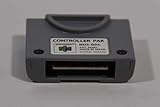
- This Certified Refurbished product is tested and certified to look and work like new. The refurbishing process includes functionality testing, basic cleaning, inspection, and repackaging. The product ships with all relevant accessories, a minimum 90-day warranty, and may arrive in a generic box. Only select sellers who maintain a high performance bar may offer Certified Refurbished products on Amazon.com
- 256 KB of Memory
- In case, if the controller is not working, please follow the steps given below:
- 1. Get a cue tip and rubbing alcohol. Dip the cue tip in the rubbing alcohol
- 2. Clean each side of the connectors in the controller pak by rubbing the cue tip side to side pressing firmly to remove any dust or dirt
Safe replacement sequence
- Back up the saves first. Use whatever compatible hardware or game-based transfer method you already trust. Do not assume that a fast battery swap preserves data: removing the cell interrupts the SRAM’s backup supply and can erase the contents.
- Open the shell carefully. A 3.8 mm Gamebit driver is listed for opening the Controller Pak in the Delta Island repair tutorial. Keep screws and plastic parts organized.
- Photograph the board and mark polarity. Record which side of the original cell is positive before desoldering. Also note the board revision and the battery’s physical position.
- Inspect before heating the joints. Look for corrosion, lifted pads and cracked solder. Clean accessible contacts with high-percentage isopropyl alcohol and let them dry completely.
- Remove the old cell and fit a tabbed CR2032. Use a tabbed replacement intended for soldering, not a loose cell with wires pressed against the board. Match the original polarity, avoid bridging adjacent pads and check that the shell closes without squeezing the battery.
- Check your work electrically. Under magnification, inspect for solder shorts and damaged traces, then verify continuity where appropriate before reassembling.
- Format and test the Pak. On real N64 hardware, allow a compatible game to initialize or format the Pak, create a save, load it, delete it and repeat the test after several power cycles.
When a battery swap should stop
If the cell has leaked, the pads are badly corroded, or the save is irreplaceable and you have no backup path, pause rather than treating this as a routine “drop-in” repair. A damaged pad or interrupted supply can turn a simple replacement into board repair and permanent data loss.
Converting the Pak to FRAM
What changes
FRAM is nonvolatile, so it retains data without a coin cell. Xrider’s Delta Island tutorial, dated 17 February 2022, describes removing both the battery and SRAM and installing an FM18W08 or FM28V020. The tutorial presents FRAM as a way to avoid future battery failure, not as a guaranteed capacity upgrade.
Rank #2

- 256 KB of Memory
- In case, if the controller is not working, please follow the steps given below:
- 1. Get a cue tip and rubbing alcohol. Dip the cue tip in the rubbing alcohol
- 2. Clean each side of the connectors in the controller pak by rubbing the cue tip side to side pressing firmly to remove any dust or dirt
- 3. Repeat this process multiple times until the cue tip gets no black, brown, or green color after thoroughly cleaning each side of the connectors
“If you wish to preserve your saves for eternity, you can replace the SRAM with an appropriate FRAM,” Xrider writes in the tutorial.
That is an engineering rationale, not a measured lifetime claim. No controlled longevity, failure-rate or success-rate statistic is published in the cited material.
Outdated Drivers Are Slowing You Down
One free scan finds every outdated or missing driver and matches the right update for your exact hardware.Free scan · exact hardware matchWindows Errors? Fix Them Before They Spread
Repair common Windows errors and clear accumulated junk for a smoother, more stable PC - no reinstall needed.Free scan · no reinstallRank #3

- It is there is film on the face.
- Comfortable to touch.
- Adopting imported materials to protect internal structure and strong heat dissipation.
- Precise card position, easy to disassemble, not easy to fall off.
- After cutting and special machine process, you no need to cut it any more.
Parts and tools
- A compatible FM18W08 or FM28V020, with its package and electrical characteristics verified against your board.
- A 3.8 mm Gamebit driver.
- Desoldering equipment, a soldering iron and suitable solder.
- Magnification and cleaning supplies for inspecting pads and contacts.
FRAM conversion workflow
- Test the unmodified Pak first. Confirm that the console and a compatible game can recognize it. This gives you a baseline before surgery.
- Back up any saves and document the board. Photograph chip orientation, pin 1 and battery polarity. Identify the exact SRAM package rather than assuming every Controller Pak revision is identical.
- Verify the replacement before desoldering. Compare operating voltage, bus width, package, pinout and timing. “FRAM” alone is not a compatibility specification.
- Open the shell and remove the battery and SRAM. Use controlled heat and desoldering technique so pads and plated-through connections are not lifted.
- Install the FRAM in the correct orientation. Inspect every joint for bridges, incomplete wetting and lifted traces.
- Check continuity and shorts under magnification. A visual inspection is not enough for closely spaced pins.
- Use a compatible game to format or repair the Pak. The Delta Island procedure includes an initial test, chip replacement, formatting or repair through a game, and post-mod save testing.
- Exercise the finished Pak on real hardware. Save, load, delete and repeat across multiple power cycles before trusting important progress.
Why chip matching matters
A part that has the wrong voltage, package or pinout can fail immediately or behave intermittently while appearing neatly soldered. Confirm the data-sheet characteristics and the board’s actual wiring before ordering an FM18W08 or FM28V020; the part number is not a substitute for electrical verification.
Adding a second SRAM bank
The AnandTech approach
The 2016 AnandTech thread piggybacks a second Toshiba TC55257B SRAM, adds 27 kΩ pull-ups on the chip-enable lines and uses a single-pole, double-throw switch to select banks. The author explicitly notes that bank selection can only be changed with the N64 turned off.
Rank #4

- Vibrating accessory responds to game stimulus. Model# NUS-013
- Different intensities for different game situations
- Easy to switch off if desired
- Batteries not included.
- Only for use with compatible titles
Why this is not a universal capacity upgrade
Two physical SRAM banks do not force every game to discover or use twice the storage. Software may expect the standard Controller Pak layout, and a game can ignore an unselected bank entirely. The switch also creates a state-management problem: changing it while powered can corrupt data or stress the memory interface. Treat this as a controlled hardware experiment, not a guaranteed larger memory card.
Practical precautions
- Map the exact chip-enable wiring on your board revision before copying any circuit.
- Keep the selector inaccessible or clearly labeled so it cannot be moved during a save or load.
- Power the N64 down fully before changing banks.
- Test each bank independently with separate saves, then repeat power-cycle tests.
- Retain a backup of anything important; the original battery-backed architecture remains part of the design unless you replace it separately.
Validation checklist after any mod
- The Pak is recognized consistently by more than one real N64 game, if available.
- Formatting or repair completes without an error.
- A new save can be created, loaded and deleted.
- The same save survives repeated power-off and power-on cycles.
- Controller contacts and the Pak edge connector are clean and dry.
- No solder bridge, lifted pad, cracked joint or unexpected continuity remains.
- For a bank mod, each bank is selected only while the console is off and retains its own test data.
Troubleshooting common failures
The N64 does not recognize the Pak
Power down, remove the Pak and clean the contacts with high-percentage isopropyl alcohol. Let them dry, then inspect the board for corrosion, cracked joints and solder bridges. If the problem began after a FRAM conversion, recheck orientation, pin 1 and the replacement’s package and pinout.
Free tools Windows power users keep installed
One-click scans. No signup required.
Best Value

- Compatible with all N64 controllers that can be inserted into Controller Pak.
- Adequate capacity: 1MB of storage space. There are 256KB built into each switch. Just toggle the switch to transform 256KB of storage space. More convenient to manage your game records.
- Plug & Play: Insert the SLOT directly behind the N64 controller.
- Brand new N64 controller package, backed by a one-year warranty and friendly customer service
- Important Notice: Long-distance shipping may cause the pre-installed CR2032 to deplete. If you experience any warnings about data corruption or inability to save during use, please replace (model CR2032) for the best experience. Don't worry - we include a free spare CR2032 to cover all your needs.
Saves disappeared after a battery replacement
The most likely explanation is that SRAM power was interrupted during removal. Restore a verified backup if one exists; otherwise, further soldering will not recreate data that the SRAM has already lost.
One bank works and the other does not
Confirm that the selector is being changed only with the N64 off, then inspect the added SRAM’s chip-enable wiring and pull-ups. A bank that passes electrical checks can still be unusable in a particular game if that game never addresses the switched layout.
Bottom line
For a standard Controller Pak that still works, replace the tabbed CR2032 if you want the smallest intervention and have a plan for preserving saves during the swap. Choose FRAM when eliminating future coin-cell maintenance is worth the greater desoldering and compatibility work; FM18W08 and FM28V020 are candidates only after board-level verification. Use the second-SRAM bank design only if you accept manual, power-off switching and the possibility that games will not expose the extra bank.
Quick Recap
Product prices and availability are accurate as of the date/time indicated and are subject to change. Any price and availability information displayed on Amazon at the time of purchase will apply.
Quick wins for a faster PC:
Clear out junk files and repair common Windows errorsFree Scan →Fix the driver behind crashes, sound loss and screen glitchesFind Drivers →Repair Windows errors before they cause bigger problemsFix Now →



