Quick wins for a faster PC:
Scan for outdated or missing drivers - takes under a minuteDriver Scan →Repair Windows errors before they cause bigger problemsFix Now →The PS5’s signature immersive features are haptic feedback and adaptive triggers. The problem often described as “PS5 stick drift” is different: it is unwanted movement from a DualSense analog stick. Sony provides reset and support steps, but the available evidence does not establish how often drift occurs or show that it is a widespread system-wide failure.
What is breaking down—and what is not established?
Sony presents haptic feedback and adaptive triggers as part of the PS5’s immersive design, delivered in part through the DualSense controller (Sony Design’s PlayStation 5 Design Story). Stick drift is a potential analog-stick problem, not evidence that the haptics or adaptive triggers themselves are failing.
No representative published figure for DualSense stick-drift frequency or failure rate is established in the sources cited here. Sony’s troubleshooting page addresses controller and analog-stick problems but does not say how often they occur. Treat individual reports as reports, not as a measured failure rate.
How to troubleshoot a DualSense controller
Sony’s regional Thailand support page recommends these general controller steps. A reset may help with some issues, but Sony does not guarantee that it will fix a mechanical stick problem.
#1 Best Overall

- INCREASED ACCURACY - Mixed height combo for faster target acquisition and increased precision on the right, as well as better control and maneuvering on the left
- IMPROVES COMFORT & GRIP - Non-slip, proprietary rubber compound offers exceptional grip and requires less force which reduces wrist, hand and thumb fatigue
- ONE HIGH-RISE (CONCAVE) THUMBSTICK - That adds 10.0 mm for increased accuracy on right analog
- ONE MID-RISE (CONCAVE) THUMBSTICK - On the left analog for enhanced control with in-game movement while adding a nominal height of 6.5 mm
- VERSATILE - The added grip and comfort works well across your entire library of games and protects stock thumbsticks from wear and tear *Packaging May Not Reflect Updated Compatibility
- Turn off the PS5. Disconnect the controller from its USB cable.
- Reset the controller. On the back, find the small recessed reset button next to the Sony logo. Use a pin or similar tool to press and hold it for at least five seconds.
- Reconnect it by USB. Connect the controller to the console with a USB cable, then press the PS button.
- Update the console software if possible. If you can operate the PS5, follow Sony’s advice to update the system software.
- Contact PlayStation support or repairs if the issue continues. Start with Sony’s DualSense troubleshooting and repairs page; available options and terms may depend on your location.
Repair, DIY, or replacement?
If resetting does not resolve the issue, compare the available paths before opening the controller or buying another one. Current comparable repair prices, turnaround times, and warranty terms are not established by the cited sources; check Sony’s location-specific support information and the terms that apply to your controller.
| Option | What to consider |
|---|---|
| Sony support or repair | Use PlayStation’s support route to check local availability, eligibility, price, and turnaround. Do not assume service will be free. |
| DIY repair | iFixit publishes a DualSense Controller V2 Stick Drift Fix guide. It is revision-specific: confirm the controller revision and part compatibility, and consider whether you are comfortable disassembling it. |
| Replacement | Compare the cost of a replacement controller with the repair options available where you live. Replacement is an alternative if support cannot resolve the issue or you do not want to attempt a repair. |
What a drift allegation does—and does not—prove
A 2021 Test Achats consumer advocacy letter characterized drift as a defect. That is the authors’ allegation, not a court finding or an independent technical determination. It does not establish a failure rate or prove that every affected controller shares the same cause.
Quick Recap
Best Value
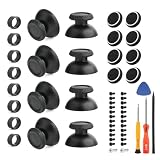
- Compatibility and Application: The thumbsticks replacement only compatible with PlayStation 5 PS5, please make sure your model is correct. To solve the problem of joystick does not slide smoothly,loss of anti-slip texture or the edges become sharp or jagged, ect. For PS5 thumbsticks replacement will help to restore the playing feeling.
- Quality Guarantee: The thumb Stick for PS5 was made by good ABS material and produce by accurate machine, can restore the quality and size with your original thumbsticks . All for PS5 thumbsticks have passed strictly QC double tested and 100% in good condition before shipment.
- Easy Installation: ①Wipe the top of the joystick with a clean damp cloth to remove dust, grease or sweat to ensure a more secure fit. ②Align the opening side of thumbstick for PS5 with the Joystick and gently press around to make it fit in completely. Then check whether it is firmly and avoid being skewed or loose. ③After installation, turning the Joystick gently to ensure that it does not rub against the controller housing.
- Good Protection: Comes with 4pcs thumb grips and 4pcs protective rings. The thumb grips for PS5 can Protect joystick,fit the original joystick tightly without fear of deviation.Avoid joystick damage and extend using time. The protective ring for PS5 are made by good silicone material to protect joystick ,and reduce wear and tear.
- Suggestion Tips: It also comes with set of professional tools and set screws of controller, helps to disassemble and replace the thumbsticks more convenient. If you do not have any installation experience, we suggest find the professional. If you need the installation guide for PS5 thumbsticks replacement or have problem, please leave a message.
Rank #4

- INCREASED ACCURACY - Mixed height combo for faster target acquisition and increased precision on the right, as well as better control and maneuvering on the left
- IMPROVES COMFORT & GRIP - Non-slip, proprietary rubber compound offers exceptional grip and requires less force which reduces wrist, hand and thumb fatigue
- ONE HIGH-RISE (CONVEX) THUMBSTICK - That adds 10.0 mm for increased accuracy on right analog
- ONE MID-RISE (CONVEX) THUMBSTICK - On the left analog for enhanced control with in-game movement while adding a nominal height of 6.5 mm
- VERSATILE - The added grip and comfort works well across your entire library of games and protects stock thumbsticks from wear and tear *packaging may vary
Rank #3

- Custom designed joysticks to perfectly fit for PS5, for PS4, for PS4 Slim, for PS4 Pro controller. Work exactly like the original thumbsticks
- Unique replacement to add much more personality to your controller. The replacement thumb sticks will make your controller distinct when playing with friends, no more boring standard color
- Made of premium PC & TPE plastic material, durable and practical. Ideal replacement for your broken or cracked controller thumbsticks
- A variety of colours thumbsticks are available, you can combine eXtremeRate replacement accessories to customize your controller
- Easy to install, requires internal fitting, the screwdriver tool included can help you easily open the shell and install the gaming parts. Get the installation video guide by searching "eXtremeRate Thumbsticks for PS5" or "EiWmjR87CS4" on YouTube
Rank #2
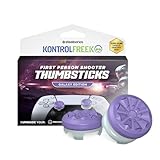
- INCREASED ACCURACY - Mixed height combo for faster target acquisition and increased precision on the right, as well as better control and maneuvering on the left
- IMPROVES COMFORT & GRIP - Non-slip, proprietary rubber compound offers exceptional grip and requires less force which reduces wrist, hand and thumb fatigue
- ONE HIGH-RISE (CONCAVE) THUMBSTICK - That adds 10.0 mm for increased accuracy on right analog
- ONE MID-RISE (CONCAVE) THUMBSTICK - On the left analog for enhanced control with in-game movement while adding a nominal height of 6.5 mm
- VERSATILE - The added grip and comfort works well across your entire library of games and protects stock thumbsticks from wear and tear *Packaging May Not Reflect Updated Compatibility
Product prices and availability are accurate as of the date/time indicated and are subject to change. Any price and availability information displayed on Amazon at the time of purchase will apply.
Independent reader supportYour contribution helps us test, update, and keep practical guides available for everyone.



