Free tools Windows power users keep installed
One-click scans. No signup required.
Some links on this page are affiliate links: if you buy through them we may earn a commission, at no extra cost to you.
Yes—you can use a PlayStation 2 with an HDMI-only TV or monitor. The PS2 does not output HDMI natively, so an adapter or scaler must convert its analog video. The important distinction is that an HDMI connector says nothing by itself about picture quality: a cheap dongle may merely convert the signal, while a dedicated scaler can properly deinterlace 480i, change resolution, and handle troublesome mode changes.
Quick recommendation
| What you want | Best direction |
|---|---|
| Cheapest, simplest connection | PS2-specific HDMI adapter |
| Cleaner budget setup | PS2 component cable plus a basic converter or scaler |
| Many ordinary 480i PS2 games | RetroTINK-5X Pro |
| Premium 4K processing and CRT-style controls | RetroTINK-4K CE or 4K Pro |
| Low-lag enthusiast line multiplication | OSSC Pro, with more configuration |
What “PS2 to HDMI” actually means
These terms are often used interchangeably, but they describe different jobs:
- Adapter: A PS2-plug device that takes the console’s analog output and presents an HDMI socket. It may perform only basic conversion.
- Converter: Changes composite, S-Video, RGB, or component video into a digital HDMI signal.
- Scaler: Converts the signal and also deinterlaces, line-doubles or upscales it, buffers it, and often offers timing and image controls.
HDMI does not make a game HD. Most PS2 software still renders at standard-definition timings such as 480i or 480p (NTSC) and 576i or 576p (PAL). An HDMI device can output a 1080p or 4K signal while the original game remains standard definition.
Outdated Drivers Are Slowing You Down
One free scan finds every outdated or missing driver and matches the right update for your exact hardware.Free scan · exact hardware matchWindows Errors? Fix Them Before They Spread
Repair common Windows errors and clear accumulated junk for a smoother, more stable PC - no reinstall needed.Free scan · no reinstallChoose the best PS2 source connection
- Component YPbPr: Usually the best unmodified PS2 connection for a modern setup. It uses three video plugs—Y, Pb and Pr—and separate red/white audio plugs, as Sony describes in its connection guide (Sony).
- RGB SCART: Can be excellent with correctly wired equipment, but is more common in European installations.
- S-Video: Sharper than composite, though many current televisions lack an S-Video input.
- Composite: The yellow RCA video plug; it is the softest standard option and should generally be a last resort.
Component is a connection type, not a promise of progressive scan. A PS2 can send 480i over component, and progressive output is supported only by particular games or software modes.
#1 Best Overall

- WORKS WITH PS2 & PS1 — PHAT AND SLIM — Connect your PS2 (both original Phat and Slim models) or PS1 directly to any modern HDTV, monitor, or projector via HDMI. No drivers required. Just plug in and play your classic game library on your modern display within minutes.
- WHAT TO EXPECT FROM THE PICTURE — This adapter converts your PS2/PS1's analog AV signal to HDMI so it works on modern TVs. The PS2 hardware outputs a standard-definition signal (480p max) — the adapter upscales this to 720p for a cleaner look, but cannot go beyond the console's own limits. Great for retro gaming; not a 4K upgrade.
- 4:3 / 16:9 ASPECT RATIO SWITCH — One button to toggle between classic 4:3 and widescreen 16:9 display. Supports 480p and 720p resolution output. Low-latency signal processing for responsive, lag-free gameplay — ideal for action and rhythm games where timing matters.
- POWER REQUIRED — PLEASE READ BEFORE BUYING — This adapter requires an external DC 5V/1A USB power source to operate. A USB cable is included; a USB power adapter is NOT included. Use any standard phone charger or plug into your TV's USB port. No power = no signal output.
- IMPORTANT — PS2 AND PS1 ONLY — Works exclusively via the PS2/PS1 AV output port. Does NOT support PS3, PS4, or PS5. Does NOT work with HDMI capture cards, splitters, or passthrough devices — connect directly from console to TV. Not compatible with BlackMagic brand displays.
Why 480i is the central PS2 problem
Interlaced 480i sends alternating fields rather than a complete frame. A modern flat panel must deinterlace it. Weak deinterlacing can produce flicker (“twittering”) on fine horizontal detail, jagged edges, combing, softness, or black screens when a game changes resolution.
Bob deinterlacing displays fields separately. It is simple and low-latency but visibly flickers on many games. Motion-adaptive deinterlacing analyzes movement and combines fields more intelligently, generally producing a steadier game image. RetroTINK says its 2X Pro uses bob deinterlacing for 480i and recommends a 5X or 4K for 480i-heavy material (2X Pro documentation).
Three ways to connect a PS2 to HDMI
1. PS2-specific HDMI adapter
This is the plug-and-play route. Kaico markets its PS2 adapter for modern TVs and lists 240p, 480i, 480p and 576i support; those are manufacturer specifications, not independent testing (Kaico product page; format listing). Its shop showed a £27 sale price when checked August 18, 2026, but prices and stock change.
What’s actually slowing this PC down?
Pick the symptom - the matching free tool is one click away.
Rank #2

- 🎮HD LINK🎮Convert and upscale the analog RGB signals to digital HDMI signals for modern HDTVs/monitors/projectors, which makes the HD link cable compatible with classic PS1, PS One, Fat PS2, Slim PS2
- 🎮EASY TO USE🎮Plug and play with well-prepared cables. Detachable design, so high-end or extended HDMI cables can be used
- 🎮AWESOME IMAGE🎮Provide the best upscaled signal processing with great precision, colors, resolution and details at this price
- 🎮ASPECT RATIO SWITCH & LOW LATENCY🎮Support 4:3 and 16:9 with a toggle switch & unnoticeable lag when playing games
- 🎮ONE-YEAR WARRANTY🎮Offer the free replacement without asking and helpful customer service
Advantages: low cost, few cables, and easy installation. Limitations: processing details, latency, deinterlacing quality, firmware support, and display compatibility may be undocumented. The adapter may leave your television to do most scaling. It can be perfectly adequate for casual play, but “upscaler” on a listing is not proof of high-quality scaling.
Setup
- Turn off the PS2 and display.
- Remove the original A/V lead and seat the adapter fully in the PS2 A/V port.
- Connect HDMI to the display and connect the adapter’s USB power lead if supplied.
- Select the correct HDMI input and start with a normal 480i game.
2. Component cable plus converter or entry-level scaler
A good component cable preserves a cleaner source than composite. Connect Y/Pb/Pr to the processor, red/white audio if the processor accepts it, then connect the processor’s HDMI output to the display. Provide its required USB or external power. Check the PS2 system’s component-video output mode so it matches the cable and downstream equipment; do not confuse this setting with a game’s separate progressive-scan option.
RetroTINK’s 2X Pro is a credible budget processor (listed at $139.99 on its category page), but it is limited to standard-definition inputs and uses bob deinterlacing for 480i. The 2X Pro Multi-format is a different model that adds 480p component pass-through (RetroTINK announcement). Do not treat every “2X” product as interchangeable.
Rank #3

- Avoid Black Screen – Easy Setup Required: Make sure to set your PS2 output to YPbPr/YCbCr (component mode) before using this HDMI converter. Search “How to set up PS2 to HDMI adapter” online to avoid black screen or “out of range” errors..
- Wide Compatibility – Works with HDTVs & Monitors: This PS2 to HDMI adapter supports all standard PS2 display modes (480i, 480p, 576i) and connects seamlessly to HDTVs, HDMI monitors, projectors, and more for a great gaming experience.
- High-Definition Video & Audio Output: Enjoy crystal-clear digital video and audio via HDMI with perfect sync. This converter only supports YPbPr/YCbCr signals (component), delivering lossless quality for your classic PS2 games. (Note: CVBS signals are not supported.)
- Designed for Original PS2 Consoles Only: Our converteronly compatible with PS2 console models (10000/ 30000/ 50000/ 70000 series). Not for PS2 90000 consoles. If your PS2 has been hardware- or software-modified, the PS2 HDMI adapter may not function correctly, potentially resulting in a black screen or loss of signal.
- Plug & Play with USB Power Supply: No drivers needed. Simply connect the converter between your PS2 and display, with no complex drivers required, this PS2 to HDMI converter ensures a straightforward installation for a seamless gaming experience.
3. Dedicated retro scaler
A scaler is most useful when your library contains lots of 480i games, PS1 titles run through the PS2, or frequent resolution changes. It can provide a stable digital output, better deinterlacing, selectable output resolutions, and low-lag processing.
The RetroTINK-5X Pro accepts component, RGB, S-Video and composite; its documentation lists 240p, 288p, 480i, 576i, 480p and 576p inputs, outputs up to 1080p/1200p/1440p depending on mode, and approximately 0.25-frame latency in framelock mode (official specifications). Listed price was $325 on August 18, 2026. Its motion-adaptive deinterlacing makes it the strongest practical choice for a PS2-heavy setup without moving to 4K pricing.
The RetroTINK-4K CE (listed at $475) and 4K Pro (listed at $750) add broad analog-input support, output up to 4K60, extensive scaling controls, profiles and CRT simulation. They are sensible for multi-console enthusiasts with a 4K display, but excessive for someone who only needs one PS2 connected.
Rank #4
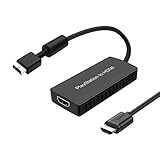
- PS2 Adapter: Convert PlayStation1/2/3 signal to HDMI signal (sony playstation game console connection to HDTV)
- No need to install drivers, portable, flexible, plug and play.
- PS2 to HDMI Converter: Support HDMI 16:9/ 4:3 output switch.
- NOTE: Compatible with PlayStation1/2/3 only.(Note: It's just a converter, you also can play PS1 games on PS2)
- RGB signal mode display. Video signal transfer only, can't improve the video quality.
The OSSC Pro offers component and RGB support, line-multiplier and scaler modes, and very low-lag operation. Its quick-start guide assumes more hands-on configuration (guide), and it is not the most forgiving choice for difficult interlaced PS2 material.
Independent reader supportYour contribution helps us test, update, and keep practical guides available for everyone.Signal formats, regions and aspect ratio
- NTSC: commonly 480i/480p.
- PAL: commonly 576i/576p.
- 240p: can appear in PS1 games played through a PS2 and in some menus or software modes.
Check console region, game region, display timing support, and the processor’s input list. Kaico claims all-region compatibility, but that remains a claim from its product page. A device that accepts a television’s 480i signal may still fail with a monitor, capture card, HDMI switch or AV receiver.
Quick wins for a faster PC:
Scan for outdated or missing drivers - takes under a minuteDriver Scan →Clear out junk files and repair common Windows errorsFree Scan →Fix the driver behind crashes, sound loss and screen glitchesFind Drivers →Most PS2 games were designed for 4:3. Set the display to its 4:3 or original-aspect option rather than allowing automatic 16:9 stretching. Widescreen support, where available, is title-specific.
Best Value
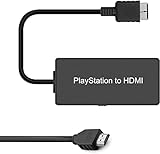
- Attention: Must set PS2 to Y Pb Pr / Y Cb Cr output before using this converter, or you will see out of range.
- PS2 HDMI Converter Provide the best upscaled signal processing with great precision, colors, resolution.
- Our PS2 to HDMI Converter No need to install drivers, Convert PS 2/3 signal to HDMI signal.
- PS2 to HDMI Adapter Compatible with PlayStation 2/3 only. It Supports All PS2/PS3 Display Modes 480i, 576i, 480p.
- PS2 HDMI Adapter Come With True Ypbpr HD Signal Output (100% Improve Video Quality).
Buying comparison (prices checked August 18, 2026)
| Solution | Typical listed price | 480i handling | Best for | Main limitation |
|---|---|---|---|---|
| PS2 HDMI adapter | £27 Kaico sale listing | Varies; often undocumented | Convenience | Unknown processing and compatibility |
| RetroTINK-2X Pro | $139.99 | Bob deinterlacing | Basic SD retro use | Not ideal for flicker-sensitive PS2 libraries; no 480p input |
| RetroTINK-5X Pro | $325 | Motion-adaptive | Serious PS2 and multi-console use | Costs more than a dongle; not a 4K output device |
| RetroTINK-4K CE | $475 | Advanced processing | 4K enthusiasts | Overkill for casual users |
| RetroTINK-4K Pro | $750 | Advanced processing | Premium multi-console systems | Very high cost |
| OSSC Pro | Varies | Configuration-dependent | Hands-on enthusiasts | Less plug-and-play for interlaced video |
No picture? Use this order
- Confirm the display is on the correct HDMI input.
- Temporarily remove switches, splitters, AV receivers and capture cards.
- Try another HDMI cable and another display.
- Confirm USB or external power is connected and regulated.
- Reseat the PS2 plug.
- Test the console with its original cable on a known-compatible display.
- Use an ordinary 480i game before testing a title that switches resolution or progressive modes.
- With component, verify Y, Pb and Pr are in the matching inputs—not composite or RGB sockets.
- Check PAL/NTSC timing support.
A black screen does not automatically mean the PS2 has failed. Some monitors and capture devices reject timings that a television accepts. RetroTINK also notes limitations and certified-splitter requirements for particular capture-card and 4K arrangements (2X Pro notes).
Common mistakes
- Assuming every HDMI adapter is a quality scaler.
- Buying composite-only hardware when component is available.
- Assuming component automatically means 480p.
- Expecting every game to offer progressive scan.
- Confusing the 2X Pro with the 2X Pro Multi-format.
- Ignoring cable quality, audio embedding, or 4:3 aspect settings.
- Diagnosing through an HDMI switch before testing a direct connection.
Bottom-line buying advice
For the lowest-cost working setup, choose a reputable PS2-specific HDMI adapter and accept that your TV may perform the scaling and deinterlacing. For the best practical upgrade, use a proper component cable with a RetroTINK-5X Pro, especially if most of your games are 480i. Choose a RetroTINK-4K CE or Pro when 4K output, profiles and advanced image controls justify the price. HDMI is only the endpoint; the quality of the conversion and 480i processing determines whether the revived PS2 feels merely functional or genuinely good on a modern screen.
Quick Recap
Product prices and availability are accurate as of the date/time indicated and are subject to change. Any price and availability information displayed on Amazon at the time of purchase will apply.

