Do these 3 things before closing this tab:
1Fix the driver behind crashes, sound loss and screen glitches2Repair Windows errors before they cause bigger problems3Scan for outdated or missing drivers - takes under a minuteSome links on this page are affiliate links: if you buy through them we may earn a commission, at no extra cost to you.
Original Nintendo 64 consoles do not output HDMI. They send analog video through the Nintendo multi-out connector, so an HDMI cable by itself cannot work. You need an external converter/scaler, a console-specific adapter, or an internal HDMI modification. For most unmodified systems, the best practical path is a region-correct S-Video cable into a purpose-built scaler; composite works as a cheaper fallback.
Check whether your console is NTSC, NTSC-J, or PAL before buying anything. NTSC and PAL accessories are not automatically interchangeable, and some PAL motherboard revisions have specific compatibility restrictions.
What you need before connecting an N64
- Region: Identify NTSC, NTSC-J, or PAL. Imported and French PAL consoles deserve extra caution.
- Console condition: Note whether it is stock, RGB-modded, or already fitted with an HDMI mod.
- Cable: Confirm whether you have composite or S-Video, and whether it matches your region.
- Display goal: Decide whether you need a simple N64-only setup or a scaler for several retro consoles.
The original console has no native HDMI output. A passive cable cannot convert analog video to digital HDMI; the active device in the chain must digitize the signal and generally scale it for a modern display.
The four practical ways to get N64 on HDMI
1. Composite cable into an HDMI scaler
N64 multi-out → composite video/audio cable → scaler → HDMI cable → TV or monitor
Composite (yellow video, red/white audio) is the easiest signal to use and may cost nothing if you already own the cable. It is also the softest option: color information is combined, so edges can bleed and the picture can look muddy. A quality scaler gives better sync and processing than an anonymous analog-to-HDMI dongle. Use this route when budget matters more than image quality or your chosen scaler has no S-Video input.
#1 Best Overall
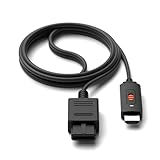
- ※Convert N64 Video signal to HDMI signal, make it easy to connect the Game console to TV.
- ※Plug and play with HDMI adapter,no screen lag.No additional power supply required.
- ※N64 HDMI Adapter Support 16:9/ 4:3 Switchover.
- ※N64 to HDMI Adapter Provide advanced signal processing with great precision, colors, resolutions and details.
- ※Note: N64/ Game Cube/SNES to HDMI converter,Support 16:9 Convert on HDTV.
2. S-Video into an HDMI scaler (best stock-console route)
N64 multi-out → region-correct S-Video cable → scaler → HDMI cable → TV or monitor
S-Video keeps luminance (brightness) and chrominance (color) separate. That normally means less color bleeding and cleaner edges than composite, although it cannot turn the N64 into a high-resolution modern source. RetroTINK’s catalog covers S-Video-capable products, and its NTSC SNES/N64 cable is listed at $8 but is explicitly for North American and Japanese NTSC consoles: official cable details. The RetroTINK-2X MINI page also documents S-Video and composite inputs, but currently shows the MINI as out of stock: product page.
3. Dedicated N64 HDMI adapter
The EON Super 64 NTSC plugs directly into compatible NTSC or NTSC-J consoles and outputs 480p. EON states that it needs no external power and includes a selectable Slick Mode. The listed price was $159.99 when checked on August 16, 2026; verify the current price before ordering.
PAL owners need the separate EON Super 64 PAL, which EON lists as outputting 576p at the same listed price. Its compatibility page identifies motherboard exceptions, including NUS-CPU-P-03 and NUS-CPU-R-01. Do not assume the NTSC model will work with a PAL console.
Rank #2

- 【Clear and Smooth Picture Quality】For legacy systems to run on newer tvs,better gaming experience.
- 【HDMI Cable Included】N64/ Game Cube/SNES to HDMI converter,Support 16:9 Convert on HDTV.
- 【Easy to Use】Plug and play with HDMI adapter,no screen lag.No additional power supply required.
- 【Note】No sound or blue screen appears, please check if the connection is successful.
- 【Customer Service】Support 30 days return and refund,1 year replacement.If you encounter any problems after placing an order, you can contact us, and we will solve it for you as soon as possible.
This is the simplest installation and keeps the setup compact, but it is N64-specific and offers fewer advanced scaling controls than a high-end universal scaler.
4. Internal HDMI modification
An internal HDMI kit can create a permanent digital output and may provide advanced N64-specific processing. It requires opening the console, soldering or specialist installation, and accepting service and preservation risks. An RGB mod is not HDMI by itself: RGB generally still needs a compatible scaler or converter. Choose this path only if you specifically want a permanent enthusiast installation; otherwise, external conversion is reversible.
Choosing the right hardware
| Priority | Recommended direction | Trade-off |
|---|---|---|
| Lowest complexity | EON Super 64 matched to your region | N64-only and motherboard-specific |
| Best value for one stock console | Compatible S-Video cable plus a 2X-class scaler | Fewer controls and lower maximum output |
| Several retro consoles | RetroTINK-5X Pro | $325 listed price; higher upfront cost |
| Premium enthusiast setup | RetroTINK-4K Pro | $750 listed price; excessive for N64 alone |
| Permanent integrated output | Professional internal HDMI mod | Modification cost, skill and service risk |
RetroTINK-2X Pro
The RetroTINK-2X Pro is the straightforward “good enough without being generic” option for a composite or S-Video console. RetroTINK listed it at $139.99. Pair it with the correct cable and confirm the exact model’s inputs and output behavior, since 2X products are not identical.
Rank #3

- 【HDMI Cable Included】Nintendo 64/ Game Cube/SNES to HDMI converter,Support 720P/1080P Convert on HDTV.
- 【Easy to Use】Plug and play with HDMI adapter,no screen lag.Note: External power supply required.
- 【Clear and Smooth Picture Quality】For legacy systems to run on newer tvs,better gaming experience.
- 【Note】No sound or blue screen appears, please check if the connection is successful.
- 【Customer Service】 We have undergone strict testing before leaving the factory to ensure normal use. If you have any questions, you can contact us.
RetroTINK-5X Pro
The 5X Pro is easier to justify when you own SNES, Genesis, PlayStation, Saturn or other analog systems. It adds more capable scaling, deinterlacing, aspect-ratio controls, scanline/CRT-style options and firmware updates. RetroTINK’s firmware repository lists current releases, including 2026 updates; menus and behavior can change, so consult the current release notes rather than relying on an old guide.
RetroTINK-4K Pro
The 4K Pro accepts a broad range of analog sources and supports output up to 4K60 according to its product page. Its value is advanced sampling, profiles, CRT simulation and processing flexibility—not magically higher original game detail. At the listed $750, it is a premium multi-console purchase, not a sensible first buy for one N64.
Step-by-step setup
- Identify the console. Confirm NTSC, NTSC-J or PAL, and check for modifications or an unusual motherboard revision.
- Select the signal path. Prefer S-Video into a quality scaler; choose a matched EON adapter for the simplest N64-only setup; use composite when necessary.
- Connect video and audio. Insert the multi-out firmly. For composite, put yellow into video and red/white into the corresponding audio inputs. Connect S-Video to the scaler’s S-Video input.
- Connect HDMI and power. Run the scaler or adapter’s HDMI output directly to the TV. Connect the supplied power adapter when the device requires one.
- Select the inputs. Choose the correct HDMI input on the TV and the correct source on the scaler if automatic detection fails.
- Start the console. Seat the cartridge fully, switch on the N64 and wait for the game signal.
- Set the geometry. Begin with 4:3. Disable the television’s Wide, Zoom, Stretch or Fill modes.
- Test games and controls. Confirm stereo audio and controller operation, then test a normal game and one that changes resolution or uses Expansion Pak features.
Picture settings that avoid common problems
- 4:3: N64 software is designed for a 4:3 image; a widescreen panel does not make the source widescreen.
- Game Mode: Enable it on the television to reduce display processing and latency.
- Scaling: Start with a clean or integer-like mode where available. Use mild smoothing or CRT simulation only if harsh diagonal edges bother you.
- Sharpening: Keep it low. Excessive sharpening creates halos around text and geometry.
- Signal chain: Connect the scaler directly to the TV while testing. An AV receiver, soundbar or capture card can add processing or handshake failures.
NTSC, PAL and import-console warnings
NTSC and PAL differ in timing and output standards. A cable or adapter advertised for NTSC may produce a black-and-white picture, unstable sync or no image on PAL hardware. EON sells separate regional Super 64 models, and its PAL page lists specific incompatible motherboard revisions. Verify the exact console revision before purchase, especially for French PAL systems, imports or modified boards. Do not treat “N64 compatible” on a marketplace listing as proof of universal support.
Rank #4

- 【Enhance Your Gaming Experience】This product includes a N64 HDMI adapter converter, HDMI cable, and USB cable to bring your old-school games into the modern gaming world. Note: Depending on the TV device, this HDMI cable cannot increase the screen resolution.
- 【Enjoy High-Quality Graphics】RuntoGOL HDMI converter compatible with Gamecube/N64/SNES/SFC, which supports 1080P/720P aspect ratio output switch, allowing you to fully experience the stunning graphics of your classic games.
- 【Easy to Use】Simply plug and play with our HDMI adapter to instantly upgrade your gaming setup, no driver is needed. Note: Only for N64, NGC, SNES, SFC.
- 【Versatile Compatibility】The N64/NGC/SNES/SFC compatible design allows you to connect your favorite classic game consoles using this N64 to HDMI adapter.
- 【Multiple Uses】With the GameCube HDMI converter, this set is complete for gaming or streaming your favorite vintage games on any HDMI-equipped device. Don't miss out on this must-have Gamecube adapter/N64 HDMI converter set!
Troubleshooting by symptom
No image
- Confirm the TV’s HDMI input.
- Check scaler/adapter power and the N64 power switch.
- Reseat the cartridge and video connector.
- Verify the scaler source selection.
- Check NTSC/PAL compatibility.
- Try another known-good HDMI cable or display.
- Test the console on a known-compatible setup before declaring it defective.
Black-and-white picture
Suspect a regional mismatch, incorrect S-Video wiring, a composite/S-Video mix-up or incorrect standard detection. Test with a confirmed region-matched cable and select the video standard manually if the scaler allows it.
Rolling, flickering or unstable image
Possible causes include a poor cable, wrong or weak power supply, cheap sync handling, incompatible timing, a cartridge problem or console hardware fault. Use the manufacturer’s supplied power adapter; a connector that fits is not proof that a substitute is electrically safe.
Stretched image
Set both scaler and television to 4:3 and disable Wide, Zoom, Stretch and Fill modes. Check menus and circular objects rather than judging geometry from one game screen.
Best Value
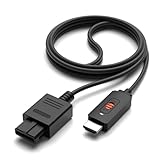
- ✅【4: 3/16: 9 Ratio Conversion】 Supports 4: 3/16: 9 aspect ratio output switching, allowing you to fully experience the stunning pictures of classic Nintendo games and enjoy high-quality game time.
- ✅【N64 to HDMI Converter】 This N64 to HDMI Converter can enhance your gaming experience by playing games or streaming your favorite vintage Nintendo games on any device equipped with HDMI.
- ✅【Plug and Play】 Simply plug and play with our N64 to HDMI adapter to instantly improve your gaming experience with no drivers needed.
- ✅【Wide Compatibility】You can connect your favorite classic Nintendo game console with this N64 to HDMI adapter, which also serves as an N64/NGC/SNES/SFC.
- ✅【Package Content】 Package include: N64 to HDMI Converter*1, HDMI Cable*1, User Manual*1.
Input lag
Enable Game Mode, bypass an AV receiver or capture card, disable motion processing and connect the scaler directly to the TV. Generic converters can buffer frames; a purpose-built retro scaler is generally the safer choice when latency matters.
Only some games work
N64 software can switch resolution and timing modes. Test a standard title, a high-resolution-mode title, an Expansion Pak game and—where relevant—both 50 Hz and 60 Hz systems. A device that handles one game is not automatically universal.
Is an internal HDMI mod worth it?
Choose a mod when you want a permanent, clean installation, advanced console-specific processing and are comfortable with soldering or professional service. Stay external when you value reversibility, want to preserve an original console, are a beginner or also use other retro systems. A mod does not remove the need to consider region, game modes or display settings.
PC Slower Than It Used to Be?
A free scan shows the junk files, broken settings and background clutter dragging Windows down - then fixes them in one click.Free scan · Windows 10 & 11Crashes, No Sound, or Screen Glitches?
Random freezes, missing sound and display glitches usually trace back to one bad driver. Find and replace yours safely.Free scan · under a minuteBottom-line buying guide
- One unmodified NTSC N64: Use a good NTSC S-Video cable with a 2X-class scaler, or choose an EON Super 64 for the fewest boxes.
- Several analog consoles: Choose the RetroTINK-5X Pro.
- Premium 4K enthusiast setup: Choose the RetroTINK-4K Pro when its processing features justify $750; 4K output improves scaling, not source detail.
- PAL console: Verify the exact region and motherboard before buying any cable or adapter.
- Budget fallback: Composite into a documented scaler is workable, but expect a softer image.
Check current prices, stock and firmware immediately before purchase. RetroTINK’s catalog and firmware pages are the authoritative places to confirm current models and releases: products and firmware.
Quick Recap
Product prices and availability are accurate as of the date/time indicated and are subject to change. Any price and availability information displayed on Amazon at the time of purchase will apply.

