Recommended Free Tools
To play Skyrim Together Reborn with friends, first confirm that every player has a supported PC copy and game version, then install the mod through the official guide for your mod manager. You can test a server on your own PC at 127.0.0.1; friends outside your home network need a reachable server, usually configured with a password and router port forwarding.
Check your Skyrim version and storefront first
Skyrim Together Reborn is a co-op mod for questing, combat, and exploration in Skyrim. The project recommends groups of 2–8 players for the best experience; that is a recommendation, not a hard player limit. The official FAQ and Nexus listing do not phrase supported game versions and storefronts identically, so check the current official requirements before installing.
- The Nexus listing says non-pirated Skyrim Special Edition and Anniversary Edition on Steam or GOG at version 1.6.1170 or later.
- The FAQ says Skyrim Special Edition on Steam, version 1.6.117X, is the only supported version. It says the Anniversary Upgrade is not required.
- The FAQ lists VR, consoles, Legendary Edition, Epic, and Game Pass as unsupported.
Because the FAQ’s Steam-only wording conflicts with the Nexus listing’s Steam-or-GOG wording, do not assume a GOG copy is supported. Confirm the latest requirements for your exact storefront and installed game version before you and your friends proceed.
Download the current mod and choose the right setup guide
Get the mod from the official Skyrim Together Reborn Nexus listing. The listing showed version 1.8.0, last updated 8 November 2025. Game and mod versions can change, so recheck the listing and official setup documentation before following installation steps.
#1 Best Overall

- ENTER THE WORLD OF SKYRIM: Experience the legendary open-world RPG as a tabletop adventure, exploring Tamriel through branching quests, iconic factions, and rich Elder Scrolls lore.
- COOPERATIVE OR SOLO PLAY: Designed for 1–4 players, allowing you to adventure solo or team up to face dragons, uncover conspiracies, and shape the fate of Skyrim together.
- OPEN-ENDED QUEST SYSTEM: Choose how you approach each mission—diplomacy, stealth, or combat—as your decisions permanently impact the story and the world around you.
- DEEP CHARACTER PROGRESSION: Build unique heroes with evolving skills, gear, and abilities inspired by the video game’s iconic progression systems.
- HIGH REPLAYABILITY: Modular scenarios, multiple quest paths, and varied character builds ensure every campaign feels fresh and every journey through Skyrim is different.
The official documentation index separates the client walkthroughs by mod manager: Mod Organizer 2 (MO2) and Vortex. Open the guide that matches the manager you use and follow its steps for downloading and installing the mod, locating it, setting up a custom launch option, first launch, and connecting. The documentation provides separate paths; do not mix steps from different managers.
For an update, remove the old Reborn installation and download the current version from Nexus. Server owners should pull the latest Docker image if they run a Docker server. A new save is not required for a Reborn update.
Rank #2

- EPIC FANTASY REBORN - Skyrim reimagines and revolutionizes the open-world fantasy epic, bringing to life a complete virtual world open for you to explore any way you choose.
- LIVE ANOTHER LIFE, IN ANOTHER WORLD - Play any type of character you can imagine, and do whatever you want; the legendary freedom of choice, storytelling, and adventure of The Elder Scrolls is realized like never before.
- YOU ARE WHAT YOU PLAY - Choose from hundreds of weapons, spells, and abilities. The new character system allows you to play any way you want and define yourself through your actions.
- BATTLE DRAGONS - Battle ancient dragons like you’ve never seen. As Dragonborn, learn their secrets and harness their power for yourself.
- INCLUDED CONTENT - The Anniversary Edition includes the core game, pre-existing and new Creation Club content, plus all three official add-ons: Dawnguard, Hearthfire, and Dragonborn.
Launch the game and connect to a server
After installation, use the first-launch and connection sections in your selected manager’s official client playguide. Follow that guide for the current screen instructions; the exact connection steps belong to its client path and may change with releases. You will need a server address and, if the host configured one, its password.
Choose a server setup for your group
| What you need | Approach |
|---|---|
| Check that the server works on the host’s PC | Windows local test; connect from that same PC to 127.0.0.1. |
| Let friends connect over the internet; host can configure the router | Windows regular setup with a server password and port forwarding. |
| Remote access without successful port forwarding | The official guide suggests ZeroTier; follow its separate setup guide. |
| Use a different server environment | The documentation index also lists Linux/Docker and Pterodactyl guides; use the relevant official guide for those paths. |
Run a local Windows server test
A local test checks whether the host can launch the server and connect from the same computer. It does not make the server accessible to friends elsewhere.
Rank #3

- Winner of more than 200 Game of the Year Awards, Skyrim Special Edition brings the epic fantasy to life in stunning detail.
- The Special Edition includes the critically acclaimed game and add-ons with all-new features.
- All-new features include remastered art and effects, volumetric god rays, dynamic depth of field, screen-space reflections, and more.
- Entertainment Software Rating Board (ESRB) Content Description: Blood and gore, intense violence, sexual themes, use of alcohol
- Open the installed mod folder and run
SkyrimTogetherServer.exe. - Allow the program through the Windows firewall prompt if it appears.
- On the same PC, connect to
127.0.0.1using the client guide’s current connection steps.
For the Windows procedure, see the official regular server setup guide and its server launch instructions.
Independent reader supportYour contribution helps us test, update, and keep practical guides available for everyone.Make the Windows server reachable to remote friends
A server that accepts a local connection is not automatically reachable from outside the host’s network. The official Windows guide’s remote-access path requires port forwarding and a server password.
Rank #4
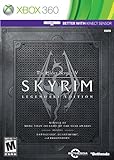
- Live Another Life, In Another World: Play any type of character you can imagine, and do whatever you want; the freedom of choice, storytelling, and adventure of The Elder Scrolls comes to life in one legendary experience from all three official add-ons.
- Dawnguard: The Vampire Lord Harkon has returned to power. By using the Elder Scrolls, he seeks to do the unthinkable - to end the sun itself. Will you join the ancient order of the Dawnguard and stop him? Or will you become a Vampire Lord?
- Hearthfire: Purchase land and build your own home from the ground up - from a simple one-room cottage to a sprawling compound complete with an armory, alchemy laboratory, and more.
- Dragonborn: Journey off the coast of Morrowind, to the vast island of Solstheim. Traverse the ash wastes and glacial valleys of this new land as you become more powerful with shouts that bend the will of your enemies and even tame dragons.
- Follow the official regular setup guide to configure the server. Set a password in
STServer.ini. - Configure port forwarding as described in the guide for your network, then start the server using the official launch instructions.
- Give friends the host’s public IPv4 address and the server password. They should use the current client guide’s connection instructions.
Router interfaces differ, so use the guide rather than guessing at router-specific settings. If port forwarding does not work, the official server documentation suggests setting up ZeroTier. Its steps are separate from the Windows regular setup.
Keep the mod setup stable
The project recommends playing without other mods for the most stable experience. Other mods are not guaranteed to work or synchronize correctly; graphics mods generally work well, according to the FAQ. Start with a minimal mod list, then check the official FAQ and compatibility tracker for the specific mod and version your group wants to use. Examples of problematic mods can change and are not a complete compatibility list.
Do these 3 things before closing this tab:
1Clear out junk files and repair common Windows errors2Scan for outdated or missing drivers - takes under a minute3Repair Windows errors before they cause bigger problemsQuick Recap
Product prices and availability are accurate as of the date/time indicated and are subject to change. Any price and availability information displayed on Amazon at the time of purchase will apply.



