Recommended Free Tools
Choose Hornet equipment only after identifying the exact ship: F7A or F7C, Mk I or Mk II. Their hardpoints and installed components differ, so a weapon or module listed for one model is not automatically compatible with another. The available references document specific configurations—not a universally best build—and do not establish current prices, vendor stock, or patch-wide performance rankings.
Identify your Hornet before changing equipment
Use the ship’s full designation in the current vehicle details or in-game equipment interface. The F7A and F7C are distinct variants, and Mk I and Mk II generations should be treated as separate configurations. Check the exact model and current game version before buying or fitting a component; the equipment references below may change as Star Citizen is updated.
The detailed F7A Mk II record discussed here is labeled Star Citizen 4.8.0 LIVE. The F7C Mk I page documents a different set of equipment and upgradeable ports. Do not use the F7C Mk I details as a compatibility guide for a Mk II.
What the documented F7A Hornet Mk II carries
The versioned F7A Hornet Mk II equipment record lists this configuration:
Do these 3 things before closing this tab:
1Fix the driver behind crashes, sound loss and screen glitches2Repair Windows errors before they cause bigger problems3Scan for outdated or missing drivers - takes under a minute#1 Best Overall

- 【With Vibration Function】This flight stick is ONLY for PC/Computer and ONLY compatible with Windows 7/8/10/11 (Mac/Apple computers/Apple devices/PS3/PS4/PS5/Xbox One/Switch not supported).PXN2113 PRO gaming joystick for pc will never let you down with realistic fly experience. Compatible with many flight joystick pc games: World of Tanks,World of Warplanes,War Thunder,Assault Horizon,Microsoft Flight Simulator,X Plane 10,etc. Vibration Switch is at the bottom,please switch to“ON”.If less than 20%,you will almost not feel the vibration.Please set the vibration strength in the driver to 50% or higher for this joystick pc flight simulator.
- 【Immersive Fly Experience for Your Flying Dream】You can make the right moves with rapid fire trigger,4 axis controlling,8-Way hat switch and 12 programmable buttons of this computer joystick for gaming pc flight.Advanced software,Support various custom adjustment and keyboard mapping,enjoy exciting joystick flight simulator controls for pc games now! Not only a game, but also a dream of flying!
- 【FAQ】:Q1:Why doesn't it work on my pc/Xbox? A: It is ONLY for PC and Windows 7/8/10/11(Not for Mac/Apple devices/Xbox).Please turn on pc First and then connect with this joystick.If not,some pc may not identify it. Q2: How to install the driver? A: No need to install the driver and can play games directly.If you need driver,please find "Installation" section in manual or follow below steps: 1:Visit PXN official website→Support→Driver→Find PXN-2113PRO driver to download. 2:Extract the driver and install. 3:Plug joystick into PC USB port,pc will identify new hardware and install automatically. 4:Play games or set the joystick in driver.The drive can test and calibrate the pc flight joystick.
- 【Comfortable to Hold, Agile to Operate】This usb joystick for pc is with a solid and smooth feeling,very comfortable.Four power-grip suction cups at the bottom of this pc joystick for flight simulator pc games,they can fix firmly and easily when the table is smooth.Precise throttle control,Ergonomic design,Single hand control full function with this flight joystick for pc games.(Note:Force Feedback/Minecraft/Asphalt 8/Ace Combat 7 not supported).This Flight simulation pc controller with Friendly and Easy-to-Reach Customer Service.If any problem,please contact us directly(Contact Seller),Fengying will reply within 12 hours.
- 【Setup Guide for Microsoft Flight Simulator】For PXN 2113 flight sim joystick pc setup in Microsoft Flight Simulation,please refer to below images and follow below steps: Step 1: Launch the game and click"MENU.FLOWBAR_ OPTIONS",select“MENU.OPTIONS CONTROLS". Step 2: Except the keyboard and mouse mode, also have joystick mode in game.Please click“GENERIC USB JOYSTICK" to map the key. (Note:The joystick should be plugged into PC before this setting). Step 3: For function settings,take “INPUT.KEY_ _SWITCH_ CAMERA"as an example,scroll down to select“Select an input",click No.12 button,finally click“VALIDATE”to save.
| Position or system | Listed equipment |
|---|---|
| Wings | Two Size 4 gimbal mounts, fitted with Revenant gatlings in the listed configuration |
| Nose | One Size 3 turret, with Omnisky IX cannons in the listed configuration |
| Center | One Size 5 ball turret carrying two Size 3 cannons; the listed turret configuration names Omnisky IX cannons |
| Missile racks | Two Size 4 racks, each carrying four Size 2 Ignite II missiles in the listed configuration |
These are the source-listed ports and example equipment, not a recommendation that the weapons are optimal. Their usefulness depends on the current patch and the mission you intend to fly. Check fitment and any current component restrictions for your ship before making a change. Source: Star Citizen Wiki API, F7A Hornet Mk II vehicle data, version 4.8.0 LIVE.
Consider the center turret separately
The F7A Mk II reference describes the C5-173f center ball turret as removable and replaceable with mission-oriented modules, giving a WillsOp Long Look Radar as an example. That makes it a potential configuration choice rather than simply another gun slot. Confirm that the proposed module is compatible with your exact ship and the current patch before planning a build around it; the reference does not provide a complete compatibility matrix for every Hornet.
Rank #2

- Perfect Addition to Your Gaming Setup - This Joystick is an excellent choice for your gaming cabinet. This joystick will bring back the nostalgia of the good old days of gaming.
- Wide Compatibility - The joystick is compatible with PC gaming and works smoothly with any gaming parts. It can be used as the 2/4/8 way joystick, providing the gaming experience.
- Durability - Made from high-quality materials, the Joystick is designed to withstand heavy use. It provides a consistent and performance for any game you play.
- Easy Installation - The joystick comes with an adjustable competition-style long handle for easy installation. It fits seamlessly with any gaming cabinet button kit.
- Experience the Excitement - Redefine your gaming with our joystick. Ideal for DIY game machine projects, home game room upgrades, and commercial game cabinets.
What the F7C Hornet Mk I reference says can be upgraded
The F7C Hornet Mk I equipment reference lists upgradeable turrets and missile racks, as well as shields, coolers, a power plant, a flight controller, and a quantum drive. It also marks some ports as hardware-locked. In practice, distinguish slots the reference identifies as changeable from fixed equipment rather than assuming every installed part can be replaced.
The page names VariPuck gimbal mounts and missile racks among the F7C Mk I equipment. Those details apply to the Mk I reference; they should not be transferred to an F7C Mk II or an F7A without checking that model’s own equipment data. Source: Star Citizen Wiki, F7C Hornet Mk I.
Quick wins for a faster PC:
Clear out junk files and repair common Windows errorsFree Scan →Fix the driver behind crashes, sound loss and screen glitchesFind Drivers →Rank #3
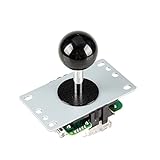
- New interface design. Correct the wrong connection.
- High-quality, accurate positioning.
- Easy to Remove the Ball Top ( Black ).
- include: Pink Ball Top + 5Pin Cable + Independent Ontology.
- Easy to Change the 4-Way and 8-Way Mode (Defaut is square 8-Ways)
A practical way to plan an upgrade
- Confirm the ship. Record the full designation, including F7A or F7C and Mk I or Mk II.
- Inspect its current ports. Note hardpoint sizes, fitted equipment, and any ports identified as hardware-locked. Use the matching model reference, then verify against the current in-game equipment interface.
- Set the mission goal. Decide whether you are configuring for weapons, missiles, or a non-combat role such as the radar-module example listed for the F7A Mk II.
- Check each proposed part against the slot. Match the specific model and port size; do not infer compatibility from the name “Hornet” alone.
- Verify current availability and fitment in game. The cited references do not establish current prices, vendor locations, stock, or a complete cross-variant compatibility list.
F7C Mk II cargo claim and its limits
Roberts Space Industries’ archived F7C Mk II announcement, published 15 March 2024 and reproduced by Star Citizen Wiki, describes the civilian Mk II as having 2 SCU of cargo space. This is a dated manufacturer claim, not an independent current performance test; it is also not an equipment specification for every Hornet. The announcement’s descriptions of larger hardpoints and heavier firepower are likewise manufacturer marketing language. Source: Roberts Space Industries Comm-Link 19756, “Anvil F7C Hornet Mk II,” 15 March 2024.
What the references do not establish
The cited material does not identify a single best-performing Hornet loadout, current component prices, vendor stock, or a full compatibility matrix across all variants. It also does not provide independent gameplay test results. Treat named weapons and modules as documented examples, and make the final choice using the equipment screen for your exact ship and current patch. The F7A Mk II model reference is available at Star Citizen Wiki, F7A Hornet Mk II.
Quick Recap
Rank #4
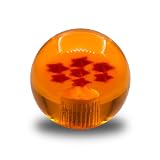
- Arcade Replacement 35mm Star Balltop Clear Ball Top Handle Joystick topball for Arcade ZIPPY SANWA SEIMITSU Hori Joystick
- 35mm diameter, M6 thread, Compatible with a wide range of joystick, Suit for sanwa JLF, Seimitsu LS, and Hori Hayabusa compatible 35mm balltop. Sanwa JLW-UM-8 – NOT Compatible.
- Competible :Sanwa: JLF-TP-8YT JLF-TP-8YT-SK JLF-TP-8Y JLF-TP-8Y-SK JLF-TRG-8YTH.SK (SILENT) JLF-TM-8T JLW-TM-8
- Competible Seimitsu: LS-32 LS-32-01 LS-33 LS-40 LS-40-01 LS-55 LS-55-01 LS-58-01
- Package included 1 pcs of star ball.
Product prices and availability are accurate as of the date/time indicated and are subject to change. Any price and availability information displayed on Amazon at the time of purchase will apply.



