Yes: the Razer BlackWidow V4 Pro 75% remains an unusually feature-rich gaming keyboard, pairing a compact layout with wireless connectivity, hot-swappable tactile switches, an OLED display, a control dial and a wrist rest. But Razer’s U.S. store listed it at $299.99 on August 16, 2026, so it makes sense mainly if you will use several of those extras—not just because you want a good gaming keyboard.
What the BlackWidow V4 Pro 75% is—and what it is not
This is a 75% mechanical keyboard: it keeps the function row and arrow keys while removing the number pad and compressing the navigation area. That saves space for mouse movement without giving up as many everyday keys as a 60% or 65% board. The trade-off is that some navigation keys are closer together, and there is no number pad.
Do not confuse it with the full-size BlackWidow V4 Pro or the less expensive BlackWidow V4 75%. The Pro 75% is the wireless, OLED-equipped, hot-swappable model discussed here. Its feature set and price are specific to this version.
Is it still competitive for gaming?
Razer’s support specifications, updated July 22, 2026, list up to 4,000 Hz Ultrapolling, HyperSpeed 2.4 GHz wireless, gaming mode, programmable keys, on-the-fly macro recording, anti-ghosting and N-key rollover. The function row and arrow cluster also make it easier to use for games and general PC work than more compact layouts. See the current Razer support specifications.
PC Slower Than It Used to Be?
A free scan shows the junk files, broken settings and background clutter dragging Windows down - then fixes them in one click.Free scan · Windows 10 & 11Crashes, No Sound, or Screen Glitches?
Random freezes, missing sound and display glitches usually trace back to one bad driver. Find and replace yours safely.Free scan · under a minute#1 Best Overall

- TRUE 4K Hz WIRELESS & BLUETOOTH 5.1 — Experience a greater level of gaming response powered by Razer HyperSpeed and Razer HyperPolling technology, and expanded control by connecting and toggling between 3 Bluetooth devices
- HOT-SWAPPABLE DESIGN — Compatible with 3 or 5-pin switches, the keyboard’s socketed PCB makes it easy swap out its pre-loaded switches for custom ones to achieve desired key feel
- OLED DISPLAY WITH COMMAND DIAL — Check the PC system metrics at a glance, show custom GIFs on the display, and enjoy expanded control with up to 100 customizable modes using the Razer Command Dial
- OPTIMIZED TYPING EXPERIENCE — With a gasket-mounted FR4 plate, tape-enhanced PCB, lubricated screw-in stabilizers, and two layers of sound-dampening foam, enjoy a clean typing sound and feel with minimal rattling or wobble
- 2-SIDE UNDERGLOW WITH PER-KEY LIGHTING — Featuring per-key lighting and a striking 2-side underglow, sync the keyboard with your battlestation and enjoy greater immersion for hundreds of integrated games
Up to 4,000 Hz is a maximum specification, not a promise of a noticeable in-game advantage for every player or setup. Polling rate is only one part of input performance; it does not show by itself that a keyboard is faster in practice or will improve results. For ordinary PC gaming, the board has a strong feature set, but buyers focused on adjustable actuation, analog input or rapid-trigger features should look at a keyboard designed to offer those capabilities. Razer’s listed specifications describe tactile mechanical switches, not analog or adjustable-actuation input.
For latency-sensitive play, use the 2.4 GHz dongle or wired USB-C rather than Bluetooth. Razer lists Bluetooth 5.1, with connections to up to three devices, as a convenience for switching among systems. As with any wireless setup, actual performance can depend on dongle placement, radio interference and system configuration; the advertised maximum polling rate should not be treated as a guarantee for every mode and circumstance.
Switches, typing and customization
The documented configuration uses Razer Mechanical Switches Gen-3 in a tactile type. A tactile switch provides a bump as the key actuates, unlike a linear switch’s smoother, uninterrupted travel. That feedback can suit both gaming and typing, though preference is personal. Razer also includes three spare switches; its support listing identifies them as Orange Tactile switches.
Rank #2

- HOT-SWAPPABLE DESIGN — Compatible with 3 or 5-pin switches, the keyboard’s socketed PCB allows an easy swap out of its pre-loaded switches for custom ones to achieve desired key feel
- COMPACT 75% LAYOUT WITH ALUMNIUM CASE — Ideal for setups where desk space is a premium, the keyboard features a durable build and covers esential commands
- OPTIMIZED TYPING EXPERIENCE — Enjoy light, balanced keystrokes that sound full and satisfying with a gasket-mounted FR4 plate, tape-enhanced PCB, lubricated stabilizers, and two layers of sound-dampening foam
- 2-SIDE UNDERGLOW WITH PER-KEY LIGHTING — Featuring per-key lighting and a striking 2-side RGB underglow, sync the keyboard with any battlestation and enjoy greater immersion for hundreds of integrated games
- MULTI-FUNCTION ROLLER & MEDIA KEYS — Pause, play, skip, and tweak everything from brightness to volume—the ultimate convenience when enjoying entertainment
The hot-swap sockets let owners replace compatible switches without soldering, which can help if a switch wears out or its feel is not to your liking. Hot-swappable does not mean every switch will work: before buying replacements, check the switch’s physical format, pin layout and socket compatibility, and confirm any support or warranty implications with Razer. Changing switches can also change key feel, sound and actuation behavior.
The board’s doubleshot PBT keycaps, sound-dampening foam in the PCB and case, and lubricated screw-in stabilizers are enthusiast-oriented touches. They do not, by themselves, establish a particular sound profile or guarantee a lifespan. Switch replacement is useful customization, but it is not the same as the broad firmware and component flexibility of an open, custom-keyboard platform.
What the OLED and command dial add
The 2-inch OLED display can present keyboard status, PC metrics, polling rate, lighting or power options, custom animations and audio-meter visualizations, according to Razer’s product announcement. It is a genuine convenience if you enjoy at-a-glance information or personalizing your setup. It does not change how keys register, and its value falls if the keyboard sits out of view or you rarely adjust settings. PCWorld’s review reflects the central question for buyers: the display may feel like an expensive extra rather than a necessity.
Rank #3

- HOT-SWAPPABLE DESIGN — Compatible with 3 or 5-pin switches, the keyboard’s socketed PCB allows an easy swap out of its pre-loaded switches for custom ones to achieve desired key feel
- COMPACT 75% LAYOUT WITH ALUMNIUM CASE — Ideal for setups where desk space is a premium, the keyboard features a durable build and covers esential commands
- OPTIMIZED TYPING EXPERIENCE — Enjoy light, balanced keystrokes that sound full and satisfying with a gasket-mounted FR4 plate, tape-enhanced PCB, lubricated stabilizers, and two layers of sound-dampening foam
- 2-SIDE UNDERGLOW WITH PER-KEY LIGHTING — Featuring per-key lighting and a striking 2-side RGB underglow, sync the keyboard with any battlestation and enjoy greater immersion for hundreds of integrated games
- MULTI-FUNCTION ROLLER & MEDIA KEYS — Pause, play, skip, and tweak everything from brightness to volume—the ultimate convenience when enjoying entertainment
The configurable Command Dial can handle tasks such as volume, zoom, track selection and lighting control. It is most useful when you regularly adjust those settings or want a physical control within reach—for example, during media playback or streaming. If keyboard shortcuts or existing media controls already do the job, it is an added feature rather than a gaming essential.
Build, size and comfort
Razer lists a recycled 5052 aluminum alloy top case, a PCR plastic bottom case, doubleshot PBT keycaps and a magnetic plush leatherette wrist rest. The board weighs approximately 1,247 g (2.74 lb) and measures about 382 × 159.6 × 39.6 mm (15.03 × 6.28 × 1.55 in), according to the support listing.
Free tools Windows power users keep installed
One-click scans. No signup required.
The weight can help keep the keyboard planted, and the included wrist rest is a meaningful comfort feature for people who like that style of support. Despite the 75% layout, the board is relatively deep, particularly with its wrist-rest and control hardware. It is not a minimalist travel keyboard. The leatherette covering may also be less appealing to users who prefer a different surface feel or find it warm during long sessions. Two-sided underglow adds lighting around the board, but is a personalization feature rather than a performance benefit.
Rank #4

- HOT-SWAPPABLE DESIGN — Compatible with 3 or 5-pin switches, the keyboard’s socketed PCB allows an easy swap out of its pre-loaded switches for custom ones to achieve desired key feel
- COMPACT 75% LAYOUT WITH ALUMINUM CASE — Ideal for setups where desk space is a premium, the keyboard features a durable build and covers essential commands
- OPTIMIZED TYPING EXPERIENCE — Enjoy light, balanced keystrokes that sound full and satisfying with a gasket-mounted FR4 plate, tape-enhanced PCB, lubricated stabilizers, and two layers of sound-dampening foam
- 2 SIDE UNDERGLOW WITH PER-KEY LIGHTING — Featuring per-key lighting and a striking 2-side RGB underglow, sync the keyboard with any battlestation and enjoy greater immersion for hundreds of integrated games
- MULTI-FUNCTION ROLLER & MEDIA KEYS — Pause, play, skip, and tweak everything from brightness to volume—the ultimate convenience when enjoying entertainment
Connections, software and onboard profiles
You can connect over Razer HyperSpeed 2.4 GHz wireless, Bluetooth 5.1 or wired USB-C. Bluetooth supports up to three devices according to Razer’s product page. The support specifications list no USB pass-through, so the keyboard cannot serve as a USB port for another device.
Full setup and customization center on Razer Synapse 4. The software handles remapping, macros, lighting, OLED behavior, profiles, gaming mode and polling-rate or power options. Razer’s announcement says this keyboard works exclusively with Synapse 4. Its hybrid onboard storage can retain up to five profiles, which helps carry some settings between systems, but that does not mean every advanced display, lighting or macro feature works without the software.
The advantage is integration for people already using Razer peripherals and Chroma lighting. The drawback is dependence on a proprietary ecosystem; buyers who want QMK/VIA-style open configuration or less vendor-specific software should compare with custom-oriented boards instead.
Best Value
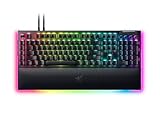
- YELLOW MECHANICAL SWITCHES FOR QUICK EXECUTION — Enjoy instant, rapid-fire smooth inputs that are just as quiet thanks to built-in sound dampeners
- IMMERSIVE UNDERGLOW & PER-KEY LIGHTING — Featuring per-key lighting and a striking 3-side underglow when paired with the wrist rest, sync the keyboard with your battlestation and enjoy greater immersion when gaming
- COMMAND DIAL & 8 DEDICATED MACRO KEYS — Assign a custom function to the keyboard’s programmable dial, and game with greater command using a set of macro keys for essential keybinds
- MAGNETIC PLUSH LEATHERETTE WRIST REST WITH UNDERGLOW — Designed to provide secure support for long hours of play, the soft, cushioned wrist rest also features Razer Chroma RGB lighting
- DOUBLESHOT ABS KEYCAPS — Using a doubleshot molding process to ensure the labelling never wears off, the keycaps also have extra-thick walls which make them extremely tough to withstand prolonged, repeated use
Price and the value question
Razer’s U.S. store listed the keyboard at $299.99 on August 16, 2026. That is a U.S. price signal from that date, not a guarantee of current retailer pricing; promotions and prices in other regions can differ. Check the Razer store listing before buying.
The price is the strongest reason to hesitate. TechRadar’s review and Windows Central’s review both identified value as a major weakness; PCWorld questioned whether the extras justify the cost. Those reviews offer useful context, but their launch-era comparisons and prices should not be read as current market prices.
What you are paying for is the combined package: wireless modes, hot-swap capability, the display and dial, lighting, onboard profiles, construction and a wrist rest. If you want only strong gaming fundamentals, many of those extras may not justify a premium. No current battery-life figure is established here, so buyers prioritizing endurance should consult current product information rather than infer it from the feature list.
Which kind of buyer should consider it?
- Consider it if you specifically want a premium Razer wireless 75% keyboard, value the function row and arrows, and expect to use the display, dial, hot-swap sockets, wrist rest or Synapse integration.
- Consider another board if adjustable actuation, analog input or rapid trigger is your priority; those features are not identified in Razer’s specifications for this keyboard.
- Spend less if you mainly need a dependable mechanical keyboard, already own a good 75% board, or would leave the OLED and dial unused. A cheaper wireless 75% model—including Razer’s non-Pro V4 75%—may fit better; verify current specifications and pricing before comparing.
- Look beyond Razer if open firmware and deep customization matter more than Synapse integration. Custom-oriented 75% boards are a relevant category, while Hall-effect or analog keyboards suit players seeking adjustable actuation. A SteelSeries Apex Pro TKL Wireless Gen 3 is another comparison target for analog-style input, but historical review pricing is not a current price quote.
Verdict
The BlackWidow V4 Pro 75% is still impressive because it brings a rare combination of compact layout, wireless connectivity, switch replacement and high-end controls into one ready-to-use keyboard. It is a qualified recommendation, not an automatic best buy: at the U.S. price listed in August 2026, it is easiest to justify for someone who genuinely wants several of its distinctive features and the Razer ecosystem. If your priority is simply gaming performance, adjustable actuation, open customization or value, choose around that priority instead.
Do these 3 things before closing this tab:
1Clear out junk files and repair common Windows errors2Fix the driver behind crashes, sound loss and screen glitches3Repair Windows errors before they cause bigger problemsQuick Recap
Product prices and availability are accurate as of the date/time indicated and are subject to change. Any price and availability information displayed on Amazon at the time of purchase will apply.



