Outdated Drivers Are Slowing You Down
One free scan finds every outdated or missing driver and matches the right update for your exact hardware.Free scan · exact hardware matchPC Slower Than It Used to Be?
A free scan shows the junk files, broken settings and background clutter dragging Windows down - then fixes them in one click.Free scan · Windows 10 & 11The Spectrum is a modern, television-connected recreation of the ZX Spectrum from Retro Games Ltd—not an original Sinclair computer. Its strongest appeal is the chance to revisit the machine through its rubber-keyboard form and classic presentation, while HDMI, USB, save slots and rewind make old games easier to run on a current setup. Whether it is a good fit depends on whether you want that keyboard-first experience: for gamepad-first players, the controls and period game design can be a real adjustment.
What The Spectrum is—and what it is trying to preserve
Retro Games Ltd describes The Spectrum as an updated replica of the ZX Spectrum with classic games. It is a contemporary recreation, not original Sinclair hardware. Its full-size, keyboard-shaped case makes the connection to the home computer more immediate than a conventional retro console: the rubber keys are part of the experience, not just decoration.

The Guardian review points to the tactile feel of the rubber keys and the presentation of the original-style loading screens as important parts of its appeal. It also notes a classic mode that allows programming, underscoring the machine’s roots as a computer as well as a games platform. In practice, most buyers will approach it as a way to play a curated selection of older games on a television.
Connecting it to a modern television
The Spectrum adapts the old computer for modern displays. Stuff reports HDMI output, USB-C power and four USB-A ports for controllers and storage devices; the British Computer Society also describes HDMI and USB connections in place of the original TV and audio connections. The result is a simpler route to a modern television than connecting original ZX Spectrum hardware, though exact cables, package contents and accessory compatibility should be checked against the current product documentation for your region.
The Tool Desk
Outbyte Driver Updater FREEFix the driver behind crashes, sound loss and screen glitchesFind Drivers →Outbyte PC Repair FREEClear out junk files and repair common Windows errorsFree Scan →#1 Best Overall

- Emulates 48 and 128 models of the ZX Spectrum.
- It contains 40 of the best genre-defining ZX Spectrum games, such as Manic Miner, Head Over Heels, Saboteur! Remastered, The Hobbit, Army Moves and The Great Escape.
- Fully functional rubber keyboard.
- Save games anytime on one of 4 slots per game and rewind the game for up to 40 seconds.
Those ports make modern connections possible, but they do not establish that every USB controller or storage device will work. If you intend to use a particular accessory, check its compatibility rather than assuming that a USB connection guarantees support.
Games, saves and rewind
The included library is a curated selection, not evidence that every game ever released for the ZX Spectrum is present. Retro Games Ltd highlights classics such as Manic Miner, Head Over Heels and Saboteur!. The manufacturer says each game has four save slots, so players can preserve progress and return later. Stuff reports a rewind feature that can go back up to 40 seconds, a useful aid when an older game punishes a small mistake.
Rank #2

- [system configuration] Important Note : The RGDS Package don’t included Game Card, NO Preload Games.Anbernic's latest RG series product, the RG DS, is now available. CPU: RK3568 quad-core 64-bit Cortex-A55, Max frequency: 2.0 GHZ, GPU: The ARM G52 2ee has 3 + 32gb of memory and storage, and is powered by the latest Android 14 system. It is a folding type android game machine with built-in whole switch chip. It is a magnet type that enters sleep mode when the cover is closed, and closes automatically at a small Angle.
- 【Dual Screens】The foldable RG DS features an entirely new, evolved dual-screen interaction system distinct from the previous X18S/X15 models, offering enhanced operational convenience: supporting multi-touch and capacitive stylus input with a resolution of 640×480. It enables swift switching of keyboard focus between upper and lower screens while achieving synchronised application operation across both displays. Through dedicated shader optimisation, it delivers more vibrant colours and sharper visuals, offering a visual feast. (Includes capacitive stylus)
- 【Dual Screen Creative】 The Dual Screen Creative function unlocks infinite possibilities. Immersive games on the upper screen, strategy guides on the lower screen – freely switch apps between the upper and lower screens.
- 【Compatible with numerous simulators】: Supports Android games (such as Genshin Impact and Honor of Kings) and over 20 other emulators; users can download compatible games themselves. Features a built-in 6-axis gyro sensor and supports online multiplayer; compatible with Moonlight Streaming, enabling free play of PC games and delivering an enhanced user experience.
- 【Battery and WIFI/Bluetooth Function】Features a built-in 4000mAh ultra-high-capacity, high-density lithium-ion battery with a battery life of 6 hours. RG DS Supports 5V/2A charging, taking approximately 3.5 hours to fully charge. 2.4/5G WIFI 802.11a/b/g/n/ac, Bluetooth 4.2
These conveniences soften some of the friction of replaying period games, but they do not make every interaction modern or effortless. Video Games Chronicle describes saving as somewhat clunky, so the existence of save slots should not be mistaken for a guarantee of a seamless save workflow.
How it feels to play
For returning ZX Spectrum owners
If the shape and feel of the original machine are part of what you remember, The Spectrum’s keyboard-led design is central to its appeal. The rubber keys and loading-screen presentation make the act of playing feel tied to the old computer rather than to a generic retro gamepad. Save slots and rewind offer practical help without replacing that presentation.
Recommended Free Tools
Rank #3
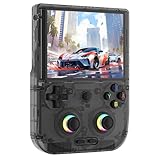
- Beautiful and ergonomic appearance: The sleek design of the RG406V is very much in line with people's aesthetic, and you can choose from beige, gray and black, rg406v ergonomic design, in line with most habits, can let you have a pleasant play at the same time have a more comfortable experience.
- RG406V Upgrade Technology and Performance: The Anbernik RG 406V uses an Unisoc T820 processor, an 8-core 6nm EUV 5G SOC chip, combined with a quad-core Mali-G57 operating frequency of 850Mhz to deliver high performance with lower power consumption. With 8GB of LPDDR4X RAM and 128GB of UFS2.2 storage, the rg406v offers plenty of room for your games and apps. Run on Android 13 for a smooth and up-to-date user experience.
- RG406V Unique design: The RG 406V supports streaming media, can play PC games on almost any device, built-in large Angle 3D lobby joystick, 16 million color RGB lighting, support for custom colors and brightness adjustment. The rg 406v has a built-in gaming front end, which supports a large number of simulation and compatible games,multi-simulator and multi-style interface switching; And RG406 built-in small fan, automatic heat dissipation, improve the performance of the console.
- RG406V Immersive Gaming experience: The RG406V features a 4-inch IPS screen with OCA full lamination for a smooth touch experience. Enjoy its sharp visuals at 960x720 resolution, perfect for immersive gaming sessions, and rg406v equipped with a 5500mAh polymer lithium battery for improved performance and life. More than 8 hours after full charge; rg406 supports 5V/2A charging and is fully charged in about 3.5 hours, so you can dive into your favorite game no matter where you are.
- The rg406 v supports Wireless Screen Casting-Imagine playing your favorite games on the big screen—this console has you covered with wireless screen casting! Simply sync it to your TV, grab your Bluetooth controller, and experience multiplayer action right from your couch. It is suitable for carrying aroundis a great for boyfriend, husband, brother, son, father and friends for birthday, Father's Day, Christmas, Valentines Day, Thanksgiving Day etc.
For newcomers and gamepad-first players
A keyboard is not automatically a more comfortable way to play than a modern controller. Many older games were built around keyboard input and conventions that can feel unfamiliar now. PCWorld describes a divide between the nostalgic appeal for older players and the steeper adjustment for younger or less familiar players. If you want immediate, familiar gamepad controls, this is a more specific proposition than a standard retro console.
The old games’ challenge is also part of the bargain. Rewind can help recover from mistakes, but it does not redesign the games or remove their period pacing and control assumptions. The Spectrum is therefore more appealing if you are curious about the original style of play than if you expect every game to feel like a modern release.
Independent reader supportYour contribution helps us test, update, and keep practical guides available for everyone.Who should buy The Spectrum?
| What matters most to you | How The Spectrum fits |
|---|---|
| Tactile retro presentation | Strong fit: the full-size keyboard form, rubber keys and classic loading presentation are central to its identity, as described by The Guardian. |
| Easy connection to a modern display | It offers HDMI and USB connections, according to Stuff and the British Computer Society. Check the current documentation for package details and accessory support. |
| A particular selection of ZX Spectrum games | Check the included titles against your interests. The manufacturer highlights several classics, but the available sources do not establish a complete catalogue of historical Spectrum games. |
| Gamepad-first play | Potentially a weaker fit: the keyboard-led design and older control conventions can take adjustment for players accustomed to modern controllers. |
| Help with difficult games | Four save slots per game are listed by Retro Games Ltd, and Stuff reports rewind of up to 40 seconds. Video Games Chronicle nevertheless found saving somewhat clunky. |
Verdict
The Spectrum makes the most sense as a way to experience the ZX Spectrum’s distinctive form and style with the convenience of modern television connections and selected gameplay aids. It is less of an obvious choice for someone who simply wants a collection of retro games controlled like a modern console. Before choosing it, look at the included games and be honest about whether a keyboard-first experience is what you want.
Retro Games Ltd: The Spectrum · Stuff review · The Guardian review · PCWorld review · Video Games Chronicle review · Time Extension review · British Computer Society review
Quick wins for a faster PC:
Fix the driver behind crashes, sound loss and screen glitchesFind Drivers →Clear out junk files and repair common Windows errorsFree Scan →Quick Recap
Product prices and availability are accurate as of the date/time indicated and are subject to change. Any price and availability information displayed on Amazon at the time of purchase will apply.




