Crashes, No Sound, or Screen Glitches?
Random freezes, missing sound and display glitches usually trace back to one bad driver. Find and replace yours safely.Free scan · under a minutePC Slower Than It Used to Be?
A free scan shows the junk files, broken settings and background clutter dragging Windows down - then fixes them in one click.Free scan · Windows 10 & 11If you want a quick game rather than a major commitment, three small Windows titles stand out: OurSweeper for Minesweeper nostalgia, Ink Ball for pen-and-touch play, and Fluent Tic-Tac-Toe for fast solo or local multiplayer matches.
There is one important qualification: “free” does not necessarily mean ad-free, purchase-free, offline, or account-free. OurSweeper is described as a Free+ app with in-app purchases, while the current advertising, sign-in, offline, and package status of the other two should be checked in their live Store or developer listings.
Quick comparison
| Game | Best for | Retro connection | Input | Free status | Installation friction |
|---|---|---|---|---|---|
| OurSweeper | Classic Minesweeper fans | Modern remake of Minesweeper | Primarily mouse and touch; verify current support | Free download; Free+ and in-app purchases reported | Low if the current Store listing is available |
| Ink Ball | Surface and pen users | Third-party revival of the Windows XP Tablet PC-era game | Pen, touch, or mouse, depending on the build | Reported free; extras and ads unverified | Low if an official listing is available |
| Fluent Tic-Tac-Toe | Local multiplayer and open-source enthusiasts | Modern Fluent-styled take on an old game | Mouse and touch; other input support should be checked | Open-source project; package status needs verification | Potentially higher if no ready-made package is offered |
The three-game selection is described in coverage from WindowsForum. They are not all recovered Microsoft releases: Ink Ball has the clearest Windows-era connection, OurSweeper is a modern remake, and Fluent Tic-Tac-Toe is an independent project built around a much older game format.
1. OurSweeper: the best default choice for Minesweeper nostalgia
OurSweeper is described as a Minesweeper remake from FireCubeStudios. Its familiar loop is unchanged in spirit: reveal safe squares, use number clues to identify mines, and clear the board without making a fatal guess.
Quick wins for a faster PC:
Clear out junk files and repair common Windows errorsFree Scan →Scan for outdated or missing drivers - takes under a minuteDriver Scan →#1 Best Overall

- Kids Friendly Design: This P30S handheld game console is specially designed for kids. It has a stylish arcade - like appearance. The body fits a child's hand, and the game settings also cater to kids psychology, thus being very attractive.
- Excellent Gaming Experience: Equipped with a 3.0 - inch high - definition screen and excellent speaker sound, it provides an excellent visual and auditory experience for video games. This handheld game console is small and lightweight, convenient for kids to use and carry. Its ergonomic design ensures a comfortable grip, allowing children to fully enjoy the games.
- Rich Collection of Classic Games: This retro handheld game console contains 220 interesting kids video games, including various types such as entertainment, sports, and adventure games, just like those found in many retro game consoles. While playing these games, kids can cultivate skills such as hand - eye coordination, thinking, and problem - solving.
- Convenient Rechargeable and Long - lasting Battery: The video game console is equipped with an 860mAh lithium - ion battery. It ensures that kids can play games without interruption, because there is no need for frequent battery replacement, which is very suitable for playing portable games outdoors. It is a great addition to the world of handheld games for children and can bring more fun to them.
- Absolutely Surprising Gift: Our handheld game toy is a surprising gift for kids, teenagers, and even adults. It is the best gift for birthdays, Christmas, Halloween, and Thanksgiving. Customer satisfaction is our top priority. Our customer support team will serve you wholeheartedly.
Its Windows 11-friendly presentation reportedly includes configurable grid sizes, mine counts or density, timers, scoring options, and a modern GlowUI or Fluent-inspired visual style. That combination makes it the easiest recommendation for a five- to ten-minute solo break. You can choose a small board for a quick reset or increase the size and mine density when you want a more demanding puzzle.
Best for: a quick solo game, familiar rules, and readers who want the closest of these three options to classic Minesweeper.
Input: Mouse and touch are the practical expectations, although the current listing should be checked for any additional support.
Free status: This is not confirmed as completely free. The available description labels OurSweeper Free+ and reports in-app purchases. That means you should treat it as free to download with optional paid content unless the current Microsoft Store listing says exactly what is included. Advertising, offline play, account requirements, and the pricing of any extras have not been established here.
The Tool Desk
Outbyte PC Repair FREERepair Windows errors before they cause bigger problemsFix Now →Outbyte Driver Updater FREEScan for outdated or missing drivers - takes under a minuteDriver Scan →Find it by searching the exact title in the Microsoft Store. Check that the publisher is FireCubeStudios and that the icon, screenshots, and purchase disclosures match before installing.
2. Ink Ball: the most distinctive choice for pen and touch
Ink Ball is based on the game associated with the Windows XP Tablet PC Edition era. It is described as a third-party recreation, not a current official Microsoft release.
Rank #2
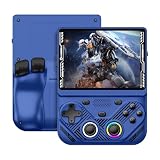
- 【Portable Dual System&RGBOX Dual Systems & RK3562 Chip Performance】 EmuELEC&RGBOX Dual Systems with Powerful RK3562 Chip: Experience seamless gaming with flexible dual-system support. Powered by the advanced Rockchip RK3562 quad-core Cortex-A53 2.0GHz processor and 2+4GB RAM, this console delivers fast, responsive performance, smooth multitasking, and enhanced capabilities for a wide range of emulators.
- 【4.3-Inch IPS Full HD Display】 4.3-Inch HD IPS Fully Laminated Display: Immerse yourself in crystal-clear visuals on the vibrant 4.3-inch IPS screen with a sharp 1024x768 HD resolution. The fully laminated display and anti-glare finish ensure excellent color reproduction and wide viewing angles, significantly reducing eye strain for comfortable extended gameplay. Whether playing classic 2D titles or fifth-generation 3D games, every frame is rendered with stunning clarity and detail.
- 【RG43V Pro Compatible with More retro games】NEW Upgrade RG43V Pro handheld game console, 64GB support Supports over 30 game formats, including open-source games and games in related formats, RG43V Pro Supports 2D&5-generation 3D games and ported games, which can be played immediately after addition. RGBOX can also access the RGBOX APP via a WiFi downloader to play over 22,000 classic retro game for a richer gaming experience, Built-in WiFi 6 Supports Dual-Band 2.5G & 5G Wi-Fi enables wireless local multiplayer for head-to-head battles or co-op play with friends – no extra accessories needed.
- 【All-in-One Multi-Function Game Console】 Precise Controls with Dual 3D Joysticks & Immersive Audio: Take command with dual 3D joysticks featuring a confirmation key and responsive mechanical buttons, including Hall linear triggers for precise analog control. The built-in vibration motors provide tactile feedback, while the joystick ambient lights offer 7 customizable color combinations to enhance your gaming atmosphere. Rich, dynamic audio is delivered through the hi-fi BOX cavity speaker or a private 3.5mm headphone jack.
- 【Fast Charging & Expandable Storage】 4000mAh Battery, Expandable Storage & Multiple Output Options: Enjoy up to 8 hours of gameplay on a single charge thanks to the powerful 4000mAh polymer lithium battery, with convenient USB Type-C fast charging. Expand your storage up to 1TB via the TF card slot. Connect to a larger screen with the HDMI output for TV play, or use the TYPE-C port for OTG, charging, and DP output, offering versatile connectivity for any gaming setup.
The mechanic is unusual and immediately understandable: draw lines to guide colored balls toward matching holes or targets. The result is part puzzle, part physics toy, and very different from a conventional grid-based game. A level can be approached, completed, and put away without requiring the long attention span demanded by a modern PC game.
This is the strongest match for a Surface-style tablet, convertible laptop, or other Windows device with a suitable digitizer. Drawing with a pen is the point of the design, while touch can make the game feel natural on a tablet. A mouse should be usable according to the available coverage, but it may not reproduce the same tactile appeal as a stylus.
What’s actually slowing this PC down?
Pick the symptom - the matching free tool is one click away.
Best for: pen users, touchscreens, and anyone who wants Windows nostalgia that is less predictable than another card or puzzle game.
Free status: Ink Ball is reported as free, but the available information does not verify whether the current version contains advertisements, paid unlocks, sign-in requirements, or offline support. Treat “free” as “reported free to obtain,” not as a guarantee that there are no conditions.
Search for the exact title in the Microsoft Store and verify the publisher and screenshots. If the app does not recognize pen input, try a mouse, check Windows pen settings, and update the device’s digitizer or manufacturer drivers. Active styluses do not behave identically across all Windows hardware.
3. Fluent Tic-Tac-Toe: the simplest option for a fast match
Fluent Tic-Tac-Toe is described as an open-source WinUI project by Dustin Fu Chang. It uses Windows 11-style presentation, including adaptive theming and Mica-style elements, but it should not be described as a recovered Microsoft game.
Rank #3

- 【Game Console with Linux Stylem】Comes with 64G TF Card Preloaded 5570 Classic Games,Support users to download games in relevant 15 kinds of games formats.
- 【supports 5G WIFI Bluetooth 2.4G Wireless Gamepad and Wired Gamepad Connection】 HDMI and TV output function makes the small screen become big screen in seconds, and the joystick connection supports multiplayer games, so you and your friends can enjoy the game together.
- 【3200 mAh Li-polymer battery and 3.5 INCHES OCA IPS screen】you can use for 6-7 hours, support fast charging with USB Type-C cable, With 3.5-inch IPS full viewing angle, zero distance OCA full-fit screen,the screen resolution is 640*480,Sharper picture quality and more saturated colours.
- 【Chip upgrade】with quad-core ARM Cortex-A53, Quad-core PowerVR SGX544MP GPU,makes have the characteristics of low power consumption and high performance. the Ram of the is LPDDR4 1GB, the larger the RAM running memory, the faster the system response time will be.
- 【Ideal gifts】Dimensions of Handled game :12.8cm*8.1cm *2.2cm,is a good size in the hand and is suitable for carrying aroundis a great gift for boyfriend, husband, brother, son, father and friends for birthday, Father's Day, Christmas, Valentines Day, Thanksgiving Day etc. Get lots of compliments on how it’s interesting or practical.
The basic rules are familiar: place marks on a grid and try to create a line before your opponent. The project reportedly adds bot matches, local multiplayer, adjustable difficulty, and larger boards such as 4×4 and beyond. Those options give the game more flexibility than ordinary three-by-three tic-tac-toe while keeping each match short.
Best for: a near-zero-commitment match, two people sharing one PC, and technically minded readers who value publicly available source code.
Free status: It is described as an MIT-licensed open-source project. That tells you about the project’s licensing and source availability, not necessarily about the safety, privacy, maintenance, or distribution of every compiled package. Open source does not automatically prove that an application is audited, telemetry-free, or actively maintained.
Installation is the main caveat. The available coverage indicates that a repository snapshot had no published releases, meaning some readers may find a Store package while others may encounter source code rather than a ready-to-run installer. Use the project’s official repository or a verified Microsoft Store package if available. Do not download an unrelated executable from a random mirror, and do not assume that building from source is a simple consumer installation.
What “free” actually means here
Before installing any of these games, separate the claims that are often bundled together:
- Free download: you can obtain the app without an upfront charge.
- Free with optional purchases: some features, upgrades, or ad removal may cost money.
- Open-source: source code is available under a stated license; this does not guarantee a safe or maintained binary.
- Ad-supported: advertising is present. This has not been verified for these titles.
- Completely free and ad-free: a stronger claim that should be made only when the current listing explicitly supports it.
For OurSweeper, optional purchases are specifically reported. For Ink Ball and Fluent Tic-Tac-Toe, the available information does not establish current advertising, paid features, telemetry, offline behavior, or account requirements.
Rank #4

- 【Kids Friendly Design】This retro handheld game console is specially designed for kids, with a stylish arcade-like appearance and a compact body that fits children's hands perfectly. Every game is thoughtfully created for children, bringing nonstop joy and excitement that keeps young gamers fully entertained.
- 【Lots of Classic & Enjoyable Games】As an emulator handheld, this retro device comes with 240 fun kids' video games, including entertainment, sports and adventure types—just like classic retro gaming console handheld. While playing, kids can enhance hand-eye coordination, thinking and problem-solving skills.
- 【Fun Gaming Experience】Equipped with a 3.0-inch high-definition screen and quality speakers, this handheld game console offers an immersive visual and auditory experience. Small, lightweight and ergonomically designed, this hand held game console is easy to hold and carry, letting kids fully enjoy their gaming time.
- 【Rechargeable, Long-Lasting & Ultra-Portable】Powered by an 1200mAh rechargeable lithium battery, this kids' game console supports long hours of fun and uninterrupted play, with no need for frequent battery changes. Lightweight and easy to carry, it's perfect for gaming on the go or playing at home. It's a wonderful little gaming partner that brings endless joy to every child!
- 【Ideal Surprising Gift】This handheld gaming console is a wonderful surprise gift for kids, teens and even adults, perfect for birthdays, Christmas, Halloween and Thanksgiving. As a popular gaming console, it brings joy to recipients. We prioritize customer satisfaction, with our team ready to serve you wholeheartedly.
How to install them without taking unnecessary risks
- Open the Microsoft Store on Windows 11 and search for the exact game title.
- Check the publisher name, icon, screenshots, and description.
- Read the purchase disclosures, permissions, privacy information, and age rating.
- Use the official Store listing or the developer’s official repository rather than a random download site.
- Do not install a similarly named app simply because it appears first in search.
- If the title is unavailable in your region, do not substitute a repackaged executable from an unknown mirror.
Store catalogs can vary by region, device category, and account. Installation can also be blocked on work or school computers by administrator policy. If the Store is disabled on a managed PC, contact the administrator rather than attempting to bypass the restriction.
Which one should you choose?
Choose OurSweeper if you want the safest recommendation for a short solo break
It has the clearest connection to a familiar Windows pastime and reportedly offers enough board and difficulty customization to suit both relaxed and serious Minesweeper sessions. Its main drawback is the Free+ model: readers who want a guaranteed purchase-free experience should inspect the current listing first.
Choose Ink Ball if you own a pen-enabled Windows device
It offers the most distinctive mechanic and the strongest link to a specific Windows era. The experience makes the most sense on a tablet or convertible with a responsive pen, although a mouse may still work. Remember that this is a third-party recreation rather than official modern Microsoft software.
Choose Fluent Tic-Tac-Toe if you want local multiplayer or an open-source project
It is the smallest mental commitment and may be the best choice for a quick two-person match. Its larger boards and adjustable bot difficulty add variety, while its open-source status gives technically inclined readers more provenance to examine. The trade-off is potentially greater installation friction if no verified ready-made package is available.
Final ranking
- Best all-rounder: OurSweeper.
- Best for Windows nostalgia and stylus play: Ink Ball.
- Best for local matches and open-source fans: Fluent Tic-Tac-Toe.
All three fit a short-break brief because their core loops are easy to understand and do not demand a large download or a long campaign. Just verify the current listing before installing: availability, pricing, advertisements, permissions, updates, and offline behavior can change, especially for small third-party projects.
Quick Recap
Product prices and availability are accurate as of the date/time indicated and are subject to change. Any price and availability information displayed on Amazon at the time of purchase will apply.
Do these 3 things before closing this tab:
1Repair Windows errors before they cause bigger problems2Scan for outdated or missing drivers - takes under a minute3Clear out junk files and repair common Windows errors



