Do these 3 things before closing this tab:
1Repair Windows errors before they cause bigger problems2Scan for outdated or missing drivers - takes under a minute3Clear out junk files and repair common Windows errorsVoicemod Key is a hardware audio bridge that lets a phone running the Voicemod app apply voice effects and soundboard audio to supported console chat. Voicemod announced it on July 18, 2024; its current product page lists PlayStation 4 and 5, Xbox One and Series X|S, and Nintendo Switch 2. It is not a native console app, and it requires a wired 3.5 mm TRRS headset—not Bluetooth.
What Voicemod announced
Voicemod announced Voicemod Key, also called VMKey in support materials, on July 18, 2024. It is a physical accessory intended to bring real-time voice changing and soundboard effects to console voice chat. The announcement described a broader ambition spanning PlayStation, Xbox, Nintendo consoles, phones and tablets; the current product page names specific supported consoles, so that list is the better guide to present compatibility. Voicemod’s announcement framed Key as a way around platform restrictions that, in the company’s explanation, limit system-level access to microphone input. That is Voicemod’s rationale, not an independently audited specification of every console operating system.
The distinction from desktop Voicemod matters: Key does not install a Voicemod app on a PlayStation or Xbox. Instead, it puts hardware in the wired audio path and uses the phone to process the voice. Voicemod promotes it for in-game chat, party chat, sound effects and supported console communication apps, including Discord in the relevant console configurations.
How the audio path works
VMKey sits between the phone, controller or console audio connection, and headset. The phone runs the Voicemod mobile app and applies the selected effect; the accessory carries audio between those devices and the console chat path. Voicemod describes the phone as supplying the processing while VMKey serves as the bridge. Voicemod’s VMKey explanation and product page describe this arrangement.
#1 Best Overall

- Real-Time AI Voice Changer for Console Game Chat: Sound like a robot, a deep villain, an alien or a girl while you play, with your new voice sent straight into PS5, PS4, Xbox Series X/S, Xbox One, Switch 2 and Meta Quest chat
- Your Squad Hears It, Not Just You: Works in Fortnite, Roblox, Call of Duty Warzone, GTA Online and any console or VR game with voice chat, while game audio and chat keep playing in your headset
- 200+ AI Voices and a Meme Soundboard: Pick voices and trigger memes, reactions and sound effects from the Voicemod app on iPhone or Android, build your own soundboard and browse 76,000+ community voice filters
- Three-Step Setup, No PC or Drivers: Plug VMKey into your controller, connect your phone and wired headset, then open the app last; includes USB-C to USB-C, USB-C to Lightning and 150 cm 3.5 mm TRRS cables
- Works with the Free Voicemod App: The complete voice and soundboard library requires a Voicemod PRO subscription, a fun pick for teen and adult gamers who play online with friends
- Connect VMKey to the phone.
- Connect the controller audio path to VMKey using the supplied controller cable and the port identified in the manual.
- Plug a compatible wired headset into VMKey.
- Open the Voicemod mobile app and select a voice effect or soundboard sound.
- Join the game, party or supported communication app, then test the microphone and listen for the result.
The precise cable layout can vary with the console and controller. Follow the included instructions and Voicemod’s official connection guide rather than assuming every controller uses an identical route. Voicemod says the device is powered by the phone, so VMKey itself does not need a separate battery or charger.
Compatibility: consoles, phones and headsets
Voicemod’s current VMKey product page and platform support information list these requirements and exclusions:
Rank #2

- Plastic, Electronic
- One Size
- Perfect for Halloween trick or treating or every day dress up and pretend play!
- Complete your Halloween costume with a variety of accessories, masks, and wigs
| Device or platform | Status | Qualification |
|---|---|---|
| PlayStation 4 and PlayStation 5 | Supported | Requires the wired audio setup and a compatible chat path. |
| Xbox One and Xbox Series X|S | Supported | Controller and chat routing still need to be configured correctly. |
| Nintendo Switch 2 | Supported | Voicemod specifies a direct-to-console connection. |
| Nintendo Switch (original) | Not supported | Voicemod’s FAQ excludes it; do not treat Switch 2 support as support for every Switch generation. |
| iPhone or iPad | Supported as the processing device | Requires iOS 16.0 or newer and the Voicemod mobile app. |
| Android phone or tablet | Supported as the processing device | Requires Android 8.1 or newer and the Voicemod mobile app. |
| Wired headset | Required | Must use a 3.5 mm TRRS connector. |
| Bluetooth headset | Not supported | Voicemod explicitly requires a wired headset. |
Supported hardware does not guarantee that every game or chat arrangement will work automatically. The game must offer voice chat for other players to hear you; console privacy settings, party-chat configuration, microphone permissions and controller routing can also affect the signal. Discord support means VMKey can be used with supported console Discord configurations; it is not a native Voicemod integration inside Discord.
What you need before buying
- Voicemod Key and its controller audio cable.
- A compatible phone or tablet with the Voicemod app installed and the minimum operating system version listed above.
- An internet connection, as listed in Voicemod’s requirements.
- A supported console and a wired 3.5 mm TRRS headset. If you currently use only Bluetooth or a wireless headset without a suitable wired mode, that headset will not meet the stated requirement.
- A Voicemod account or applicable plan or trial, depending on the current purchase and setup flow.
Voicemod lists manufacturer specifications of 45 × 45 × 15 mm and 30 g, with two female audio-jack connectors and a USB-C phone connection. Its packaging list says a USB-C-to-Lightning cable is included for iPhone connection. These are manufacturer-listed figures, not independent measurements. Check the current package contents before purchase if you need a particular cable.
Rank #3

- 8 VOICE EFFECTS WITH FINE-TUNING - Transform your voice with 8 distinct modes: male to female, female to male, normal, Lolita, baby, youth, king, and witch. Use the fine-tuning knob to adjust each voice further — unlock endless variations. Perfect for gaming, streaming, and prank calls.
- 8 Built In Sound Effects: The sound card comes with 8 interesting sound effects,8 BUILT-IN SOUND EFFECTS & RGB LED LIGHTS - 8 fun sound effects at your fingertips: applause, kiss, laughter, cheerful, surprise, fright, crow, and time. Colorful LED lights create a cool gaming vibe — with a separate switch to turn them off when not needed. you can get sound effects just by pressing each sound effect . The eight sound effects are applause, kiss, laughter, cheerful, surprise, fright, crow, and
- PLUG & PLAY WITH CARRYING CASE - No drivers needed — just plug in and start changing your voice instantly. Compact and portable, comes with a carbon-fiber storage case for easy transport. Perfect for indoor and outdoor use, from gaming sessions to parties.
- COMPATIBLE WITH MULTIPLE DEVICES - Works with phones, computers, tablets, , , , Switch, iOS, and Android. Note: 3.5mm interface — iOS devices require a separate adapter cable (not included). PC connection also requires an adapter.
- FUN VOICE FOR GAMING & PRANKS - your voice in online games, party chats, or voice calls — surprise your friends with unexpected characters. Perfect for role-playing, content creation, and adding excitement to any conversation. No one will know who you are!
Subscription and price: check the live offer
The current product pages direct buyers through plan selection and promote a Voicemod PRO trial; one console page specifies a one-month trial. The 2024 announcement described Key as part of a multi-platform Voicemod Pro subscription. The indexed product copy does not establish one universal current hardware price, ongoing subscription requirement, renewal price or premium-feature limit. Review the terms shown at checkout for your country before paying, and distinguish the hardware purchase from any subscription that may continue after a trial. The official VMKey page is the purchase entry point.
Voicemod advertises a large voice and sound library, but its pages give differing counts and do not establish that every item is available on every plan or platform. Treat the catalog and any trial as offer-specific rather than assuming that buying the accessory permanently unlocks all premium content.
Rank #4
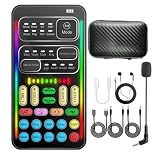
- 16 Built-In Voice and Sound Effects: The I9 voice changer includes 8 sound modes: Normal, Robot, DJ, RAP, Studio, Vlog, KTV, and Cartoon; plus 8 real-time voice effects: Baby, Youth, Male, King, Female-to-Male, Male-to-Female, Cute, and Witch. Fine-tune each voice effect across 10 pitch levels for gaming, streaming, voice chat, and content creation.
- Portable Digital Sound Card and Audio Mixer: Adjust microphone, voice, music, echo, and monitoring levels in real time. Noise reduction helps reduce unwanted background sound, vocal reduction lowers vocals in compatible music tracks, and auto-ducking lowers background music while you speak.
- Plug-and-Play Device Compatibility: No app or driver is required. The two included audio cables and USB-C audio adapter work with compatible phones, tablets, PCs, laptops, speakers, and game consoles. Connection methods vary by device, and some consoles require a controller with a 3.5 mm audio jack.
- Multi-Device Streaming and Voice Chat: Connect up to two phones and one computer for cross-platform streaming. Use this compact handheld voice changer for team chat, livestreaming, dubbing, karaoke, gaming, and mobile content creation at home or on the go.
- Complete Ready-to-Use Kit: Includes 1 I9 voice changer, 1 mini plug-in microphone, 1 monitoring earphone, 2 audio cables, 1 USB-C charging/OTG cable, 1 USB-C audio adapter, 1 portable PU carrying case, and 1 user manual.
Who is VMKey a good fit for?
It may suit you if
- You want voice effects or soundboard audio in console chat without routing your setup through a PC.
- You already use, or are willing to use, a wired 3.5 mm TRRS headset.
- You are comfortable keeping a phone connected and running the Voicemod app while gaming.
- You want to use effects across supported games or console communication apps rather than rely on one game’s built-in voice features.
Look elsewhere if
- You rely on a Bluetooth-only headset, want a fully wireless setup, or do not want a phone involved.
- You play on the original Nintendo Switch; Voicemod lists Switch 2, not Switch 1.
- You expect a native PlayStation or Xbox app, or a one-time hardware purchase that necessarily includes permanent premium access.
- You prefer a more configurable streaming setup. Voicemod’s desktop app is the software-based alternative for PC gaming and streaming; mixers and audio interfaces can offer more routing control but generally involve more setup and equipment.
Trade-offs and claims to treat cautiously
- Fewer PC requirements, more accessories: VMKey avoids routing through a PC, but adds the adapter, cables, phone and wired headset to the gaming setup.
- Phone-powered processing: No separate VMKey battery is needed, but the phone must stay connected, charged enough and running the app.
- Performance language: Voicemod markets the experience as having “no lag.” That is a company claim, not a published independent latency measurement for every phone, game and connection.
- Privacy: Voicemod says processing is local to the phone and voice data is not sent to its servers. That is the company’s privacy claim, not an independent verification.
- Voice-chat etiquette: Soundboard audio goes into a social channel. Use it deliberately, check the volume and follow the rules of the game, platform or server; unwanted playback can be disruptive or moderated.
Troubleshooting common setup problems
No microphone input
- Reseat the headset plug and confirm it is a 3.5 mm TRRS headset.
- Check that the controller cable is attached to the correct VMKey port and that the controller or console audio path matches the setup guide.
- Confirm the console’s selected input, microphone permissions and privacy settings, and make sure voice chat is enabled in the game or app.
- Check that the phone recognizes VMKey and that the Voicemod app has microphone permission.
You hear the effect, but other players do not
Local monitoring does not prove that the processed signal is being transmitted to chat. Check the console’s selected microphone input, then check whether party chat and in-game chat use different routes. Also verify that the game or communication app permits microphone access and is not muted or restricted by privacy settings.
Soundboard effects are missing from chat
Make sure the soundboard is active in the app and that its audio is routed to chat rather than local monitoring only. Check the soundboard level and confirm the game or platform is not suppressing the signal.
Best Value
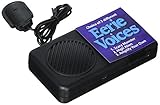
- Requires 3 AA Batteries - NOT INCLUDED
- Country of origin: China
- Product Dimension: 10.0"L x 7.0"W x 1.5"H
- Model Number: 9291
Bluetooth audio does not connect
This is an advertised limitation, not necessarily a fault: VMKey requires a wired 3.5 mm TRRS headset.
Quick Recap
Product prices and availability are accurate as of the date/time indicated and are subject to change. Any price and availability information displayed on Amazon at the time of purchase will apply.




