A wet PS5 DualSense controller may malfunction if liquid reaches its internal components. Sony does not describe the controller as waterproof or provide a spill-specific drying procedure, so stop using it, unplug any cable, and do not charge or test it while liquid may remain inside. Wipe the exterior with a soft, dry cloth, then contact PlayStation support if it behaves abnormally.
What can happen if a DualSense gets wet?
Liquid that enters the controller can interfere with its operation or damage it. Sony’s DualSense instruction manual warns: “Do not allow liquid or small particles to get into the product.” It does not establish that the controller is waterproof, guarantee recovery after a spill, or give a safe drying time.
A small amount on the outside is not the same as liquid entering the controller, but appearance alone cannot confirm whether the inside is dry. Treat unusual operation as a reason to stop using it rather than repeatedly pressing buttons to check.
What to do immediately after a spill
- Stop playing and disconnect the cable. If the controller is connected by USB, unplug it. Do not connect it to charge or power it on to test it while liquid may be inside. This is cautious handling based on the risk of operating a wet electronic device, not a spill procedure specified by Sony.
- Wipe the outside gently. Use a soft, dry cloth. Sony says to “Wipe with a soft, dry cloth” and warns: “Do not use solvents or other chemicals. Do not wipe with a chemically-treated cleaning cloth.” Do not spray cleaner into ports or other openings.
- Leave it unpowered and do not open it. Sony’s manual says not to disassemble or modify the product. It does not recommend rice, a hair dryer, direct heat, or a particular number of drying hours as a way to recover a wet controller. Keep the controller away from high temperatures and direct sunlight during storage.
- Watch for warning signs and seek support. If it makes unusual sounds or smells, becomes too hot to touch, or does not work normally, stop using it and disconnect cables. Sony says to stop use and contact technical support if the built-in lithium-ion battery’s fluid leaks. For controller hardware help, use PlayStation hardware and repairs support.
How long should you let it dry?
Sony’s reviewed manual does not give a drying interval or say that waiting a set number of hours makes the controller safe to use. A fixed recommendation such as 24, 48, or 72 hours would not be Sony guidance. If you suspect liquid entered the controller, keep it disconnected and ask PlayStation support for advice rather than relying on a timer or testing it while it may still be wet.
#1 Best Overall

- High quality silicone case is specially designed for PS5 controller. A variety of styles and colors to choose from, keep your controller safe, new and stylish
- The surface of the non-slip silicone grip skin is designed with many 3D studded edition, which can improve grip feeling during gameplay, prevent slip, and make you enjoy a better gaming experience
- Durable silicone sleeve is easy to install and remove, and will not interfere with the function of the controller after it is put on, will not hinder the use of any buttons and ports
- Precisely cut rubber cover skin provides all around and reliable protection for PS5 controller, preventing scratches, dirt, falling, spilling and grease caused by daily use
- Come with 1 pcs silicone skin and 3 pairs thumb grip caps in different styles, controller and other parts are NOT included. Kindly Reminder: This product is not compatible with the charging station. Please search "PlayVital Silicone Cover for PS5" or "Ns3IPOwlQ"on Youtube to get the installation guide
Will Sony replace a water-damaged controller?
Coverage depends on your region, warranty terms, and the assessment of your particular case; an article cannot determine whether Sony will accept a spill claim. Sony’s cited accessories limited warranty applies to the United States and Canada. It provides a one-year term from purchase for defects in materials or workmanship, requires proof of purchase, and excludes damage arising from abuse, unreasonable use, mistreatment, neglect, or causes other than defects in materials or workmanship. Sony may repair or replace products that qualify under those terms.
Check the warranty for your country and contact PlayStation support with the controller’s symptoms and purchase details. Sony’s U.S. PlayStation Protect page advertises accidental-damage coverage that includes spills, but the standard DualSense wireless controller is not among the products listed on the page reviewed. Do not assume that plan covers your controller; confirm device eligibility and the complete terms directly.
Rank #2

- ★【Perfectly Fit PS5 Controller Grip】Specialized design come from SIKEMAY for your beloved PS5 controller. Protect your PS5 controller grip from sweat, fingerprints, scratches, damage and daily usage. Top quality silicone grip cover fits PS5 controllers snug and nice, feels really smooth and soft to the touch.
- ★【Stronger Anti-Slip Comfortable Design】Using ergonomic design, particles on the surface and groove on the back design will better improve the grip and control of the handle. Our controller cover skin has a more powerful and professional anti-slip, sweat-proof and comfortable design than other ordinary skin on the market and prevents sweaty hands from affecting playing.
- ★【Perfect Protection】Anti-fall, Anti-scratch, Dust-free. Make of higher quality silicone raw materials, our controller grip skin has better protective to avoid vibration and scratch damage, can stronger protect your controller and keep it as new always, extended service life.
- ★【Exquisite Package】Package included PS5 Controller Grip Skin x 2, Thumb Grips x 8. SIKEMAY protective case will make more better gaming experience and multiple fun. Very suitable to as the best gift for your son, family, brother and good friends on Birthday, Christmas and other important days.
- ★【Tips】Recommended to remove the protective cover while WIRELESS charging.
What if it works again—or still does not?
If the controller appears to work after a spill, that does not prove liquid did not enter or that no damage will follow. Do not charge or use it while you still suspect it is wet. If it continues to malfunction, Sony’s DualSense troubleshooting page includes general controller troubleshooting and directs users to repairs if problems remain. Its reset procedure is for troubleshooting, not for drying or repairing liquid damage. If the controller remains unusable, ask support about repair options before deciding whether replacement is necessary.
Quick Recap
Best Value
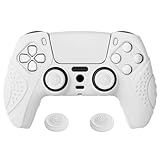
- High quality silicone case is specially designed for PS5 controller. A variety of styles and colors to choose from, keep your controller safe, new and stylish
- The surface of the non-slip silicone grip skin is design with ergonomic guardian edition, and the bottom of the inner side grip has small bumps, which can increase your comfort and provide a unique looking
- Durable silicone sleeve is easy to install and remove, and will not interfere with the function of the controller after it is put on, will not hinder the use of any buttons and ports
- Precisely cut rubber cover skin provides all around and reliable protection for PS5 controller, preventing scratches, dirt, falling, spilling and grease caused by daily use
- Come with 1 pcs silicone skin and 1 pairs thumb grip caps, controller and other parts are NOT included. Kindly Reminder: This product is not compatible with the charging station. Please search "PlayVital Silicone Cover for PS5" or "Ns3IPOwlQ"on Youtube to get the installation guide
Rank #4

- Tactical Aesthetics: The G.S.TAC for PS5 controller cover is a visual marvel. Its sleek, matte black finish exudes a sense of power and sophistication, perfectly complemented by its robust, angular design. The PS5 cover's aesthetic is inspired by military-grade equipment, evident in its rugged contours and tactical accents
- Precision Engineering: The high-precision analog sticks offer smooth, accurate movement, while the responsive buttons ensure that every press is instantaneous. For PS5 controller skin is packed with advanced features designed to enhance your gaming experience
- Superior Comfort: Ergonomically designed to fit perfectly in your hands, GSTAC for PS5 controller case reduces fatigue and enhance your gameplay experience.while the ergonomic shape provides unparalleled comfort and control
- Durability: Built to last, our for PS5 skin is made from high-quality materials that can withstand the rigors of hardcore gaming.The controller's robust build quality means it can withstand the most intense gaming sessions, providing reliable performance time and time again
- What You Get: For PS5 silicone controller cover*1, joystick cap *2, touchpad sticker *2, black modified sticker * 1, wet wipe *1, dust cloth *1. A nice customized packaging is perfect gift for your lover or friend. Gear up with G.S.TAC and go forth with strength and style
Rank #3
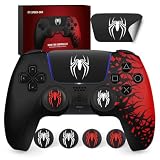
- Safe Material Perfect Fit - Darno Made of high-quality silicone Ps5 Controller Skin, protects your Ps5 controller handle from water, scratches, accidental drops. Does not affect the wireless charging and vibration feedback of the controller.
- Anti-Slip and Compatible Charging Station - The front and back of the PS5 controller grip will greatly improve the grip and control of the controller. And it can ensure that the charging station can be used normally when wearing the skin.
- Spider 2 Theme - This controller skin cover has a unique Spider theme design, which looks very stunning. It adds a different style to your controller and brings you a unique style enjoyment.
- Exquisite Packaging Design - The gift box design is very suitable for giving to friends as gifts. The packaging content is Ps5 controller grip skin, controller touch pad stickers(Controller NOT included).
- Quality Service - Our professional service team is always ready to answer all kinds of questions about this controller skin before and after sales.
Product prices and availability are accurate as of the date/time indicated and are subject to change. Any price and availability information displayed on Amazon at the time of purchase will apply.



