Recommended Free Tools
The EXT port on a PS4 DUALSHOCK 4 controller is its Extension Port. Sony documents it as the connection for the DUALSHOCK 4 Charging Station. It is separate from the controller’s Micro-B USB port and stereo headset jack.
What the EXT port is for
Sony’s DUALSHOCK 4 specifications list three distinct connections: an Extension Port, a USB (Micro B) port, and a Stereo Headset Jack. The documented use for EXT is connecting the controller to Sony’s DUALSHOCK 4 Charging Station.
To use the station, align its charging connector with the controller’s Extension Port, then press the controller down until it clicks, as described in Sony’s charging station manual. Sony says charging takes approximately two hours when the controller battery has no remaining charge; this is an approximate figure, not a guarantee for every charging condition.
EXT vs. USB and the headset jack
| Connection | Sony’s name | Documented purpose |
|---|---|---|
| EXT | Extension Port | Connects to the DUALSHOCK 4 Charging Station. |
| Top port | USB (Micro B) | Sony’s support instructions use the included USB cable to connect the controller to the PS4 for charging and pairing. |
| Bottom audio port | Stereo Headset Jack | Connects a compatible headset; Sony’s audio guidance covers headset use and settings through this jack. |
Sony’s controller support page describes USB charging as an option, so the EXT dock connection is not the only documented way to charge a DUALSHOCK 4. USB charging does not mean a cable is required for wireless play once the controller has enough battery charge.
#1 Best Overall
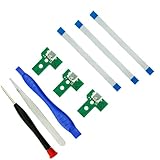
- Pacakge:3*Charging port, 3*flex cable, 1*Screwdriver, 1*Open Tool, 1*Tweezer.
- Dismantle Your controller and compare our pictures, choose match board items and replace your old or broken board.
- Port: Micro USB port same like original and the flex cable is also from 12pin or 14 pin, the flex cable send together with board.
- Tools: In order to make your replace the board convinent, we also send 1*Screwdriver, 1*Open Tool, 1*Tweezer.
- Models: We have models from JDS-001, JDS-011, JDS-030, JDS-040 / FJDS-040 or Jds-055. Select out the models you need.
Which accessories use EXT?
DUALSHOCK 4 Charging Station
This is the accessory Sony explicitly documents for the Extension Port. PlayStation’s US accessories listing says the official station can power up to two DUALSHOCK 4 controllers at once. If considering a third-party dock, check its product documentation for explicit DUALSHOCK 4 Extension Port compatibility; the existence of EXT does not establish that every controller accessory fits it.
Back Button Attachment
The DUALSHOCK 4 Back Button Attachment is not an EXT accessory according to Sony’s setup instructions: its stereo plug aligns with the controller’s stereo headset jack. Sony’s announcement describes headset pass-through for a wired 3.5 mm headset, while its product page describes 16 possible button functions and up to three saved profiles. Those details concern the attachment’s functions, not the EXT port.
Rank #2
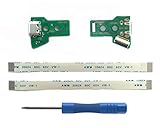
- 2 pieces of PlayStation USB charging port socket board adapter; Model: ✅JDS-055 with 12 pin flex ribbon cable. Replacement part for the latest edition of PS4 wireless controller - DualShock 4 came with some PS4 Pro and PS4 Slim, normally called DS4 V5. Our JDS-055 is fully compatible with FJDS-055, JDS-050 and FJDS-050 (🔺Another choice is to upgrade the Micro-USB to USB Type-C, please turn to product ID: B0DBZL9GFW)
- Kindly reminder: Sony has launched 5 edition of this DualShock 4 controller. They come with different built-in charger module. It’s a must to check which one is yours before placing an order. Dismantle your controller, compare your adaptor with our pictures, choose right one accordingly: JDS-001, JDS-011, JDS-030, JDS-040 / FJDS-040 or the latest edition of 050 or 055
- Packaging: 2*Micro-USB charging port socket - JDS-055; 2*12 Pin flex ribbon cable; 1* free PH000 (1.5+) precision screwdriver; Professional installation is recommended, Instructions are Not included
What EXT does not establish
Sony’s cited documentation establishes a charging-station connection. It does not establish a general data-transfer function for EXT or a universal accessory standard. Treat compatibility as product-specific, and rely on documentation for the particular dock or accessory rather than assuming that an add-on for a PS4 controller uses this port.
Quick Recap
Best Value

- New Pack of 2 JDS-011 Replacement Charging Port Micro USB Adaptor Charger Socket Circuit Board with 12 Pin Flex Cable for SONY PS4 2nd Gen DualShock 4 Controller
- Please Disassemble your PS4 controller in hand and compare with the charging board pictures as our listing shows. Please Purchase the correct part.
- WARNING: Only Compatible with PS4 2nd Gen Wireless Controller JDS-011 Charging Board with 12 Pin Power Socket, NOT with JDS-001, JDS-030, JDS-040 FJDS-040 or JDS-050 JDS-055 Power Board
- Please Replace This Part Under Professional Guide, If Not, NO TRY
- 90 Days Warranty, Please Make Sure There is No Man-Made Damage or Scratch when Returning or Exchanging
Rank #4
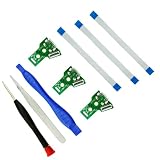
- Pacakge:3*Charging port, 3*flex cable, 1*Screwdriver, 1*Open Tool, 1*Tweezer.
- Dismantle Your controller and compare our pictures, choose match board items and replace your old or broken board.
- Port: Micro USB port same like original and the flex cable is also from 12pin or 14 pin, the flex cable send together with board.
- Tools: In order to make your replace the board convinent, we also send 1*Screwdriver, 1*Open Tool, 1*Tweezer.
- Models: We have models from JDS-001, JDS-011, JDS-030, JDS-040 / FJDS-040 or Jds-055. Select out the models you need.
Rank #3

- [JDS Charging Port with USB Type-C Port] – Replacement USB socket board work with PS4 controller. This new JDS-045C is a direct upgrade for original Micro-USB models: JDS-040, JDS-050 and JDS-055. The repair part fits the second gen of DS4 controller with main board: JDM-040, JDM-050 and JDM-055
- [USB Type C vs. Micro-USB] –1. Compared with Micro-USB, USB C delivers a more stable connection. 2. The Type-C interface supports forward and reverse insertion, with no direction restrictions. 3. Unify the interface with other devices
- [For Problems] – JDS triangle socket board needs to be replaced: Insertion is loose, No connection, Disconnects from time to time, No charging, No LED. (Be noticed: You’d distinguish the problem from the charger, USB cable, internal battery and the main board before ordering.)
- [Kindly Reminder] – 1. We designed two models for different DS4. The 013C model is for the 1st gen, while 045C is for the 2nd gen. It’s a must to check the model of your original JDS or the main board before ordering. 2. The USB port on the back plastic cover must be cut and enlarged, which voids the warranty. 3. Serious DIY skills required in the operation
- [What’s in Box] – 2x JDS-045C, 2x Flex Cables, Round File, Cutter, Pry Tools and Cross Screwdriver, Installation Guide in English
Product prices and availability are accurate as of the date/time indicated and are subject to change. Any price and availability information displayed on Amazon at the time of purchase will apply.



