Crashes, No Sound, or Screen Glitches?
Random freezes, missing sound and display glitches usually trace back to one bad driver. Find and replace yours safely.Free scan · under a minutePC Slower Than It Used to Be?
A free scan shows the junk files, broken settings and background clutter dragging Windows down - then fixes them in one click.Free scan · Windows 10 & 11A padlock on a PS4 game usually means the console cannot verify that the signed-in account can use it right now. It does not, by itself, mean the game was erased or that you need to buy it again. Start by signing into the account that bought or claimed the game, then check that account’s purchase or subscription entitlement and primary-PS4 activation before trying repairs.
Start with these checks
- Sign into the owning account. On the PS4, check which PSN account is active. Use the account that purchased the game or redeemed its voucher, and check its transaction history if you are unsure. A game installed on the console is not automatically available to every account.
- Check primary-PS4 activation. While signed into the purchasing account, open Settings > Account Management > Activate as Your Primary PlayStation 4 and choose Activate if offered. A primary PS4 lets other users on that console access eligible purchased applications and supports offline access to eligible content. Each account can have one primary PS4. Sony’s primary-PS4 guide explains activation and remote deactivation.
- Restore licenses. Connect to the internet, sign into the owning account, then go to Settings > Account Management > Restore Licenses and follow the prompts. This refreshes license information; it does not delete the game or change who owns it. Sony also documents a game-level option: highlight the game, press Options, and choose Restore License where available. Menu availability can vary by software version and region. See Sony’s restore-licenses instructions.
If the game remains locked, work through the checks below rather than buying it again or initializing the console.

Why a PS4 game can show a padlock
| Possible cause | What it means | What to check |
|---|---|---|
| Wrong PSN account | The game’s entitlement belongs to a different account from the one currently signed in. | Sign into the purchasing or redeeming account and check transaction history. |
| Primary PS4 not activated | The owning account may be able to use its own content while signed in, but other users on the console may not have access. Offline access can also be affected. | Activate this console as the owning account’s primary PS4. |
| PlayStation Plus entitlement ended | A claimed monthly game generally requires an active qualifying subscription. A Game Catalog title can become unavailable when the subscription ends or the title leaves the catalog. | Check the subscription and whether the title remains eligible. |
| PSN or internet problem | The console may be unable to verify an entitlement online. | Check PlayStation Network status and the PS4’s connection. |
| Local license or content database issue | The console’s stored license or content information may need refreshing or reorganizing. | Restore licenses; if needed, use Safe Mode’s Rebuild Database. |
| Suspension or account access problem | A suspended account or console can lose access to Store-purchased content and other PlayStation services. | Check account status and follow Sony’s suspension guidance. |
| Disc, edition, or region mismatch | A disc installation still needs its disc to launch; a digital entitlement may not match the installed edition or region. | Confirm the correct disc, game edition, and account region. |
Sony’s downloaded-game troubleshooting guide covers account, subscription, network, license, system-software, and database checks.
Follow the full troubleshooting sequence
1. Confirm the purchase or entitlement
Check the transaction history of the account you believe bought the game. Do not rely only on the title being installed or appearing in the Library: an installation can remain after a subscription entitlement or sharing arrangement ends. If the game is missing from the Library, also check the correct account, hidden games, voucher or bundle contents, and whether you are using the expected regional account.
#1 Best Overall

- Precision Control: The feel, shape, and sensitivity of the DualShock 4’s analog sticks and trigger buttons have been enhanced to offer players absolute control for all games on PlayStation 4.
- Sharing at your Fingertips: The addition of the Share button makes sharing your greatest gaming moments as easy as a push of a button. Upload gameplay videos and screenshots directly from your system or live-stream your gameplay, all without disturbing the game in progress.
- New ways to Play: Revolutionary features like the touch pad, integrated light bar, and built-in speaker offer exciting new ways to experience and interact with your games and its 3.5mm audio jack offers a practical personal audio solution for gamers who want to listen to their games in private.
- Charge Efficiently: The DualShock 4 Wireless Controller can easily be recharged by plugging it into your PlayStation 4 system, even when on standby, or with any standard charger with a micro-USB port.
2. Check primary-PS4 activation
Use Settings > Account Management > Activate as Your Primary PlayStation 4 while signed into the account that owns the game. This is especially relevant after replacing a console, using a second-hand PS4, or sharing access from another account. If the account is already activated on another PS4, deactivate the old console first where possible. If you no longer have it, Sony allows remote deactivation of all devices, but limits that action to once every six months; the process is described in the primary-PS4 guide.
3. Check PlayStation Plus status, if relevant
Work out how the game entered the Library before changing subscriptions. An outright purchase is not the same entitlement as a monthly PlayStation Plus game, a Game Catalog title, a trial, or access shared by another account. PlayStation Plus is not a blanket requirement for all digital games. Subscribe only if the locked title’s entitlement actually depends on it.
Rank #2

- 🎮【Kind Remind】- Fully compatible with PS4/PS4 pro/Slim. USB wired connection supports PC(Windows 7/8/10/11). With this controller, you can enjoy games in multiple platforms. (Note: you need to activate device with the USB cable in the package for the first connection.)
- 🎮【Support for Built-in Vibration Function】 The game controller has two built-in motion motors, which give you different intensity feedback and a more realistic game experience.
- 🎮【New Way to Play】- The clickable touch pad and integrated light bar offer you a new way to play games. Additionally, 3.5mm audio jack supports compatible headphone.You can enjoy volume controls located directly on the controller and don’t need to worry about disturbing others.is optimized with excellent dual analog gamepad design.
- 🎮【Upgraded Version】- The buttons are with high sensitivity and provide an accurate gaming experience. The layout of controller buttons is optimized with excellent dual analog gamepad design.
- 🎮【Customer Service】- We have a reliable after-sale service team. If you have any problems with the product once it arrives or if you have any questions about the product, please do not hesitate to contact our customer service team via Amazon e-mail.
4. Check PSN and the console connection
Check the official PlayStation Network status, test the PS4’s internet connection, and sign out and back into the owning account. If the connection is unreliable, restart the PS4 and router. When several digital games lock at once, a shared account, activation, service, or local database problem is more plausible than multiple purchases disappearing independently.
5. Update the PS4 and restore licenses
Install the latest system software available for the console, then restore licenses using Settings > Account Management > Restore Licenses. If restoration fails, first verify the account and connection, check PSN status, and try again after restarting the console and router. Record any error code.
The Tool Desk
Outbyte PC Repair FREEClear out junk files and repair common Windows errorsFree Scan →Outbyte Driver Updater FREEFix the driver behind crashes, sound loss and screen glitchesFind Drivers →Rank #3

- 🎮【2 Packing】Two controllers are packaged in one box, which is less costly than buying two controllers separately. You can get two different custom designed controllers at the same time, which is very cost-effective.This will bring you a better game experience when you play with your friends, lover, family.
- 🎮【Wide Compatibility】AceGamer wireless controller compatible with PS4/Pro/Slim/Windows PC. ❗*Attention*❗: Only when connecting for the first time, you must activate the device with the USB cable for the first pairing and connection. After that, the normal wireless connection of Bluetooth can be made, and USB data cable is no longer needed. ❗*Note*❗: Connecting to PC(without Bluetooth) needs to install receiver, not included.
- 🎮【Function Highlights】360° Refined analog sticks, the new touch pad on the face of the game controller offer players precise control. Controller which built-in 6-axis gyro sensor has dual motor vibration, excellent dual shock effect design makes the tactile sense more sensitive. The optimized buttons and triggers, ergonomic design non-slip grips, which offer you fantastic gaming experience.
- 🎮【Turbo Setting】You can customize any key as a turbo key. First, hold down the 'share' key, then click the turbo key you want to set up successfully. Secondly, you can adjust the turbo frequency. First, hold down the 'share' key, then touch the joystick on the right up and down. There are three gears to adjust in total.
- 🎮【To Be AceGamer】You can get: 2x AceGamer for ps4 controllers wireless; 1x Charging Cable; 1x User Manual; Professional after-sales service. We focus on the design, production and sales of custom controllers. If you have any questions, please contact us in any time!
6. Rebuild the database if the basic checks fail
Turn the PS4 off completely, start it in Safe Mode, and select Rebuild Database. This can address a local content-index problem, but it cannot transfer a purchase between accounts or restore an expired entitlement. It is not the same as Initialize PS4, which is a destructive reset and is not a routine license fix.
7. Re-download only if the installation appears damaged
If transaction history confirms the entitlement and license restoration has not helped, delete only the affected game application and download it again from the owning account’s Library. Do not select saved data for deletion. Back up important saves before any destructive troubleshooting.
Rank #4
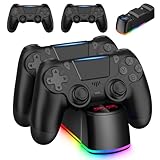
- Package Include: 2 x wireless controllers(black) for PS4 controller, 2 x usb cable, 1 x charging dock station, 1 x user manual.
- Stable Compatibility: These controllers are widely compatible with PS4/Pro/Slim consoles and PC. It supports USB wired connection.
- LED Charger Dock Station: Powered via micro USB from the PS4 console, PC, or AC adapter. It offers the fastest charging speed, fully charging your controller within 1.8 hours, saving you time. (Blue light indicates the controller is fully charged, while red light indicates it is charging.)
- Perfect Replacement: Vibration motors, 6-axis motion sensor, multi-touch touchpad, share button, light bar, speaker, 3.5mm audio jack—perfectly replaces for the PS4 controller.
- Great Gift: This set of gaming equipment is perfect as a gift for family and friends on birthdays, Halloween, Thanksgiving, and Christmas
If only one game is locked
Focus on that title’s entitlement and installation rather than changing settings for the whole console.
- Check that its purchase or voucher redemption appears in the correct account’s transaction history.
- Confirm whether it was an outright purchase, a subscription title, a trial, or content shared by another account.
- Check that the installed game is the edition associated with the entitlement. Add-ons, editions, and regional versions may not be interchangeable.
- Restore licenses. If the entitlement is present but the installed application appears damaged, re-download it from the owning account.
If every digital game is locked
Check shared causes first: the PS4 may no longer be primary for the relevant account, the console may be signed into the wrong account, PSN may be unavailable, or account or console access may be restricted. Then restore licenses and, if needed, rebuild the database. If the affected games belong to different accounts, check each owning account’s access separately.
Quick wins for a faster PC:
Repair Windows errors before they cause bigger problemsFix Now →Fix the driver behind crashes, sound loss and screen glitchesFind Drivers →Clear out junk files and repair common Windows errorsFree Scan →Best Value
If the game is on disc
A disc-based game is authenticated differently from a digital purchase. Keep the correct disc inserted to launch the installed game. A digital license does not replace a missing disc. If the disc is not recognized, inspect it and test another game disc to help distinguish a damaged disc from a drive issue. Imported discs and downloadable add-ons can also have region or edition compatibility differences.
If you cannot sign into the owning account
Check the sign-in details and two-step verification, then consider whether the account may have been compromised or suspended. If you suspect unauthorized access, use Sony’s compromised-account guidance to secure the account and contact PlayStation Support. Do not give your password to someone offering to unlock games. Unofficial license bypasses can create security, account, and service-access problems.
What the 2026 digital-license reports do—and do not—show
In 2026, reports about newly purchased PS4 and PS5 digital games described temporary license-validation behavior and raised claims of recurring 30-day check-ins. Later reporting attributed a clarification to Sony: newer purchases require a one-time online license check, rather than a permanent recurring 30-day check-in. This account comes from secondary reporting, not a clearly indexed Sony support article, so it should not be treated as a universal explanation for a PS4 padlock or as proof that every older purchase needs monthly authentication. Read the accounts from Tom’s Guide, GamesRadar, and TechRadar.
When to contact PlayStation Support
Contact Sony if the correct account shows the entitlement, the console can connect to PSN, and the activation and license steps have not resolved the padlock—or if the account cannot sign in or appears suspended. Include the game title and edition, whether it is digital, disc, PlayStation Plus, or shared, the transaction date or receipt if available, the exact error code, and when the failed launch occurred. Sony recommends providing the error, a description of the problem, steps to reproduce it, and a timestamp in its purchased-game troubleshooting guidance.
What’s actually slowing this PC down?
Pick the symptom - the matching free tool is one click away.
Quick Recap
Product prices and availability are accurate as of the date/time indicated and are subject to change. Any price and availability information displayed on Amazon at the time of purchase will apply.




