PC Slower Than It Used to Be?
A free scan shows the junk files, broken settings and background clutter dragging Windows down - then fixes them in one click.Free scan · Windows 10 & 11Outdated Drivers Are Slowing You Down
One free scan finds every outdated or missing driver and matches the right update for your exact hardware.Free scan · exact hardware matchSome links on this page are affiliate links: if you buy through them we may earn a commission, at no extra cost to you.
When a phone will not pair with Just Dance, the usual cause is not Bluetooth. It is the wrong companion app, an unsupported game/platform combination, blocked local-network discovery, missing phone permissions, or a stale game session. First identify which Just Dance product you own, then follow the matching recovery steps below.
First, identify your Just Dance product
| What you have | Phone app | How connection works |
|---|---|---|
| Just Dance 2023, 2024, 2025 or 2026 Edition on Nintendo Switch, Switch Lite, PlayStation 5 or Xbox Series X|S | Just Dance Controller (also on iPhone) | Phone and console discover each other over the local network. |
| Just Dance 2016–2022 | Just Dance 2016–22 Controller (also on iPhone) | Support varies by edition and console. |
| Just Dance Now on a TV, computer, tablet, Apple TV, Android TV or casting device | Just Dance Now | Join the Dance Room shown on the screen by QR code or room number. |
| Xbox One, PS4, Wii, Wii U or another older setup | Check the exact edition before installing anything. | Controller support is edition-specific. |
The current Just Dance Controller listing is for the 2023–2026 console editions. It will not make Just Dance 2021 or 2022 discoverable. Conversely, the older controller app is not the right choice for current editions.
The fastest five-minute fix
- Write down the exact game year and console model.
- Install the controller app that matches that edition; do not automatically choose the newest app.
- Connect the phone and console to the same ordinary home network. Use neither cellular data nor a guest network.
- On iPhone, open Settings → Privacy & Security → Local Network and enable the matching Just Dance app. Also allow Camera access if you scan a QR code. Menu wording can vary slightly by iOS version.
- On Android, review the permissions shown for the app, including camera or nearby-device/network access where your Android version requests it. Remove aggressive battery restrictions.
- Fully close the controller app and quit the game; do not leave either suspended.
- Restart the phone and console.
- Open the game first and wait for its controller/player-connection screen. Then open the phone app and choose its console connection option.
- Scan the on-screen QR code, or enter the code displayed by the game if manual entry is offered.
- If it still fails, try a second phone on the same network. One working phone points to a problem on the first phone; no working phones points to the game, console or network.
Check the network properly
“Both devices are on Wi-Fi” does not guarantee that they can communicate. The phone should be on the same non-guest SSID as the console. Disable any VPN or private-DNS service temporarily. Guest Wi-Fi, hotel or dorm networks, and routers with client isolation, AP isolation or guest isolation can block device-to-device discovery. A mesh satellite or extender may also place the phone on an isolated network even when its name looks identical.
The Tool Desk
Outbyte Driver Updater FREEScan for outdated or missing drivers - takes under a minuteDriver Scan →Outbyte PC Repair FREERepair Windows errors before they cause bigger problemsFix Now →An Ethernet-connected console can work with Wi-Fi phones, but only if the router allows traffic between wired and wireless clients. A temporary phone hotspot is useful as a diagnostic test for router isolation, not a guaranteed solution: some consoles cannot join a hotspot reliably, and some hotspots block peer discovery.
#1 Best Overall

- 【AI Tracking Tripod with Gesture Control-No APP Need】This face tracking tripod is equipped with smart AI that automatically locks onto your face. Working without app-a simple hand gesture “OK” to start or show your palm to pause. The phone tripod helps you maintain focus while moving around in tutorials, workouts, or live streams, making it easier to create dynamic content without touching your device
- 【Tracking Tripod with 3-Color LED Ring Lights 】The tracking tripod comes with 2 LED ring lights( 50 minutes battery life at max brightness) with 3 color options (Warm, Cool, Natural) to flatter various skin tones and environments. This selfie light helps you achieve well-lit, professional-looking videos and photos for your late-night live stream
- 【Smart Selfie Stick-Bluetooth Remote Control】Take control of your shots from a distance. The selfie stick tripod with 1 Bluetooth remote allows you to start/stop recording or capture photos without touching your device, which is ideal for group shots and long-exposure photography
- 【360° Rotatable Selfie Stick Tripod】The motion tracking tripod supports smooth 360° horizontal and 270° vertical rotation, allowing you to easily switch between portrait and landscape modes. This phone stand supports a variety of creative shots, from overhead tutorials to panoramic views, catering to the needs of different angles
- 【3-in-1 Motion Tripod & Extendable Stick】This 3-in-1 motion tripod functions as a handheld selfie stick, a desktop stand, or a floor tripod. Extend to 180cm (70.9”), fold to just 32cm (12.6”)—The extendable stick design is more convenient for travel and daily needs
Internet access is separate from local discovery. Ubisoft documents internet requirements for setup and online features in its Just Dance FAQ, but a phone and console can both reach the internet while still being unable to find each other locally.
If QR-code pairing fails
- Increase TV brightness, reduce glare and hold the phone steady at a distance where the camera can focus.
- Confirm Camera permission for the controller app.
- Return to the game’s controller screen to generate a fresh code; an old screen may have expired.
- Use manual code entry when available. Code length and menu labels differ by edition, so copy exactly what your game displays.
- If the QR code opens the app but pairing stalls, close both apps, restart the game and phone, and try again.
When only one phone fails
Compare the failing phone with a phone that connects. The likely causes are denied Local Network or camera access, a VPN/private DNS setting, battery saver suspending the app, an outdated operating system or app, a different SSID, or corrupted app data. Reinstalling the controller app can restore permissions and clear data, but you may need to sign in again. Resetting the phone’s network settings is more disruptive because it erases saved Wi-Fi networks, so reserve it for a phone-specific failure after the simpler checks.
Rank #2

- 【Zoom in & out】This remote shutter with zoom feature (Must open zoom in accessibility setting for iPhone/iPad) can help you easily zoom in and out from a distance when taking photos and videos, bringing great convenience and making your shooting more professional
- 【Front & Rear Camera Switch】There is a bluetooth button on the side of the wireless remote control that can switch the camera. Click once to switch the system camera, and double-click to switch the camera within the application. This unique feature can help you easily and quickly switch between front and rear cameras, making it perfect for content creation
- 【Video Scrolling & Page Turner】Compared to other single function remote controls, our upgraded wirless remote control not only has a shutter function, but also multiple functions such as zooming, switching between front and rear cameras, flipping pages, scrolling short videos and adjusting volume. This Versatile remote control can meet all your needs for taking photos & videos, Tiktok and reading e-books at the same time
- 【Reachageable & Portable】This camera remote control only takes 1 hour to charge and can last for 30 days of standby after being fully charged. The weight of 28 grams and compact size make it easy to store and carry, making it convenient to use both indoors and when traveling
- 【Widely Compatible】The Multi-functional wirless shutter is compatible with all iPhone, iPad, iPod and most smartphones and tablets with Android systems, compatible with most camera applications
Keep the phone awake while playing. Locking the screen or allowing a manufacturer’s battery manager to suspend the app can disconnect a controller. Charge the phone, disable battery-saving restrictions for the app, and use a secure grip or wrist strap.
Do these 3 things before closing this tab:
1Repair Windows errors before they cause bigger problems2Fix the driver behind crashes, sound loss and screen glitches3Clear out junk files and repair common Windows errorsWhen no phone can connect
Recheck the support matrix before changing router settings. A current app with an older game, an unsupported console, a stale suspended game session, a recent update defect or router isolation can all produce the same “game not found” message. Test another phone, then—only as a diagnostic—another network. If the correct app, permissions, restarts, manual code and network test all fail, check Ubisoft’s support pages for a known outage or game/app defect rather than repeating factory resets.
Rank #3
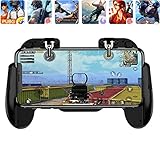
- 【Game Controller Design】Our gamepad have two adjustable triggers on the top, mechanical button made of conductive silicone and zinc alloy that triggers no delay. The handle whole body is made of high quality ABS material, which is sturdy and lightweight.
- 【Improve Your Game Level】Perfect four-finger operation. In the game, the two trigger on the top of the handle is responsible for aiming and shooting. You can quickly open the aiming magnifier and then shoot the enemy while moving and aiming. These four actions can be completed in one instant. You only need to practice a few times to adapt to this mobile game handle, you will find that the shooting game will become so easy, you can also become a game master.
- 【Best Assistant for Shooting Games】Very easy to use and install. You can use it for almost any PvP, FPS type shooter, as long as you can customize the keys icons in the game to fit the trigger. It is especially suitable for PUBG mobile phone shooter games.
- 【Supported Mobile Devices】This mobile game controller is compatible with almost all large screen smartphones. Stretchable handle body, maximum stretch length left and right: 172 MM/6.77 inch. The supported phone size is 4.7-7.0 inch screen, and the supported phone thickness is 10.5 MM/0.41 inch (recommended to remove the phone protection case before installing the controller).
- 【Ideal for Mobile Shooting Games】For PUBG/ Critical Ops/ Rules of Survival/ Knives Out/ CrossFire/ Survivor Royale/ Terminator 2 Judgment Day, etc., as long as the game settings are allowed to customize the position of the button keys.
Pairing is not the same as Camera Controller Mode
Ordinary phone-controller mode means holding the phone and having the game track its movement. Camera Controller Mode uses the phone camera to track full-body movement. Ubisoft says this mode launched with Just Dance 2026 Edition, moved out of beta in its version 26.0 notes, and supports Just Dance 2025 and 2026 choreographies; other songs may not be compatible. A phone can therefore pair successfully yet fail to start Camera Controller Mode because of the song, edition, camera permission, phone position or mode availability. Test ordinary controller mode and a supported choreography first. See Ubisoft’s 26.0 patch notes.
Independent reader supportYour contribution helps us test, update, and keep practical guides available for everyone.Just Dance Now uses a different process
Just Dance Now is a separate service, not the console game’s controller screen. It requires the smartphone app and an internet-connected display such as a computer, tablet, Apple TV, Android TV or compatible casting setup, as described in Ubisoft’s requirements guide. On the display, open a Dance Room; on each phone, scan its QR code or enter the room number. Follow Ubisoft’s joining instructions. It is a practical alternative when you lack a supported console, but it does not repair a console game that cannot discover a phone.
Rank #4
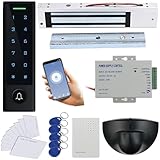
- Easy Install and wire, Provide Detail video guide and On-line support for any question, Can check video before purchase.
- WiFi Access Control Device, Waterproof, conforms to IP66 Grade,Multiple Access Modes: Smartphone APP, Card, PIN Code, completely running stand alone,Has a door bell button. Has backlight, work indicating light, very convenient to use even at dark.
- Support smart Phone App Remote open the door,Remotely ADD/Delete User,check history records even in another city.
- Can make door schedule KEEP OPEN or Lock back.Can set Time Restriction for Password users: Allow for access at certain time for different users.
- Include Motion Sensor will detect person and trigger to open lock automatically. High-sensitivity, quick and accurate response. Specially apply in commercial, industrial and demanding of automatic access area.
When the setup is unsupported
Do not buy a newer game merely because pairing fails. First verify the edition, install the correct free app, check permissions and test the network. Buying Just Dance 2026 is relevant only if you actually want its supported features, including Camera Controller Mode; it cannot fix a blocked router or a denied permission. Optional Just Dance+ access likewise does not resolve controller discovery.
Recommended Free Tools
Contact Ubisoft with useful diagnostic details
Escalate after the diagnostic sequence and include the game edition, console model, phone model, iOS/Android version, controller-app version, exact error text, whether another phone works, whether another network works, and whether manual code entry succeeds. This lets support distinguish an unsupported setup from a phone permission problem or a current software defect.
The Bottom Line
Most pairing failures are fixed by using the correct controller app, putting both devices on a non-isolated local network, granting Local Network/camera permissions, and restarting the game and phone in that order. If a second phone and a second network also fail, verify edition support and check Ubisoft for a software or service issue.
Quick Recap
Product prices and availability are accurate as of the date/time indicated and are subject to change. Any price and availability information displayed on Amazon at the time of purchase will apply.

