If your SCUF controller is not vibrating, first check the vibration setting for its exact model. SCUF documents adjustment steps for Envision controllers in iCUE and Valor Pro controllers in the Valor Companion App; those paths are not universal. The connected device and game can also affect whether a feature is available.
Identify your SCUF model and connection
Before changing settings, note the controller’s model and whether you are using it with a console or PC. SCUF organizes setup information by controller family, and its Reflex connection guidance cautions that some features may not be available on every connected device. There is no single vibration menu established for every SCUF model, platform, and game. See SCUF’s support and setup resources for model-specific guidance.
Check vibration settings for your model
Envision: inspect the iCUE vibration profile
- Open iCUE and select the Envision controller.
- Open the Vibration tab and select a recommended profile or create a custom one.
- Check that the vibration slider or sliders are not set fully to the left, which turns vibration off.
- If Sync is enabled, the two sliders mirror one another. Turn Sync off if you want to adjust them independently.
SCUF’s Envision FAQ documents these profile, slider, Sync, and off-position controls.
Valor Pro: check and save the Companion App profile
- Open the Valor Companion App and go to the profile configuration screen.
- Adjust the vibration sliders individually, or use the sync boxes to adjust them together.
- Save the profile edits.
This workflow is specific to Valor Pro; SCUF’s Valor Pro manual does not establish it as the setting path for other controllers.
What’s actually slowing this PC down?
Pick the symptom - the matching free tool is one click away.
#1 Best Overall

- Built for PS5 Consoles: Officially Licensed PlayStation 5 performance controller, engineered for easy setup and low-latency connectivity. Designed to meet Sony Interactive Entertainment’s exacting performance standards for input response, power management, and wireless stability you can trust
- 11 Additional Inputs: x4 rear paddles, x2 side action buttons, G-Keys; all fully customizable for personalized gameplay, faster reactions, and more control at your fingertips
- New SCUF Mobile App: Customize almost every input on your controller. Full control over your trigger and thumbsticks response curves, action (Triangle, Circle, Square, and Cross) buttons, and true 0% thumbstick deadzone. Directly from your phone (iOS & Android) to your controller in real time
- Endurance TMR Thumbsticks: Delivers increased durability, preventing the wear and tear that causes drift and/or jitter while consistently providing precision and smooth control
- Omron Mechanical Switches: Faster activating, mouse-like clicks across Instant Triggers, Instant D-Pad, and Instant Action Buttons. Utilising Omron switches for the most durable, consistent, and crisp feeling possible
Test with a supported game and connection
After checking the model’s settings, test vibration in a game and on a connection known to support the controller’s features. If vibration works in one setup but not another, the difference may be the game or connected device rather than the controller itself. SCUF’s Reflex connection guidance notes that feature availability can depend on the device.
Independent reader supportYour contribution helps us test, update, and keep practical guides available for everyone.If vibration still does not work
- Recheck that you changed the active profile and saved it where the app requires saving.
- Confirm that you followed instructions for your exact SCUF model rather than another controller’s app or menu.
- Use SCUF’s model-specific support route if the setting is enabled but vibration remains absent.
The available SCUF instructions describe settings and device-dependent availability, but do not establish a universal motor test, repair procedure, or warranty outcome. One game or connection without vibration is not enough by itself to diagnose a failed motor.
Quick Recap
Rank #4

- Anti-drift Hall effect thumbsticks prolong the life of your controller
- Four rear, remappable paddles keep your thumbs on the sticks for faster reactions
- Five fully remappable G-Keys for advanced macros and Corsair iCUE integration
- Two unique side-mounted SAX buttons are designed to provide additional configurability and fit the natural placement of your fingers
- OMRON mechanical button switches operate like a mouse click for instant activations
Rank #3

- FASTER GAMEPLAY: Features four rear paddles so you can react faster in-game and with our instant triggers that eliminate trigger pull, shaving milliseconds off your reaction time. And when you're on PC, activate the 1k Hz polling rate for lightning-fast inputs.
- MULTIPLE WAYS TO CONNECT: Switch between low-latency wireless, Bluetooth, or ultra-fast wired. No matter how you play, Valor Pro keeps your connection stable so you can stay locked in.
- TAILORED FUNCTIONALITY: Use the audio control system to change volume levels on the fly and save up to three remapping configurations with the flip of a switch.
- ULTIMATE CUSTOMIZATION: Show off your personality and coordinate your controller with your space. With a wide range of colors, designs, and swappable faceplates and thumbsticks, it’s easy to create a look that’s all you.
- MORE COMFORT: Utilizing over a decade of expertise our performance grip provides ultimate non-slip comfort, and the new wraparound bumpers have more surface area for faster movements.
Rank #2
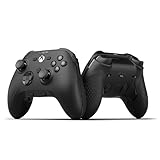
- FASTER GAMEPLAY: Features four rear paddles so you can react faster in-game and with our instant triggers that eliminate trigger pull, shaving milliseconds off your reaction time. And when you're on PC, activate the 1k Hz polling rate for lightning-fast inputs
- MULTIPLE WAYS TO CONNECT: Switch between low-latency wireless, Bluetooth, or ultra-fast wired. No matter how you play, Valor Pro keeps your connection stable so you can stay locked in
- TAILORED FUNCTIONALITY: Customize your inputs and adjust the TMR thumbstick deadzones directly from your Xbox or PC using the SCUF app; Built for total control with no need to pause
- ULTIMATE CUSTOMIZATION: Show off your personality and coordinate your controller with your space. With a wide range of colors, designs, and swappable faceplates and thumbsticks, it’s easy to create a look that’s all you
- MORE COMFORT: Utilizing over a decade of expertise our performance grip provides ultimate non-slip comfort, and the new wraparound bumpers have more surface area for faster movements
Product prices and availability are accurate as of the date/time indicated and are subject to change. Any price and availability information displayed on Amazon at the time of purchase will apply.




