Which connectors your Wii has depends on its model code, so identify that first. The original RVL-001 has the most: rear AV Multi Out, DC input, Sensor Bar connector and USB connectors, a front SD card slot, and GameCube controller sockets and memory-card slots. The sections below explain what each connector does, how to connect a television, and where the models differ.
Identify your model first
Nintendo’s documentation covers three models by code: RVL-001, RVL-101 and the Wii mini (RVL-201). The table shows the differences that affect cables, controllers and accessories. Where Nintendo’s pages do not address a feature for a model, the cell says so rather than assuming.
| Feature | RVL-001 | RVL-101 | Wii mini (RVL-201) |
|---|---|---|---|
| GameCube controller sockets | Yes | No | No |
| GameCube memory-card slots | Yes | No | No |
| GameCube game discs and accessories | Supported | Not compatible | Not compatible |
| Wii titles or accessories that require GameCube controller ports | Supported | Cannot support | Not stated in the sources reviewed |
| SD card slot | Yes (front) | Not stated in the sources reviewed | Not supported |
| USB | Multiple USB connectors | Not stated in the sources reviewed | One USB port |
| Television cable | Wii AV cable; component and S-Video also documented for Wii | Not stated in the sources reviewed | Wii AV cables only |
The Wii mini also has no online functionality, according to Nintendo’s support pages. The RVL-001 and RVL-101 entries reflect the sources reviewed, which are Nintendo’s RVL-001 setup manual and its Support pages accessed October 8, 2026. Those Support pages do not show publication dates.
The ports and what each one does
The RVL-001 setup manual identifies the connectors below. Each one serves a separate purpose, so a connector that fits a device does not mean that device is supported.
Free tools Windows power users keep installed
One-click scans. No signup required.
#1 Best Overall
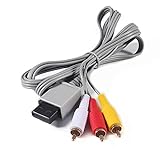
- Compatible: premium quality AV Cable for Nintendo Wii and Wii U Consoles
- Feature: the AV cable length is about 1.8 meter/6 feet, with standard AV composite lead, red, white, and yellow connectors on one end, input for Nintendo Wii and Wii U on the other
- Multiple uses: let you connect for Nintendo Wii/Wii U console with TV or monitors by the AV IN socket, provides composite video and audio output for viewing on a TV
- Applicable TV model: the AV cable can work well with modern HD LCD LED televisions, Please make sure your display has composite video and audio inputs
- If you have any issues with Audio Video Cable for Wii/Wii U, please contact us by Amazon message, we will provide you a satisfied solution at the first time
| Port | Location | Purpose |
|---|---|---|
| AV Multi Out | Rear | Connects the television cable (Wii AV cable or another documented cable) |
| DC input | Rear | Connects the power supply |
| Sensor Bar connector | Rear | Connects the Sensor Bar |
| USB connectors | Not stated in the sources reviewed | Connects supported devices such as the Wii LAN Adapter |
| SD card slot | Front | Accepts an SD Card |
| GameCube controller sockets | Not stated in the sources reviewed | Connect GameCube controllers (RVL-001 only) |
| GameCube memory-card slots | Not stated in the sources reviewed | Accept GameCube memory cards (RVL-001 only) |
Connecting a Wii to a television
Composite AV is the connection the Wii AV cable provides. Component and S-Video are also documented by Nintendo, with the limits described below. Check your console model and your television’s inputs before you buy or select a cable.
Composite AV with the Wii AV cable
- Plug the AV Multi Out end of the Wii AV cable into the connector on the back of the console.
- Connect the yellow plug to the television’s video input. Nintendo labels it “Yellow: Video Input.”
- Connect the white plug to the television’s left or mono audio input. Nintendo labels it “White: Audio Input Left (or Mono).”
- Connect the red plug to the television’s right audio input. Nintendo labels it “Red: Audio Input Right.”
- Power on the Wii, then select the matching input on the television.
Make sure the television sockets you use are inputs, not outputs. Plugging into an output socket is a common cause of a blank screen with this setup.
Rank #2

- 【Product Specifications】: AV Cable for Wii, Length: 1.8M/6FT. Standard AV composite lead, one end is RCA AV(Yellow, Red & White connectors ), and input for Nintendo Wii and Wii U on the other.
- 【Product Compatibility】: Replacement stereo audio video AV RCA composite cable compatible with Nintendo Wii, Wii U. Suitable for many TV games(Support TV with RCA input only), bring you extraordinary experience when you play games on TV.
- 【Plug and Play】: Wii AV cables with color-coded connectors that can easily identify where to plug into the back of the game console and TV. It’s designed to provide you with super clear video and sound when you play games.
- 【Safe and Secure】: The cable is made of high-quality copper and shield, which will not be easily bent or wear and tear, is durable and reusable, improve signal passage, and play games without delay. Compact design and slim enough to carry anywhere.
- 【What You Get】: Content: 1 x AV Cable. You can give it as a gift to your family, friends, classmates and anyone. If there are any problems, please feel free to contact us. We offer 18-month quality assurance for all products, providing lifelong technical support.
Component video
Nintendo documents component video as an optional, higher-quality image connection for the Wii. It requires a Wii model that supports it and a television with component inputs. The Wii mini is excluded: Nintendo says it is compatible only with Wii AV cables.
S-Video
Nintendo’s S-Video instructions state that S-Video cables are sold separately. The Wii mini limitation applies here too, so a Wii mini should be connected with a Wii AV cable.
What’s actually slowing this PC down?
Pick the symptom - the matching free tool is one click away.
Rank #3

- 【What You Will Get】1 x Wired Sensor Bar for Wii; 1 x AV Cord for Wii. This set is truly a necessity for a game master which can meet the needs of all your games.
- 【Advanced Sensor Bar】The Wii Sensor Bar is come with a clear stand, it with adhesive for easy attachment to tv, monitor or any smooth surface. Super easy to operate, quick install, simple plug and play installation just like the original sensor bar. About 7.2ft cable ensures you place sensor bar more conveniently.
- 【Premium-quality Composite AV Cable】The Composite cable with 3 RCA plugs (red, yellow and white), you can connect your Wii console with TV or monitors via the AV in socket. And the cable feature gold-plated connectors for increased longevity, and provide you a more secure interference and distortion free connection. With up to 480i standard resolution, let's you enjoy the high-quality audio and video experience of Wii during game time.
- 【Fantastic Gaming Experience】With brand new decoder chip,advanced signal processing with great precision,colors and resolution will be provided. The picture is exquisite and stable, no blurring, no fuzzy lines, no delay, which ensures you a better game experience.
- 【Buy with Confidence】If you have any problems with the purchase or use of this Wii Accessory Set, please contact us at the first time, we will provide efficient customer service for replacement or other assistance!
If your television has none of these inputs
The Nintendo pages reviewed cover composite AV, component and S-Video. They do not address other connection types. If your television has none of those inputs, these sources do not establish a supported Wii connection for it, and you should check the Support pages for your model before buying anything.
Sensor Bar
The Sensor Bar plugs into the rear Sensor Bar connector. You can mount it above or below the television. Nintendo advises centering it with the screen and aligning its front edge appropriately with the television or the surface it sits on. Then set the matching Above TV or Below TV option in System Settings so the console reads its position correctly.
Rank #4

- High-Quality AV Performance,This premium Wii AV cable delivers stable audio and video signal transmission with minimal interference, ensuring clear and smooth playback for your gaming and entertainment needs.
- Durable & Functional Design,Built with a robust cable structure and gold-plated connectors, this Wii to TV cable resists oxidation and corrosion, guaranteeing long-term durability even with frequent use.
- Stereo Audio & 480i Video Support,Supports AV stereo audio signals and video output up to 480i resolution—ideal for standard-definition TVs. Note: Not compatible with 480p or HDTV systems.
- Wide Compatibility for Wii & Wii U,Specifically designed for Nintendo Wii and Wii U consoles, this AV cable easily connects to TVs or monitors with AV input ports. Plug and play—no additional drivers required.
- 1.8M Length for Flexible Setup,With a 1.8-meter cable length, this Wii component cable offers ample reach for convenient placement of your console and TV, perfect for home entertainment setups.
GameCube controller sockets
Only the RVL-001 has GameCube controller sockets. Nintendo says GameCube controllers generally work when playing GameCube games on the Wii. Some Virtual Console and WiiWare titles, and some Wii games, may also use them. Support varies by game, and the required socket positions are listed in the specific game’s instructions.
Independent reader supportYour contribution helps us test, update, and keep practical guides available for everyone.USB devices
The RVL-001 manual describes USB for supported devices such as the Wii LAN Adapter and warns against unsupported devices. The USB port fitting a device does not mean the device is supported. The Wii mini has a single USB port.
Best Value
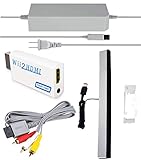
- Upgraded Version Sensor Bar: Compatible with all Wii controllers, motion plus controllers and other Wii controller addons. Comes with a clear stand, it with adhesive for easy attachment to tv, monitor or any smooth surface. Quick and easy install, just like the original sensor bar with simple plug and play installation. More than 7ft cable ensures convenient placement of sensor bar.
- Composite AV Cable: Composite cable with 3 RCA plugs connect your Nintendo Wii console with TV or monitors via the AV in socket, high end gold-plated connectors give you a secure interference and distortion free connection supports up to 480i standard resolution using an analog signal. Lets you enjoy quality audio and video from your Nintendo Wii.
- Reliable and Multi-protection AC Adapter for Nintendo Wii: Equipped with 56kΩ pull-up resistor and 22 wire core. To ensure safe use with your Nintendo Wii system, the charger built-in "smart PD (Power Delivery) IC" & the thermal material design protect your devices against overcurrent, overvoltage and overcharge. The combination of safety features offers reliable performance and promotes ultimate peace of mind.
- Upgraded Version Wii to HDMI Converter: With built-in American chip, advanced signal processing with great precision, colors and resolution will be provided. Full digital HDMI format, no transmission loss, the picture is exquisite and stable with no blurring, no fuzzy lines or lag, which ensures you do better in the game.
- What You Wii Get - 1 x AC Power Adapter for Wii; 1 x AV Cord for Wii; 1 x wii to hdmi converter; 1 x Wired Sensor Bar for Wii. This is truly a necessity for a games master.
Checklist before you buy a cable, controller or device
- Confirm the model code (RVL-001, RVL-101 or RVL-201).
- Check your television’s inputs: yellow, white and red composite inputs, component inputs, or S-Video.
- For a Wii mini, buy a Wii AV cable. Component and S-Video cables are not supported on that model according to Nintendo.
- For GameCube controllers, confirm you have an RVL-001 and check the game’s instructions for controller support.
- For USB devices, confirm the device is supported by Nintendo, not just that it fits the port.
- For SD storage, remember the Wii mini has no SD card slot.
This guide reflects Nintendo’s documentation, not hands-on testing of each cable or device.
Quick Recap
Product prices and availability are accurate as of the date/time indicated and are subject to change. Any price and availability information displayed on Amazon at the time of purchase will apply.



