If Xbox disc-to-digital conversion is not working, first determine whether the console reads the disc. A disc the console cannot recognize points to a disc or drive problem; a disc that launches the game but does not grant a digital entitlement points to eligibility or an incomplete claim. Microsoft says most Xbox One and Xbox Series X game discs support the feature, but not all do.
Check that your console can use the feature
Microsoft’s described process requires inserting a supported Xbox One or Xbox Series X game disc into a supported Xbox console and launching the game. A console without a disc drive cannot complete that insert-and-launch flow. Confirm that your exact console model accepts physical discs before troubleshooting the entitlement.
Microsoft introduced the feature as a rollout starting with “thousands of titles,” not as support for every game or disc. Its announcement says most Xbox One and Xbox Series X disc-based games support it; the usage rules clarify that some discs are ineligible. Eligibility can also vary or change for technical, licensing, publishing, or other reasons. Microsoft’s Xbox Wire announcement and its Digital Goods usage rules do not establish that Xbox 360 or original Xbox discs qualify.
Follow the symptom that matches your problem
The console does not recognize the disc
The claim process depends on the console recognizing a supported disc. If it does not read the disc or the game will not launch, the problem is at the physical-media or disc-drive stage—not yet evidence that the digital entitlement was denied. The Microsoft sources cited here do not provide model-specific cleaning, repair, or error-code instructions, so there is no universal disc-cleaning or restart fix established for this symptom.
#1 Best Overall

- 【EXTERNAL CD DRIVE FOR LAPTOP】- Considering that most of the latest laptops have not been added to the built-in CD/DVD drive, so you can’t insert CDs or DVDs directly into your laptop to listen to music, watch movies, data backup or install systems. The external CD drive that ORIGBELIE newly released is a good solution. No need for additional drivers. PLUG and PLAY. The CD Rom external drive for laptop has strong error correction, anti-skid and quiet capabilities.
- 【USB 3.0 HIGH-SPEED DATA TRANSFER】- CD Burner with high speed USB 3.0 technology, many of the port cluster connectors are labelled by blue colour and backward compatible with USB 2.0 / 1.1. USB 3.0 is an updated version of USB 2.0 which provides higher data transfer rates up to 5 Gigabits/S (625MB/S). it is approximately 10 times faster than USB 2.0. Besides that, The cd drive offers Max 8x DVDR Read Speed and Max 24x CD Write/Read speed, faster than you expected.
- 【SUPPORT CD & DVD BURNING】- The optical drive supports reading and writing of CD±R/RW, CD-ROM, DVD±R/RW, DVD-RAM, VCD, and SVCD. In addition, This USB-A and USB-C external disk drive supports different devices such as Macbook, iMac, Notebook, Desktop, and Laptop, etc. It's compatible with Windows 11/10 /8 /7 /XP , Vista 7 / 8, Linux, Mac OS10.6 or above. (Cars, TVs, Tablets, Smartphones, Projectors and Blu-ray disk are not supported;Windows 11 requires media player and network)
- 【8 IN 1 USB HUB】- Our external drive can not only burn and read CD DVD, but also can be used as a external laptop usb hub, including 1 USB 3.0 port, 3 USB 2.0 port, 1 TF slot ,1 SD card slot and 1USB C Port, compatible with usb hard drive, limited/wireless mouse & keyboard, computer radiator and other usb computer accessories, The card slot are perfect for transferring photo and video files by your camera from cards to your computer(Note: SD port and TF port cannot be used at the same time)
- 【ULTRA SLIM & PORTABLE DESIGN】- This external disk drive is very slim and lightweight and the embedded data cable is easy to use and organize, skip-proof rubber pad prevents sliding on the desktop, so you can easily carry in your laptop bag ideal for home, office, or anywhere you go. It is also a good idea to give it to hobbyists who collect CDs and DVDs. (We provide up to 2-year after-sales.)
The game launches, but no digital entitlement appears
Check whether the exact disc and edition are eligible, then confirm that you completed the documented claim flow: insert the supported disc and launch the game. If the disc reads but the entitlement still does not appear, eligibility or claim completion remains unresolved. Ask Xbox Support for current help with the specific title and account rather than assuming every disc qualifies or buying another copy.
The entitlement appeared before, but access is now missing
The qualifying disc remains important after conversion. Microsoft describes the disc-to-digital license as limited access, says it cannot be transferred separately from the qualifying disc, and may require eligibility revalidation. Confirm that you still possess the disc, then check the account and license state or contact Xbox Support if access is still unavailable.
Rank #2
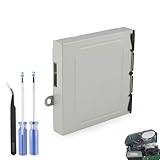
- Compatible Model: The Blu-ray Disc Drive replacement compatible with Xbox One DG-6M1S-01B, DG-6M1S-02B and DG-6M2S-01B.NOT for One X/S, they are different model, please must make sure that have confirmed before place the order.
- Replacement Application: When your console meet with the problem of unable to read discs, making noise while reading discs, stuck on the reading screen, slow installation, or unable to autoplay, etc.. Replace the new disc drive for Xbox One, which will help to solve these problem and make the console normal to use.
- Quality Guarantee: For Xbox One X blu-ray disc drive replacement was test before shipment,and made of good quality, ABS plastic material make it use more accurately and has longer working life,resistant to wear and tear.
- Convenient Installation: Comes with professional Repair tools. The repair tools will help to disassemble the console and install the disc drive for Xbox One, save time and convenient to install the new one.
- Suggestion Tips: If do not have any installation experience, we suggest to find the professional to replace for Xbox One disc drive. If you have any problem or need installation guide, please leave a message.
Know what the digital entitlement does—and does not—include
Conversion does not make every title eligible for every digital benefit. Play Anywhere and cloud gaming are available only for games that support those features; neither is guaranteed by disc-to-digital conversion. Microsoft also says eligibility may be added or removed, so a title’s status is not necessarily permanent.
Quick Recap
Best Value

- Replacement for Lite-On DG-6M1S drive for xbox one console. Not fit for xbox one s ,xbox one x game console.
- This will also replace the DG-6M1S-01B & DG-6M1S-02B models
- Model: HOP-B150. Compatible with all Xbox One Liteon DG-6M1S-01B drives.
- An original replacement Blu-ray disc drive for Xbox One.Watch video on YouTube,please take your old circuit board from your old drive and install it into the new drive.
- NOTE: Only Fit for Xbox One Console, NOT for Xbox One S/ One X or 360 360 S 360 E Consle. Please check The model of your console before purchasing.
Rank #4

- Replacement for Lite-On DG-6M5S drive for xbox one s (Slim) console. Not fit for xbox one ,xbox one x game console.
- Compatible with all Xbox One S Liteon DG-6M5S drives.
- The product is not plug and play, and two wires need to be soldered.
- An original replacement Blu-ray disc drive for Xbox one s (Slim).Watch video on YouTube,please take your old circuit board from your old drive and install it into the new drive.
- NOTE: Only Fit for Xbox One S (Slim) Console, NOT for Xbox One/ One X or 360 360 S 360 E Consle. Please check The model of your console before purchasing.
Rank #3

- Original Lite-On DG-6M1S drive for XBOX One game console,Compatible with all Xbox One Liteon DG-6M1S-01B DG-6M1S 6M2S B150 drives.
- NOTE: Only Fit for Xbox One Console, NOT for Xbox One S/ One X or 360 360 S 360 E Consle.Please check The model of your console before purchasing.
- If you are experiencing errors, skipping and cannot play a game or movie then this will solve your problem,Great replacement for your broken or defective DVD drive.don' t need to change new device, just buy this item and replace your damage xbox one disc drive , let your xbox one console work again.
- Installation This drive is NOT plug-and-play. so u need to exchange your Original Disc Drive Green PCB Board with the PCB in our part. Original PCB must be installed in the drive as this is married to the console, basic soldering required.
- Just follow the instructions sent with the disc drive.
Product prices and availability are accurate as of the date/time indicated and are subject to change. Any price and availability information displayed on Amazon at the time of purchase will apply.
The Tool Desk
Outbyte PC Repair FREEClear out junk files and repair common Windows errorsFree Scan →Outbyte Driver Updater FREEFix the driver behind crashes, sound loss and screen glitchesFind Drivers →



