Some links on this page are affiliate links: if you buy through them we may earn a commission, at no extra cost to you.
Short answer: Yahboom’s MicroROS-Pi5 is an unusually complete platform for learning ROS 2 robotics, combining an ESP32 micro-ROS controller, encoder motors, LiDAR and a camera. It is not a plug-and-play toy, though: expect software setup and calibration, and the advertised $299 base configuration is listed as without a Raspberry Pi 5. Choose it if you want to work on robotics; look elsewhere if you simply want a car that works straight out of the box.
Which Raspberry Pi 5 robot car is this?
“Raspberry Pi 5 ROS2 Robot Car” is a generic description used for more than one product. This review concerns Yahboom’s MicroROS-Pi5, SKU 6000200579, and its associated software repository. Yahboom describes a Raspberry Pi 5 running Raspberry Pi OS and ROS 2 Humble, paired with an ESP32 micro-ROS expansion board.
That distinction matters when comparing listings: other kits may use different sensors, motor controllers, software images and support. It also matters at checkout. Yahboom’s page shows a “Without Raspberry Pi” option and Pi 5 options from 2GB to 16GB. The $299 regular price displayed for the product page is not a reliable price for a complete Pi-included setup; option prices, shipping and regional charges can change.
What’s in the kit?
Yahboom’s published component list describes the following core hardware. Confirm the exact bundle contents on the seller’s order page and in the box, since the Pi and accessories depend on the selected configuration.
#1 Best Overall

- AI-Powered Raspberry Pi Smart Car — PiCar-X: PiCar-X brings AI learning to life — powered by Openclaw and multi-LLMs including ChatGPT, Gemini, Grok, DeepSeek, Qwen, Doubao, Ollama (Local LLMs), and compatible with many more AI platforms. Featuring OpenCV, MediaPipe, TTS & STT, PiCar-X enables true AI vision and voice interaction — it can see, listen, talk, drive and think like an intelligent companion. Ideal for students (10+), educators, and engineers, PiCar-X is the perfect gateway to explore AI, robotics, and machine learning on Raspberry Pi 5/4/3B+/3B/Zero 2W (Raspberry Pi not included)
- Engaging Interactions with Multi-LLMs: PiCar-X, powered by Openclaw and multi-LLMs — including ChatGPT, Gemini, Grok, DeepSeek, Qwen, Doubao, and Ollama (Local LLMs) — and compatible with many other AI platforms, supports voice interaction and visual recognition to make the robot smarter and more responsive. Users can enjoy natural AI conversations, solve math problems through the camera, and interpret gestures, unlocking a world of diverse and fun AI-driven interactions
- Feature-rich and Adaptable: PiCar-X offers engaging applications like line following and obstacle avoidance, supports TTS (Text-to-Speech) and STT (Speech-to-Text) for interactive voice control, and includes a camera for video and vision recognition. It also comes with various sensors, while its customizable design enables a wide range of creative AI and robotics projects
- Versatile Programming Options: Catering to users of all skill levels, PiCar-X supports both Python and Scratch programming languages, allowing for flexible learning and skill development
- Simplified Assembly & Support: PiCar-X is perfect for beginners, yet learning with experienced users is recommended for best results. It comes with easy assembly instructions and forum support for smooth project completion
| Part | Role | What to verify |
|---|---|---|
| Aluminum-alloy chassis, wheels and motor assemblies | Robot frame and drive system | Check the supplied motor labels: the product page specifies four 310 encoder motors, while the repository describes four 370 encoder motors. |
| ESP32 micro-ROS expansion/controller board | Connects low-level control hardware with the ROS 2 system | Check board revision, motor-driver connections and cable labels. |
| MS200 LiDAR | Provides range scans for mapping and obstacle-related experiments | Inspect its mount, cable and unobstructed view. |
| 2MP camera and 2DOF pan/tilt mechanism | Supports camera and vision demonstrations | Check gimbal movement, connector routing and camera alignment. |
| 7.4V, 2,000mAh rechargeable battery | Supplies mobile power | Confirm whether a charger is included, how charging is handled and whether the battery is replaceable. |
| Raspberry Pi 5 | Runs the main Linux and ROS 2 software | Included only if the chosen bundle says so; note the memory size. |
Also check for a microSD card or other storage, Pi cooling hardware, power regulator, USB and sensor cables, fasteners, spare parts, a remote-control accessory and printed instructions. Do not assume that a separately pictured accessory is included. Before powering up, inspect the chassis, battery security, connectors and motor wiring. A Raspberry Pi supplied separately may need its own storage and suitable power accessories.
Assembly and setup: two different jobs
Mechanical assembly and getting a functioning ROS 2 robot are not the same measure of difficulty. Even if the chassis goes together smoothly, software, networking and calibration may take considerably more troubleshooting. The available product and repository descriptions do not establish a dependable build time or verify that every current package arrives pre-imaged, so treat those as bundle-specific rather than guaranteed.
- Mechanical: fit the chassis plates, motors, wheels and sensor mounts. Check that the LiDAR and camera have clear views and that their cables cannot snag on wheels or the gimbal.
- Electrical: connect the controller, motor driver, encoders, battery, Pi and sensors according to the instructions for the exact board revision. Inspect polarity and power connections before switching on.
- Software: identify the installed OS image, ROS 2 distribution, Python environment and vendor workspace before following a tutorial.
- Calibration: check motor direction, encoder polarity, wheel dimensions and spacing, odometry and sensor transforms. A car can respond to a drive command yet report incorrect motion to ROS 2.
Ask the seller whether the selected package includes the Pi, pre-imaged storage, active cooling, the required power arrangement and a battery charger. Those details affect both the bill and the amount of setup work.
The Tool Desk
Outbyte PC Repair FREERepair Windows errors before they cause bigger problemsFix Now →Outbyte Driver Updater FREEScan for outdated or missing drivers - takes under a minuteDriver Scan →How the ROS 2 architecture fits together
The intended division of work is sensible for a teaching robot. The Raspberry Pi 5 runs the main ROS 2 software and higher-level tasks; the ESP32 micro-ROS board is the interface for lower-level robot control. Encoder feedback can contribute to odometry, the MS200 supplies range scans, and the camera supports vision experiments. RViz can display robot and sensor data, often from a separate computer or remote session.
Yahboom advertises teleoperation, SLAM mapping, path planning, obstacle avoidance and visual-interaction examples, including OpenCV and MediaPipe-based functions. These are capabilities the platform is intended to explore, not guarantees that every feature works immediately or reliably on every software image. Ask which examples are installed and which require separate downloads, another computer, internet access or calibration. A demo that detects an object is not proof of robust autonomous navigation.
Rank #2
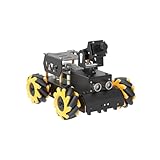
- Raspberry Pi 5 & ROS2 Platform. TurboPi runs on the ROS2 operating system and leverages Python and OpenCV to deliver efficient AI processing and a wide range of robotic applications.
- Multimodal large AI model ChatGPT & Voice Interaction. With an integrated multimodal large AI model and AI voice interaction capabilities, TurboPi supports smart conversations, environment awareness, and flexible task execution for richer human-machine interactions.
- AI Vision & Autonomous Driving. Equipped with a 2-DOF HD camera, TurboPi offers FPV video feedback, object and color recognition, line following, and autonomous driving features—perfect for creative AI projects.
- 360° Omnidirectional Movement. Featuring a robust metal chassis and Mecanum wheels, TurboPi can move in any direction and rotate on the spot, adapting smoothly to various scenarios.
- Comprehensive Code & Learning Resources. We provide full Python source code, diverse experiment examples, and detailed course materials to support your journey in mastering AI and programming while inspiring endless innovation.
Version consistency is a particular concern. Yahboom’s material names ROS 2 Humble, while Raspberry Pi’s current page lists Raspberry Pi OS Trixie and Bookworm as compatible with Pi 5 and says older releases are not supported. A Humble tutorial may rely on a specific image or package environment. Record the OS release, 32- or 64-bit status, ROS distribution, kernel, Python version, vendor image date and repository revision before changing a working installation. See the Raspberry Pi 5 specifications and OS information.
A safe, useful first-start sequence
Use the instructions for the exact hardware and software revision you receive. The public project information cited here does not confirm a complete, current command-by-command installation sequence, so this is a diagnostic order—not a substitute for Yahboom’s wiring diagrams or launch instructions.
- Confirm whether the Pi is included and record its memory size and board revision.
- With power disconnected, inspect the chassis, battery, cables and motor connections.
- Follow the supplied instructions to charge and install the battery; verify how the Pi receives regulated power. Do not guess at battery wiring.
- Identify the Pi image and check its OS, ROS 2 and vendor-software versions. Avoid replacing the supplied environment before establishing what it is.
- Connect to the Pi locally or over a known Wi-Fi or Ethernet connection, then confirm the vendor’s ROS 2 environment is available.
- Start the documented ESP32/micro-ROS connection and robot nodes. Check that the expected sensor and control topics appear before driving.
- Check transforms in RViz or the vendor’s visualization method. Inspect the frame tree rather than assuming frame names: a LiDAR scan that is rotated or displaced can indicate a transform or mounting problem.
- Raise the wheels for an initial low-speed command. Confirm forward, reverse, turn and stop behavior, and check that encoder direction agrees with actual wheel motion.
- Test on an open, level floor. Compare reported odometry with the car’s actual direction and distance before attempting mapping.
- Only after drive, sensor data and transforms are stable should you try mapping, localization or navigation. Shut down the software cleanly before disconnecting battery power.
Watch for power symptoms during initial tests: a Pi reboot, a disappearing LiDAR, camera freezes or USB disconnections when motors start can point to a brownout or unstable power path. Raspberry Pi recommends a high-quality 5V/5A USB-C supply for Pi 5 and advises active cooling under demanding workloads. The vendor also describes a 5.1V/5A solution; verify what is actually supplied and how it connects rather than assuming the robot’s battery circuit meets that recommendation. See Raspberry Pi’s power and cooling guidance.
What to evaluate before calling it autonomous
A worthwhile review separates basic driving from the more demanding ROS 2 features. If you are evaluating a unit, report the actual environment, software revision and method; do not call odometry accurate, SLAM reliable or vision fast without measurements that support those descriptions.
Driving and encoders
Test forward, reverse, rotation, low-speed control and stopping with the wheels lifted first, then on the floor. Note whether straight commands drift, whether the car stops consistently, and how behavior changes on smooth flooring versus carpet. Encoder feedback is useful only when motor direction and encoder polarity are correct; wheel slip and an uncalibrated wheel model can still produce odometry drift.
Rank #3

- 【Powerful control system】RaspberryPi 5 has made breakthroughs in processor speed,multimedia performance,memory and connection.Based on the RaspberryPi 5 main control,AI performance has been greatly improved,and the camera picture is smoother.The combination of RaspberryPi 5 and the robot driver expansion board significantly enhances the AI performance of Raspbot V2!
- 【Empowered by Large Al Model, Enhanced Human-Computer Interaction】Raspbot V2 uses an OpenRouter-centric interactive system based on 3 AI models. Combined with the AI voice interaction module, it uses multimodal vision to determine whether the scene on the screen matches the description, enabling environmental perception and AI visual gameplay. Only superior kit.
- 【Multiple control methods】Raspbot-V2 can be connected through APP,PC,remote control,and handle,and FPV transmits images.Android and iOS APP can be used for remote control of robots.Through the APP,you can control the robot in real time and switch various AI games with just one click.
- 【Excellent hardware configuration】Equipped with Pi5 robot driver board,communicates with Pi5 via I2C, and supports Pi5 PD (5V/5A) power supply.The metal chassis is equipped with TT motors and Mecanum wheels to achieve 360°moving;it adopts a four-way patrol module,infrared patrol sensors with 4-way high-precision infrared probes;Ultrasonic waves to achieve distance measurement,obstacle avoidance,and following;with an OLED screen to view the main control temperature data in real time.
- 【What do you get?】You will get a programmable metal chassis structure robot kit,you need to assemble the camera, main control,and expansion board yourself.With rich tutorials and open source Python code,Raspbot-V2 is a perfect platform for Raspberry Pi 5 robot learning,where you can learn ROS, Python programming,Open CV technology and AI vision,shorten the project development cycle and fully experience AI!
LiDAR, mapping and navigation
Confirm that scans display correctly and that the sensor frame is positioned and oriented correctly. Test slowly in a controlled indoor area before trying a larger map. Wheel slip, moving people, repetitive walls, glass, reflective surfaces, narrow passages and incorrect transforms can all degrade mapping. A sensor’s presence does not mean the car reliably detects every obstacle: LiDAR height and field of view may miss low objects, and the source material does not provide independently verified range or mapping-accuracy results.
What’s actually slowing this PC down?
Pick the symptom - the matching free tool is one click away.
Navigation depends on a working chain of components: motion control, odometry, sensor data, transforms, localization and planning. If a map warps, a scan appears displaced, or Nav2 cannot find a required transform, resolve the underlying frame or odometry issue before treating navigation as a feature failure or success.
Camera and vision
Check that a camera stream is available, then note resolution, frame rate and latency under your actual network and lighting conditions. Test the pan/tilt mechanism separately. The vendor lists OpenCV and MediaPipe examples, but the available descriptions do not establish that all processing runs locally on the Pi, or that gesture and object recognition will be robust in varied conditions. Treat each example as a software demonstration until its compute location and repeatability are known.
Heat, power and runtime
Check temperature during sustained work, not just immediately after boot: mapping and camera processing can load the Pi more heavily than idle teleoperation. Note whether a fan is included, how it is mounted and whether throttling or instability occurs. Runtime likewise cannot be inferred from the stated 7.4V, 2,000mAh battery alone; motors, surface, workload and regulator efficiency all affect it. Test actual driving, idle ROS 2 and sensor-heavy use, and find out how the battery is charged and protected. Do not charge unattended unless the supplied documentation explicitly permits it.
Independent reader supportYour contribution helps us test, update, and keep practical guides available for everyone.Pi 5 configuration and the real cost
Raspberry Pi 5 uses a quad-core 2.4GHz Arm Cortex-A76 processor and offers dual-band Wi-Fi, USB 3, a 40-pin GPIO header and camera interfaces useful for robotics projects. The official page lists memory options from 1GB to 16GB, though Yahboom’s kit options and regional availability may differ. Its December 2025 official list prices were $55 for 2GB, $70 for 4GB, $95 for 8GB and $145 for 16GB; those are Pi list-price references, not guaranteed kit or reseller prices. See the Raspberry Pi pricing announcement.
Quick wins for a faster PC:
Repair Windows errors before they cause bigger problemsFix Now →Scan for outdated or missing drivers - takes under a minuteDriver Scan →Rank #4

- Multiple Functions: This car has four drive wheels, the rotatable head has a camera and an ultrasonic distance sensor (Assembly required) (Raspberry Pi and Battery NOT included)
- Detailed Tutorial: Provides step-by-step assembly guide and complete Python code (The download link can be found on the product box) (No paper tutorial)
- Compatible Models: Raspberry Pi 5 / 4B / 3B+ / 3B / 3A+ (2B / 1B+ / 1A+ / Zero 2 W / Zero W / Zero 1.3 is also compatible but needs extra parts) (NOT included in this kit)
- Control Methods: Controlled wirelessly by your Android phone or tablet, iPhone (with Freenove App) and computer (run Windows, macOS or Raspberry Pi OS)
- Battery NOT Included: Please refer to the downloaded tutorial to buy
For this use, 4GB is a reasonable general-purpose choice if the bundle premium is sensible. Two gigabytes may suit basic driving and lightweight sensor work, with less room for development tools and vision workloads. Eight gigabytes can help when multitasking or running heavier local software; 16GB is hard to justify for this robot alone. More memory does not improve motor control, sensor quality, bad transforms or wheel calibration.
Calculate the total, not just the base-kit figure: kit plus Pi if needed, storage, power and cooling accessories, shipping, tax or import charges, and any separate computer needed for development or RViz. A microSD card or SSD, spare battery or charger may be useful, but exact requirements depend on the bundle. Raspberry Pi says Pi 5 is expected to remain in production until at least January 2036, which is useful context for long-term availability but says nothing about how long this specific kit’s parts or software will be supported.
Who should buy it?
Buy or shortlist it if you want an integrated ROS 2 learning target and value having encoders, a micro-ROS controller, LiDAR and camera in one platform. It can give you a concrete base for exploring teleoperation, sensor topics, mapping and vision without designing every electrical connection yourself.
Be cautious if this is your first Linux or ROS 2 project. Mechanical assembly may be approachable, but networking, version mismatches, transforms, calibration and power troubleshooting are a meaningful part of the experience. The $299 base-price signal excludes the Pi, and the listed motor specifications conflict between the product page and repository. Ask the seller to identify the motor and software revisions for the exact package.
Do these 3 things before closing this tab:
1Scan for outdated or missing drivers - takes under a minute2Clear out junk files and repair common Windows errors3Fix the driver behind crashes, sound loss and screen glitchesChoose a simpler or custom build instead if you want a low-cost toy, expect dependable autonomy with no tuning, or need to select every component and maintain a current software stack yourself. A basic Arduino or ESP32 car is a cheaper way to learn motor control; a custom Pi build offers component choice but demands more integration work. Yahboom is not the only seller of Pi 5 ROS 2 cars, and a more advanced platform such as the Hiwonder MentorPi M1 is a separate, potentially more complex and expensive alternative—not a like-for-like verified performance upgrade.
For buyers in Bangladesh, the Raspberry Pi BD listing is a regional price and availability reference, not a universal price. The accessible listing and reseller alternatives do not supply independent test evidence sufficient to establish real-world reliability. Treat vendor feature claims as a guide to intended use, then confirm package contents, software image and support terms for your market.
Quick Recap
Product prices and availability are accurate as of the date/time indicated and are subject to change. Any price and availability information displayed on Amazon at the time of purchase will apply.

