mGBA is the best GBA emulator for most PC players. It is open source, actively developed, accurate, and offers official Windows, macOS, and Linux downloads. The current release shown on its download page is 0.10.5. If you already use a multi-system library, choose RetroArch with the mGBA core instead. Classic VisualBoyAdvance users should use the maintained VisualBoyAdvance-M project—not random downloads labeled simply “VisualBoyAdvance.”
This guide separates practical recommendations from specialist and legacy choices, explains safe installation and save handling, and never links to ROM or BIOS download sites.
Quick comparison
| Choice | Best for | Windows | macOS | Linux | Type | Official source |
|---|---|---|---|---|---|---|
| mGBA | Most players, ROM hacks, homebrew | Yes | Yes | Yes | Dedicated GBA emulator | mGBA downloads |
| RetroArch + mGBA | Multi-system libraries, achievements, shaders, netplay | Yes | Yes | Yes | Frontend plus GBA core | RetroArch |
| VisualBoyAdvance-M | Classic interface and legacy familiarity | Yes | Yes | Not stated | Dedicated emulator | VBA-M downloads |
| OpenEmu | Mac-native library management | No | Yes | No | macOS frontend using mGBA | OpenEmu |
| BizHawk | Tool-assisted speedrunning and debugging | Primary | Limited | Unix pathway | Multi-system tool suite | BizHawk |
| ares | Preservation-focused experimentation | Yes | Yes | Yes | Multi-system emulator | ares installation |
| higan | Existing preservation setups | Yes | Yes | Ubuntu support stated | Accuracy-focused multi-system emulator | higan |
| NO$GBA | Specific development or compatibility needs | Verify current official support | Not stated | Not stated | Specialist/legacy | Use only a verified official source |
| Mednafen | Existing Mednafen users | Verify current support | Verify current support | Verify current support | Legacy multi-system emulator | Check official documentation |
| RetroArch + VBA-M | Alternative core preference | Yes | Yes | Yes | Frontend plus GBA core | Libretro VBA-M |
Platform labels describe documented project availability, not a promise that every release has equal polish. “Verify” means current official support should be confirmed before downloading.
The best GBA emulators, ranked
1. mGBA — best overall
mGBA is the simplest strong default for Windows, macOS, and Linux. Its project describes highly accurate GBA hardware emulation, and the official downloads page lists version 0.10.5 with Windows installer and portable packages, modern and legacy macOS builds, Linux AppImages, and Ubuntu packages. It is a good fit for ordinary games, ROM hacks, homebrew, testing, and speedrunning practice.
What’s actually slowing this PC down?
Pick the symptom - the matching free tool is one click away.
#1 Best Overall
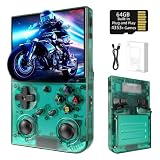
- 【 Retro handheld game console 】CPU:H700 quad-core ARM Cortex-A53, 1.5GHz frequency. GPU:dual- core G31 MP2.RAM:1GB. System:Linux 64-bit .The retro gaming console can run large-scale retro simulation games smoothly. Moreover,it significantly improves game installation,loading, and system responsiveness,significantly reduced game loading times,support multitasking,ensures smooth and lag-free gaming.
- 【Compatible with Numerous Simulators】The retro gaming console handheld features a built-in game frontend.It supports third-party software like RixelHK (a game downloader) and enjoy the fast download experience of massive game resources. The handheld game console features an intuitive user interface that is easy to pick up with no operational barriers, along with a vast library of retro and modern games as well as powerful emulation capabilities, ensuring a smooth and uninterrupted gaming experience.
- 【3.5-inch IPS Screen】The retro game handheld console is equipped with 3.5-inch IPS full viewing angle, OCA full lamination, multi-touch, 640*480 resolution.Ultra-high-definition realistic game graphics enhance your gaming experience.This is a cost-effective game handheld that brings you an extraordinary gaming experience.
- 【5G WIFI & 4.2 Bluetooth & HDMI TV Output】The retro gaming console 2.4/5G WIFI 802.11a/b/g/n/ac, Bluetooth 4.2,2.4G wireless controller and wired controller connection, Bluetooth controller connection, HD connection to TV, vibration motor, online multiplayer via WiFi, and streaming expanding your entertainment options beyond gaming.Not only can you enjoy a good game time alone, but you can also call your friends and have fun together.
- 【3200mAh High Capacity Battery】The Retro gaming console handheld built-in 3200mAh high capacity lithium battery for ultra-long standby time and battery life.Support up to 7 hours game playing.Support fast charging with USB Type-C cable.Brings lots of joy and happiness to you during a trip or a long journey.
The trade-off is a more utilitarian interface than a console-style library frontend. Download it from https://mgba.io/downloads.html; project code and documentation are at https://github.com/mgba-emu/mgba.
2. RetroArch with the mGBA core — best multi-system setup
RetroArch is a frontend, not a GBA emulator by itself. You install RetroArch and select the mGBA core for GBA games. This gives you unified controller mapping, playlists, shaders, hotkeys, rewind, run-ahead, RetroAchievements, and netplay alongside other console cores.
It adds layers that beginners may find confusing: core updates, save locations, per-game overrides, and frontend settings. Choose it when one organized multi-system environment matters more than the fewest setup steps. See official platform downloads and the mGBA core documentation.
3. VisualBoyAdvance-M — best classic-style alternative
VisualBoyAdvance-M (VBA-M) continues the VisualBoyAdvance lineage and supports Game Boy, Game Boy Color, and GBA. It suits players migrating from an older installation or preferring a traditional desktop emulator.
Do these 3 things before closing this tab:
1Clear out junk files and repair common Windows errors2Fix the driver behind crashes, sound loss and screen glitches3Repair Windows errors before they cause bigger problemsSearch results often mix the abandoned original project with unofficial repackagings. Use the project-controlled download page or project site; its page provides Windows 64-bit, Windows 32-bit, macOS 64-bit packages, and ASC signature files. Do not assume it is universally faster or more accurate than mGBA without controlled testing.
4. OpenEmu — best Mac-native experience
OpenEmu organizes games in a macOS-focused library and uses the mGBA engine for GBA. It is attractive if you want artwork, playlists, and fewer emulator windows to manage. It is Mac-only, and users seeking the newest mGBA-specific options may prefer standalone mGBA. The official site is openemu.org; supported engines are documented at its repository. Check the site for current macOS requirements because displayed version information can change.
5. BizHawk — best for TAS and debugging
BizHawk targets tool-assisted speedrunning and advanced testing, with recording/playback and debugging tools. Its EmuHawk documentation is Windows-centric and x86-64 oriented, with a Unix/Linux pathway. It is excessive for casual GBA play. Also, do not assume every GBAHawk component associated with the wider ecosystem is included in the standard BizHawk package. Details are maintained at the official repository.
6. ares — preservation-focused alternative
ares emphasizes accuracy, preservation, and configurability across systems. Installation documentation covers Windows, macOS, Linux, and FreeBSD. It is worth considering if preservation work or experimentation is your priority, but it is less straightforward for a GBA-only setup than mGBA. See the installation documentation.
Quick wins for a faster PC:
Scan for outdated or missing drivers - takes under a minuteDriver Scan →Repair Windows errors before they cause bigger problemsFix Now →7. higan — for legacy preservation requirements
higan is historically important to accuracy-focused emulation and provides official releases through GitHub, with Windows, macOS, and Ubuntu Linux materials described by the project. It is best reserved for an existing higan workflow or a specific archival reason, not as the default modern GBA recommendation. Source: official repository.
8. NO$GBA — specialist only
NO$GBA has a history in GBA and Nintendo DS development and debugging. Current official availability, licensing, operating-system support, and download safety should be checked directly before use. Do not use third-party download portals or present it as the safe default.
9. Mednafen — for existing users
Mednafen is a long-running multi-system project, but its configuration is less approachable and it is not a natural first choice for modern GBA-only play. Consider it only when you already maintain a Mednafen library and have verified current GBA support in official documentation.
10. RetroArch with VBA-M — an alternative core, not a separate frontend
RetroArch can load VBA-M instead of mGBA. Libretro documents them as separate cores with different configuration and BIOS behavior. Try this when a particular legacy workflow or personal preference calls for it; do not count it as a wholly different application from RetroArch.
Free tools Windows power users keep installed
One-click scans. No signup required.
Choose by priority
| Your priority | Pick | Why |
|---|---|---|
| Least configuration | mGBA standalone | Fewer frontend and core layers |
| Several console systems | RetroArch + mGBA | Unified libraries, controls, shaders, and achievements |
| Classic interface | VBA-M | Familiar VisualBoyAdvance lineage |
| Mac library management | OpenEmu | Native-feeling organization |
| TAS or debugging | BizHawk | Recording, playback, scripting, and debugging tools |
| Preservation work | ares or higan | Accuracy and configurability emphasis |
| ROM-hack or homebrew testing | mGBA | Current dedicated project and developer-oriented features |
Safe installation and first-time setup
- Download only from the emulator’s official project site or official repository release page. Avoid third-party “download” buttons and repackaged bundles.
- Choose the correct package: Windows installer or portable archive; the macOS build matching the documented system and CPU; or a Linux AppImage, distribution package, or project build.
- Install or extract to a folder you control, then open the emulator.
- Set ROM, save, screenshot, and configuration directories. Avoid protected system folders if the emulator cannot write there.
- Map D-pad, A, B, L, R, Start, and Select. Add deliberate hotkeys for pause and fast-forward; keep load-state away from an easy-to-hit button.
- Load a legally obtained
.gbafile. Make an in-game save, close normally, reopen, and confirm that the save returns. - Back up battery-save files before changing emulators, cores, versions, or save directories.
In-game saves, save states, and BIOS files
Use normal saves as your portable record
An in-game save is written by the game to battery-backed save memory and is generally more portable. A save state is a snapshot of emulator memory and hardware state; it is convenient but depends more heavily on the emulator, core, version, and settings. Keep multiple backups and never rely on one state file.
Rank #2
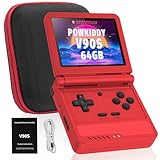
- 🎮 10,000+ Classics Preloaded Instantly play 8-bit to PSP-era gems across 20+ systems. No setup – unfold and relive childhood!
- 🔄 Fold & Go Anywhere Military-grade hinges survive 20K flips. Folds to pocket size (8.9x8.5cm) – 30% smaller than phones!
- 💾 Dual TF Slots for Upgrades Separate slots for OS (system) and games – update firmware without losing saves. Supports 512GB total!
- ⚡ Cartridge-Smooth Performance Quad-core CPU boots in 8 sec – faster than blowing NES cartridges. Zero lag on GBA classics.
- 🔓 Hack Your Childhood Install ArkOS/RetroArch for Dreamcast/PSP games. Includes USB-C cable & quick-start guide.
BIOS is optional in the documented Libretro cores
Libretro’s mGBA and VBA-M documentation lists gba_bios.bin as optional and gives the expected MD5 hash a860e8c0b6d573d191e4ec7db1b1e4f6. That value is verification data, not a download invitation. Obtain firmware only through lawful means applicable to your jurisdiction; never download BIOS files from random sites. Some games or boot behavior may differ with BIOS use.
Special hardware needs testing
Tilt, solar-sensor, rumble, and other cartridge accessories can require emulator-specific settings or mapped inputs. Do not infer support from a generic feature checklist—test the exact game.
Picture, sound, and controller settings
- Use integer scaling where practical and preserve the GBA aspect ratio.
- Start without heavy sharpening or smoothing; add a modest shader only after stable performance is confirmed.
- Keep audio synchronization enabled unless diagnosing a specific audio problem.
- Test a controller’s D-pad and analog stick separately. Pair wireless controllers in the operating system before changing emulator mappings.
- On RetroArch, change one input layer at a time so frontend and core bindings do not conflict.
Troubleshooting
The game does not open
Confirm the file type and integrity, then try the same legally obtained file in standalone mGBA. In RetroArch, verify that the mGBA core—not a different core—is selected. Temporarily disable shaders, cheats, and run-ahead. Unusual cartridge hardware may require game-specific investigation.
A save disappeared
Create a fresh in-game save, close normally, and locate the configured save folder. Back up every .sav, .srm, and state file before renaming or replacing anything. Different cores may use different names or directories; do not overwrite the only copy.
The controller is not detected
Check that the operating system sees it, connect it before launching the emulator, and map buttons manually. Check whether it is in XInput, DirectInput, or another mode.
Windows SmartScreen or macOS blocks the app
First verify that the file came from the official project or GitHub release and check signatures or hashes where offered. Approve a trusted macOS app through privacy and security settings only after verifying its source. Do not bypass warnings for an unknown repackaging.
Legal and download safety
An emulator imitates console hardware; it does not include the game. Use game images and firmware you are legally entitled to use under the laws that apply to you. This article does not link to ROM or BIOS sites, and reputable projects do not require a paid subscription, proprietary cloud service, or special accessory.
For optional hardware, a compact USB or Bluetooth controller with a good D-pad is useful but not required. Official examples include 8BitDo and the Xbox Wireless Controller. A Steam Deck can run PC emulators portably, but buying a handheld is unnecessary if an existing computer meets your needs.
Frequently Asked Questions
Is mGBA better than RetroArch for GBA games?
For a dedicated, low-complexity setup, choose standalone mGBA. RetroArch with the mGBA core is preferable when you want a unified multi-system frontend, achievements, shaders, or netplay.
Is the original VisualBoyAdvance safe to download?
Do not rely on pages offering the abandoned original project. Use the maintained VisualBoyAdvance-M project from https://vba-m.com/page-1 or its official project site.
Do I need a GBA BIOS file?
The documented Libretro mGBA and VBA-M cores mark the BIOS as optional. If you use one, obtain it lawfully and treat the published hash only as verification data.
Windows Errors? Fix Them Before They Spread
Repair common Windows errors and clear accumulated junk for a smoother, more stable PC - no reinstall needed.Free scan · no reinstallOutdated Drivers Are Slowing You Down
One free scan finds every outdated or missing driver and matches the right update for your exact hardware.Free scan · exact hardware matchThe Bottom Line
Choose standalone mGBA for most Windows, Mac, and Linux users; RetroArch with mGBA for a multi-system setup; VBA-M for a familiar classic interface; OpenEmu for a Mac-native library; and BizHawk only when TAS or debugging tools are the reason you are emulating.
Quick Recap
Product prices and availability are accurate as of the date/time indicated and are subject to change. Any price and availability information displayed on Amazon at the time of purchase will apply.




