Free tools Windows power users keep installed
One-click scans. No signup required.
For a game to feel like play, learning should be built into what a child does: solving a puzzle, making a story, building a world, or exploring nature. These 13 picks span literacy, math, science, engineering, and logic. Age labels and access details vary, so check a title’s current availability before planning around it.
How to choose a game that fits
“Educational” can mean very different things. Some games give direct practice with letters or arithmetic; others ask children to use skills while exploring, building, or solving a challenge. Start with the activity your child already enjoys, then look at the age fit and the kind of practice the game offers.
PBS KIDS’ recommendations below were published in 2021. They describe the activities and age groupings at that time, but do not establish that every title is still playable. Its pages described the games as free on the PBS KIDS website and app when published; verify current access before choosing one.
Reading, language, and storytelling
Letter recognition, spelling, and rhyme
- Letter Dance Party: practices letter recognition through a dance-party activity.
- Princess Presto’s Spectacular Spelling Play: focuses on letter sounds and spelling.
- Wonder Red’s Rhyme Racer: puts rhyming into a racing activity.
Stories to explore and create
- Adventure Stories: offers interactive Clifford stories.
- Story Creator, Pinkcredible Story Maker, and Storybook Builder: invite children to create stories, sequence a beginning, middle, and end, or make a choose-your-own-adventure book.
- Arthur’s Puppet Theater stories: let children stage familiar tales.
PBS KIDS also grouped Fish Camp, Sparkletopia, and Luna’s Seek & Find for ages 6–8. Their activities include using reference sections to learn about fishing, solving riddles, and finding objects and animals in city scenes. These are PBS KIDS’ age groupings, not universal age guidance.
Recommended Free Tools
#1 Best Overall
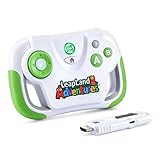
- This video game for early learners takes kids on a quest for keys to unlock Clever Castle while exploring letters, numbers, shapes and colors
- Insert the HDMI game stick and USB power cable into the TV and start playing immediately using the wireless controller; no downloads or account setup required
- Choose between two characters to explore replayable game levels; save unique game progress for up to 5 players
- Kids can explore 150+ learning items at their own pace by playing the educational content in the Learning Center
- Intended for ages 3+ years; requires 2 AA batteries; batteries not included
Math games that hide practice inside play
Counting, sorting, shapes, and measurement
- Don’t Go Bananas: counting.
- Sorta-ma-gogo: sorting objects by attributes.
- Super Peg: geometry and shapes.
- Leaf Leader: matching teams by total weight.
- Down The Tubes: measurement, addition, and spatial reasoning.
- Mission Motherboard: direction skills, inverse operations, addition, and money.
Fantasy-world math practice
Prodigy Math wraps math questions in a fantasy game. Prodigy Education describes its content as adaptive and standards-aligned, with free educational content for home or school and optional parent memberships. These are product claims, not independent evidence that playing improves achievement. The company also reports that 91% of surveyed parents said their children enjoy Prodigy Math; the product page identifies the survey as commissioned by Prodigy but does not state its year or enough methodological detail to assess the figure independently. Check the current product page for access terms.
Science and engineering through exploration
Nature and science
- Elinor’s Nature Adventure: observing and discovering nature.
- Elinor Pond Life: exploring pond ecosystems.
- Seasons Spinner and Super Seasons Snapshots: exploring seasonal changes.
- Mission Earth: exploring Earth features and weather.
- Veggiezilla!: caring for plants.
- Amazin’ Amazon: an animal-rescue activity.
Engineering, forces, and classification
- Builda-ma-loo: choosing wheels to cross different terrain.
- Arcade Escapade: exploring force and motion.
- Team Hamster! Power Painters: introduces simple machines.
- Fish Force: explores force, friction, and angles.
- Creature Duty: combines classification and fractions.
- Corn Maze Craze: brings engineering and programming into a maze challenge.
- Puppy Quest and Animal Match are additional elementary-age PBS KIDS picks.
PBS KIDS grouped several of these activities for ages 6–8. The descriptions explain the concepts the games present; they are not independent evaluations of learning outcomes.
Rank #2

- Get IN the game! Explore 25 preloaded games and adventures where YOU are the controller with three learning levels that explore math, spelling, phonics and more.
- Flap wings to soar into numbers, catch glowing orbs to explore letters, race through an obstacle course to build words and so much more across 20+ school skills
- Plug in the LeapMove system using the included HDMI and USB cables to start playing right away
- Intended for ages 4-7 years; batteries not required; download additional games including two-player options for more excitement
- This active learning video game system is great for preschoolers and kindergarteners to explore math, spelling, phonics and more; makes an exciting unisex gift for holidays, birthdays or just because
Building, coding, and open-ended projects
Minecraft Education
Minecraft Education is a separate licensed product from the standard consumer version of Minecraft. It offers curriculum content, collaboration features, and accessibility tools across subjects including STEM, coding, social-emotional learning, history, and language arts. Minecraft Education says it offers “over 600 standards-aligned lessons to engage students across the curriculum.” That is the product’s own description.
The official page lists Windows, Mac, Chromebook, iPad, Android, and iOS. The Education edition uses yearly subscriptions, while demo lessons are available for free. Families should check the official page for current subscription and device requirements; this option may involve more adult setup than a simple browser game.
Do these 3 things before closing this tab:
1Clear out junk files and repair common Windows errors2Fix the driver behind crashes, sound loss and screen glitches3Repair Windows errors before they cause bigger problemsRank #3

- Packed with mini-games and music, this handheld video game toy introduces kids to numbers, letters, shapes and more
- Pop bubbles to dive into letter sounds or collect coins and count hearts to explore numbers
- Slide and jump to collect letters with Penguin, help a hungry bug chomp on numbers and catch shapes with an ape
- Intended for ages 2+ years; requires 3 AAA batteries; batteries included for demo purposes only; new batteries recommended for regular use
- This handheld gaming toy is great for kids to explore numbers, shapes, letters and more while playing exciting games; makes a great interactive unisex gift for holidays, birthdays or just because
Logic puzzles and computational thinking
Zoombinis
Zoombinis is an adventure puzzle game in which players guide small creatures through logic challenges. The Institute of Education Sciences describes it as a level-based game for elementary and middle school students involving logic, data analysis, pattern finding, and problem solving. Its official education page describes twelve math-based logic puzzles and computational-thinking skills; its about page says the game is designed for ages 7 and up.
Zoombinis has app/download and classroom access paths, but current platform and purchase details should be confirmed on its official pages. A game’s stated age range is a useful starting point, not a guarantee that its puzzles will suit every child.
Quick Recap
Best Value

- Take Ryder’s Pup Pad and join him on problem-solving missions with the PAW Patrol
- Play immediately using the wireless controller and HDMI game stick; no Wi-Fi, downloads or account setup required
- Replayable games feature your kid’s favorite pups Chase, Skye, Marshall, Everest, Zuma, Rocky, Tracker and Rubble; save unique game progress so the whole family can play
- The fun isn’t done when you’ve completed all the missions, play them again from the Quick Challenge Menu
- Intended for ages 4+ years; requires 2 AA batteries; batteries not included
Rank #4

- Play like a big kid, discover like a preschooler with this handheld video game toy
- Explore 20 exciting games packed with skills for preschool readiness, including letters, numbers, shapes, colors, music and logic skills
- Drive a go-kart, show off groovy dance moves, race a speedboat, mix gumball colors, collect critters, feed hungry birds and more
- Discover the letters of the alphabet, the sounds they make and build vocabulary by exploring the ABC keyboard
- Intended for ages 3+ years; requires 4 AA batteries; batteries included for demo purposes only; new batteries recommended for regular use
Quick comparison
| Game or group | Learning focus | Play style | Age or access information |
|---|---|---|---|
| PBS KIDS literacy and story titles | Letters, spelling, rhyme, reference use, and storytelling | Short activities, interactive stories, and story-making | PBS recommendations include age bands; articles date to 2021. Games were described as free on the website and app at publication. |
| PBS KIDS math titles | Counting, sorting, geometry, weight, measurement, and arithmetic | Embedded practice in game challenges | PBS recommendations date to 2021; confirm current availability. |
| PBS KIDS science and engineering titles | Nature, ecosystems, weather, plants, forces, and simple machines | Exploration, rescue, and design challenges | PBS grouped some examples for ages 6–8; confirm current availability. |
| Prodigy Math | Math practice | Fantasy game with adaptive questions, according to Prodigy | Free educational content and optional parent memberships are described by the company; check current terms. |
| Minecraft Education | STEM, coding, history, language arts, and other curriculum areas | Open-ended building and collaborative projects | Windows, Mac, Chromebook, iPad, Android, and iOS; yearly subscription, with free demo lessons. |
| Zoombinis | Logic, patterns, data analysis, and problem solving | Level-based adventure puzzles | Designed for ages 7 and up, according to its official about page; confirm current purchase and platform details. |
What to check before a child starts
- Look beyond the label: decide whether the child is looking for direct practice, an open-ended building activity, or a puzzle to solve.
- Match the age guidance carefully: PBS age groupings apply to the listed titles; Zoombinis’ age guidance comes from its own about page.
- Confirm current access: several PBS recommendations are from 2021, and app or game availability can change.
- Check the adult role: Minecraft Education is a licensed education product with classroom-oriented tools, while other options may be simpler standalone activities. The appropriate setup depends on the game and how a family plans to use it.
- Treat outcome claims cautiously: product descriptions explain what a game is designed to do; they do not prove lasting learning or achievement gains.
Sources and current details
- PBS KIDS for Parents: 13 PBS KIDS Games for Reading and Storytelling
- PBS KIDS for Parents: 14 PBS KIDS Games for Learning Science and Engineering
- PBS KIDS for Parents: 11 Fun Math Games from PBS KIDS
- Prodigy Math product page
- Minecraft Education: What Is Minecraft Education?
- Zoombinis in Education and Zoombinis About
- Institute of Education Sciences: Guide to Educational Learning Games and Technologies
Product prices and availability are accurate as of the date/time indicated and are subject to change. Any price and availability information displayed on Amazon at the time of purchase will apply.




