For the US cloud-gaming market in 2025, GeForce NOW was the best overall fit for existing PC-game owners, Xbox Cloud Gaming delivered the best included-game value, Amazon Luna suited Prime members and casual TV play, and Boosteroid offered the strongest catalog alternative when a specific PC title was missing elsewhere.
The crucial distinction is access model: some services stream games you already own through supported stores, while others provide a changing subscription catalog. Use the ranking below as a fit guide, then verify the exact game, storefront, plan, region, device, and controller before paying.

As an Amazon Associate I earn from qualifying purchases.
Short answer: For the US cloud-gaming market in 2025, NVIDIA GeForce NOW was the best fit for players who already owned PC games and wanted high-end streamed graphics. Xbox Cloud Gaming offered the strongest included-library value through Game Pass. Amazon Luna made the most sense for Prime members and casual TV play, while Boosteroid was the best alternative when a specific owned PC game was unavailable on GeForce NOW.
Those recommendations depend on how you obtain games. GeForce NOW and Boosteroid are primarily bring-your-own-game services; Xbox Cloud Gaming and Luna are more catalog-oriented. No service is a universal replacement for a gaming PC or console, and a game being listed in Steam, Epic Games Store, Xbox, or another store does not automatically mean it can be streamed from every provider.
#1 Best Overall

- With broad game support, the Logitech Gamepad F310 works with old standbys to today's biggest titles, so it's easy to set up and use with your favorite games.
- Profiler software allows the gamepad to be programmed to perform keyboard and mouse commands for games without gamepad support.* * Requires software installation.
- A familiar control layout that doesn't require a learning curve to be able to use, with all the same buttons as on an Xbox 360.
- The unique floating D-pad rests on four switches-instead of a single pivot point-making it responsive to quick changes in direction.
- The six-foot cord lets you lean back and play a comfortable distance from your PC monitor.
Disclosure: If an enabled product link on this page leads to a purchase, VGSources may earn a commission at no additional cost to you. That does not change the rankings or the troubleshooting advice.
Best cloud gaming services in the US for 2025
| Rank | Service | Best for | How access works | Main trade-off |
|---|---|---|---|---|
| 1 | NVIDIA GeForce NOW | Existing PC-game owners and image-quality enthusiasts | Connect supported stores or subscriptions and stream eligible games | Game support and ownership are checked title by title |
| 2 | Xbox Cloud Gaming | Included-game value, Xbox users, and families | Play a cloud-enabled catalog through an eligible Game Pass plan; selected owned games may also be supported | The cloud catalog is not identical to the complete Game Pass catalog |
| 3 | Amazon Luna | Prime members, Fire TV households, and casual play | Use Prime’s rotating selection or paid Luna access routes | The catalog is curated rather than a universal PC library |
| 4 | Boosteroid | Players seeking an alternative PC-game catalog | Subscribe to remote gaming hardware and provide licenses for supported games | Store, region, and ownership checks can be complicated |
Game counts are not directly comparable. A provider may count included catalog games, free-to-play titles, games available through connected stores, or games that require a separate license. A large compatibility number does not mean you can play every title without buying it.
1. NVIDIA GeForce NOW: best for PC-game owners
GeForce NOW is the strongest choice when you already have a PC library and want to stream the PC versions of supported games. Rather than giving you one universal all-you-can-play catalog, NVIDIA connects with eligible libraries and subscriptions from Steam, Epic Games Store, GOG, PC Game Pass, and Ubisoft Connect. NVIDIA’s current service materials advertise more than 4,500 supported PC games, but that number changes and should not be treated as a permanent 2025 total.
Quick wins for a faster PC:
Scan for outdated or missing drivers - takes under a minuteDriver Scan →Repair Windows errors before they cause bigger problemsFix Now →Fix the driver behind crashes, sound loss and screen glitchesFind Drivers →This model is attractive for someone with an older Mac, inexpensive laptop, low-powered PC, or a compatible TV device. The remote server performs the rendering, so the local computer does not need to match the game’s recommended GPU. Premium memberships add benefits such as higher resolution, faster frame rates, longer sessions, and access to a broader library through NVIDIA’s Install-to-Play capability.
NVIDIA also positions its current highest tier around RTX 5080-class performance. That describes the tier’s hardware positioning, not a promise that every game will run at identical settings, resolution, frame rate, or ray-tracing quality. Game optimization, display type, membership level, and the particular server assigned to a session all matter.
What you still need
- A license or subscription entitlement for most games you want to play.
- A title that NVIDIA supports from the specific store where you own it.
- A compatible device, supported app or browser, and suitable controller or keyboard-and-mouse setup.
- A stable connection with enough capacity for the chosen resolution.
The key limitation is easy to miss: owning a game on Steam does not prove that GeForce NOW supports that game, and support on one store does not guarantee support on another. Check the GeForce NOW library for the exact title and storefront before subscribing or buying a game for cloud play.
Choose GeForce NOW when: you already own PC games, prefer PC versions, use an older computer or Mac, or care more about a high performance ceiling than about receiving a large included catalog.
Skip it when: you want to press Play on a broad catalog without buying individual PC games or verifying store compatibility.
2. Xbox Cloud Gaming: best included-game value
Xbox Cloud Gaming is the most straightforward option for people who want a ready-made catalog rather than a collection of connected PC stores. It is integrated with Xbox Game Pass, with cloud access, game availability, and other benefits determined by the plan, region, device, and date.
Xbox describes the cloud library as hundreds of playable games. Its later Ultimate presentation uses a 500-plus total across supported console, PC, and other-device experiences; that number should not be read as 500 cloud-streamable games available to every US user on every device. The cloud catalog is only part of the broader Game Pass offering, and games can leave or change availability.
Rank #2

- MODERNIZED DESIGN — Experience the modernized design of the XBOX Wireless Controller with sculpted surfaces and updated geometry that enhances comfort and control during long gaming sessions.
- PRECISION PERFORMANCE — Stay on target with a hybrid D-pad and textured grips on triggers, bumpers, and back case for improved accuracy and handling.
- SHARE BUTTON: Seamlessly capture and share content such as screenshots, recordings, and more with the new Share button.
- VERSATILE CONNECTIVITY — Connect via USB-C for plug-and-play on console and PC, or quickly pair and switch between supported devices with XBOX Wireless and Bluetooth support.
- BUILT-IN AUDIO SUPPORT — Plug in compatible headsets using the 3.5mm audio jack for direct voice chat and immersive in-game sound.
For the 2025 US comparison, Xbox Cloud Gaming’s main advantage was value for players who wanted Xbox and console-oriented games without purchasing each title separately. Depending on the plan and date, Game Pass benefits can also include day-one releases, EA Play, and other bundled perks. Confirm the current plan page before subscribing because plan names, prices, included benefits, and cloud-access rules change.
Free tools Windows power users keep installed
One-click scans. No signup required.
Supported devices and controls
Xbox lists support across Windows PCs, Apple and Android phones and tablets, Xbox consoles, web browsers, select LG and Samsung smart TVs, Amazon Fire TV, selected Meta Quest headsets, and other supported devices. Availability is not identical across those platforms.
Xbox says a compatible controller is generally required, although selected games offer touch controls. A controller is therefore the safest purchase for TV, browser, tablet, and mobile play. A Xbox Wireless Controller for cloud gaming is a practical general-purpose option, but compatibility still depends on the device, connection method, operating system, and game. Do not assume that every controller works with every TV, phone, browser, or title.
For phone play, a mobile controller for cloud gaming can be more comfortable than touch controls. A Razer Kishi-style device may suit Xbox Cloud Gaming or Luna, but check the exact phone model, USB-C or Lightning connector, case clearance, and app support before ordering.
Xbox Cloud Gaming’s limitations
- The complete Game Pass catalog is not the same as the cloud-playable catalog.
- Cloud access and features vary by Game Pass plan, country or region, device, and time.
- Streaming can have limitations involving resolution, saves, companion apps, accessories, and peripherals.
- Some games may offer touch controls while others require a controller.
Choose Xbox Cloud Gaming when: you want a subscription catalog, play Xbox franchises, share access with a household, or do not want to buy every PC game separately.
The Tool Desk
Outbyte PC Repair FREERepair Windows errors before they cause bigger problemsFix Now →Outbyte Driver Updater FREEFix the driver behind crashes, sound loss and screen glitchesFind Drivers →Skip it when: you specifically want the PC version of a game you already own on Steam or need the full features and peripheral support of a local console or PC.
3. Amazon Luna: best for Prime members and casual TV play
Amazon Luna was the easiest low-commitment choice for many Prime members in 2025. Amazon’s documented service model gave Prime members access at no additional cost to a rotating selection of more than 50 cloud-delivered games. Other access routes included Luna Premium, individual game purchases, Jackbox, and Ubisoft+.
Luna is designed around devices people may already have. Amazon lists support for iOS and Android, PC and Mac, Fire tablets, Chromebooks, browsers, Fire TV, and selected US Samsung smart TVs and Comcast Xfinity devices. That makes it particularly suitable for casual sessions in a living room, although exact device and game compatibility must be checked.
Amazon recommends a sustained connection of at least 10 Mbps. Outside the GameNight library, Luna supports a controller or mouse and keyboard. Amazon identifies the Xbox One Controller, DualShock 4, Razer Kishi, Luna Controller, and standard mouse and keyboard among compatible input options.
PC Slower Than It Used to Be?
A free scan shows the junk files, broken settings and background clutter dragging Windows down - then fixes them in one click.Free scan · Windows 10 & 11Crashes, No Sound, or Screen Glitches?
Random freezes, missing sound and display glitches usually trace back to one bad driver. Find and replace yours safely.Free scan · under a minuteIs the Luna Controller worth considering?
The Amazon Luna Controller is a Luna-specific accessory aimed at reducing friction when switching screens. Amazon describes its cloud-direct connection as an optimization that can help the controller communicate with Luna without relying entirely on the local device, while also supporting seamless screen switching. It is most relevant to people who already use Luna on Fire TV or move between a TV, phone, and computer.
Rank #3

- The Mouse Pad Is Large Enough,It Will Fit Your Desktop Perfectly And Provide Perfect Movement Space,Offers Plenty Of Room For Gaming Or Office Works All While Protecting Your Desk,Applies To All Types Of Mouse Keyboards And More.
- This Large Mouse Pad Is Crafted With A Clever Anti Slip Rubber Base,Dense Slip-Resistant Shading Can Firmly Grip The Desktop To Provide Stable Operation Of The Mouse And Keyboard,It Can Effectively Prevent The Mouse And Keyboard From Sliding And Moving.
- Cloth Is Made Of High-Density Material With High Quality Stitching Around Its Edges,The Silky Smooth Surface And Thick Edge Allows More Accurate And Fast Mouse Movement,Let You Maintain Excellent Speed And Control When Your Gaming Or Working.
- When You Spill A Drink Or Somehow Get Food On It, It’s Easy To Clean And Will Not Delay Your Work Or Game.Due To The Foldable Design,You Can Carry This Mouse Pad With You Everywhere You Go,Easy To Carry,Even In Your Travling.
- Available For All Types Of Mouse, Laser & Optical.
It is not a universal recommendation for Xbox Cloud Gaming, GeForce NOW, or Boosteroid. Refresh its current price, availability, supported devices, and software requirements immediately before publication or purchase.
Luna’s trade-offs
Luna’s catalog is curated and materially smaller or less PC-store-like than GeForce NOW or Boosteroid. It should not be described as a replacement for a universal PC library. Prime access is also rotating, so a game available during one period may not remain included indefinitely.
Choose Luna when: you already pay for Prime, mostly play casually, want to use Fire TV or a supported smart TV, or want to test cloud gaming without committing to a console.
Skip it when: your priority is a broad owned PC library, a specific Steam title, or the largest possible selection of high-end PC games.
4. Boosteroid: best catalog alternative for owned PC games
Boosteroid is another bring-your-own-games service, with remote cloud gaming computers accessed through supported apps, browsers, and devices. Its catalog labels games as free or license-required and shows titles associated with Steam, Epic Games, Xbox, Battle.net, and other ecosystems.
Boosteroid’s official materials have used different catalog counts—more than 1,700 on one page and more than 2,000 on another, depending on date and counting method. The safer comparison is that Boosteroid offers a large catalog of more than 1,000 games, not that it provides a fixed number of universally playable titles.
Do these 3 things before closing this tab:
1Clear out junk files and repair common Windows errors2Fix the driver behind crashes, sound loss and screen glitches3Repair Windows errors before they cause bigger problemsThe service can be valuable when a particular PC game is missing from GeForce NOW. Boosteroid also has a Microsoft partnership covering supported Xbox PC games and Microsoft Store or Game Pass access. The partnership does not remove the need for title-by-title verification: a Microsoft, Steam, Epic, or other license may still be required, and the relevant version must be available in your region.
Network and billing considerations
Boosteroid’s terms recommend at least 15 Mbps for Full HD at 60 frames per second and prefer Ethernet or 5 GHz Wi-Fi. Those figures are provider recommendations, not a guarantee of low latency or consistent image quality. Server distance, ISP routing, congestion, Wi-Fi interference, and household traffic can matter just as much as download capacity.
Boosteroid pricing is especially unsuitable for an undated US price comparison. A January 2026 update listed Ultra prices in euros, including a lower monthly equivalent for annual billing. Those are not 2025 US-dollar prices and should not be converted or presented as if they were. Compare Boosteroid’s billing model and library fit, then verify the live price and regional terms before subscribing.
Rank #4
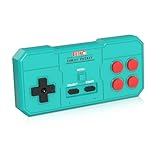
- Plug & Play, Instant Connection Simply install 2 AAA batteries (not included) – no drivers or setup needed. The controller auto-connects to your GV300S console for instant retro gaming.
- 2-Player Fun with Extra Controllers Want to team up with friends? Buy an additional controller for co-op battles! Classic button layout and ultra-responsive controls bring back childhood gaming joy.
- Perfect Replacement for GV300S Designed exclusively for GV300S consoles, this controller matches original specs. Ideal for replacing lost or damaged controllers.
- Retro Buttons, Precise Control Classic D-pad + function buttons deliver lag-free responsiveness, Conquer challenging levels with ease!
- Ready to Use & Complete Package Includes 1 controller and 1 manual – unbox and start gaming instantly!
Choose Boosteroid when: a specific owned PC game is unavailable on GeForce NOW, the exact title and storefront are confirmed in Boosteroid’s catalog, and you accept the extra license and region checks.
Skip it when: you want a simple included catalog, dislike checking storefront entitlements, or need predictable support for a game’s companion apps and peripherals.
Cloud gaming setup: requirements that apply to all four services
Cloud gaming moves rendering to a remote server; it does not eliminate local requirements. You still need a supported device, a supported input method, a service region with access to the desired game, and a stable path to the provider’s servers.
| Provider guidance | Published recommendation | What it does—and does not—mean |
|---|---|---|
| Xbox Cloud Gaming | At least 10 Mbps for mobile devices; 20 Mbps for consoles, PCs, and tablets; 5 GHz Wi-Fi preferred | A baseline for capacity, not a promise of low latency |
| Amazon Luna | At least 10 Mbps sustained | Enough bandwidth may still produce poor play if the connection is unstable or distant from the server |
| Boosteroid | At least 15 Mbps for Full HD/60 fps; Ethernet or 5 GHz Wi-Fi preferred | A provider target for a particular quality level, not a guarantee |
| GeForce NOW | Use the current NVIDIA requirements for the selected membership, device, and resolution | Higher image quality requires more consistent network capacity and stability |
Bandwidth and latency are different. A fast speed-test result can coexist with high ping, jitter, packet loss, or a poor route to the cloud server. Wired Ethernet usually reduces local interference. If you use Wi-Fi, 5 GHz is often preferable to crowded 2.4 GHz, but range and wall penetration can be worse.
Before you subscribe
- Check the exact game. Search the provider’s own catalog, not only Steam, Epic, Xbox, or a publisher page.
- Check the storefront entitlement. Confirm whether the game is included, free to play, or requires a license from a particular store.
- Check your device. Verify the current app, browser, TV, phone, tablet, or headset support for your region.
- Check the input method. Confirm controller pairing, touch support, keyboard-and-mouse support, and any device-specific restrictions.
- Test at the time you actually play. Evening congestion and household streaming can be more important than an off-peak speed test.
- Start with the provider’s free tier, trial, or lowest-commitment option when available. Use that time to test the games and devices you actually care about.
Which service should you choose?
Choose GeForce NOW if you already own PC games and want the strongest PC-oriented performance ceiling.
Choose Xbox Cloud Gaming if you want the simplest included-game subscription and are comfortable with Xbox versions, plan restrictions, and a changing cloud catalog.
Choose Amazon Luna if you already have Prime or mainly want casual play on Fire TV or a supported television.
Choose Boosteroid if a particular owned PC game is unavailable on GeForce NOW and you have confirmed that the title, storefront, region, and license all work on Boosteroid.
There is no reliable basis for calling one provider universally fastest or lag-free. Performance depends on the US region, ISP, home network, device, server assignment, game, and time of day. These rankings describe product fit and access model—not controlled latency or image-quality tests.
What’s actually slowing this PC down?
Pick the symptom - the matching free tool is one click away.
Troubleshooting cloud gaming before blaming the service
- Verify the game and account. A missing title, wrong storefront, expired subscription, or wrong Xbox account can look like a streaming problem.
- Update the app or browser. Also install operating-system updates and restart the device before testing again.
- Reduce local network competition. Pause large downloads, video uploads, cloud backups, and other high-bandwidth activity.
- Try Ethernet or 5 GHz Wi-Fi. Move closer to the router if using Wi-Fi and avoid testing through a weak extender until the basic connection is verified.
- Pair the controller again. Test the controller in another supported app or device so you can separate input failure from server or game failure.
- Lower the stream quality temporarily. If reducing resolution or frame-rate targets stabilizes the session, capacity or connection consistency may be the limiting factor.
- Check the provider’s status and support pages. A provider-side outage cannot be repaired by changing Windows drivers.
For gaming creators: a related tool, not a cloud-gaming service
StreamNeo belongs in a separate creator workflow, not in this four-service ranking. Its official product description focuses on hosting a prerecorded video as a continuous YouTube Live stream, with automatic recovery and a stated 24-hour trial. A creator could use 24/7 gaming livestream hosting to rebroadcast owned gameplay highlights, tutorials, or event replays, subject to copyright and YouTube’s platform rules.
That is fundamentally different from interactive cloud gaming: StreamNeo broadcasts prerecorded material, while GeForce NOW, Xbox Cloud Gaming, Luna, and Boosteroid deliver an interactive game session controlled by the player.
What’s actually slowing this PC down?
Pick the symptom - the matching free tool is one click away.
Frequently Asked Questions
Is GeForce NOW better than Xbox Cloud Gaming?
GeForce NOW is usually the better choice if you already own PC games and want to stream their PC versions. Xbox Cloud Gaming is better if you want a Game Pass catalog without buying each game separately. The right choice depends on the specific title and storefront.
Does Xbox Cloud Gaming include every Game Pass game?
No. Xbox Cloud Gaming exposes only a cloud-enabled portion of the broader Game Pass catalog, and availability varies by plan, region, device, and time. Check the individual game in the Xbox cloud catalog.
Do I need to own games for cloud gaming?
Usually, you need a supported license or subscription entitlement, and the game must be supported by that provider from the relevant storefront. A game appearing in Steam or Epic Games Store does not automatically make it playable on GeForce NOW or Boosteroid.
How fast does my internet need to be for cloud gaming?
The providers’ baseline recommendations range from 10 Mbps to 20 Mbps depending on service and device, but bandwidth alone does not determine quality. Latency, jitter, packet loss, Wi-Fi interference, ISP routing, and server distance also affect play.
Can I use a keyboard and mouse or phone controller for cloud gaming?
A compatible controller is generally the safest option for Xbox Cloud Gaming, especially on TVs, browsers, phones, and tablets, although selected Xbox games support touch controls. Luna supports controllers and, outside its GameNight library, mouse and keyboard; exact support varies by device and game.
The Bottom Line
Best overall fit for PC owners: GeForce NOW. Best included catalog: Xbox Cloud Gaming through Game Pass. Best for Prime and TV households: Amazon Luna. Best alternative for a missing owned PC title: Boosteroid.
Before paying, verify the exact game, storefront license, plan, region, device, controller, and network. Those checks matter more than any advertised game count.
Quick Recap
Product prices and availability are accurate as of the date/time indicated and are subject to change. Any price and availability information displayed on Amazon at the time of purchase will apply.
Quick wins for a faster PC:
Repair Windows errors before they cause bigger problemsFix Now →Scan for outdated or missing drivers - takes under a minuteDriver Scan →Clear out junk files and repair common Windows errorsFree Scan →



