Free tools Windows power users keep installed
One-click scans. No signup required.
If your PS4 gets loud while you play, start with airflow: move it out of enclosed furniture, clear space around its vents, and remove visible exterior dust. A louder fan can be a response to heat, but not every noise is normal—and cleaning is not a guaranteed fix. These five steps move from simple checks to repair and safety decisions.
1. Give the PS4 room to breathe
First check where the console sits. Sony’s PS4 Safety Guide for CUH-72XXB says, “Do not block any vents.” It also recommends leaving at least 10 cm (4 in) between the console and a wall. Avoid a closed cabinet or cramped space where heat can build up, long-fiber carpet, and covering the system with cloth.
Place the console on a firm, open surface and make sure nothing is pressed against its ventilation openings. This is a low-risk first step; it improves the conditions around the console but cannot establish that restricted airflow is the cause of the noise.
2. Remove visible dust from the exterior vents
Turn off the PS4, unplug it, and then clear dust from the outside of the vents. Sony says to unplug the system before cleaning and advises against allowing dust to build up on the vents. Use a method appropriate for electronics; the safety guide does not endorse a particular cleaning tool or technique.
#1 Best Overall

- FIVE FANS WITH SUPER TURBO DESIGN: With 5 Turbo cooling fans, efficiently cool down for PlayStation 4 hardware and make sure it is dustless. Keeping it cool in the hot summer and in long time games.
- TWO COOLING MODES: Normal speed to save energy; Turbo speed for heavy games and hardcore gamers to cool down your ps4 quickly. (not fit for PS4 Slim or PS4 Pro)
- TWO WORKING MODES: Switch to “ON”, the fan will work continuously. Switch to “AUTO MODE", the built-in temperature sensor will begin its smart working. The cooling fan will work automatically when your PlayStation 4 gets hot and turns down when it gets cool.
- EASY TO USE: Working voltage DC 5V from console's USB port - No extra power supply needed. Plug and play! It can also be worked with most PlayStation vertical charger stand on the market. It can be used in both the vertical and horizontal orientation
- WHAT YOU GET: 1 x Cooling Fan for PS4, 1 x USB Power Cable, 12 months warranty, and always friendly customer service.
Keep this step external. If the fan remains loud after the console has open space and its exterior vents are clear, that alone does not prove the inside is clean—or that dust is the problem.
3. Distinguish airflow noise from warning signs
A fan may get louder as cooling demand rises. A 2013 PlayStation.Blog PS4 FAQ described the fan as variable-speed; that historical note is context, not evidence that every loud sound is normal or that it describes every PS4 model and situation.
Rank #2
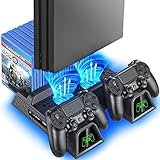
- Multi-functional Design stand for Regular PS4/ PS4 Slim/ PS4 Pro Console: This ps4 stand can cooling & storage your Playstation 4 console, with dual ps4 controller charger station and 12 game slots.
- LED Indicators & Fast Charging Speed: Let you know the charging status at a glance, the red indicator means charging, green light means charging is completed; Say goodbye to USB dongles which take 4 hours when charging, charged through the EXT port would provids just 2-hours.
- Upgraded PS4 Fan Cooler: Turn on the ps4 fan, and Cooling down your Playstation 4 console efficiently, the noise was decreased as low as 50dB, metal bottom helps you to keep your console cool and clam through playing games all the day and night.
- Compatible with PS4/Slim/Pro Console: Put your Playstation 4 Consols on the ps4 cooling stand, more tight design for the PS4 Pro, much reliable to secure your console. (Note: need to use the extra horder included for PS4 slim.)
- Power Supply Devices: PS4 stand comes with a USB cable, support powered by various devices, USB Adapter, USB HUB, Wall adapter, or your ps4 console.
Pay attention to the character of the sound. Steady airflow that changes with gameplay is different from scraping, grinding, or another unusual sound. Sony advises stopping use and unplugging the system if it makes unusual sounds or smells or becomes too hot to touch. Do not dismiss those symptoms as ordinary fan noise.
4. Treat internal cleaning as optional repair work
Dust can accumulate in a PS4’s fan, heatsink, or vents, according to the iFixit guide to opening and cleaning a PlayStation 4. It provides a model-specific disassembly and cleaning procedure, including TR8 Torx security screws and tools such as a dust blower, microfiber cloth, and anti-static brush. It does not establish that dust is the cause in every noisy console or that cleaning will make one quieter.
Do these 3 things before closing this tab:
1Repair Windows errors before they cause bigger problems2Scan for outdated or missing drivers - takes under a minute3Clear out junk files and repair common Windows errorsRank #3

- Adjustable Fan Speed High Speed Turbo and Slow options are available. Suitable for both hardcore gamer and light gaming sessions
- Automatic Fan Mode: Fans run in automatic mode. It turns on when console temperature reaches 40 degrees Celsius and above and turns off as the console cools down. You can switch to OFF to stop.
- Horizontal 3 Fans Design: The cooler comes with 3 fans to disperse heat and cool down your PS4 Slim system, prevents overheating, malfunctions and improve console's lifespan
- Space Saving & Easy Installation: The stand design is light and compact, can be mounted and dismounted easily and with stylish appearance
- No Batteries or Adapter Required: The included USB to DC cable allows you to utilize power from the PS4 Slim console itself, no need for taking up additional outlet space. Compatible with PS4 Slim console only. Third party made, NOT official item.
Opening the console is a more involved repair choice, not routine exterior maintenance. Sony’s safety guide says the system has no user-serviceable internal components other than the hard drive. If you are not comfortable following instructions that match your exact PS4 model, use a qualified repair provider instead of improvising or forcing parts apart.
Independent reader supportYour contribution helps us test, update, and keep practical guides available for everyone.5. Escalate overheating or persistent noise
If the PS4 displays an elevated-temperature message, Sony says to turn it off and leave it unused until it cools. Before using it again, move it to a well-ventilated place. If the console is too hot to touch or produces an unusual sound or smell, stop using it and unplug it.
Rank #4

- Replacement Internal Cooling Fan Compatible with SONY PS4 fan ps4 CUH-1001A CUH-11XX CUH-1000 CUH-1000AB01 CUH-1000AB02 1115A 1115B 500GB KSB0912HE
- Item: High quality replacement internal cooling fan Compatible with Sony Playstation 4 (PS4) KSB0912HE cooling fan
- Replacement and high quality
- All items are tested before shipping
- Package include:1pcs Internal Cooling Fan Compatible with Sony PS4
If the noise continues after you have checked placement and exterior dust, arrange a qualified diagnosis rather than assuming a particular part has failed. The available guidance does not identify one universal cause of persistent PS4 noise.
Quick Recap
Best Value

- 【Compatible Model】for Sony Playstation 4 PS4 CUH-1200 CUH-12XX CUH-1200AB01 1200AB02 1215A 1215B
- 【Compatible part numbers】KSB0912HE
- 【You Can Get】1* Cooling Fans
- 【Warranty】365 days
Product prices and availability are accurate as of the date/time indicated and are subject to change. Any price and availability information displayed on Amazon at the time of purchase will apply.




