Recommended Free Tools
If a Wittle Defender stage keeps ending in a wipe, change the part of your run that is failing: protect your support heroes if the team dies early, add control if waves overwhelm you, or invest in single-target damage if the boss outlasts a healthy squad. There is no verified universal lineup or current boss-by-boss counter; the useful guides offer different team sizes and builds, so treat them as starting points and adjust for your roster and mode.
First, identify why the run is failing
Wittle Defender combines tower defense, roguelike progression and card strategy: you form a squad and combine skills and gear, according to the App Store listing. That makes a stalled run a team-and-upgrade problem as much as a question of raw hero strength. Before changing everything, note when the run breaks.
- Your heroes die before the boss: Add healing or crowd control, and check whether your formation leaves a key support hero exposed.
- The boss survives while your team stays healthy: Favor single-target damage and upgrades for the hero doing that job.
- Enemy waves overwhelm you: Look for area damage and control that can reduce pressure across multiple enemies.
These are practical applications of roles described in the published guides, not guaranteed counters for a particular encounter.
Build for distinct roles, not a universal tier list
A useful squad has a way to deal damage, a way to control threats, and enough sustain to stay in the fight. Focus resources on a main damage dealer rather than spreading upgrades evenly across the roster; WittleAI’s team guide, updated June 1, 2026, recommends concentrating investment. The right balance depends on whether your current problem is the boss, the waves, or survival.
Crashes, No Sound, or Screen Glitches?
Random freezes, missing sound and display glitches usually trace back to one bad driver. Find and replace yours safely.Free scan · under a minuteWindows Errors? Fix Them Before They Spread
Repair common Windows errors and clear accumulated junk for a smoother, more stable PC - no reinstall needed.Free scan · no reinstall#1 Best Overall
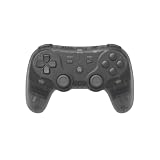
- Dual Wireless Modes – Switch between 2.4GHz and Bluetooth for flexible connectivity
- Pressure-Sensitive Buttons – More precise control across all games
- Multi-System Support – Compatible with PS1, PS2, PS3, PS Classic, Switch, and PC
- Hall Effect Sticks – No drift, high precision, long lifespan
- Customizable Triggers – Toggle analog/digital trigger stops to suit your playstyle
One dated five-hero example
A guide published May 30, 2025, proposes Seraph for healing, Ice Queen and Ice Demon for control, and Demon Spawn and Blazing Archer for damage. Its suggested order is to summon Seraph first, then the ice pair, then the damage pair. It recommends unlocking basic summons before pursuing the Icicle Storm and Burning Ground chain skills, and then improving the damage dealers. This is one older guide’s example, not a confirmed current best team; later balance changes may affect its usefulness.
A different hard-stage suggestion
WittleAI’s June 1, 2026 guide suggests Robot, Ice Demon and Seraph for a three-hero hard-stage setup. The contrast with the five-hero example is a reminder to choose around your available heroes, investment and mode instead of copying a lineup as if it were a guaranteed answer.
Rank #2

- Dual Wireless Modes – Switch between 2.4GHz and Bluetooth for flexible connectivity
- Pressure-Sensitive Buttons – More precise control across all games
- Multi-System Support – Compatible with PS1, PS2, PS3, PS Classic, Switch, and PC
- Hall Effect Sticks – No drift, high precision, long lifespan
- Customizable Triggers – Toggle analog/digital trigger stops to suit your playstyle
Choose three or five heroes based on the mode and your roster
Published recommendations conflict, and the available guides do not settle which team size performs best for every account or mode.
| Choice | What the guides say | Trade-off to consider |
|---|---|---|
| Five heroes | Pocket Gamer recommends five for the experience multiplier. WittleAI recommends five for selected modes, including Guild Boss and Nightmare. | More slots can cover more roles; Pocket Gamer’s experience advice may matter if that benefit applies to your run. |
| Three heroes | WittleAI recommends three for most content and argues that a smaller lineup gives a tighter skill-card pool. | A smaller squad may make it easier to focus on a compact set of skills, but leaves fewer hero slots for roles. |
Test the options in the mode where you are stuck. Compare whether the lineup has enough boss damage, wave clear, control and healing, and whether you can access the chain skills your plan depends on. The guides do not provide independent testing that resolves the disagreement.
Rank #3

- BREAKER SERIES — Hold nothing back. Storm Breaker lets nothing stop its style with classic grays and blacks, offset with whites. Part of the collective debut of the Breaker special edition series.
- BOLD STYLE, BUILT TO PERFORM — Define your swagger with a wild, head-turning design. Stay elegantly on target with textured triggers built for every moment.
- RUBBERIZED GRIPS — Hold on to the action with rubberized grips on the back cases, designed for comfort and control during long gaming sessions.
- UP TO 40 HOURS OF BATTERY LIFE — Get up to 40 hours of battery life so you can keep playing without stopping to recharge.
- PLAY ACROSS EVERY SCREEN — Quickly pair with, play on, and switch between devices including console and PC. Stream games across mobile, gaming handhelds, Smart TVs, and supported VR headsets with XBOX Cloud Gaming.
Summon in an order that protects your plan
WittleAI’s team guide and the May 2025 lineup guide say summon order affects formation positions. Decide which hero needs protection or a central position before the battle, then summon with that placement in mind. In the older five-hero example, Seraph comes first, followed by the control pair and then the damage pair. Treat that sequence as specific to the example rather than a rule for every squad.
Use in-battle upgrades to fix the run’s weak point
Make sure your team has the roles it needs, then choose upgrades that address what is actually going wrong. Pocket Gamer’s June 24, 2025 guide advises focusing on a boss-killer and an area-damage hero, upgrading other heroes afterward, and rerolling only when the offered skills are unhelpful. The older five-hero guide instead prioritizes basic summons, then the Icicle Storm and Burning Ground chain skills, followed by damage upgrades.
Rank #4

- MAJOR COMPATIBLITY: We've got you covered! The Defender is compatible with the PS3, PS4, and PC!
- Wireless Bluetooth technology Sixaxis capability Compatible with PS3/PS4/PC** Pressure sensitive buttons Turbo functionality Comfortable and responsive analog sticks Vibration feedback Wireless range of over 30 feet LED indicator Includes USB-C charging cable
Those priorities are alternatives, not a single proven upgrade sequence. If waves are the problem, favor area damage or control; if the boss is the problem, invest in single-target damage; if the team collapses early, value the sustain or control that gives it time to deal damage.
Try a slower speed if a hard fight keeps going wrong
Pocket Gamer recommends at least 2x speed. By contrast, WittleAI’s mechanics guide, updated June 1, 2026, says x3 speed can disrupt skill triggers or card selection and suggests x1 or x2 for bosses and difficult stages. That guide says its claims draw on APK analysis and community testing; the App Store listing does not verify the behavior.
Best Value

- 4 MOUSE CLICK BACK BUTTONS & 2 CLAW GRIP BUMPERS — Enjoy the same ultra-responsive actuation found in Razer's top gaming mice with 4 buttons built into the controller’s ergonomic, rubberized handles—topped with 2 claw grip bumpers for even more control
- PRO HYPERTRIGGERS — Set the triggers for instant actuation with zero travel time or ultra precise analog control—be fully immersed in the action and feel every trigger pull with integrated haptic vibrations
- HALL EFFECT PRECISION THUMBSTICKS — Experience analog thumbsticks that are not only more accurate than traditional models but are smoother, lighter, and more durable thanks to their anti-friction rings and pro grade materials
- HYPERSPEED WIRELESS — Delivering an ultra-low latency 2.4 GHz connection via its USB Type A dongle, experience fast, reliable performance that meets the demands of the most intense competitive players on Xbox and PC
- RAZER MECHA-TACTILE ACTION BUTTONS & 8-WAY FLOATING D-PAD — By combining the speed of microswitches with the cushioned comfort of a rubber membrane, compete with quicker inputs that feel just as comfortable to press
Use speed as a troubleshooting experiment, not a certainty: if a difficult fight repeatedly goes wrong at high speed, lower it and observe whether your skill choices improve. If they do not, return to the more consequential decisions—team roles, formation and upgrades.
Independent reader supportYour contribution helps us test, update, and keep practical guides available for everyone.Strengthen your account between attempts
Pocket Gamer’s June 24, 2025 guide recommends pushing campaign stages, completing daily challenges, and using Star Challenge after campaign progress stalls. It describes daily activities as sources of gold, experience and gear. WittleAI’s June 2026 advice is to commit resources to one main damage dealer rather than distribute them evenly. Game systems and offers can change, so treat dated progression advice as guidance rather than a guarantee about every current account.
How to compare two possible teams
When choosing between squads, compare the factors that matter to your specific failure point rather than asking which build is simply “best.”
- Boss damage: Which lineup can concentrate damage on a single target?
- Wave handling: Does it have area damage or control to keep groups from overwhelming the team?
- Survivability: Is there healing or enough control to keep important heroes alive?
- Skill access: Can the team reach the chain skills its plan relies on?
- Account fit: Do you own the heroes, and have you invested enough in them?
- Mode fit: Does the lineup make sense for the content and team size you are testing?
What is—and is not—known about specific bosses
The cited guides provide general team-building and mechanics suggestions, not a reliable current counter for each named boss or stage. They do not establish specific boss weaknesses, damage thresholds or patch-specific tactics. HABBY’s App Store description says, “Winning or losing is about strategy and choices, not luck!” That is the game’s promotional description, not evidence that a particular lineup or strategy guarantees a clear.
Quick Recap
Product prices and availability are accurate as of the date/time indicated and are subject to change. Any price and availability information displayed on Amazon at the time of purchase will apply.



