FamiStudio is a cross-platform editor for composing music and sound effects for the NES and Famicom. Its piano-roll interface is more approachable than a traditional hexadecimal tracker, but it still works within the consoles’ limited channels and hardware rules. It can export audio for listening, NSF files for standalone playback, and data for NES homebrew games through its sound engine. Version 4.5.3, released August 10, 2026, is the latest version identified on the official site as of August 18, 2026.
What is FamiStudio?
FamiStudio is a specialized NES/Famicom music editor, not a conventional sample-based digital audio workstation and not a Nintendo product. You compose with the sound hardware’s channels, instruments, envelopes, patterns, and effects, then export the result as audio or game-oriented data. Its piano roll and visual editing tools make note entry less dependent on hexadecimal effect codes than in traditional tracker workflows, though composing for NES hardware still requires arranging around strict technical limits.
It suits beginners who prefer a piano roll, composers moving from FamiTracker, and homebrew developers who need music or sound effects in a game. It is a weaker fit if you need unrestricted polyphony, modern plug-ins, large sample libraries, mixing buses, or a general-purpose production environment. The App Store listing also describes it as a specialized chiptune editor rather than a full DAW.
Current version and platforms
The official site lists FamiStudio 4.5.3, released August 10, 2026, as the latest hotfix as of August 18, 2026. It fixes PAL VGM import timing and data issues, a crash from right-clicking a note, problems in the Mega Man 2 demo song, and an NSF/ROM export issue introduced in 4.5.2. The latest major release is 4.5.0, dated April 5, 2026. Check the official site for current downloads and release information.
What’s actually slowing this PC down?
Pick the symptom - the matching free tool is one click away.
#1 Best Overall

- ✅【Compatibility】Compatible with Raspberry Pi, Windows PC, Linux ,Mac. Specifically designed for playing classic old school retro snes games on computer or laptop.This is the USB controller what has a USB plug for PC, NOT compatible for Original SNES super Nintendo console
- ✅ 【Ergonomic Design】Super precise cross key and function buttons,the cross direction key adopts frosted concave design,anti-sweat and anti-slip.The shape of the controller is designed to fit the contour of your hands,easy and comfortable to hold.
- ✅ 【Advanced Game Experience】PC running operating system:Windows 98/2000/ ME/XP/Vista/Win7/8/8.1/11 or later,or Mac running OS X 10.0/Mac OS X or above.It works with most of emulators you wish to download and use,such as VirtuaNES(PC),sens9x,Zsens,sensgt,Uosnesw,RetroArch,OpenEmu(MAC),NESEmu and Jnes etc.
- ✅ 【Wired USB Connection】Standard USB 2.0 port with a 1.5 meters (5ft) cable, don't need to install any drivers, you must manually set the buttons and directionals within the emulator you're using, and the controller not automatically assigns buttons/directional axes. Notice: please download the game emulator first before start the games, you can download the emulator “VirtuaNES” on PC and “OpenEmu”on MAC.
- ✅【Satisfaction】Third party controller(USB Version), not for original snes console and not support for switch. If there is an incompatibility on MAC or Raspberry Pi , please contact the seller for a support.
Desktop editions are available for Windows, macOS, and Linux; mobile editions are available for Android and iPhone. The source code is public under the MIT license at the project repository. These facts do not mean every store edition has the same features or terms. The U.S. App Store listing showed the iPhone version at $4.99 on August 18, 2026, and labels it iPhone-only; that price and availability may vary by region or change. Desktop downloads are offered from the official site, which does not state a desktop purchase price.
How composing works
Notes, patterns, and songs
The piano roll is where you place and edit notes. Patterns organize phrases, and songs arrange those patterns over time. Notes can be dragged with audio preview, and the editor provides copy and paste, undo, and redo. This visual approach is helpful for seeing melody and timing, but it does not remove the need to fit parts into the available NES channels.
Instruments, envelopes, and effects
Instruments are shaped with envelopes for parameters such as volume, pitch, duty cycle, and arpeggio. Effect tracks provide controls including fine pitch, vibrato, and slides. A register view helps inspect chip-level behavior when a musical result needs to be understood in terms of the hardware. FamiStudio also includes DPCM sample editing, while MIDI input can be used to bring in note material for further arrangement.
The official feature listing summarizes the editor’s capabilities at FamiStudio on itch.io. A full walkthrough of installation, basics, instruments, DPCM, and other topics is available in the official documentation.
Recommended Free Tools
NES channels and expansion audio
The standard NES APU provides two square-wave channels, one triangle channel, one noise channel, and DPCM sample playback. FamiStudio also supports editing for several expansion sound systems. Editing support does not automatically guarantee that every export route or embedded-engine configuration supports every chip or chip combination.
| Sound hardware | What to know |
|---|---|
| NES/Famicom APU | Two square channels, triangle, noise, and DPCM form the standard baseline. |
| VRC6 | Supported expansion audio; check the selected export route and engine configuration. |
| VRC7 | Supported expansion audio; some imported VRC7 effects may need manual correction. |
| FDS | Supported expansion audio; FDS image export is a distinct path from ordinary audio or NSF export. |
| MMC5 | Supported expansion audio; check the target engine and export configuration. |
| Namco 163/N163 | Supported expansion audio; check the target engine and export configuration. |
| Sunsoft S5B | Supported expansion audio; check the target engine and export configuration. |
| EPSM | Supported expansion audio; verify support for the intended playback or game integration route. |
The sound-engine configuration allows at most one expansion chip. In addition, ROM/FDS export cannot be used for projects that use multiple audio expansions. The sound-engine documentation and export documentation describe these separate constraints.
Make a first song
-
Install the desktop edition. Choose the appropriate package from the official download page. Desktop is the practical starting point if you expect to import MIDI, convert formats, or integrate the result into a game.
Rank #2
 VANJUNN For NES USB Joystick PC Computer Gamepad for Nintendo NES Controller Game Joypad (USB port)
- It's a USB Controller Gamepad with premium quality.
- The USB Controller Gamepad is only compatible with Nintendo NES.
- All buttons can be configured.
- Plug and play, no extra drivers needed.
- Package: 1 pcs * USB Controller Gamepad
-
Create a project and choose the playback region. Set NTSC or PAL to match the intended target. Timing can differ by region, so do not leave the choice until after you have arranged the song.
Special offer. See more information about Outbyte and uninstall instructions. Please review EULA and Privacy policy. -
Start with the standard APU. Use the basic NES channels unless the project specifically needs an expansion chip. This keeps the first arrangement and export simpler.
-
Choose or create an instrument. Shape its volume, pitch, duty, and arpeggio envelopes to get the sound you want.
-
Write a short melody in the piano roll. Keep the phrase brief at first, then play it back while adjusting notes and effects.
-
Add supporting parts. The triangle channel can carry a bass line; the noise channel can provide percussion or rhythmic effects. Leave room for the two square channels rather than trying to reproduce a full modern arrangement note-for-note.
Special offer. See more information about Outbyte and uninstall instructions. Please review EULA and Privacy policy. -
Arrange patterns into a song. Check tempo, channel conflicts, and looping by listening through the complete arrangement.
-
Export for the next step. Use a WAV for a conventional audio preview or NSF/NSFe for chip-oriented playback. For a game, follow the sound-engine or text/assembly workflow and test the resulting build.
Rank #3
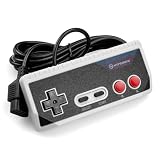 Hyperkin "Cadet" Premium Controller for NES with 10 ft. Cable (Gray)
- Premium build quality with comfortable, ergonomic design
- Compatible with all NES models
- 10 ft. Cable
Importing MIDI, FamiTracker, and NSF
MIDI: a sketching aid, not a faithful conversion
Desktop FamiStudio can import notes, time signatures, and tempo changes from MIDI. It creates blank instruments named after General MIDI instruments; those names do not reproduce the original sounds. MIDI can be mapped by channel or track to NES channels, and velocity can optionally be imported as volume. Because NES channels are monophonic, a polyphonic MIDI arrangement cannot simply be carried over intact. Reduce it to useful monophonic parts, assign each part to a channel, and rebuild instruments and envelopes in FamiStudio.
MIDI export is desktop-only and requires the song to use FamiStudio tempo mode. The import and export behavior is documented at the import guide and in the export guide.
Free tools Windows power users keep installed
One-click scans. No signup required.
FamiTracker: useful imports, imperfect round-trips
FamiStudio imports FamiTracker binary and text formats, with documented support for official FamiTracker 0.4.6. Only a subset of effects is supported. VRC7 effects may need correction; pitch and arpeggio envelopes can behave differently; VRC6 saw-channel behavior and vibrato may change; and slides are converted to FamiStudio slide notes in a lossy process. Keep the original project, import a copy, and compare difficult passages rather than expecting an identical result. The import documentation lists the compatibility limits.
NSF/NSFe: reconstructing playback, not recovering a project
Desktop FamiStudio can import NSF and NSFe files, including expansion audio. The import is reconstructed from playback behavior; it generally does not recover the original instruments, envelopes, or repeating pattern structure. Some unsupported hardware sweeps and advanced DPCM manipulations are ignored. The result can be useful for transcription or reverse engineering, but it is not a restored authoring project. See the official import guide.
Export options and their limits
| Output | Useful for | Important qualification |
|---|---|---|
| WAV, MP3, OGG Vorbis | Listening, sharing, or using the audio in another project. | OGG export is listed for desktop. |
| NSF and NSFe | Standalone NES-style music playback and testing. | NSFe adds track names and durations. PAL, NTSC, and Dual modes are available. The approximate size ceiling is 28 KB minus DPCM sample data; project-file size does not reliably predict NSF size, so test the export. |
| NES ROM or FDS image | Playback in an emulator or, with suitable compatible hardware, on original hardware. | Mapper assignments vary by expansion chip. Multiple expansions cannot be used in this ROM/FDS export path. Track names in the simple ROM interface are truncated to 28 characters. |
| VGM | Chip-oriented playback or interchange. | Region and import timing can matter; the 4.5.3 hotfix addresses PAL VGM import issues. |
| MIDI | Moving a composition into a conventional MIDI workflow. | Desktop-only; the song must use FamiStudio tempo mode. |
| FamiTracker text | Moving material into a compatible tracker workflow. | Desktop-only; compatibility is not fully lossless. |
| FamiStudio text and sound-engine data | Building music and effects into a homebrew project. | Choose the matching engine workflow and configuration for the target game. |
| Video | Creating oscilloscope or piano-roll visuals. | Desktop video export requires a separately installed FFmpeg binary: ffmpeg.org. |
Export format details and edition-specific limits are covered in the official export documentation.
Using FamiStudio in an NES homebrew game
FamiStudio includes a NES/Famicom sound engine intended for homebrew integration. Engine variants are provided for CA65/CC65, NESASM, ASM6, and SDAS. The workflow exports music and sound-effect data for the game to call, rather than turning the editor into a complete game-development environment. The sound-engine documentation explains integration and configuration.
Do these 3 things before closing this tab:
1Scan for outdated or missing drivers - takes under a minute2Clear out junk files and repair common Windows errors3Fix the driver behind crashes, sound loss and screen glitchesEngine options can be disabled to reduce CPU and RAM use, but a project can fail if the engine omits a feature its song actually uses. Compare the project’s needs with the enabled FAMISTUDIO_USE_... options, paying particular attention to expansion support, effects, DPCM bankswitching, extended DPCM range, and extended instrument range. If the game crashes after integration, first check whether a required feature was disabled; the documentation warns this can cause crashes or undefined behavior.
Rank #4

- 【Supported Operating System】The Game Controller is specifically designed for playing classic old school retro snes games on computer or laptop. Compatible with Windows 98 / ME / Vista / 2000/2003 / XP / 7 / 8 / 8.1 / 10/11, Mac OS X/ OS X 10.0 and beyond, Raspberry Pi, Raspberry PI 2 model B,Model A, Raspberry Pi 1 Model B+, Raspberry Pi 2,Raspberry Pi OS, Raspberry Pi 3 Model B+, Raspberry Pi 3, Raspberry Pi Zero.
- 【Simple USB Plug and Play】If your program or application accepts USB controller input, this classic game controller do not need install drivers or patches. 1.5 meter external cable(approx. 5 ft. Long). Notice: Please download the game emulator first before start the games, and then you must manually set the buttons and directionals within the emulator you're using, and the controller not automatically assigns buttons/directional axes. If on the Steam platform, you need to first enable Steam's "Universal Controller Configuration Support" and then restart Steam. After entering the game, you also need to manually bind key positions in the game
- 【High Sensitivity without Delay】Super sensitive buttons for precision control: 6 fire buttons, a 'Start' button and a 'Select' button, motion control cross. Play your favorite old school games with classic retro feel. Fits perfectly in the hand and also perfect for two player action.Note: Not applicable to Switch/PS games. Not Compatible with TV/ TV Box, third Mini Games Box and Tesla Model 3
- 【Supported Game Emulators】The game controller works with most emulators. Download any emulator you wish to download and use from Google and do the same with ROMS. Notice:Third party controller, not original controller. But it works phenomenal with the Raspberry Pi game emulation and so on
- 【Product Service】If you have any problem during use, send message to us and we will help you to solve the problem soon
For repeatable builds or batch conversions, the official documentation also covers command-line processing at the command-line guide. Use the syntax documented for the version you have installed rather than relying on flags remembered from an older release.
Test the actual output in an emulator and, where practical, on the intended hardware. An exported ROM or FDS image is not a guarantee of compatibility with every cartridge, mapper, flash device, or hardware setup.
Independent reader supportYour contribution helps us test, update, and keep practical guides available for everyone.Desktop and mobile editions
| Edition | Best suited to | Known considerations |
|---|---|---|
| Windows, macOS, Linux | Full editing, larger projects, conversion, and homebrew integration. | Desktop documentation identifies MIDI export, FamiTracker text export, sound-effect export, and command-line workflows as desktop-oriented or desktop-only. |
| Android | Portable composition and editing. | The official download page recommends the Google Play route and also offers a standalone APK. Do not assume feature parity with desktop. |
| iPhone | Portable editing on a phone. | The U.S. App Store listing says iPhone-only; it does not establish an iPad-optimized edition. The listing showed $4.99 in the U.S. on August 18, 2026. |
On Windows, use the current installer and follow the official troubleshooting guidance if a dependency is missing; older distribution notes mention the Visual Studio 2015 x86 runtime, but that should not be treated as a universal current requirement. On macOS, the downloaded app may trigger a security warning because it is unsigned, and the official page says macOS may prompt for .NET if needed. On Linux, Flatpak/Flathub is the simpler dependency-managed route; the standalone ZIP requires .NET separately. Current installation information is on the download page and installation guide.
Windows Errors? Fix Them Before They Spread
Repair common Windows errors and clear accumulated junk for a smoother, more stable PC - no reinstall needed.Free scan · no reinstallCrashes, No Sound, or Screen Glitches?
Random freezes, missing sound and display glitches usually trace back to one bad driver. Find and replace yours safely.Free scan · under a minuteCommon problems and how to respond
MIDI import sounds wrong
-
Reduce simultaneous notes into monophonic parts and assign them to specific NES channels.
-
Rebuild instruments and envelopes rather than expecting General MIDI sounds to transfer.
-
Use velocity-to-volume import selectively, and review articulation and sustain manually.
FamiTracker import changes the song
-
Keep the original file and work on an imported copy.
Quick wins for a faster PC:
Clear out junk files and repair common Windows errorsFree Scan →Scan for outdated or missing drivers - takes under a minuteDriver Scan →Repair Windows errors before they cause bigger problemsFix Now →Special offer. See more information about Outbyte and uninstall instructions. Please review EULA and Privacy policy.Best Value
 ZAMPAM 2 Pack 2.4GHz Wireless USB Controllers with Turbo for PC, Mac, Linux
- USB Wireless Adapter: Compatible with PC, Window Games and Android Devices with Game Emulator,For using the USB wireless adapter, Please pay atention, Our controller does not compatible with Super Nitnedo, Mini NES, NES CLASSIC EDTION, if you have one of those console, please do not purchase our controller.
- Please download software like" joystick mapper" configure keys first if needed. then you can play on your PC , Macs,Window, Linux ,Raspberry PI Gadget.
- Wireless: Via 2.4GHz Wireless technology.Wireless range Up to 10 meters.
- Turbo Function: You can set your own rapid button as you want. beware you might accidently iniated the turbo function for certain keys when you play game, you can cancel it. please take reference from the manual sheet come with the packing box.
- Build in rechargeable Lithium Ion battery, One charge last around 100 hours playing time.
-
Compare passages that use unsupported effects, slides, vibrato, VRC7, or the VRC6 saw channel.
-
Avoid repeated round-trips between formats when preserving exact behavior matters.
NSF or ROM export fails
-
Check DPCM sample size and whether the project approaches the NSF size ceiling.
-
Confirm the selected expansion chip and that ROM/FDS export is not being asked to combine multiple expansions.
Recommended: Crashes or Glitches? A Free Driver Scan Usually Finds the Culprit →Recommended: PC Feels Slow? A Free Scan Shows What's Dragging Windows Down →Recommended: Update Every Outdated Driver on Your PC in One Scan - Free →Special offer. See more information about Outbyte and uninstall instructions. Please review EULA and Privacy policy. -
Review project naming and exported feature configuration.
-
Use version 4.5.3 or later to avoid the NSF/ROM export issue introduced in 4.5.2 that the 4.5.3 hotfix addresses.
Playback differs by region or device
Check whether the project is intended for NTSC or PAL and compare the export in the emulator or device you actually target. Emulator accuracy, expansion-chip implementation, DPCM behavior, and hardware audio mixing can also affect the result; matching the project and game-engine configuration is important.
Alternatives by workflow
| Tool or approach | Consider it when | Trade-off |
|---|---|---|
| FamiTracker | You want the established NES tracker workflow, legacy material, or traditional pattern/effect notation. | Less suited to users who prefer piano-roll editing; FamiStudio’s import/export compatibility is not perfectly lossless. |
| Furnace Tracker | You want a broader multi-system tracker environment. | Its wider scope may be less direct for an NES-specific game workflow; verify the needed export and engine compatibility. |
| DefleMask | You want a commercial multi-console tracker workflow. | It is not a direct substitute for FamiStudio’s integrated NES sound-engine path; verify current platform, licensing, and expansion compatibility. |
| Conventional DAW plus NES-focused instrument or plug-in | You prioritize modern arrangement, mixing, and automation while approximating NES sounds. | Audio alone does not solve NES channel, memory, mapper, DPCM, or expansion constraints, and may not yield game-ready music data. |
Verdict
FamiStudio is a strong choice for NES-focused composers and homebrew developers, especially those who would rather work in a piano roll than a traditional tracker grid. Its most important advantage is that composition, chip-oriented export, and game-engine integration sit in one NES-specific workflow. Choose desktop for serious production and development; treat mobile as a convenient editing option rather than assuming it includes every desktop conversion and export feature. It is not a general DAW, and its import tools cannot erase the fundamental differences between MIDI, tracker projects, and NES hardware.
Quick Recap
Product prices and availability are accurate as of the date/time indicated and are subject to change. Any price and availability information displayed on Amazon at the time of purchase will apply.



