Recommended Free Tools
Yes. Dead by Daylight supports cross-play between supported platforms. To invite someone, open your Friends list, select the add-friend icon, search their full Dead by Daylight ID, and send an invite. You’ll both need to be on supported platforms with the same game version.
Which platforms support Dead by Daylight cross-play?
Behaviour’s cross-play FAQ lists PC (Steam, Microsoft Store, and Epic Games), PlayStation 4 and 5, Xbox One and Xbox Series X|S, and Nintendo Switch. This platform list comes from a 2020 support article; a later cross-progression FAQ mentions Nintendo Switch 2, but that does not confirm Switch 2 cross-play.
Cross-play allows players on these platforms to play together. It is separate from cross-progression, which syncs progress and inventory across linked platform accounts.
How to add and invite a friend from another platform
- Open the Friends list in Dead by Daylight.
- Select the add-friend icon.
- Search for your friend’s full Dead by Daylight ID. It consists of their username followed by four unique identifying characters; ask them to share the complete ID.
- Select Invite A Friend to send the invite. Your friend can respond the next time they log in.
These steps follow Behaviour’s friend-invite instructions. Share IDs privately, and don’t publish someone else’s ID or friend list without their consent.
#1 Best Overall

- Up to 120 Hours of Gaming on a Single Charge: Achieve up to 120 hours of gameplay on 2.4GHz. Push the limits even further with up to 200 hours in Bluetooth Mode.
- Works With PC, PS5, PS4, Nintendo Switch, Mac, and Mobile: Connect with the included USB-C or USB-A 2.4GHz dongle, Bluetooth, or Instant Pair with select OMEN laptops. Not compatible with Xbox.
- Connect via 2.4GHz, Bluetooth, or Instant Pair: Gain the convenience and versatility of wireless freedom with 2.4GHz wireless or Bluetooth connectivity. Instant Pair is also available with select OMEN gaming laptops, no dongle required.
- Audio Tuned for Your Entertainment: Angled 53mm drivers have been tuned by HyperX audio engineers to provide an optimized listening experience that accents the dynamic sounds of gaming.
- HyperX Signature Comfort: Comfort is in the Cloud III's DNA. HyperX signature memory foam in the headband and ear cushions wrapped in soft, premium leatherette make for a plush, comfortable fit all around.
What to check if you can’t invite or join
Confirm that both platforms are supported
Check that each player is using one of the platforms in Behaviour’s cross-play list above. The later mention of Switch 2 in the cross-progression FAQ is not confirmation of cross-play support.
Make sure both games are on the same version
All players need the same game version for cross-play. If an update reaches one platform later than another, players on the platform still waiting for it can match only with people on that platform until the update becomes available. Behaviour explains this in its cross-play troubleshooting FAQ.
Rank #2
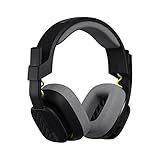
- Enhanced sound quality: ASTRO Gaming A10 Gen 2 Headset for PlayStation 5, PlayStation 4, Nintendo Switch, PC, Mac features custom-tuned 32mm dynamic drivers so you can always hear your game and teammates with clarity and precision
- Flip-to-mute mic: Integrated boom microphone that can be flipped up to mute for privacy and down for crystal-clear comms via a 6.0 mm unidirectional mic
- In-line volume control: This PlayStation headset features a removable headphone cable with in-line volume control, letting you adjust audio without pausing the game
- Built to last: An ultra durable headband and sturdy construction offers reliable performance that transcends the standard gaming headset for PS5 / PS4
- Comfortable over-ear headset: Ergonomical and robust circumaural construction with a closed back design; optimal for long sessions
Check that cross-play is enabled
From the main menu, open Settings and check the cross-play toggle. You can’t change this setting while in a lobby. If cross-play is off, you’re limited to playing with people on the same platform, and matchmaking may take longer. See Behaviour’s cross-play troubleshooting instructions.
Does inviting a cross-platform friend require a Behaviour Account?
No Behaviour Account linking is required for the documented in-game friend-invite steps. Don’t confuse cross-play with cross-progression: cross-play lets players on supported platforms play together; cross-progression syncs progress and inventory across linked accounts.
Quick wins for a faster PC:
Clear out junk files and repair common Windows errorsFree Scan →Fix the driver behind crashes, sound loss and screen glitchesFind Drivers →Repair Windows errors before they cause bigger problemsFix Now →Rank #3
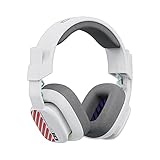
- Enhanced sound quality: ASTRO Gaming A10 Gen 2 Headset for for Xbox Series X|S, Xbox One, Nintendo Switch, PC, Mac & Mobile Devices features custom-tuned 32mm dynamic drivers so you can always hear your game and teammates with clarity and precision
- Flip-to-mute mic: Integrated boom microphone that can be flipped up to mute for privacy and down for crystal-clear comms via a 6.0 mm unidirectional mic
- In-line volume control: This Xbox gaming headset features a removable headphone cable with in-line volume control, letting you adjust audio without pausing the game
- Built to last: An ultra durable headband and sturdy construction offers reliable performance that transcends the standard gaming headset for Xbox Series X|S
- Comfortable over-ear headset: Ergonomical and robust circumaural construction with a closed back design; optimal for long sessions
If you want cross-progression, Behaviour’s cross-progression FAQ says to create or sign in to a Behaviour Account, link platform accounts, and sync them. Its eligible-platform list includes Steam, Epic Games Store, Windows Store, PlayStation 4 and 5, Xbox One and Series, Nintendo Switch, and Nintendo Switch 2. Only one account from each platform provider can be linked and synced. Once syncing is activated, accounts cannot be unsynced.
Cross-progression also has limits: Auric Cells don’t share with Nintendo Switch; DLC can share from other platforms to Switch, but not from Switch to other platforms; and platform-exclusive items and achievements generally don’t transfer. These account-syncing rules do not apply to cross-platform friend invites.
Rank #4

- ICONIC KITTY EARS — Personality shines through with this headset featuring Razer's iconic kitty ears, a design that’s captured global attention; play in style and stand out in every gaming session
- HYPERCLEAR CARDIOID MIC — Speak with clarity using a mic with an improved pickup pattern that focuses on the voice and reduces background noise, ensuring clear communication during team play or casual chats
- TRIFORCE 40MM DRIVERS — The headset's patented 3-part driver delivers clear highs, rich mids, and deep lows for an immersive, dynamic experience—optimized for tracking enemies in-game, enjoying music, or tuning into a live stream
- 7.1 SURROUND SOUND — With advanced 7.1 surround sound, enjoy true-to-life acoustics that optimizes game sound design, making every detail heard as if right in the heart of it all
- CROSS-PLATFORM COMPATIBILITY — Plug and play effortlessly across PC, consoles, and more with a trusty 3.5 mm jack—enjoy seamless switching between devices for instant, uninterrupted audio anytime, anywhere
Can console players use in-game chat with PC friends?
Behaviour’s chat FAQ says console players can’t access the in-game pre-game or post-game chat; only PC players can. It does not establish which third-party voice-chat options work across different console and PC combinations.
Quick Recap
Best Value

- CUSTOM-TUNED 50 MM DRIVERS: Provides a wide soundscape, from subtle footsteps sneaking up behind you to climatic explosions that blow you away.
- COOLING GEL-INFUSED EAR CUSHIONS: Reduces heat build-up, while a soft cloth and leatherette combination provides comfort and sound isolation, so you can enjoy gaming for hours.
- UNIDIRECTIONAL RETRACTABLE MICROPHONE: Ensure your shotcalls are always delivered in absolute clarity
- BAUXITE ALUMINUM FRAME WITH THICKER PADDING: For light weight, durability and flexibility. The headband padding relieves pressure on your head, so the headset feels even lighter.
- CROSS-PLATFORM COMPATIBLE: Compete across your PC, PS4, Xbox One, Switch and Mobile Devices with the 3.5 mm combo jack
Product prices and availability are accurate as of the date/time indicated and are subject to change. Any price and availability information displayed on Amazon at the time of purchase will apply.