Recommended Free Tools
There is no dependable, documented PC method established here for playing Time Crisis 5 without TeknoParrot. The clearly documented way to play is on the original arcade machine. Community posts mention direct-launch workarounds, but they do not verify a stable setup for current game versions or controls.
What is documented
Bandai Namco’s Time Crisis 5 Operation Manual, authorized in September 2014, treats the game as an arcade machine and covers its installation, operation, transport, maintenance, and safety. For machine or repair inquiries, the manual says to contact the distributor.
TeknoParrot’s compatibility listing identifies Time Crisis 5 as a shooter for Namco ES3X. Its project documentation describes support for selected PC-based arcade titles and mapping proprietary arcade hardware to standard PC peripherals. These sources establish the arcade context and TeknoParrot’s role; they do not document an alternative PC launcher for this game.
What about launching it directly on a PC?
An ArcadeControls forum thread, indexed as dating from around 2020, discusses Time Crisis 5 and direct-launch approaches. It is an anecdotal community discussion, not a maintained compatibility guide. It does not establish that a particular procedure works with current versions, or that the game’s controls will function correctly without TeknoParrot.
The Tool Desk
Outbyte PC Repair FREERepair Windows errors before they cause bigger problemsFix Now →Outbyte Driver Updater FREEScan for outdated or missing drivers - takes under a minuteDriver Scan →#1 Best Overall

- Classic Arcade Experience: Enjoy 12 legendary games from 1981 on a full-size cabinet with real-feel joysticks, buttons, and authentic arcade-style gameplay
- Vibrant 17" Display: Features a crisp BOE 17" LCD screen that brings retro graphics to life with bright colors and sharp details for immersive gaming fun
- Wi-Fi Leaderboards: Connect to Wi-Fi and compete with players nationwide by posting high scores on global leaderboards—no subscription required
- Premium Retro Design: Over 5 feet tall with a sleek cabinet, light-up marquee, and faux coin door for a nostalgic look that enhances any game room or space
- Crisp Stereo Sound: Dual speakers deliver classic arcade soundtracks and effects just like you remember, bringing every game to life with rich audio
So, if by “without TeknoParrot” you mean running a PC arcade installation through another launcher or by starting its executable directly, the available sources do not support a reliable step-by-step recipe. A community post can be a lead to investigate, but it should not be treated as a verified setup.
Choose the route that matches what you have
| Route | What is established | What to check |
|---|---|---|
| Original arcade machine | Bandai Namco’s operation manual documents the machine and its operation. | Access to the cabinet and its controls; contact the distributor for machine or repair inquiries. |
| PC installation without TeknoParrot | No current, supported launch method is established in the sources cited here. | Whether the method is documented for your exact game version and whether your input setup works with that method. |
Do not assume a generic light gun will work
Time Crisis 5 is an arcade shooter, but the cited sources do not verify any particular generic USB light gun for this game, much less for a direct-launch setup. Before buying hardware, confirm compatibility for the exact game version and the launch method you intend to use. A light gun by itself does not resolve whether the game can be launched or whether its inputs will be recognized.
Rank #2

- RETRO GRAPHICS: Immerse yourself in nostalgia with the Arcade Classics Pac-Man’s classic arcade graphics that look just like the original!
- AUTHENTIC GAMEPLAY: Use the joystick to guide Pac-Man through the mazes as you collect Pac-Dots and power-ups. Just don’t get caught by those sneaky ghosts!
- FULL COLOR SCREEN: With a brighter, full color screen that makes it easy to see the characters and dots, you’ll be cruising through those mazes like a pro.
- CLASSIC MUSIC: Pac-Man fans will love the authentic music and sounds that play just like the original arcade game.
- SHARE AND COLLECT: Arcade Classics are a must-have retro toy for collectors or for anyone looking to share this classic toy with the next generation!
Use legally obtained game files
TeknoParrot’s project documentation says the project does not host or link game files and that users must legally obtain their own. Do not treat a launcher or a forum post as a source for game files.
Quick Recap
Best Value

- COOPERATIVE MARVEL ADVENTURE: Team up as Spider-Man, Miles Morales, Ghost-Spider, and Black Cat to stop Green Goblin’s citywide chaos.
- EPIC BOSS BATTLES & ENEMIES: Fight through waves of Goblin Army goons, Spider-Slayers, and War Goblins before facing the Green Goblin himself.
- LEVEL UP & CUSTOMIZE HEROES: Gain experience, unlock powerful abilities, and evolve your characters throughout the campaign.
- COMPLETE GAME EXPERIENCE: Includes miniatures, dice, boards, tokens, and cards—everything needed for cooperative gameplay out of the box.
- IMMERSIVE STORY-DRIVEN GAMEPLAY: Progress through dynamic encounters across New York City with evolving challenges and replayability.
Rank #4
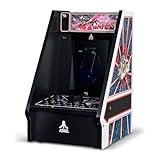
- Classic Atari Arcade Experience: Relive the fun and play through arcade favorites such as Tempest, Gravitar, Lunar Lander, Warlords, and Major Havoc – all in one cabinet for nonstop action.
- Packed with Retro Gaming Favorites: Play to your heart’s content with 5 legendary hits, making it a comprehensive classic gameplay experience in one machine.
- Immersive Multi-Game Fun: Each game in this arcade cabinet recreates its original gameplay, graphics, and sound for fast-paced excitement of classic nostalgia.
- Authentic Controls for True Arcade Feel: Includes a built-in spinner and responsive buttons that let you blast and spin with the same accuracy as the original machines. Ideal for defending castles, racing through mazes, or landing your vessel to victory.
- Vibrant 8-inch Display with Easy Setup: The full-color 8-inch liquid crystal screen brings every action to life with crisp detail. Assembly is simple, and the cabinet plugs directly into the wall with the included AC adapter.
Rank #3

- Remake of the iconic action game released for arcade in 1987
- Survival Mode: Confront waves of enemies
- Campaign playable in solo or duo
- Gameplay with endless action
- Arsenal of various weaponry (Uzi, Rifle, Grenade Launcher…)
Product prices and availability are accurate as of the date/time indicated and are subject to change. Any price and availability information displayed on Amazon at the time of purchase will apply.
Do these 3 things before closing this tab:
1Scan for outdated or missing drivers - takes under a minute2Clear out junk files and repair common Windows errors3Fix the driver behind crashes, sound loss and screen glitches



