PC Slower Than It Used to Be?
A free scan shows the junk files, broken settings and background clutter dragging Windows down - then fixes them in one click.Free scan · Windows 10 & 11Crashes, No Sound, or Screen Glitches?
Random freezes, missing sound and display glitches usually trace back to one bad driver. Find and replace yours safely.Free scan · under a minuteTo reclaim an infected base in StarRupture, find and destroy the infection growth attached to the Base Core tower, then approach the core and use its disinfect interaction when it appears. Community reports warn that destroying the growth alone may not clear the infection.
How to clear an infected base
- Inspect the Base Core tower. Look for a tumor or spore growth attached to it. Players report that it can be hard to spot and may sit high or low on the tower, so check from different angles.
- Destroy the growth. Once you locate it, remove it before trying to finish the cleanup.
- Disinfect the core. Approach the Base Core and use the disinfect interaction when the prompt appears. One player discussion says to hold the interaction key; the exact prompt or input may vary by build.
These steps come from player discussions, not an official mechanic guide, so the precise interaction can differ between builds. Read the Steam Community discussion.

Can’t find the growth?
Look over the tower from multiple sides and elevations; player reports describe growths that are difficult to see from ground level. One player also reported using the deconstruction tool’s highlight to inspect the core area. Treat that as an observation rather than a guaranteed in-game feature or required step. If no growth is visible, do not assume the base is permanently stuck.
The core looks clear, but the infection remains
- Check the tower and nearby structures again for another growth.
- Return to the core and confirm that the disinfect interaction completed; destroying a spore may not finish the cleanup by itself.
- Players describe blue or purple infection clouds and interaction prompts on some infected structures. If a prompt appears, try it; reports do not establish that every affected structure must be disinfected individually in every build.
- If the growth is gone and the interaction appears complete but the infection state persists, try saving and reloading. A server restart has also been reported as a workaround. These are anecdotal troubleshooting attempts, not guaranteed fixes.
If the issue persists or the growth never appears, contact Steam Support for technical help. The support listing is a route for persistent issues, not a guide to this game mechanic.
Quick Recap
Rank #3

- In the far future, countless alien species explore the galaxy in search of fortune and fame. The last interstellar war ended over fifty years ago and since then peace treaties have been in effect. Trade routes are set, civilizations flourish, and a new source of power was discovered – the Hexis crystals.
- Star Scrappers: Cave-in is the first game in the Star Scrappers series, set in a rich and exciting space-western universe, with a unique gameplay mechanics.
- Players take roles of Galactic entrepreneurs, rival mining bosses who compete in this difficult, sometimes even merciless industry.
- As a mining boss, you will have to recruit new mercenary laborers, use their skills, and collect precious artifacts. Your job is to excavate the Hexis crystals but never let your guard down though, as your competition is waiting for a chance to buy off your trusted men and steal the bounty from under your nose! The goal of the game is to get as many victory points as possible before the crystal mine collapses.
- Star Scrappers: Cave-in uses a unique game mechanics called “discard building”. With every action taken, players put their mercenaries into their discard piles. The order of the discarded cards matters because your top card is your Leader and gives you a special action at the beginning of your next turn. Beware, if your discard pile grows too much, it will draw the attention of other players who will not hesitate to steal cards from you – they’re just bribing your men!
Rank #2
#1 Best Overall
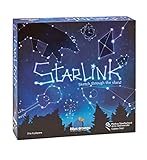
- CREATIVE DRAWING GAME: Starlink is a cosmic themed party game perfect for developing fine motor and drawing skills for both children and adults! This new party game has an amazing table presence with beautiful and high-quality cardboard pieces
- FAMILY OR ADULT GAME: This 3 to 6 players cosmic game can be enjoyed by children, parents, or the whole family! Best recommended for ages 8 & Up
- HOW TO PLAY: Each turn you will be given a new concept that you must represent by drawing lines between the available stars on the board. But watch out! Once a star has been used in one constellation, it can no longer be used for the rest of the game! The player who creates the best constellations is the winner!
- INCLUDES 100 Constellations cards, 1 Dry Erase game board, 2 Dry Erase Markers, 1 Telescope card, 1 Sand timer, Rules
Product prices and availability are accurate as of the date/time indicated and are subject to change. Any price and availability information displayed on Amazon at the time of purchase will apply.
Independent reader supportYour contribution helps us test, update, and keep practical guides available for everyone.



