To play two-player Cuphead, start the game, connect or pair a second controller, and have the second player join as Mugman. The game supports local co-op; on Steam for PC, community guidance says player two can press a button on the second controller after entering the game.
What you need for two-player Cuphead
- A copy of Cuphead running on the platform where you will play.
- Two compatible controllers connected or paired with that platform. The Steam version lists full controller support and local co-op; compatibility and prompts can differ by platform and setup.
Cuphead is designed for one player or local co-op, with the second player controlling Mugman. The official Cuphead site describes the game as playable in local co-op.
| # | Preview | Product | Price | |
|---|---|---|---|---|
| 1 |
|
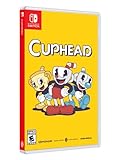
Cuphead - Nintendo Switch | $31.97 | Buy on Amazon |
| 2 |
![Cuphead & The Delicious Last Course Standard - Nintendo Switch [Digital Code]](https://m.media-amazon.com/images/I/51ilObkY9hL._SL160_.jpg)
|
Cuphead & The Delicious Last Course Standard - Nintendo Switch [Digital Code] | $26.88 | Buy on Amazon |
| 3 |
![Cuphead - Nintendo Switch [Digital Code]](https://m.media-amazon.com/images/I/51-2M7vtO5L._SL160_.jpg)
|
Cuphead - Nintendo Switch [Digital Code] | $19.99 | Buy on Amazon |
| 4 |
![Cuphead - The Delicious Last Course Standard - Nintendo Switch [Digital Code]](https://m.media-amazon.com/images/I/41CuESpkdnL._SL160_.jpg)
|
Cuphead - The Delicious Last Course Standard - Nintendo Switch [Digital Code] | $7.59 | Buy on Amazon |
| 5 |

|
Cuphead - Switch | $49.93 | Buy on Amazon |
Join a second player on Steam for PC
- Connect both controllers to the PC and confirm the system recognizes them.
- Launch Cuphead and enter the game.
- Have player two press a button on the second controller to join as Mugman.
This join procedure comes from a Steam Community answer posted October 16, 2017, rather than current official instructions, so button behavior may vary with the controller and configuration. Steam’s Cuphead listing confirms local shared/split-screen co-op and full controller support.
Join on a console
- Pair or connect the second controller to the console.
- Start Cuphead and follow the on-screen prompt for player two to join.
The exact button or prompt is platform-specific; the available guidance does not establish one sequence that applies to every console version.
Recommended Free Tools
#1 Best Overall
- Experience the classic run and gun action with a pal in 2-player local co-op
- Includes the “Delicious Last Course” expansion filled with new bosses and brand-new character Ms. Chalice
- Includes exclusive “Cuphead Funnies” comic collector cards & vintage-inspired “Cuphead Club Membership”, and a hand-drawn reversible coversheet
If the second player cannot join
- Check that the console or computer recognizes both controllers, not just the first one.
- Look at Cuphead’s controller assignment or controller settings if the wrong controller is assigned to a player.
- Try the on-screen join prompt again after both controllers are connected. On Steam PC, the community-reported method is to press a button on player two’s controller while in the game.
Controller assignment issues have been reported by players, but no single fix or menu path is established for every platform and configuration.
Independent reader supportYour contribution helps us test, update, and keep practical guides available for everyone.Can you play Cuphead online with a friend?
The official game description and Steam listing establish local co-op, not a universal online co-op mode. Do not assume a friend can join remotely simply because a platform offers streaming or remote-play features; online availability depends on the platform and its features.
Quick Recap
Best Value
- The physical edition includes the following exclusive physical items: 6 Comic cards, Membership Card
- Includes “The Delicious Last Course” expansion in the cartridge
- In Cuphead - The Delicious Last Course, Cuphead and Mugman are joined by Ms. Chalice for a DLC add-on adventure on a brand-new island! With new weapons, new charms, and Ms. Chalice's brand-new abilities, take on a new cast of multi-faceted, screen-filling bosses to assist Chef Saltbaker in Cuphead's final challenging quest
- Featuring Ms. Chalice as a brand-new playable character with a modified moveset and new abilities. Once acquired, Ms. Chalice is fully playable through the DLC and the original Cuphead adventure
- Traverse a brand-new Inkwell Isle and wallop the most wacky and monstrous bosses Cuphead has faced yet
Rank #4
- Help Chef Saltbaker on a brand new adventure to uncover the mystery of Legendary Chalice's secret quest!A Nintendo Switch Online membership may be required for online play. Please check the game detail page on Nintendo.com for membership requirements.
- 2022 StudioMDHR Entertainment Inc. All Rights Reserved. Cuphead and StudioMDHR are trademarks and/or registered trademarks of StudioMDHR Entertainment Inc. throughout the world.
Rank #3
- Play as Cuphead or Mugman in single-player or local co-op, as you traverse strange worlds
- Meet a variety of bosses in a single game or local cooperative action
- Acquire new weapons, learn powerful and exciting moves, and reveal hidden secrets
- Defeat your enemies and win boss battles to pay your debt back to the devil!
- The game's completely traditional hand-drawn graphics and watercolor background in a combination with a jazz soundtrack provide a unique gaming experience
Rank #2
- A Nintendo Switch Online membership may be required for online play. Please check the game detail page on Nintendo.com for membership requirements.
- 2022 StudioMDHR Entertainment Inc. All Rights Reserved. Cuphead and StudioMDHR are trademarks and/or registered trademarks of StudioMDHR Entertainment Inc. throughout the world.
Product prices and availability are accurate as of the date/time indicated and are subject to change. Any price and availability information displayed on Amazon at the time of purchase will apply.



