Do these 3 things before closing this tab:
1Clear out junk files and repair common Windows errors2Scan for outdated or missing drivers - takes under a minute3Repair Windows errors before they cause bigger problemsIf Mobile Legends: Bang Bang (MLBB) gets stuck while starting, logging in, checking resources, or loading a match, first note exactly where it stops. Then check your connection and try reversible device and app steps before considering anything that could affect account access. A loading screen alone does not identify the cause: the problem could involve the device, connection, game resources, or the game service.
Start by identifying where loading stops
Write down the stage and any on-screen message before changing settings. For example, does the game hang at startup or login, while checking or downloading resources, or while entering a match? Phrases such as “stuck on checking resources” and “loading resources failed” appear in individual player discussions, but there is no measured evidence here that either is a common error.
The failure point is a useful clue, not a diagnosis. A hang during resource checking may warrant checking the connection, while a match-only hang may be worth reporting with the match context. Neither symptom by itself proves what caused the problem.
Try reversible checks first
- Check whether the connection works outside MLBB. Open an ordinary website on the same device. If possible, try the game once on Wi-Fi and once on cellular data. General Android mobile-game guidance and an independent MLBB troubleshooting guide recommend these kinds of connection checks; they can help narrow down the failing layer, but they do not guarantee a fix. EA’s general Android troubleshooting guidance and an independent MLBB guide are not MOONTON-specific confirmation.
- Close and reopen the game. Force-close MLBB, then launch it again. If it remains stuck, restart the device and close other apps to reduce background load. These are general mobile-game troubleshooting steps, not a published MOONTON procedure. EA’s Android guide recommends restarting apps and devices and closing background apps for general issues.
- Check for updates and available storage. Confirm that MLBB and the device software are up to date, and check that the device has free storage. The general Android guidance includes update and storage checks, but it does not establish a minimum amount of storage required by MLBB. See EA’s general guidance.
- Try an in-game repair control only if your installed version offers one. Player discussions mention Network Test, cache-clearing, or resource-repair controls. These reports are anecdotal and may refer to different app versions or problems. If you can find a relevant option in the game, try it and restart; it is not a guaranteed remedy or a confirmed universal MLBB step. Player discussions on the MLBB subreddit are anecdotal, not official support instructions.
Use the symptom to narrow down what to report
- Other internet access also fails: the issue may extend beyond MLBB. Restore or test the connection before concluding the game itself is at fault.
- Web access works, but MLBB fails on both Wi-Fi and cellular: the problem appears specific to the game or its interaction with the device, but this does not establish a service outage.
- MLBB works on one network but not the other: record which connection works. That comparison can help support staff distinguish a network-dependent failure from one that follows the game across connections.
- The game stops at one particular stage: report whether it was startup/login, resource checking or downloading, or match loading, along with the exact message if shown.
No current outage, maintenance event, affected region, or version-specific loading bug has been verified. A service-side problem remains possible, but a single loading failure is not evidence of one. Check MOONTON’s official site for current announcements or support information rather than assuming the service is down.
Free tools Windows power users keep installed
One-click scans. No signup required.
#1 Best Overall
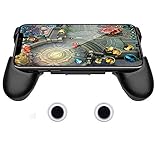
- it is not a electronic product ,Compatible with all touch-screen smartphones ,all iPhone and Android phone. It have no matter with OS , The telescopic boom design allows it to adapt to Large size of the smartphone (13CM to 16 CM / 5.1 inch ~ 6.3 inch length)
- Also it’s an adjustable smartphone case and a smartphone stand holder . You can use it to watch videos with hands-free. There are 3 piece 3mm soft mat to left air place between the handle and phone ,this will help the working smartphone cool off .
- The handle grip has an ergonomic design and comfortable feeling to relax your hand fatigue for the long-time gaming.
- Unlike Bluetooth / WIFI controller , you no need to contact the smartphone to controller . It avoid battery consumption ,but have the same game experience like Bluetooth controller. It left the space for USB port and earphone port ,you can ware the earphone and charge your smartphone when you play games .
- The conductive material stick-on joystick gives players the great physical manipulation, providing precise controlling on the in-game characters, and can deal easier with more complex positioning. Perfect for any game that has an on-screen control pad such as Mobile Legends, Arena of Valor, FIFA, Dragon Nest SEA, GTA and etc.
Protect your account before clearing data or reinstalling
Do not clear app data or uninstall MLBB as an early troubleshooting step. First make sure you understand how your account is linked and how you could recover access. General mobile-game guidance warns that uninstalling can cost progress on a guest or unlinked account; that warning is not confirmation of MLBB’s specific recovery rules. Consult MOONTON’s current official support information before taking a destructive step. If you cannot confirm a safe recovery route, leave app data intact.
Report a persistent MLBB-only loading failure
If ordinary internet access works but MLBB still fails, send a concise report through in-game Contact Us if available, or use the developer contact shown on the game’s current official store listing. The independent guide recommends including the following context so the problem can be investigated:
Rank #2

- Bluetooth Controller for iPhone & Android: Mocagen mobile gaming controller Compatible with all iPhone models (including 18/17 series) and Android devices. Pairing steps: 1. Turn on Bluetooth on your phone and go to the pairing screen. 2. Press and hold the Home button for 3 sec until LED4 flashes. 3. Find "XBOX Wireless Controller" on your phone and tap to pair. Quick reconnect: After first pairing, simply press the Home button once (with Bluetooth on) to reconnect
- Play Most Controller-Compatible Games: This iPhone game controller supports cloud gaming (e.g., Xb*x Game Pass, GeForce NOW), Xbox Remote Play, emulator games, and native mobile games (e.g., Apple Arcade). Enjoy effortless control and play Fortnite, Call of Duty, Roblox, Genshin Impact, and many more anytime, anywhere. Note: Controller only works with games that support controller input, and does not support PS Remote Play
- 5M-Cycle Lifespan & Zero Drift: MC1 mobile gaming controller features a Hall-effect joystick with a 5M cycle lifespan, 2.5x longer than standard carbon-film sticks. Its innovative electromagnetic induction technology ensures drift-free operation, enabling precise character control in intense games and significantly extending this phone game controller durability
- Ergonomic Grip Design: The handle is ergonomically shaped with a l*ser-engraved texture for anti-slip and enhanced grip, effectively reducing fatigue during long gaming sessions. The scientifically designed joystick and button layout ensures smooth operation. Whether for personal use or as a gift, it delivers a more comfortable and healthier gaming experience
- 7-Color RGB Light Ring & 600mAh Battery: The mobile game controller features a 7-color adjustable light ring on the joystick(ABXY button lights can be turned off, but their colors are not adjustable). The lighting is vibrant yet eye-friendly. The built-in 600mAh battery provides up to 6 hours of battery life in brightness mode — enough for a full day of gaming
- The exact error text, or a screenshot if there is no text.
- When it happened, including the time zone, and your country or region.
- Your device model, operating system, and MLBB version from the official app store.
- Whether you were on Wi-Fi or cellular data, and which connection tests you tried.
- The loading stage where the game stopped.
These details support diagnosis; they do not imply that the failure is known to MOONTON or that a particular cause has been confirmed. The guide is independent and is not affiliated with MOONTON. See its suggested reporting details.
Quick Recap
Best Value
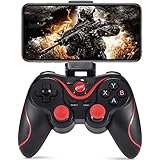
- NO SIMULATOR NEEDED – Adopt Key Mapping function (just download a APP), login and play game from the original game App instead other unauthorized platforms or simulators, never worry about your gaming account got banned by using OTHER controller.
- COD & APEX FULLY SUPPORT – The gamepad supports most controller supported Action/Racing/Fighting/Shooting/Athletics games from Android App store. Such as Call of Duty Mobile, APEX Legends Mobile, Summoners War, War Dragons, NBA 2K Mobile Basketball, NBA LIVE Mobile Basketball,Madden NFL Overdrive Football, MLB 9 Innings 18 and so on.
- COMPATIBLE MODELS - Requires Android 6.0+ version. Compatable with Samsung S20 S20+, Samsung Galaxy S10+ S10 S9 S8 S7 Note 10+ 9 8 A9 C9, LG, Moto, Google, Lumia, Huawei, Xiao MI, Table [BUT do not support Android device with MediaTek CPU].
- LONG BATTERY LIFE - The bluetooth controller for android comes with 400mAh large capacity rechargeable battery enables you playing the games more than 18 hours after full charge. The holder for device can be adjustable from 2.16 - 3.66 in, support 4 - 7 inch phone screens.
- NOTICE – The gamepad is 100% compatible with COD/ APEX Legends, problem such as can not press 2 buttons simultaneously or key doesn't work with settings, it is due to your game setting problem, please contact us first, we will guide you to solve problem.
Rank #4

- NO SIMULATOR NEEDED – Adopt Key Mapping function (just download a APP), login and play game from the original game App instead other unauthorized platforms or simulators, never worry about your gaming account got banned by using OTHER controller.
- COD & APEX FULLY SUPPORT – The gamepad supports most controller supported Action/Racing/Fighting/Shooting/Athletics games from Android App store. Such as Call of Duty Mobile, APEX Legends Mobile, Summoners War, War Dragons, NBA 2K Mobile Basketball, NBA LIVE Mobile Basketball,Madden NFL Overdrive Football, MLB 9 Innings 18 and so on.
- COMPATIBLE MODELS - Requires Android 6.0+ version. Compatable with Samsung S20 S20+, Samsung Galaxy S10+ S10 S9 S8 S7 Note 10+ 9 8 A9 C9, LG, Moto, Google, Nokia Lumia, Huawei, Xiao MI, Table [BUT do not support Android device with MediaTek CPU].
- LONG BATTERY LIFE - The bluetooth controller for android comes with 400mAh large capacity rechargeable battery enables you playing the games more than 18 hours after full charge. The holder for device can be adjustable from 2.16 - 3.66 in, support 4 - 7 inch phone screens.
- NOTICE – The gamepad is 100% compatible with COD/ APEX Legends, problem such as can not press 2 buttons simultaneously or key doesn't work with settings, it is due to your game setting problem, please contact us first, we will guide you to solve problem.
Rank #3

- WIDE SCREEN COMPATIBILITY — PHONE TO TABLET: X5 Lite is a versatile phone controller that stretches up to 213mm to fit iPhone 15/16, most Android phones, iPad mini 6/7, and compatible Android tablets. Secure Type-C connection keeps gameplay stable and responsive.
- MOBILE, CLOUD & REMOTE GAMING: Play supported mobile games like Zenless Zone Zero, or stream console and PC games through Xbox Game Pass, Steam Link, Moonlight, and remote play. Enjoy physical controls wherever you play.
- HALL EFFECT STICKS — PRECISE CONTROL: GameSir Hall Effect sensing sticks deliver smooth 360° control for accurate aiming, movement, and camera adjustments. Built for fast-paced mobile games and streamed console or PC titles.
- LIGHTWEIGHT & ERGONOMIC — 135.4G: At just 135.4g, X5 Lite stays lightweight during extended gaming. Ergonomic, laser-engraved textured grips provide a secure, comfortable hold at home or on the go.
- CUSHIONED MEMBRANE CONTROLS — COMFORTABLE & QUIETER: Cushioned membrane buttons and triggers provide comfortable feedback for repeated inputs while keeping operation quieter. Ideal for extended sessions or gaming in shared spaces.
Product prices and availability are accurate as of the date/time indicated and are subject to change. Any price and availability information displayed on Amazon at the time of purchase will apply.



