A PS4 beep alone doesn’t identify the cause. Check the power light, whether the fan starts, whether the console shuts off, and whether the TV shows a picture; those clues help distinguish a power problem from a frozen startup, overheating, or a display issue. Work through these nine checks before considering a repair.
1. Read the power light and note what the console does
Watch the indicator when you press the power button. PlayStation’s power indicator guide describes these PS4 clues:
- No light: The console is powered off.
- Solid white: The console is powered on. If the screen stays black, investigate the display connection in step 4.
- Blue that does not turn white, or blinking white: PlayStation identifies these as error or frozen-state clues.
- Pulsing red: PlayStation identifies this as console overheating.
Also note whether the fan starts, the light goes out quickly, or the console stays on. A beep by itself does not prove that a particular internal part has failed.
2. Check the outlet and power cord
Start with the external power connection, especially if there is no light or the console shuts down immediately.
Crashes, No Sound, or Screen Glitches?
Random freezes, missing sound and display glitches usually trace back to one bad driver. Find and replace yours safely.Free scan · under a minuteWindows Errors? Fix Them Before They Spread
Repair common Windows errors and clear accumulated junk for a smoother, more stable PC - no reinstall needed.Free scan · no reinstall#1 Best Overall

- Quality Materials: The power housing is made of wear proof abs material, with a small body and a fully sealed design
- Portable Design: The product adopts a portable design, and the compact body adopts a streamlined fully sealed design, making it easy to carry
- Good Compatibility: The power module is only compatible with PS4 CUH-1215A CUH-12XX (4 pins). Please check the model carefully before purchasing
- 4-pin Power Supply unit: This power replacement component has a 4-pin connection, which is an alternative power supply for the adp-200er power supply unit
- Easy To Replace: It is used to replace old or damaged power adapters, with simple operation and convenient portability
- Push the power cord firmly into the PS4 and the wall outlet.
- Look for visible damage to the cord. Do not use a cord that is damaged.
- Test the outlet with a device you know works. If you use a power strip, test the wall outlet directly as well.
- If you have access to one, try another compatible IEC C7 power cable. iFixit includes a cable swap among its PS4 no-power troubleshooting checks.
Change one thing at a time so you can tell whether the outlet or cord made a difference.
3. Power-cycle the PS4
Use the sequence that matches the light behavior; PlayStation and iFixit give different procedures for different symptoms.
Rank #2

- This model for ps4 has 3 version, they are not compatiable!!! The photo and could help to confirm the model, please make sure that have confirmed before place the order!!!The power supply replacement compatible with PlayStation 4 PS4 ADP-200ER and ADP-200PIA. For CUH-1215A CUH-12XX. Not for PS4 1000 ADP-240AR and 1100 ADP-240CR!!!
- The replacement will help to solve the problem of can’t turn on/suddenly shuts down/power indicator light is abnormal/unable to charge or provide power,etc. Replace the new power supply for PS4 ADP-200ER, which will help to make the console normal to use. .Input voltage of 120 Volts, output voltage of 100 Volts.
- For PS4 ADP-200PIA internal power Source replacement was test before shipment,and the ADP-200PIA power supply are made of good quality, ABS plastic material make it use more accurately and has longer working life,resistant to wear and tear,. The controller will use as a new one after replacing for ADP-ER console power supply replacement.
- Comes with new power cable and set tools. The power cable could help to replace the damaged or loosed power cable, more stable to charge. And the repair tools, help to disassemble the console and install the power supply, save time and convenient to install the new one.
- Please power off the console before install the new power supply. If do not have any installation experience, we suggest to find the professional to replace for PS4 ADP-200ER /ADP-200PIA internal power supply. If you have any problem or need installation guide, please leave a message.
For blue or blinking-white error behavior
- Unplug the PS4 from power.
- Wait three minutes.
- Reconnect it and try turning it on.
This is PlayStation’s power-cycle guidance for the blue/blinking-white error state.
For a blinking-white light that persists
- Hold the power button until the white light stops flashing.
- Unplug the console for at least 20 minutes.
- Reconnect it and try again.
This is the distinct power-drain procedure listed by iFixit for blinking-white startup behavior. Don’t treat the two wait times as interchangeable instructions for every symptom.
Rank #3

- Small size, streamlined, full sealed design, easy and convenient to carry.
- cuts and interfaces ensure perfect suitability, suitable for installation location, and easy to install.
- High-quality and superior ABS material, wear-resistant and corrosion-resistant.
- Stable performance and high reliability, designed to fit for PS4 Slim 2200 Model.
- Built to meet standard specification, strictly follow factory quality control.
4. If the PS4 seems on but there’s no picture, check the display
A black TV screen does not necessarily mean the PS4 has no power. If the indicator stays on, check that the TV is set to the correct input and that the HDMI connections are secure. Then test with a known-working HDMI cable or another display, if available. This branch is for a powered console with no picture, not evidence of a failed power supply.
5. Enter Safe Mode if the console stays on long enough
Safe Mode can help when the PS4 can remain powered on but does not start normally. Follow PlayStation’s Safe Mode instructions:
Rank #4

- Compatible with: Sony PS5 / PS5 Slim / PS5 Pro / PS4 / PS4 Slim / PS3 Slim/ PS3 Super Slim ; Xbox Series S, Xbox Series X, Xbox One S, Xbox One X
- UL Listed / Safety: this power cord are Tested, Approved, and Certified by UL to ensure safety for you and your device. UL testing is authorized by OSHA - US Federal Agency, this certification provides peace of mind that this power cord meets rigorous safety standards for electrical products
- Power Cord Type: Non Polarized 2 Prong C7 Figure 8 Power Cord, 125V 7A, 18 AWG (American wire gauge)
- Durable & Sturdy: built with pure copper wire / heavy-duty flame-retardant cable Jacket, resistant to bending and daily wear for long-lasting use
- Wide Compatibility: works with most Game Consoles, TVs, Printers, Speakers and Other Devices that use the same 2-prong figure-8 power connector
- Turn the console off by holding the power button for three seconds.
- After it has shut down, press and hold the power button again.
- Release the button after the second beep. PlayStation says the second beep sounds about seven seconds after the first.
- Connect the controller to the console with a USB cable, then press the PS button.
If the console shuts off before you can reach Safe Mode, continue to the repair guidance in step 9 rather than repeating initialization attempts.
Independent reader supportYour contribution helps us test, update, and keep practical guides available for everyone.6. Try non-destructive Safe Mode options first
Start with options that do not intentionally erase user data. PlayStation lists these PS4 choices in its Safe Mode guidance:
Free tools Windows power users keep installed
One-click scans. No signup required.
Best Value
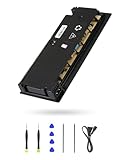
- 【Perfectly Fitment】:ADP-160ER/N16-160P1A Power Supply Unit Replacement Part CUH-2115A CUH-21xx Series Console(Please check your device model before your purchase)
- 【Technical parameters】:ADP-160ER/N16-160P1A Game Console Power Adapter, input voltage 100-240V, 2.1A 50/60Hz, output voltage 4.8V--1.5A,12V--13A
- 【Easy Installation】: Our power supply is user-friendly with a detailed manual and video guide. Plus, we provide professional support for any questions.
- 【Excellent products】:Adopting high quality materials, strict factory quality inspection, optimizing the heat dissipation performance, just to provide better products to you!
- 【What’s in box】:A power board, an adapted power cord, a manual, a tool kit (screwdriver, crowbar, tweezers). These professional tools will help you complete the replacement more easily.
- Restart System: Exits Safe Mode and tries a normal restart.
- Change Resolution: Restarts at 480p; useful when troubleshooting a blank screen.
- Rebuild Database: Scans the drive and creates a new database. PlayStation describes it as useful for system-feature problems or game icons that remain after content has been deleted.
Choose the option that fits the symptom rather than cycling through every option without a reason.
7. Avoid initialization unless you accept data loss
Initialization is not a routine first fix. PlayStation warns that some Safe Mode options cause data loss. Initialize PS4 deletes user data; Initialize PS4 (Reinstall System Software) deletes user data and removes the PS4 firmware. If the console is accessible and you can back up saves or other files, do so to USB or cloud storage before using either option. If preserving data matters and you cannot back up, seek repair advice before initializing.
8. If the light pulses red, cool and ventilate the console
A pulsing red light is PlayStation’s overheating indicator. Turn the PS4 off and give it time to cool. Move it to a ventilated location and make sure its vents are not blocked. If the red pulsing returns or the console continues to shut down, arrange repair guidance rather than repeatedly trying to power it on.
9. Get repair help if these checks don’t resolve startup
If the outlet and cord are sound, the display path has been checked where relevant, and the PS4 still will not start or cannot reach Safe Mode, use PlayStation’s repair diagnostic guidance to find next steps and arrange service.
What’s actually slowing this PC down?
Pick the symptom - the matching free tool is one click away.
Do not infer a failed power supply, motherboard, or APU from the beep. iFixit lists several possible troubleshooting areas, including power, display, overheating, and firmware; the symptom alone does not establish which one applies. Sony’s CUH-7215B safety guide says not to disassemble or modify the console and states that it has no user-serviceable internal components apart from removal of the supplied hard drive. Internal repair is therefore not a safe next step based only on a beep.
Quick Recap
Product prices and availability are accurate as of the date/time indicated and are subject to change. Any price and availability information displayed on Amazon at the time of purchase will apply.



