Free tools Windows power users keep installed
One-click scans. No signup required.
Select the potion from your inventory or equipment bar, then press or hold the on-screen use control to consume it. The control depends on your platform and custom bindings, so follow the prompt shown in your current game. A Small Shield Potion restores 25 shield points and is capped at 50 shield in Epic’s Creative documentation; a standard Shield Potion restores 50.
How to drink a shield potion
- Pick up a potion and make sure it appears in your inventory or equipment bar.
- Select it. Use your platform’s inventory controls to highlight the potion.
- Activate the use control shown on screen. The exact button or key varies by platform and custom bindings; the official sources cited here do not specify current Battle Royale mappings.
- Check the blue shield bar at the lower left of the screen to confirm your shield increased. The green bar below it represents health.
Epic’s Creative documentation describes an application delay of two seconds for a Small Shield Potion and five seconds for a standard Shield Potion. These are Creative documentation timings, not verified timings for every current Fortnite mode. Epic Developer Community: Using Shield Items in Fortnite Creative.
What each potion restores
| Item | Shield restored | Cap or delay documented by Epic |
|---|---|---|
| Small Shield Potion | 25 points | Cannot raise the shield bar above 50; two-second application delay in Creative documentation |
| Shield Potion | 50 points | Five-second application delay in Creative documentation |
The small potion’s 50-point cap describes the item behavior in Epic’s documentation. Creative island settings can change maximum shield, so a custom island may not use the default maximum. The documentation does not establish how the item behaves with every custom setting.
Why a mini may not work above 50 shield
A Small Shield Potion cannot raise the shield bar past 50 according to Epic’s Creative documentation. If your shield is already at 50 or higher, that cap explains why the potion will not add shield. Do not confuse this shield limit with health: Epic’s documentation says shields absorb incoming damage while leaving player health unchanged.
Quick wins for a faster PC:
Clear out junk files and repair common Windows errorsFree Scan →Fix the driver behind crashes, sound loss and screen glitchesFind Drivers →#1 Best Overall

- GILDED TROOPER: Board the Battle Bus and drop in with Fortnite Legendary Skull Trooper (Gilded)!
- FORTNITE: 6-inch action figure is inspired by the video game Fortnite
- ARTICULATED: Feature 28 points of articulation to win any Battle Royale
- ACCESSORIES: Comes equipped with Back Bling and Harvesting Tools
- BONUS CODE: Code for virtual item included: Mecha-jolly
Can you drink a shield potion while moving?
Epic’s December 19, 2017 announcement said Small Shield Potions “Cannot be consumed while moving” in the version described there. That is a historical Battle Royale rule, not confirmation of the current rule in Battle Royale, Reload, or other modes. The official sources cited here do not verify present-day movement behavior. Check the current in-game prompt or a current mode-specific official source rather than treating the old restriction as universal. Epic Games: Small Shield Potion Update.
Quick Recap
Rank #2
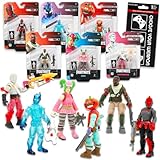
- Fortnite Action Figures Legendary Series Set for Kids - Bundle of 6 Figurines of Red Knight, Zero, and More, Plus Stickers | Fortnite Figures for Boys, Girls, Styles May Vary.
- This Fortnite set includes 6 figurines from the popular video game, Fortnite. Charactes can include Red Knight, Zero, Tomatohead, Love Ranger, and more.
- These Fortnite Legendary Series figures will be great for boys and girls! Perfect for fans and collectors, watch as you assemble your squad with these memorable characters.
- Great for play & display, imaginative storytelling, showcasing, and more. This action figure set is great as party favors, party supplies, goodie bag fillers, loot bag stuffers, and more. Each action figure is 2.5 inches tall.
- Officially licensed Fortnite action figure pack for boys and girls, ages 8 and up. Set also includes a Choose Your Weapon decal sticker.
Product prices and availability are accurate as of the date/time indicated and are subject to change. Any price and availability information displayed on Amazon at the time of purchase will apply.




