Juno is most effective when you balance three jobs: keep allies in reach of your healing, pressure enemies when there is a safe opening, and use your mobility and team abilities to support where your team is going next. Her kit rewards attention to the fight’s direction—not just quick use of every cooldown.
How to balance healing and damage
Juno’s Mediblaster heals allies and damages enemies with burst fire, so you can support teammates and contribute pressure without switching weapons. Check who needs help first; when the team is stable, look for a safe opportunity to fire at an enemy. The right priority changes with the fight—there is no universal rule that damage or healing should always come first. Blizzard’s Juno hero page describes the weapon’s two functions.
When to use Pulsar Torpedoes
Pulsar Torpedoes require you to lock on before firing homing projectiles. They heal allies over time and damage enemies, so take a brief look for useful targets before committing: allies who need support and enemies you can safely target are both candidates. Do not wait so long for a perfect lock that the opportunity passes. Blizzard documents the lock-on and projectile effects, but does not prescribe a universal target priority or firing window. See the official ability description.
Use mobility to reposition, not to linger in danger
Martian Overboots let Juno double-jump and hover while airborne. Glide Boost gives her a faster horizontal glide. Use these tools to change angles, reach a useful position, or leave a threatened one. Before moving, consider where your cover and route back to teammates will be; being airborne or moving quickly is not itself protection. These positioning suggestions follow from the abilities’ movement effects, not from a documented defensive effect. Blizzard’s hero page lists both movement abilities.
#1 Best Overall

- Firefly Wireless Control for Switch: Built as a FUNLAB switch 2 controller with a switch pro controller style grip, this wireless switch remote keeps everyday play comfortable while adding Hall Effect sticks and a cleaner Firefly look
- Hidden Glow RGB, Clean When Off: The black shell of the switch turbo controller looks low-profile until powered on, then the wave pattern lights up with RGB LED glow and adjustable lighting modes for a subtle or brighter gaming setup
- Hall Effect Sticks for Smoother Aiming: Magnetic Hall Effect joysticks give the controller a drift-resistant feel for camera turns, racing lines, FPS games, shooting games and platformers
- Wake-Up, USB-C Charging and Daily Play: After first pairing, just press HOME of this switch pro controller for one-key wake-up and quick reconnect. The USB-C rechargeable battery setup fits travel, docked mode and handheld-style sessions
- More Controls for Shared Play: This switch wireless controller features with turbo, customizable macro back buttons, mappable back paddles, NFC, vibration and 6-axis gyro motion control support multiplayer, party games, family gaming and competitive play
Put Hyper Ring on a route allies can use
Hyper Ring increases the movement speed of allies who pass through it. Place it where teammates are likely to cross, and consider what that movement is for: starting an engagement, rotating to another position, or disengaging. A ring that allies cannot reach—or that points away from their intended route—may not help the team. The placement advice is a practical application of the documented effect; Blizzard does not specify one best location or timing. Read the Hyper Ring description.
Send Orbital Ray along the fight’s path
Orbital Ray travels forward, healing allies and increasing their damage. Its direction matters: aim it along a path where your team can keep fighting while benefiting from it. It can support a push, but the official description does not establish a single best direction, trigger point, or fight state. Judge the line by where your allies are moving and where the fight is likely to continue. Blizzard’s hero page describes Orbital Ray’s effects.
Rank #2
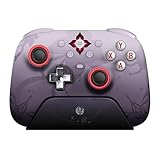
- Officially licensed by Honkai: Star Rail
- Compatible with Windows PC, Apple, Steam, and Android devices – 2.4G and wired connection for Windows, and Bluetooth for SteamOS, Apple and Android.
- TMR Joysticks - Delivers higher sensitivity, precision, and durability, featuring an RGB Fire Ring and wear-resistant joystick rings.
- Integrated charging dock keeps your controller always charged and ready, with auto-reconnection. Features customizable 6-Axis motion control, turbo, and rumble. Supports 8BitDo Ultimate Software V2.
- 1000Hz polling rate (for 2.4G and wired connection) & 8Speed Wireless Technology.
Make Juno’s abilities work together
Juno combines direct healing, damage, mobility, team movement speed, and an ultimate that supports allies while they deal more damage. Think about the team’s next move: keep a safe angle that lets you support nearby allies, use movement to adjust that angle, and choose team utility that matches the route or fight you are supporting. These are tactical applications of the documented kit, not claims of a fixed rotation or optimal timing.
Independent reader supportYour contribution helps us test, update, and keep practical guides available for everyone.How much should map and composition advice matter?
Blizzard’s Season 12 Director’s Take, published in 2024, described Juno as successful in most modes at that time and particularly effective on Payload and Hybrid maps including Circuit Royal, King’s Row, and Blizzard World. It also noted anticipated pairings with Ana or Brigitte based on OWCS Korea trends. Treat those comments as historical launch-era context, not a 2026 map ranking or current composition prescription. Read Blizzard’s Season 12 commentary.
Rank #3

- Concealed Lighting and Multi-functional Dock: Both the switch wireless controller and charging dock feature a hidden lighting design with 60 LED lights, offering 7 colors and 3 lighting modes for you to customize, creating a personalized gaming atmosphere
- Multi-functional Dock: The multi-function charging dock not only synchronizes perfectly with the controller's lighting, but also charges the wireless switch 2 controller when it is placed in the dock, enhancing convenience and overall gaming experience
- Hall Effect Joystick: The pro controller switch featuring Hall effect sensors for precise and sensitive control, which ensures accurate and smooth gameplay, especially in competitive games. It also offers a longer lifespan and stable performance with no mechanical wear
- Versatile Features: The switch turbo controller with charging dock includes vibration adjustment, macro settings and Turbo function. You can set up complex game actions according to your preferences, makes complex in-game actions mucheasier
- Convenient App-link: The switch oled controller can be connected via app to perform various operations such as remapping function, joystick adjustment, motor control, customizing lighting effects and adjusting the wireless controller's auto shutdown time
Juno’s abilities and tuning can change. For current changes, check Blizzard’s Overwatch patch notes alongside the live hero page; a patch-note archive or isolated bug-fix entry should not be treated as a complete balance assessment.
Quick Recap
Best Value
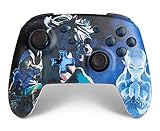
- Works with Nintendo Switch 2. C button not available
- Wireless controller with Bluetooth 5.0 technology
- Rechargeable lithium-ion battery: Up to 30 hours per charge
- Two mappable Advanced Gaming Buttons
- Embedded anti-friction rings for smooth thumbstick control
Rank #4
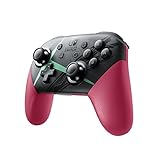
- Kick your game sessions up a notch with the Nintendo Switch Pro Controller featuring a special Xenoblade Chronicles 2 theme
- Also includes charging cable (USB-C to USB-A)
- Amiibo sold separately
Product prices and availability are accurate as of the date/time indicated and are subject to change. Any price and availability information displayed on Amazon at the time of purchase will apply.




