What’s actually slowing this PC down?
Pick the symptom - the matching free tool is one click away.
There is no proven universal “best” mouse for Diablo IV. The right choice is the one that feels comfortable and gives you reachable controls for the way you play. Diablo IV lets you remap keyboard-and-mouse inputs, so a standard configurable gaming mouse can be enough; a 12-button MMO mouse is an optional way to put more commands under your thumb, not a requirement.
What matters most for Diablo IV
Blizzard says keyboard-and-mouse inputs can be remapped to suit players’ preferences and capabilities in its accessibility overview. That flexibility means you can choose a mouse around comfort and useful button placement rather than chasing a particular button count. The game’s development team has also described preserving familiar keyboard-and-mouse conventions while adding controller-friendly shortcuts or alternate flows (development update).
- Comfort and reach: Make sure the mouse’s size, shape, and weight suit your hand and grip. Extra buttons do not help if reaching them is awkward.
- Useful controls: Decide how many commands you actually want to bind to the mouse. A few accessible programmable buttons may be simpler than a full thumb grid.
- Connection: Wired mice are straightforward to connect and avoid charging, but the cable can get in the way. Wireless mice remove that cable, while requiring charging or battery replacement.
- Software: Check that the mouse’s current software supports the button assignments and game-specific profiles you want.
A higher DPI headline alone does not establish that a mouse is a better fit for Diablo IV. Likewise, the sources available do not establish a controlled, Diablo IV-specific performance advantage for any model.
Mouse styles to consider
| Style or example | Why it may suit you | Trade-off to consider |
|---|---|---|
| Configurable general-purpose mouse, such as Logitech G502 X Plus | Logitech presents it as an MMO/MOBA-oriented option with programmable controls and game profiles in its gaming mouse guide. | The guide gives differing button counts in separate passages, so confirm the current official specification rather than relying on a precise count. It is not a proven Diablo IV winner. |
| MMO mouse with a thumb grid, such as Corsair Scimitar Elite Wireless SE | PC Gamer reports 16 programmable controls, including a movable 12-button thumb panel, and game-specific layouts via iCUE (review). | The same review lists a weight of 161 g and notes that the layout takes some getting used to. That weight applies to this model, not MMO mice generally. |
| MMO mouse with a 12-button grid, such as SteelSeries Aerox 9 Wireless | Tom’s Hardware includes it among popular MMO mice and describes its 12-button grid (MMO mouse guide). | Verify the current revision, specifications, price, and availability before buying. |
How to choose your button layout
- Start with the game’s bindings. In Diablo IV, open the controls or key-bindings settings and review the commands you want to change. Blizzard confirms that keyboard-and-mouse inputs can be remapped, but the exact menu labels can vary by game version and platform.
- Choose only the commands you want at hand. If a few frequent actions are enough, look for comfortable, reachable side buttons. If you want a larger number of commands under your thumb, consider an MMO grid.
- Assign and save a layout in the mouse software. Logitech describes game profiles in G HUB; PC Gamer describes game-specific iCUE layouts for the Scimitar. Confirm the current software supports the profile behavior you need.
- Try the layout before committing to it. Check that you can find each assigned button without shifting your grip. If the grid slows you down or is uncomfortable, use fewer bindings or choose a simpler mouse.
Should you buy a mouse with four skill buttons?
Four extra buttons can be a useful preference, but they are not established as necessary for Diablo IV. A player on the Diablo IV subreddit asked for a wired mouse with four skill buttons for the game’s four skill slots (discussion). That question illustrates one player’s way of framing the choice; it does not demonstrate that four extra mouse buttons are required or that the preference is universal.
Do these 3 things before closing this tab:
1Scan for outdated or missing drivers - takes under a minute2Repair Windows errors before they cause bigger problems3Fix the driver behind crashes, sound loss and screen glitches#1 Best Overall

- Pentakill, 5 DPI Levels - Geared with 5 redefinable DPI levels (default as: 500/1000/2000/3000/4000), easy to switch between different game needs. Dedicated demand of DPI options between 500-8000 is also available to be processed by software.
- Any Button is Reassignable - 11 programmable buttons are all editable with customizable tactical keybinds in whatever game or work you are engaging. 1 rapid fire + 2 side macro buttons offer you a better gaming and working experience.
- Comfort Grip with Details - The skin-friendly frosted coating is the main comfort grip of the mouse surface, which offers you the most enjoyable fingerprint-free tactility. The left side equipped with rubber texture strengthened the friction and made the mouse easier to control.
- 5 Decent Backlit Modes - Turn the backlit on and make some kills in your gaming battlefield. The hyped dynamic RGB backlit vibe will never let you down when decorating your gaming space, it would be better with other Redragon accessories with lights on.
- Fatigue Killer with Ergonomic Design - Solid frame with a streamlined and general claw-grip design offers a satisfying and comfortable gaming experience with less fatigue even though after hours of use.
If that arrangement matches your own bindings, prioritize a wired model whose side buttons you can reach comfortably. If not, remap controls to suit your preferred layout rather than buying a mouse for a button count you may not use.
Independent reader supportYour contribution helps us test, update, and keep practical guides available for everyone.Check current specifications and listings
Prices and availability change, and older reviews may describe a previous product revision. Before purchasing, check the manufacturer’s current specification page and current retailer listings for the exact model, weight, connectivity, software support, and included controls. The model examples above illustrate different layouts and trade-offs; none has been shown by the cited sources to perform best in a controlled Diablo IV comparison.
Quick Recap
Best Value
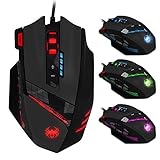
- Smooth TEFLON feet pads and contoured body for ultimate gaming control. High-end features including: 12 buttons, pulsing light in 6 color modes, and 12 MMO programmable side buttons.
- Support 4 level DPI: Support 1000-1500-2000-4000 4 levels DPI switch, you can choose the DPI level as you please, support double-speed adjustment,the highest mouse movement speed up to 8000DPI.
- Quick thumb function: Original with 6 number keys on the left side, can be self programmed to any other functional keys to provide you a convenient thumb operate experience. Ergonomic design, internally and externally, to create the ultimate game concept.
- Fire Key: triple click botton on the right,more convenient for you to get a triple click, help you to get a fast speed than other players in the game.Built-in 8 weights, can be adjusted according to your habit.
- LED Light Mode Flash: 7- color cycle breathing effect, provide cool appreance. High-end 6ft braided-fiber cable with gold-plated USB connector for greatest durability and signal accuracy.
Rank #4

- 17 Fully Programmable Buttons: Built with Ideal for performing frequent actions and executing complex macros in MMOs and MOBAs.
- Patented Key Slider Control System: Reposition the 12 side buttons to comfortably fit your grip.
- Native 18,000 DPI Optical Sensor: Equipped with a custom PixArt PMW3391 sensor, adjustable in 1 DPI resolution steps, for highly accurate and customizable tracking.
- Ultra-Durable Construction: The SCIMITAR RGB ELITE’s 50 million click-rated Omron switches, sturdy scroll wheel, and braided cable ensure that it stands up to the wear-and-tear of extended gaming.
- Comfortable Contoured Shape: Sculpted to fit the contours of your palm, regardless of hand size or grip style, with a right-side finger rest for added support.
Rank #3
![Redragon M602 Gaming Mouse, Ergonomic RGB Gaming Mouse Wired with 7200 Adjustable DPI, 9 Programmable Buttons, Professional Software for Gamer Office [Black]](https://m.media-amazon.com/images/I/4189L2UBl9L._SL160_.jpg)
- 【Classics Last Longer】Redragon Gaming Mouse - M602 was launched in 2015, It is Professional and Durable with a positive sharing of 96.8%, a quality product with historical verification.
- 【Fast & Sensitive】UP 7200 Adjustable DPI can be fit for different uses, and the high-precision sensor ensures the wired mouse movement and tracking are consistent. Responsive, and Stable for your gaming or working.
- 【Real Comfort Ergonomic】This mouse is designed with an ergonomic shape that can fit for hand size and is designed with dedicated positions for fingers, allowing you to get a comfortable experience in any grip.
- 【Programmable and Macro Edit】You can edit the light, remap the button function, adjust the speed, or input the macro edit to the pc gaming mouse by the software. DIY your mouse for different uses. (TIPS: software download on redragon.com)
- 【RGB Gaming Mouse】Truly RGB backlit 7 RGB Modes and Effects, can be a single color, RGB, or off. You can switch the light mode by clicking the button or editing the software. (TIPS: software download on redragon.com) Redragon Mouse Gaming supports PC, Windows, Laptop, Mac, etc.
Rank #2

- Professional Gaming Mouse - Redragon M908 optical gaming mouse is designed with up to 12400 DPI, 5 adjustable DPI levels (500/1000/2000/3000/6200 DPI) meet your multiple needs, either for daily work or gaming. DPI can be adjusted freely by ±100 from 200 to 12400 via software. 1000 Hz polling rate, 30G acceleration and high-precision Pixart PAW3327 Sensor giving you a greater edge over your competition.
- RGB Backlight & Programmable Buttons - 16.8 million RGB LED color options (LED Backlight can be disabled). 18 programmable buttons, 5 memory profiles each with a dedicated light color for quick identification. Comes with 8-piece weight tuning set (2.4g x8), easy to change the weight to suit your games.
- Comfort & Precision At Your Hands - Redragon M908 gaming mouse is an essential computer accessory for die-hard with its aggressive design for hands! You will be amazed by the unmatched comfort, lethal accuracy and killer precision of our durable, desktop and laptop pro gaming mouse!
- High-end Design - Redragon M908 Mouse features 6 buttons and 12 MMO programmable side buttons. Durable smooth TEFLON feet pads for ultimate gaming control. 6ft braided-fiber cable with gold-plated USB connector ensures greater durability.
- Die-hard Players Choice - Whether you are targeting, aiming, slashing or attacking, a professional gaming mouse is your basic weapon! The mouse will be your ideal partner. Compatible with Windows 2000/ME/XP/03/VISTA/7/8/10 system for programmable using and Mac OS for normal using.
Product prices and availability are accurate as of the date/time indicated and are subject to change. Any price and availability information displayed on Amazon at the time of purchase will apply.




