What’s actually slowing this PC down?
Pick the symptom - the matching free tool is one click away.
For Android families, the NeOn Games for Kids app is a documented place to find ten named offline games, including Tic Tac Toe, Flip & Match and Coloring Pad. Its developer says the app is free during open testing and ad-free; check its current Google Play listing for availability and terms in your country. Other options include a BBC CBeebies app with downloadable offline games, but several alternatives have paid tiers or subscriptions rather than being wholly free.
Ten offline games in NeOn Games for Kids
NeOn’s Google Play listing names the following games and describes the app as offline and ad-free. The developer says the Android app is free during its open test. These are brief descriptions based on the listing, not independent reviews.
- Tic Tac Toe: a familiar two-player game.
- Dots and Boxes: turn-taking and spatial planning.
- Flip & Match: memory and matching.
- Color Echo: a sequence and memory game.
- Critter Tap: quick-action play.
- Bubble Burst: quick-action play.
- Coloring Pad: open-ended drawing.
- Beam Bridge: a bridge-building challenge.
- Dice Sums: a number-focused game.
- Star Hopper: a space and physics challenge.
The developer’s site gives age guidance ranging from 3+ to 6+ across its library, but does not establish a recommended age for each named game. Google Play labels the app “Everyone”; that store rating is not the same as individualized age guidance. Check the live listing and see how a child responds before deciding whether a particular game suits them. The publisher site and store listing differ on the library’s size and contents, so an exact catalogue total is not established. Google Play listing · NeOn Games for Kids.
Other documented offline options
| App | Offline access | Cost qualification | Platform or age information |
|---|---|---|---|
| CBeebies Playtime Island | Google Play says downloaded games can be played offline. | Described as free. | Google Play lists more than 40 games associated with properties including Hey Duggee, Bing, Peter Rabbit and Octonauts. The listing reports an update on August 28, 2026, and says anonymous performance statistics are used internally with an opt-out. |
| Plippo Games | Apple’s listing says its games work in Airplane Mode. | Free content is available; a one-time paid Kids Pass adds games, so not all content is free. | iOS listing; individual age guidance is not stated in the cited listing. |
| GameForKidz | The official site describes its games as offline. | The site says one optional $9.99 payment unlocks everything; this is not a fully free catalogue. | Official site describes 97 games for ages 3–12. |
| Pok Pok | Google Play describes offline play. | Free trial followed by an automatically renewing subscription. | Google Play describes it for ages 2–8. |
Sources: CBeebies Playtime Island on Google Play, Plippo Games on the App Store, GameForKidz, and Pok Pok on Google Play. Store availability, prices, payment terms and app features can vary by country and change; confirm them in the relevant live listing.
Do these 3 things before closing this tab:
1Scan for outdated or missing drivers - takes under a minute2Repair Windows errors before they cause bigger problems3Fix the driver behind crashes, sound loss and screen glitches#1 Best Overall

- Screen-Free Entertainment for All Ages: Boppo is a handheld, screen-free educational tablet that features games, stories, music, and sensory play. It uses tactile mechanical buttons and audio interaction for hands-on play, with ten light-up buttons and a high-quality speaker that make it easy to use at any age. Designed for the whole family, it gives parents peace of mind with safe, screen-free entertainment you can enjoy together.
- One Boppo, Endless Fun: Boppo features a growing library of 40+ screen-free games, songs, stories, and activities that families can enjoy forever with no subscriptions required. We periodically add new, free content to the device, ensuring the adventure stays fresh as your child grows. Buy once and play forever with learning games, music-making, and calming audio experiences ready for screen-free play right out of the box.
- The Ultimate Handheld Travel Game: This is the perfect portable gaming system for long-haul flights, road trips, and boring waiting rooms. It features 32GB of internal storage and a high-capacity rechargeable battery in a portable design. Boppo works offline with no hotspot or WiFi needed so the fun never stops when you leave the house. Optional WiFi access is only needed for podcast streaming, over-the-air updates, or communicating with the phone app.
- An Educational Game System for Kids: Boppo entertains while teaching new topics and important skills, such as problem-solving and cause-and-effect. Whether you are trying to cut down on screen time, engage a young mind, or learn something new, this Boppo has something for everyone. It is a thoughtfully designed learning tablet for kids that turns curiosity into play.
- Pop a Toppo on Your Boppo: Boppo grows with your child through our unique Toppo expansion system. Our interchangeable “Toppo” faceplates pop onto the kids game console to experience entirely new themed worlds. Explore the mysteries of the solar system, discover life on the farm, or conduct a musical symphony. It’s a versatile system that grows alongside your curiosity and skill level, ensuring the fun never becomes obsolete.
How to choose an offline game for your child
“Offline” can mean different things: an app may work without a connection from the start, or it may require you to download games first. Before relying on an app during travel or without Wi-Fi, check which applies and download any required content while connected.
Quick Recap
Best Value

- 10 New Activities to Expand Your Screen-Free Experience: The Toppo is the expansion system for the Boppo handheld learning tablet, the screen free educational tablet known for tactile buttons and high-quality audio. Each Toppo is interchangeable and physically pops onto your existing Boppo device to instantly experience 10 new fun, themed screen-free games, stories, and sensory play.
- Explore the Solar System: Launch into a cosmic adventure by popping this Toppo onto your game system. Designed for budding astronauts ages 1–8, this expansion features 10 specialized activities focused on planetary discovery and space exploration. Kids can sing, play, and learn about the stars through immersive storytelling and tactile games.
- Seamless Top-and-Play Technology: Boppo automatically recognizes when a Toppo is added, instantly opening up a new world of handheld kids games, stories, songs, facts and activities. This smart screen-free tablet is designed for effortless transitions; the moment a Toppo is removed, the system seamlessly returns to its original home menu. There are no complicated settings or streaming required, just pop a Toppo on your Boppo to start a new adventure and pull it off to return home.
- Boppo Grows With Your Child: The Toppo expansion system ensures your screen-free tablet for kids remains a favorite for years to come. By swapping your Toppo, you can instantly update the themes and challenges to match your child’s evolving interests and developmental milestones. This modular design transforms your handheld system into a long-term companion, providing fresh activities and new worlds to explore as they grow.
- One Boppo, Endless Fun: We believe in play that lasts without the clutter of subscriptions. Each Toppo is a one-time addition to your Boppo, giving your family permanent access to every new story and game. By choosing physical expansion, you are building a tangible library of discovery that works 100% offline. It’s a straightforward way to keep the adventure going with no hidden fees, just more room for their imagination to grow.
Rank #4

- 10 New Activities to Expand Your Screen-Free Experience: The Toppo is the expansion system for the Boppo handheld learning tablet, the screen free educational tablet known for tactile buttons and high-quality audio. Each Toppo is interchangeable and physically pops onto your existing Boppo device to instantly experience 10 new fun, themed screen-free games, stories, and sensory play.
- Step Into Life on the Farm: Transform your game system into an immersive adventure with the Farm Animals Toppo. This expansion features 10 specialized activities where kids explore animal care and rural life through interactive storytelling and tactile games. Designed for ages 1–6, it encourages independent discovery and shared learning.
- Seamless Top-and-Play Technology: Boppo automatically recognizes when a Toppo is added, instantly opening up a new world of handheld kids games, stories, songs, facts and activities. This smart screen-free tablet is designed for effortless transitions; the moment a Toppo is removed, the system seamlessly returns to its original home menu. There are no complicated settings or streaming required, just pop a Toppo on your Boppo to start a new adventure and pull it off to return home.
- Boppo Grows With Your Child: The Toppo expansion system ensures your screen-free tablet for kids remains a favorite for years to come. By swapping your Toppo, you can instantly update the themes and challenges to match your child’s evolving interests and developmental milestones. This modular design transforms your handheld system into a long-term companion, providing fresh activities and new worlds to explore as they grow.
- One Boppo, Endless Fun: We believe in play that lasts without the clutter of subscriptions. Each Toppo is a one-time addition to your Boppo, giving your family permanent access to every new story and game. By choosing physical expansion, you are building a tangible library of discovery that works 100% offline. It’s a straightforward way to keep the adventure going with no hidden fees, just more room for their imagination to grow.
Rank #3

- Memory Enhancement: Improve cognitive function and mental sharpness through engaging brain training activities
- Offline Gaming Experience: Access over 100 pre-loaded games and books without internet connection requirement
- Dual Mode Setup: Switch between super-organized mode and super-simple mode to accommodate different user preferences
- Hardware Specifications: Features 2GB RAM, 32GB storage expandable to 64GB, and 10-inch capacitive touch screen
- Comprehensive Package: Includes tablet, charger, headphones, USB adapter, protective sleeve, stylus pen, and tablet stand
Rank #2
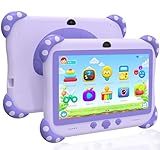
- 【Powerful Kids Tablet Performance & Kid-Friendly Android System】The YINOCHE Y8 7'' kids tablet is engineered for tomorrow's learners with a blazing-fast Quad-Core processor HD IPS touch screen and Android delivering 4x smoother performance than standard tablets for kids. With 2GB RAM + 32GB storage (expandable to 512GB), this tablet for kids 3-7 effortlessly handles multiple educational apps, and interactive e-books effortlessly. Our Smart Learning optimizer automatically adjusts performance for different activities. Unlike ordinary electronics tablets, our toddler tablet features dual cooling vents to prevent overheating. Perfect for home school projects, video calls or virtual classrooms
- 【Eye-Safe 7" HD Display Tablet Kids with Advanced Protection】Designed by pediatric optometrists, our 7 inch tablet for kids 3-7 features 1024×600 IPS anti-blue light screen with auto-brightness adjustment, which reducing eye strain by 42% compared to regular tablets for toddlers.The wide viewing angle ensures clear visibility during group learning, The tablet for kids 2-5 love features vivid colors for interactive storybooks and a special "Outdoor Mode" that the tablet screen bright is enough for outdoor use
- 【Enjoy More Outdoor Fun with offline Apps】The YINOCHE toddler tablet comes pre-installed with Yubabe, offering thousands of free educational apps that work offline, with no Wi-Fi required Kids Ipad,Your child will love Montessori games, brain training puzzles, creative painting, fun kids' games, and offline kids' TV shows. Want even more learning? Easily download top-rated apps like YouTube Kids, ABCmouse, Khan Academy Kids, and Netflix from the Google Play Store!
- 【Parent-Controlled Kids Tablet, Safe and Customizable】The YINOCHE tablets for kids puts you in control with its advanced Parental Controls Mode, so your child enjoys a safe, kid-friendly digital experience. Powerful Parental Controls Include: Create Separate Profiles – Perfect for families with multiple kids, Block Apps & Content – Filter websites contents, videos, and apps for age-appropriate learning, you can monitor what's your kid doing. Set Screen Time Limits – Prevent overuse and encourage healthy habits, Kid-Safe Browser – Blocks inappropriate content automatically. All the controls give your child a fun educational tablet while keeping them safe online with the Y8 Kids Tablet!
- 【Ultra-Durable 7-inch Tablet for Kids with Shockproof Case】The YINOCHE Children's Tablet features a military-grade drop-resistant case that protects against drops and spill bumps, and rough handling which is specially designed for little hands, With Adjustable Stand on the tablet back which is Perfect for hands-free learning, watching, and playing at any angle, and Easy-Grip design makes it lightweight and comfortable for small hands to hold, Give your child a fun, safe tablet for toddlers 3-5 experience with the most durable kids tablets in YINOCHE store
- Check what “free” covers: distinguish a free app or tier from a one-time unlock, trial or recurring subscription. Review in-app purchase terms before handing over the device.
- Use age labels as a starting point: a store rating and a publisher’s age guidance are different signals, and neither guarantees a fit for an individual child. Review the game’s content and play alongside the child if you are unsure.
- Confirm platform and country: the options above are documented on Android, iOS or a publisher website; availability and open-test access may not be the same everywhere.
- Review ads, data and controls: rely on current store disclosures rather than assuming an app collects no data or has no advertising. For example, CBeebies Playtime Island’s listing describes anonymous performance statistics and an opt-out.
- Match play style to the occasion: consider whether your child wants a solo puzzle, a shared turn-taking game, creative play or a quick-action challenge.
Product prices and availability are accurate as of the date/time indicated and are subject to change. Any price and availability information displayed on Amazon at the time of purchase will apply.
Independent reader supportYour contribution helps us test, update, and keep practical guides available for everyone.



