If your Total War: WARHAMMER DLC is missing, first check which game you launched and which Steam or Epic account owns the content. For Immortal Empires, launch Total War: WARHAMMER III—the mode is not available from WARHAMMER I or II. If the right content is still unavailable, confirm its ownership and status on the account that bought it, then contact Creative Assembly support if it remains inaccessible.
First identify what is missing
“DLC missing” can mean the add-on is absent from your library, it is listed as owned but not installed or enabled, or an in-game campaign, character, or feature remains locked. Those are different situations. Note the exact DLC name and the game in which you expect to use it before changing anything.
Trying to play Immortal Empires? Launch WARHAMMER III
Immortal Empires is accessed through Total War: WARHAMMER III, not as a mode inside WARHAMMER I or II. Creative Assembly’s Immortal Empires FAQ says to launch WARHAMMER III from your Steam or Epic Games library.
Creative Assembly also says that trilogy DLC can be used in Immortal Empires. For example, owning WARHAMMER I and DLC for WARHAMMER II or III can let you use the relevant content in Immortal Empires. That does not mean every DLC unlocks every campaign or feature in WARHAMMER III.
#1 Best Overall

- Epic cooperative campaign board game for 1–4 players set in the dark fantasy world of Warhammer
- Includes 49 push-fit miniatures, featuring 7 heroes, 4 villains, 33 enemies, plus companions and tokens
- Fast setup with lay-flat hardback map book, allowing games to start in as little as five minutes
- Highly replayable gameplay with 341 cards, randomized quests, evolving hero progression, and dynamic enemy actions
- Complete all-in-one box, including 14 dice, 61 tokens and markers, rulebook, and quick start guide
Check what your WARHAMMER ownership includes
Do not confuse access to Immortal Empires with access to every WARHAMMER III campaign or feature. Creative Assembly says owners of WARHAMMER I or II can access Immortal Empires and The Lost God prologue through WARHAMMER III. Its FAQ says the WARHAMMER III Upgrade Pack is needed for certain other WARHAMMER III content, including the Realms of Chaos campaign and specified Legendary Lords or features. Check the exact content you expect against the FAQ’s access details before treating it as missing DLC.
On Steam, verify the account and DLC listing
- Check the account. Make sure you are signed into the Steam account that acquired the DLC. A listing or purchase on a different account will not establish ownership on the account currently running the game.
- Open the relevant game in your Steam Library. View its DLC list or management page and confirm that the specific add-on is listed as owned and enabled. Steam explains how to view and manage DLC from the library in its DLC support guide. Interface wording may change.
- Check the game you expect to use it in. Trilogy DLC may be relevant to Immortal Empires in WARHAMMER III, but that does not make it content for every other campaign or feature. Match the DLC to the intended game mode.
Ownership and installation are separate checks. A DLC entry showing ownership is useful evidence, but it does not guarantee that the game has successfully registered the entitlement.
Rank #2
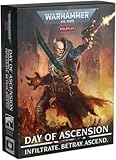
- Official Warhammer 40,000 Social Deduction Experience – Immerse yourself in the grim darkness of the 41st Millennium with an original infiltration and betrayal game set in the Imperium’s shadowy underbelly.
- Fast-Paced, High-Player Gameplay - Designed for 5-12 players, perfect for game nights, conventions or large group sessions where tension and paranoia thrive.
- Deception and Deduction at Its Core - Root out the Genestealer cultists hiding among your allies or deceive your way to victory as one of them.
- Fully Illustrated Deck - Features 56 detailed cards that bring the universe’s paranoia, faith, and corruption vividly to life.
- Dynamic Role System for Endless Replayability - Mix and match unique Roles like the Astropath or Magos Biologis to alter how each session plays out - no two games are ever the same.
If it is owned and enabled but still unavailable
Some players have reported that DLC appears owned and installed on Steam but remains inaccessible in game. A Creative Assembly community report documents that symptom, and a developer directed the player to customer support. An individual report does not establish the cause, prevalence, or a universal fix.
Contact Creative Assembly through its Bug Reporting Forum or current customer-support channel if the correct account owns and enables the DLC but it remains unavailable. Include the platform, game and version, exact DLC name, what you expected to appear, what you see instead, and the steps you have already tried. This helps support distinguish an ownership issue from a game-mode or installation problem.
Free tools Windows power users keep installed
One-click scans. No signup required.
Rank #3
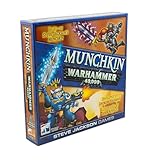
- Enter the grim but silly Warhammer 40,000 universe with a standalone Munchkin card game where 3-6 players loot, level up, and laugh while battling monsters, grabbing gear, and racing to be the first to reach the top level.
- Choose from iconic factions like Ultramarines, Orks, Necrons, and more, each packed with tongue-in-cheek references that Warhammer fans will recognize while Munchkin fans enjoy new ways to break the rules and backstab friends.
- Build outrageous combos with armor, weapons, and abilities, then kick down doors to fight enemies including Mortarion and the Sloppity Bilepiper, turning every encounter into a chaotic mix of strategy, luck, and bad puns.
- Designed for 3-6 players ages 12 and up with a 1-2 hour playtime, this card game fits game night groups that enjoy tactical choices, take-that moments, and plenty of table talk as alliances shift from turn to turn.
- Features classic John Kovalic art, trademark Munchkin humor, and easy-to-learn rules, making this Warhammer crossover a playful way to introduce new gamers to Munchkin or add a fresh twist for long-time fans of the series.
Do not assume that reinstalling the game or validating files will repair an entitlement problem; the available reports do not establish those actions as reliable fixes. If you have confirmed you do not own the specific DLC, troubleshooting cannot grant it.
Quick Recap
Best Value

- Brand: Games workshop
- Material: Paper
- Age range description: All
Rank #4

- Warhammer 40,000
Product prices and availability are accurate as of the date/time indicated and are subject to change. Any price and availability information displayed on Amazon at the time of purchase will apply.



