The Tool Desk
Outbyte Driver Updater FREEFix the driver behind crashes, sound loss and screen glitchesFind Drivers →Outbyte PC Repair FREERepair Windows errors before they cause bigger problemsFix Now →RetroArch can play games from many classic consoles, including the NES, SNES, Game Boy, Genesis, Nintendo 64, PlayStation, PlayStation 2, and Sega Saturn—but only when a compatible core is available for your RetroArch build and host device. “On RetroArch” can also mean the device that runs the app, so it helps to separate the host platform from the console being emulated.
How RetroArch plays console games
RetroArch is a frontend, not a single emulator. It uses cores, which provide emulators or other applications. As the Libretro installation guide puts it, “RetroArch requires cores to run any content.” The official core catalog includes cores for many consoles, as well as arcade systems, computers, game engines, and media applications.
A system appearing in the catalog does not mean every game for it will work, or that its core is available in every RetroArch build. Compatibility and performance depend on the core, the content, the host device, and the software version.
Which consoles can RetroArch emulate?
The official core catalog includes systems such as these. This is a representative selection, not a promise that every core is available on every device or build.
What’s actually slowing this PC down?
Pick the symptom - the matching free tool is one click away.
#1 Best Overall

- Multiple Simulator Support: Compatible with more than 20 formats of games, supports open source RetroArch system and allows downloading games in relevant formats
- Advanced Gaming Features: Supports archiving and reading, searching for games, checking recently played games, collecting favorite games, supporting dual controllers, and wifi online battles
- High-Definition Display: Features a 5-inch IPS high-definition screen with 1280x720 high resolution, offering both full screen and original resolution display options
- Long-Lasting Battery Performance: Built-in 5000mAh Lithium battery with Type-C USB 5V/1.5A recharging capability, providing up to 5 hours of continuous battery life
- Storage and Expandability: Comes with 128GB TF card pre-installed and supports external TF card expansion up to 256GB maximum capacity
| Console family | Examples listed in the core catalog |
|---|---|
| Atari | Atari 2600 and Atari 5200 |
| Nintendo | NES, SNES, Game Boy, Game Boy Advance, Nintendo 64, and Nintendo DS |
| Sega | Genesis and Saturn |
| Sony | PlayStation and PlayStation 2 |
| NEC | PC Engine |
| SNK | Neo Geo CD and Neo Geo Pocket |
| 3DO | 3DO |
These are emulated targets: RetroArch runs on a host device, and a core represents the older console or system. The specific core documentation is the place to check supported file types, firmware requirements, and core-specific behavior.
Which devices and consoles can run RetroArch?
The host platform is the device or operating system running RetroArch. Official platform listings cover desktop operating systems, Android and iOS, Apple TV, Raspberry Pi, Steam Link, and web browsers, as well as several game consoles. Availability and installation conditions differ by platform; see the official platforms page for current listings and downloads.
Rank #2

- 【Premium Compact Design & Display 】 Crafted with a high-quality CNC Aluminum Alloy body, this handheld game console is both durable and lightweight. It features a vibrant 3.2-inch fully laminated IPS screen with a sharp 1024x768 resolution for a crisp and immersive gaming experience.NOTE:Please charge the machine for about 30 minutes before turning it on for the first time.Note: No TF card,No pre-installed games, installation required
- 【Powerful Performance for Retro Gaming 】Retro gaming console equipped with a fast 1.8GHz Allwinner A133P CPU and 1GB of RAM, the Brick Hammer smoothly emulates a wide range of classic game consoles. Enjoy your favorite retro titles with reliable performance and quick load times.
- 【Dynamic RGB Lighting & Vibration Feedback】 Enhance your gameplay with immersive features, including a customizable RGB top bar ambient light, illuminated function keys, and a single-channel vibration motor that gameboy provides tactile feedback for a more engaging experience.
- 【Long-Lasting Battery & Modern Connectivity 】Game consoles play for up to 5 hours on a single charge with the built-in 3000mAh battery. It supports convenient USB Type-C charging and offers multiple connectivity options, including WLAN for online battle support and a USB Host port for connecting external game controllers.
- 【Expandable Storage & Versatile Controls 】 With 8GB of built-in storage and support for TF cards up to 1TB, you can build an extensive game library. The handheld emulator also includes a custom FN switch and front F1/F2 hotkeys for customizable controls tailored to your gaming style.
Console ports and installation caveats
- Xbox One and Xbox Series: RetroArch’s official platform page says Developer Mode is required and that there is no official retail version. It also disclaims involvement with derivative retail builds distributed through the Microsoft Store.
- Nintendo Switch: The official platform page lists a download and installation instructions.
- PlayStation 2, PSP, PS Vita/TV, Wii, Wii U, GameCube, and 3DS/2DS: The official page lists builds but identifies them as unauthorized homebrew ports. Platform-specific installation requirements may apply.
- PlayStation 3 and PlayStation 4: The official page describes these as “Coming soon” and notes that unofficial versions are available elsewhere; it does not list them as official ports.
Builds can differ
Not every RetroArch distribution has the same core options. The official platforms page says the Steam version has no Core Updater and provides selected cores through Steam. Some package-manager installations also require users to install cores through that package manager rather than through RetroArch’s in-app downloader, according to the installation guide.
Independent reader supportYour contribution helps us test, update, and keep practical guides available for everyone.How to check whether a console will work on your setup
- Identify your host device. Choose the RetroArch build for the device or operating system you plan to use, and check its platform-specific installation conditions.
- Find a core for the console. Search the official core catalog for the system you want to play, then confirm that the core is available in your chosen build.
- Read the core’s documentation. Check its supported content formats, required firmware, and any configuration or behavior notes before loading a game.
- Consider the host’s performance. Compatibility and speed vary by core, device, and version. Libretro notes that more accurate emulation can require more processing power, so a core that runs well on one device may not perform the same way on another.
The catalog changes over time, and the official platform page reports a stable RetroArch version of 1.22.2 at the time reflected by that page; check it directly for current releases and platform availability.
Quick wins for a faster PC:
Fix the driver behind crashes, sound loss and screen glitchesFind Drivers →Clear out junk files and repair common Windows errorsFree Scan →Scan for outdated or missing drivers - takes under a minuteDriver Scan →Quick Recap
Best Value

- 【Game Console with Linux Stylem】Comes with 64G TF Card Preloaded 5570 Classic Games,Support users to download games in relevant 15 kinds of games formats.
- 【supports 5G WIFI Bluetooth 2.4G Wireless Gamepad and Wired Gamepad Connection】 HDMI and TV output function makes the small screen become big screen in seconds, and the joystick connection supports multiplayer games, so you and your friends can enjoy the game together.
- 【3200 mAh Li-polymer battery and 3.5 INCHES OCA IPS screen】you can use for 6-7 hours, support fast charging with USB Type-C cable, With 3.5-inch IPS full viewing angle, zero distance OCA full-fit screen,the screen resolution is 640*480,Sharper picture quality and more saturated colours.
- 【Chip upgrade】with quad-core ARM Cortex-A53, Quad-core PowerVR SGX544MP GPU,makes have the characteristics of low power consumption and high performance. the Ram of the is LPDDR4 1GB, the larger the RAM running memory, the faster the system response time will be.
- 【Ideal gifts】Dimensions of Handled game :12.8cm*8.1cm *2.2cm,is a good size in the hand and is suitable for carrying aroundis a great gift for boyfriend, husband, brother, son, father and friends for birthday, Father's Day, Christmas, Valentines Day, Thanksgiving Day etc. Get lots of compliments on how it’s interesting or practical.
Rank #4

- 【Dual Android 10 System with WiFi for YouTube & TikTok】 Powered by Qualcomm Gen1 quad-core CPU and Mali 450 GPU, this handheld runs full Android 10 dual system with built-in WiFi. You can freely connect network to browse YouTube, scroll TikTok besides retro gaming, integrate entertainment in one device. It supports tons of emulators and preloaded 20000+ classic games for smooth lag-free gameplay
- 【4.2 Inch OCA Full Laminated HD IPS Screen】 4.2-inch full-fit MiPi IPS display with 720*720 resolution, OCA lamination cuts screen reflection and color deviation. Equipped with RGB glowing joysticks, the eye-care panel reduces visual fatigue for long-hour gaming and video watching
- 【Expandable Large Storage Space】 Built-in 1GB RAM + 8GB EMMC memory, supports TF card expansion from 16GB to 256GB to store more games and videos. Plug-and-play design, no complicated setup to access arcade, RPG, racing and puzzle retro games anytime
- 【Pocket Portable & Long-Lasting Battery】 Compact 210g lightweight body easy to slip into pocket or bag for travel. 3500mAh lithium battery provides up to 8 hours continuous use for gaming or watching videos, full charge only takes 2 hours via Type-C port. Built-in 8W cavity speaker delivers clear audio
- 【Multi-Functional & Perfect Nostalgic Gift】 Supports local room multiplayer real-time battle, available in transparent black/red/purple shells with cool RGB joysticks. Combines retro gaming and online video playback, an ideal stress relief gift for retro game lovers, teens and adults
Rank #3
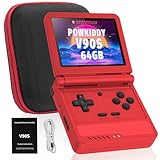
- 🎮 10,000+ Classics Preloaded Instantly play 8-bit to PSP-era gems across 20+ systems. No setup – unfold and relive childhood!
- 🔄 Fold & Go Anywhere Military-grade hinges survive 20K flips. Folds to pocket size (8.9x8.5cm) – 30% smaller than phones!
- 💾 Dual TF Slots for Upgrades Separate slots for OS (system) and games – update firmware without losing saves. Supports 512GB total!
- ⚡ Cartridge-Smooth Performance Quad-core CPU boots in 8 sec – faster than blowing NES cartridges. Zero lag on GBA classics.
- 🔓 Hack Your Childhood Install ArkOS/RetroArch for Dreamcast/PSP games. Includes USB-C cable & quick-start guide.
Product prices and availability are accurate as of the date/time indicated and are subject to change. Any price and availability information displayed on Amazon at the time of purchase will apply.



