What’s actually slowing this PC down?
Pick the symptom - the matching free tool is one click away.
The right fix depends on what “stuck” means: a quest may be waiting on a prerequisite, exploration may call for a map check, combat may require a different approach, and co-op or technical issues have their own requirements. First note your platform, game version, quest or activity, and any message on screen. Then use the matching steps below.
Start by identifying what is blocking you
Before changing settings or abandoning an activity, classify the problem. Is a quest objective unclear, are you lost while exploring, unable to win a fight, unable to enter co-op, or dealing with lag or another client issue? The distinction matters: a World Level adjustment documented for open-world exploration, for example, is not a general solution to every difficult challenge.
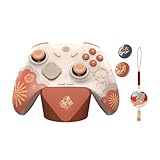

- Quest: the objective will not advance, a character or area seems unavailable, or the next step is unclear.
- Exploration: you cannot find a route, waypoint, or remaining activity in an area.
- Combat: an enemy or challenge is stopping progress.
- Co-op: you cannot join another player or start a session.
- Technical: the game is lagging, failing to download, or showing a device or connection problem.
Keep the exact on-screen wording handy. If a step below does not match the labels in your client, use the current in-game prompts and official support for your platform; Genshin Impact’s interface and requirements can change by version.
If a quest will not progress
Check the active objective and requirements
- Open the Quest menu and select the quest you are trying to advance.
- Read its current objective and any stated unlock requirements. Check whether another quest, activity, or prerequisite is still pending.
- Follow the objective shown in your current client rather than relying on an older guide whose interface or quest order may no longer match.
HoYoverse announced a Quest Overview interface and replayable cutscenes for Version Luna IV on January 13, 2026. Earlier update notes also describe special icons for certain quests that unlock systems. These are version-dependent interface details, so look for the current options and indicators in your own client rather than assuming every label is unchanged. HoYoverse’s Version Luna IV announcement and its Version 4.8 update notes describe these features.
When the quest appears bugged
If the objective is satisfied but nothing changes, make a note of the quest name, objective text, platform, game version, and what you did immediately before the problem. Check the quest menu and any current in-game prompt again, then consult HoYoverse support if the blocker persists. A broad guide cannot identify a quest-specific bug without those details.
If you are lost while exploring
Use the map to plan the next move
- Open the map and zoom out to see the surrounding area and available routes.
- Check the area’s Exploration Progress and look for reachable Waypoints that can make travel easier.
- Review the Tutorials archive for gameplay tips that have already appeared in your game.
HoYoverse’s Version 1.1 explanation says area Exploration Progress can reflect activities including opening chests, collecting Elemental Oculi, and unlocking Waypoints. That is historical documentation from November 6, 2020; current map labels and presentation may differ. Use the map and Tutorial archive as in-game aids, and confirm their current names in your client. HoYoverse’s Version 1.1 feature explanation describes the earlier system.
If combat is stopping your progress
Distinguish open-world difficulty from a specific challenge
For a difficult fight, first identify whether it is part of ordinary open-world exploration or a separate domain, boss challenge, or other activity. HoYoverse’s Version 4.8 update notes describe a World Level reduction option for players at World Levels 3–6, surfaced through a prompt after all party members are defeated during open-world exploration. The notes do not establish that this option applies in domains, every boss challenge, or at other World Levels. Check the prompt and your current World Level before relying on it. The Version 4.8 notes give the documented scope.
If that situation does not fit, use the activity’s own prompts and requirements; do not assume a setting documented for one open-world scenario will change a separate challenge.
Outdated Drivers Are Slowing You Down
One free scan finds every outdated or missing driver and matches the right update for your exact hardware.Free scan · exact hardware matchPC Slower Than It Used to Be?
A free scan shows the junk files, broken settings and background clutter dragging Windows down - then fixes them in one click.Free scan · Windows 10 & 11Rank #3

- WIDE SCREEN COMPATIBILITY — PHONE TO TABLET: X5 Lite is a versatile phone controller that stretches up to 213mm to fit iPhone 15/16, most Android phones, iPad mini 6/7, and compatible Android tablets. Secure Type-C connection keeps gameplay stable and responsive.
- MOBILE, CLOUD & REMOTE GAMING: Play supported mobile games like Zenless Zone Zero, or stream console and PC games through Xbox Game Pass, Steam Link, Moonlight, and remote play. Enjoy physical controls wherever you play.
- HALL EFFECT STICKS — PRECISE CONTROL: GameSir Hall Effect sensing sticks deliver smooth 360° control for accurate aiming, movement, and camera adjustments. Built for fast-paced mobile games and streamed console or PC titles.
- LIGHTWEIGHT & ERGONOMIC — 135.4G: At just 135.4g, X5 Lite stays lightweight during extended gaming. Ergonomic, laser-engraved textured grips provide a secure, comfortable hold at home or on the go.
- CUSHIONED MEMBRANE CONTROLS — COMFORTABLE & QUIETER: Cushioned membrane buttons and triggers provide comfortable feedback for repeated inputs while keeping operation quieter. Ideal for extended sessions or gaming in shared spaces.
If co-op is unavailable
Check the in-game co-op prompt first, especially if it names a requirement you have not met. HoYoverse’s 2020 PlayStation 4 FAQ documents these conditions for co-op: both players must be on the same server, reach Adventure Rank 16, and complete the required unlock quests. Because this is an older, platform-specific FAQ, treat it as documented guidance rather than a complete statement of current policy. If your client shows different requirements, follow its current prompt or contact support. HoYoverse’s PlayStation 4 FAQ lists the conditions.
If the game is lagging or having a technical problem
Start with reversible checks
- For lag, check current platform support guidance and try lowering graphics quality if the relevant setting is available.
- For download problems, check your connection and network settings, including VPN settings if you use a VPN.
- Before changing account, server, or saved-data settings, read the current platform instructions carefully.
These basic troubleshooting directions appear in HoYoverse’s PC FAQ dated September 25, 2020. The FAQ is historical: its PC specifications and Windows support details should not be treated as current requirements. For present-day compatibility and platform-specific steps, use current official support. If the basic checks do not resolve the issue, contact HoYoverse customer service with your platform, game version, and exact error or symptoms. HoYoverse’s PC FAQ contains the older troubleshooting advice.
Rank #4
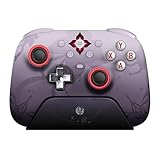
- Officially licensed by Honkai: Star Rail
- Compatible with Windows PC, Apple, Steam, and Android devices – 2.4G and wired connection for Windows, and Bluetooth for SteamOS, Apple and Android.
- TMR Joysticks - Delivers higher sensitivity, precision, and durability, featuring an RGB Fire Ring and wear-resistant joystick rings.
- Integrated charging dock keeps your controller always charged and ready, with auto-reconnection. Features customizable 6-Axis motion control, turbo, and rumble. Supports 8BitDo Ultimate Software V2.
- 1000Hz polling rate (for 2.4G and wired connection) & 8Speed Wireless Technology.
What to include when asking for help
A precise report makes it easier to distinguish a missing prerequisite from a bug or device problem. Include:
Quick Recap
Best Value

- 📱【Multi‑Device Compatibility】 Featuring a stretchable design, this mobile controller fits devices from 4.7‑9.0 inches. It works with Android phones, iPhone 15/16/17, iPad Mini 6/7, Switch and PC. Note: This product model only supports Bluetooth connection and does not have USB-C connection function.
- 🕹️【Hall joystick & dual-switch Hall triggers】Equipped with GL18 split Hall joysticks, the non-contact magnetic induction structure fundamentally eliminates joystick drift. Long press Fn+LT/RT for 2 seconds to switch trigger modes with one click, linear long-stroke mode for racing games and micro-switch short-stroke mode for competitive shooting games
- 🔋【400mAh battery】Supports up to 7-9 hours of playtime on a full charge. Adopts Bluetooth 5.0 low-latency wireless connection, no wired cable required during gaming, supports wireless gameplay during commuting, lying in bed and outdoor activities
- 🖐️【Ergonomic design】Full curved ergonomic grips with laser anti-slip texture on the back, fits the natural curve of palms, balanced weight distribution relieves hand fatigue during long gaming sessions
- 🔥【Supported Games】✅️ Native Support : Call of Duty Mobile, Minecraft, Genshin Impact, Zenless Zone Zero, Brawlhalla, Honkai series, Wuthering Waves, Neverness to Everness, Sky. ✅️ Button Mapping Required: Wild Rift, Rocket League Sideswipe, PUBG Mobile, Valorant Mobile, Delta Force, Identity V, Oddmar, Free Fire, Fortnite. Note: Key mapping is supported on Android system only.
- Your platform and the game version shown by your client.
- The quest, challenge, or activity name and the exact objective or error text.
- What you expected to happen and what happened instead.
- For co-op, the server and the requirement shown in the current prompt.
- For technical issues, when they occur and any troubleshooting steps already tried.
Product prices and availability are accurate as of the date/time indicated and are subject to change. Any price and availability information displayed on Amazon at the time of purchase will apply.



