Outdated Drivers Are Slowing You Down
One free scan finds every outdated or missing driver and matches the right update for your exact hardware.Free scan · exact hardware matchPC Slower Than It Used to Be?
A free scan shows the junk files, broken settings and background clutter dragging Windows down - then fixes them in one click.Free scan · Windows 10 & 11For a new RTX 5090 gaming PC, the AMD Ryzen 7 9850X3D is the best default choice. It is the leading gaming option in Tom’s Hardware’s RTX 5090-based CPU hierarchy, while its eight Zen 5 cores are sufficient for almost every game. Choose the Ryzen 7 9800X3D when it is substantially cheaper, the Ryzen 9 9950X3D for gaming plus serious productivity, and the Ryzen 9 9950X3D2 only if your creator or developer workloads justify its $899 premium.
The RTX 5090 does not make every expensive CPU worthwhile. At 4K, especially with demanding ray tracing, the graphics card often limits performance. CPU choice matters most for high-refresh gaming, lower resolutions, simulation-heavy games, strong 1% lows, and workloads running alongside the game.
Quick picks
| Award | CPU | Cores / threads | Best for | Main drawback | US price signal | Platform |
|---|---|---|---|---|---|---|
| Best overall gaming | AMD Ryzen 7 9850X3D | 8 / 16 | High-refresh and enthusiast gaming | Less suitable for heavy all-core work | $499 | AM5 / DDR5 |
| Best gaming value | AMD Ryzen 7 9800X3D | 8 / 16 | 4K gaming when discounted | Slightly slower than the 9850X3D | $479 signal | AM5 / DDR5 |
| Best gaming plus productivity | AMD Ryzen 9 9950X3D | 16 / 32 | Gaming, editing, rendering, compiling | Higher cost and cooling demands | $699 | AM5 / DDR5 |
| Best extreme creator option | AMD Ryzen 9 9950X3D2 Dual Edition | 16 / 32 | Developer and creator workloads | Gaming evidence and availability remain limited | $899 | AM5 / DDR5 |
| Best Intel alternative | Intel Core Ultra 9 285K | 24 hybrid cores | Intel-focused workloads or discounted prebuilts | Behind AMD X3D CPUs in current RTX 5090 gaming tests | Check current street price | LGA1851 / DDR5 |
Prices above are signals from AMD’s US store, observed in the supplied research, not guaranteed current retail prices. Several AMD listings showed out-of-stock status when crawled. Check the complete platform price before buying.
1. AMD Ryzen 7 9850X3D: best overall gaming CPU for an RTX 5090
The Ryzen 7 9850X3D is the clearest recommendation for a gaming-first RTX 5090 build. It has eight cores, 16 threads, Zen 5 architecture, 96 MB of L3 cache, a boost clock of up to 5.6 GHz, and a 120 W default TDP. AMD lists a $499 US price.
Quick wins for a faster PC:
Clear out junk files and repair common Windows errorsFree Scan →Scan for outdated or missing drivers - takes under a minuteDriver Scan →Repair Windows errors before they cause bigger problemsFix Now →#1 Best Overall

- Intel Quad-Core i5-4590 3.3GHz Processor up to 3.7GHz, 6MB SmartCache
- 16GB RAM, 4 slots, support up to 32GB;
- 1TB HDD-7200rpm; 256GB SSD to boot the processing speed
- 10 x USB ports (front: 4, rear: 6); 2 x Audio ports: 2 x PS/2; 2 x Display Port, RJ45, 1x Headphone, 1x Microphone, 1x Line In
Tom’s Hardware’s 2026 CPU hierarchy used an RTX 5090 Founders Edition for its gaming comparisons and placed the 9850X3D at the top of that gaming ranking. That makes it a more relevant recommendation than a generic CPU chart tested with a slower graphics card. The result should still be read as a benchmark-suite verdict, not a guarantee that it wins every game, resolution, or configuration.
The chip’s advantage is most visible when the processor is limiting the frame rate: 1080p or 1440p testing, 240Hz or 360Hz displays, competitive settings, simulation and strategy games, and scenarios where frame-time consistency matters. At native 4K, the RTX 5090 frequently becomes the dominant limiter, shrinking the difference between high-end CPUs.
Why eight cores are enough
Eight fast cores are generally sufficient for gaming, game launchers, voice chat, ordinary browser use, and typical background applications. More cores do not automatically produce higher gaming performance. The 9850X3D is therefore a better gaming purchase than a 16-core processor when the PC will mainly run games.
It is a weaker fit for sustained 3D rendering, large software builds, heavy video exports, CPU-based simulation, or simultaneous gaming and demanding production work. In those cases, the Ryzen 9 9950X3D is usually the more balanced choice.
Do these 3 things before closing this tab:
1Clear out junk files and repair common Windows errors2Fix the driver behind crashes, sound loss and screen glitches3Repair Windows errors before they cause bigger problems2. AMD Ryzen 7 9800X3D: best value when the discount is real
The Ryzen 7 9800X3D remains a sensible RTX 5090 pairing because it offers the same eight-core/16-thread AM5 design and a 120 W default TDP. Its listed specifications include a boost clock of up to 5.2 GHz and 104 MB of combined cache.
In Tom’s Hardware’s RTX 5090-based aggregate gaming ranking, it measured at roughly 97% of the 9850X3D’s gaming performance. That gap is small enough to disappear in many 4K GPU-limited games, particularly when the RTX 5090 is rendering demanding ray-traced scenes.
The pricing decision is straightforward:
- If the 9850X3D costs only about $20–$40 more, buy the newer, faster model.
- If the 9800X3D is discounted substantially, it can be the better value.
- If you play mostly at 4K and do not target extreme refresh rates, the small performance difference is less important.
Both chips require a discrete graphics card for serious gaming despite having basic integrated graphics. Neither includes a bundled stock cooler, so budget for an appropriate third-party cooler.
3. AMD Ryzen 9 9950X3D: best for gaming plus heavy productivity
The Ryzen 9 9950X3D is the right upgrade when the RTX 5090 is only one of the system’s demanding components. It combines 16 cores, 32 threads, a boost clock of up to 5.7 GHz, 128 MB of L3 cache, and a 170 W default TDP.
Independent testing from Tom’s Hardware and Gamers Nexus places it well ahead of Intel’s Core Ultra 9 285K in their gaming comparisons while also giving it substantially more multithreaded capacity than an eight-core gaming CPU. That makes it suitable for video editing, 3D rendering, compiling, streaming, recording, large multitasking workloads, and gaming while other CPU-heavy applications remain active.
Rank #2

- [CUSTOMlZED, Professional Upgraded to]32GB DDR4 Memory, Brand New 1TB NVMe M.2 SSD, Windows 11 Pro
- 6th Generation Intel Core i7-6700 Processor 8 MB Intel Smart Cache, Processor Base Frequency 3.40 GHz, up to 4.00 GHz, 4 Cores 8 Threads
- Intel HD Graphics 530, 2 x DisplayPort , 1 x RJ45 LAN (Gigabit Ethernet)
- WIFI & BT Adapter Package, 6 x Type-A USB 3.1, 1 x Type-c 3.1, 4 x USB 2.0
- Brand New Black Wireless Mouse & Black Wireless Keyboard English
For gaming alone, however, it is not automatically a better purchase than the 9850X3D. The extra eight cores increase the platform and cooling budget, but they may produce little visible benefit when the RTX 5090 is the limit at 4K. Buy the 9950X3D because you need its productivity performance, not merely because its model number is higher.
4. AMD Ryzen 9 9950X3D2 Dual Edition: extreme creator and developer option
The Ryzen 9 9950X3D2 Dual Edition is a newer 16-core/32-thread Zen 5 processor with dual 3D V-Cache, 192 MB of L3 cache, a 200 W default TDP, and a boost clock of up to 5.6 GHz. AMD announced it on April 22, 2026, with a $899 suggested price.
Its extra cache and flagship positioning make it interesting for development, compilation, simulation, content creation, and extreme workstation/gaming systems. AMD’s launch material includes RTX 5090-equipped systems and creator/developer comparisons, but those are AMD or partner tests.
Do not call it the proven fastest RTX 5090 gaming CPU yet. The dossier does not establish a broad independent gaming ranking for the 9950X3D2. More cache does not automatically translate into more game performance; results can depend on cache behavior, scheduling, BIOS maturity, memory configuration, and the game itself. At $899, its gaming-only value is difficult to justify until independent RTX 5090 testing shows a meaningful advantage.
5. Intel Core Ultra 9 285K: a conditional alternative
The Core Ultra 9 285K remains a high-end 24-core hybrid processor for the LGA1851 platform. Tom’s Hardware reports 76 MB of cache, a 125 W processor base power, and up to 250 W turbo power. Verify current retail pricing before purchase.
It can be rational for an Intel-optimized workload, an existing compatible LGA1851/Z890 system, or a complete prebuilt sold at a substantial discount. A prebuilt with a 285K may be better value than a custom AMD system if its motherboard, memory, cooling, storage, warranty, and total price are competitive.
For a new gaming-first RTX 5090 build at a similar total platform cost, current published testing favors AMD’s X3D processors. Tom’s Hardware found a large gaming advantage for the 9950X3D over the 285K in its tested suite. That does not make Intel universally poor; it makes the 285K a weaker default choice for this specific flagship-GPU gaming pairing.
Recommended Free Tools
Does an RTX 5090 need a top-end CPU?
The RTX 5090 is an NVIDIA Blackwell GPU with 32 GB of GDDR7 memory. NVIDIA’s official examples emphasize 4K ray-traced gaming with DLSS and Multi Frame Generation. Those technologies make it important to distinguish native rendering from generated or displayed frames.
Resolution
- 1080p: The CPU is often exposed as the frame rate rises, especially with a fast RTX 5090.
- 1440p: CPU differences remain relevant for high-refresh gaming and CPU-heavy titles.
- 4K native: The GPU is commonly the primary limit, but CPU differences do not disappear universally.
- 4K ray tracing or path tracing: Added GPU workload often reduces CPU differentiation, although simulation, streaming, and frame-time issues can remain.
Game type and refresh rate
Simulation and strategy games can remain CPU-limited because of complex game-state calculations. Competitive shooters can benefit from high average FPS and better 1% lows. Large open-world games may stress scheduling, asset streaming, and background processing. A 240Hz or 360Hz display gives a faster gaming CPU more opportunity to matter than a 60Hz display.
Rank #3

- Versatile Desktop PC for Gaming, Work, Creation & Entertainment - Designed for gaming, streaming, video editing, photo editing, content creation, business work, online learning, home office tasks, day trading, cryptocurrency trading, and everyday entertainment.
- Powerful Hardware for Smooth Multitasking Performance - Equipped with an i7 processor up to 4.0GHz, GTX 1660 SUPER 6GB graphics, 16GB RAM, 512GB SSD, and Windows 11 Home 64-bit.
- Smooth 1080P Gaming with Popular Game Support - Supports popular PC games including Fortnite, Call of Duty, Valorant, Apex Legends, Minecraft, GTA V, Roblox, Overwatch, League of Legends and more.
- WiFi 6, BT 5.3 & Versatile Connectivity - Stay connected with WiFi 6 and BT 5.3 support for compatible wireless devices. Multiple USB ports, RJ45 Ethernet, audio connections, and dedicated graphics card display outputs provide flexible connectivity for monitors and everyday peripherals.
- Graphics Card Packed Separately for Shipping Protection - To help reduce the risk of damage during transit, the graphics card may be packed separately and requires installation before first use. Install the GPU into the PCIe slot, secure it, connect the required power cable, and connect your monitor to the graphics card display port before powering on.
DLSS and frame generation
DLSS Super Resolution can reduce the GPU’s rendering workload, exposing the CPU sooner. Multi Frame Generation can increase displayed frame rates without increasing native CPU-rendered frames proportionally. A generated-frame number is therefore not equivalent to native rendered FPS or input responsiveness.
When comparing CPUs, prioritize native results and frame-time data first. Treat DLSS and frame-generation results as separate test categories rather than combining them into one headline number.
What’s actually slowing this PC down?
Pick the symptom - the matching free tool is one click away.
What “best” should mean
There is no single best CPU for every RTX 5090 owner:
- Fastest gaming choice in the cited RTX 5090 suite: Ryzen 7 9850X3D.
- Best gaming value: Ryzen 7 9800X3D when its discount is large enough.
- Best mixed gaming/productivity choice: Ryzen 9 9950X3D.
- Best extreme creator/developer candidate: Ryzen 9 9950X3D2, with its gaming verdict still provisional.
- Best Intel option: Core Ultra 9 285K only when workload fit, existing hardware, or total-system pricing makes it compelling.
- Best upgrade: The CPU that improves a measured limitation without forcing unnecessary motherboard and memory replacement.
9850X3D versus 9800X3D
Both are eight-core/16-thread AM5 X3D processors. The 9850X3D boosts to 5.6 GHz, compared with 5.2 GHz for the 9800X3D. AMD store signals showed $499 for the 9850X3D and $479 for the 9800X3D when crawled, but availability and street pricing can change.
At a nominal $20 difference, the 9850X3D is the easier recommendation. At a much larger gap, the 9800X3D becomes attractive because its roughly 97% aggregate result in the cited RTX 5090 hierarchy is unlikely to matter in many 4K games. Check the actual prices at the retailer you intend to use rather than relying on launch or official-store pricing.
9950X3D versus 9950X3D2
| Specification | 9950X3D | 9950X3D2 |
|---|---|---|
| Cores / threads | 16 / 32 | 16 / 32 |
| Maximum boost | Up to 5.7 GHz | Up to 5.6 GHz |
| L3 cache | 128 MB | 192 MB |
| Default TDP | 170 W | 200 W |
| Price signal | $699 | $899 |
The 9950X3D is the established, independently reviewed high-end option. The 9950X3D2 adds cache and power headroom but also costs $200 more at the cited US store signals. Do not infer a gaming win from cache capacity alone. Independent game testing, BIOS maturity, application scheduling, and real-world stock should determine whether its premium is worthwhile.
Upgrade advice by current platform
AM4
If your existing AM4 CPU already delivers acceptable 4K performance, keeping it may be cheaper than replacing the motherboard and DDR4 memory with an AM5 platform. Upgrade only after measuring CPU limitation in the games and refresh rate you actually use. An AM4 owner targeting extreme high-refresh performance should calculate the complete AM5 platform cost, not just the new CPU price.
AM5
Existing Ryzen 7000 or 9000 owners should not upgrade automatically. Check the current CPU, target display refresh rate, game benchmarks, motherboard support, and BIOS version. If the RTX 5090 is already GPU-limited at your settings, a CPU upgrade may produce little visible change.
Intel LGA1700
Moving from a 12th-, 13th-, or 14th-generation Intel system to AM5 requires a new motherboard and DDR5 memory if the current system uses DDR4. Compare that platform cost with the expected improvement at your resolution and refresh rate.
Rank #4
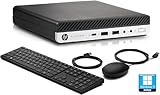
- This HP EliteDesk 800 G5 Mini Computer features the Intel Core i7-9700T. It is a high-performance 9th generation CPU with 8 cores and 8 threads. It operates at a base frequency of 2.0GHz and can boost up to 4.8GHz with Intel Turbo Boost technology, providing excellent processing power for multitasking and demanding applications.
- This HP EliteDesk 800 G5 Mini Desktop is equipped with 16GB of RAM. It ensures smooth multitasking performance, allowing you to run multiple applications simultaneously without slowdowns or bottlenecks. It provides ample memory for productivity tasks, creative work, and even light gaming. 512GB of hard drive for your daily storage needs for lots of pictures, videos, and applications.
- This HP EliteDesk 800 G5 Mini PC desktop has USB 3.0 ports, 2 DisplayPorts, VGA port, and also includes a keyboard and mouse.
- This HP EliteDesk 800 G5 Mini desktop come pre-installed with Windows 11 Pro, that runs fast and smooth, making it a great choice for work and everyday use.
Intel LGA1851
An existing LGA1851 owner may reasonably retain a 285K if productivity performance and current gaming results are satisfactory. A new buyer should compare complete system prices rather than selecting the CPU in isolation.
Free tools Windows power users keep installed
One-click scans. No signup required.
Prebuilt buyers
Judge the whole RTX 5090 system: CPU, motherboard model, memory configuration, cooler, power supply, case airflow, storage, warranty, and retailer support. A nominally slower CPU in a well-priced, properly cooled prebuilt can be the better purchase.
Independent reader supportYour contribution helps us test, update, and keep practical guides available for everyone.Platform, cooling, and stability checklist
- Confirm motherboard support. For any AM5 processor, check the motherboard manufacturer’s CPU-support list and minimum BIOS version before buying. AMD lists support across multiple 600- and 800-series chipsets, but compatibility still depends on the board and firmware.
- Plan for DDR5. All four AMD recommendations use AM5 and DDR5. The 285K uses LGA1851 and DDR5.
- Budget for cooling. None of the listed CPUs includes a bundled stock cooler. The 9850X3D’s 120 W default TDP is easier to cool on paper than the 9950X3D2’s 200 W rating. Select a quality tower or liquid cooler based on case clearance, noise target, and sustained workload; no single cooler is mandatory without system-specific testing.
- Check the case and power supply. The RTX 5090 needs suitable GPU clearance, airflow, and an appropriately sized quality PSU. The CPU recommendation does not replace a complete system compatibility check.
- Update firmware carefully. Use the motherboard manufacturer’s documented BIOS procedure, then install the appropriate AMD chipset or Intel platform drivers.
- Validate memory stability. Enable EXPO or XMP only after confirming stability. Test memory before attributing crashes to the CPU or RTX 5090.
- Compare complete platform cost. Include motherboard, DDR5, cooler, and possible upgrade value—not only the processor price.
How to evaluate RTX 5090 CPU benchmarks
The most useful review should report average FPS and 1% lows across several conditions: 1080p CPU-limited testing, 1440p, 4K native, 4K ray tracing or path tracing, DLSS Quality, and DLSS with frame generation. Native and generated results must be labeled separately.
Memory capacity, speed, timings, BIOS, drivers, operating-system version, and game patches should be consistent. AMD and Intel vendor tests sometimes use different memory configurations, so those results should be labeled as internal testing rather than treated as an impartial head-to-head.
A generic “bottleneck percentage” is not a substitute for measured frame rates and frame times. Bottleneck calculators are model-based estimates and cannot reliably represent every game, resolution, graphics setting, background workload, or frame-generation mode.
The Tool Desk
Outbyte Driver Updater FREEScan for outdated or missing drivers - takes under a minuteDriver Scan →Outbyte PC Repair FREEClear out junk files and repair common Windows errorsFree Scan →Decision tree
- Gaming only, new AM5 build: Buy the Ryzen 7 9850X3D.
- Gaming only, but the 9800X3D is much cheaper: Buy the Ryzen 7 9800X3D.
- Gaming plus rendering, editing, compiling, streaming, or heavy multitasking: Buy the Ryzen 9 9950X3D.
- Extreme developer or creator workload and no concern about diminishing returns: Consider the Ryzen 9 9950X3D2, but wait for or consult independent gaming benchmarks before treating it as the gaming winner.
- Existing AM4 or AM5 system: Measure CPU limitation first and calculate total upgrade cost.
- Existing LGA1851 system or discounted prebuilt: The Core Ultra 9 285K can be sensible if the complete system price and workload fit overcome its gaming disadvantage.
Frequently Asked Questions
Is the Ryzen 7 9850X3D overkill for 4K RTX 5090 gaming?
Not necessarily, but it is not mandatory. At 4K, the RTX 5090 often limits performance, especially with ray tracing. The 9850X3D is most valuable for high refresh rates, CPU-heavy games, stronger 1% lows, and longevity across future GPU upgrades.
Should I buy the 9950X3D2 instead of the 9950X3D?
Only if your workload can use its additional cache or you specifically want the newest flagship. The 9950X3D has established independent gaming and productivity reviews; the available 9950X3D2 evidence is primarily AMD or partner testing, so its gaming advantage is not yet proven.
Can a Ryzen 9800X3D feed an RTX 5090?
Yes. It remains a credible pairing, particularly at 4K. Its small aggregate deficit versus the 9850X3D matters more at lower resolutions and very high refresh rates than in GPU-limited 4K gaming.
Is the Core Ultra 9 285K bad for an RTX 5090?
No. It can be worthwhile for selected productivity workloads, existing LGA1851 owners, or discounted prebuilts. However, current RTX 5090-focused gaming testing favors AMD X3D processors, making Intel a conditional rather than default recommendation for a new gaming build.
Do I need an expensive X870E motherboard for these CPUs?
Not automatically. Choose a board with confirmed CPU support, the required BIOS, suitable power delivery, desired connectivity, and good memory support. The RTX 5090 alone does not require the most expensive chipset.
The Bottom Line
Buy the Ryzen 7 9850X3D for a new gaming-first RTX 5090 PC. Choose the Ryzen 7 9800X3D when its discount is substantial, the Ryzen 9 9950X3D when productivity matters, and the Ryzen 9 9950X3D2 only for a demonstrable extreme workload. Keep an existing CPU when measured gaming performance is already GPU-limited; the RTX 5090 does not make every platform upgrade worthwhile.
Quick Recap
Product prices and availability are accurate as of the date/time indicated and are subject to change. Any price and availability information displayed on Amazon at the time of purchase will apply.




