The Tool Desk
Outbyte Driver Updater FREEFix the driver behind crashes, sound loss and screen glitchesFind Drivers →Outbyte PC Repair FREERepair Windows errors before they cause bigger problemsFix Now →The MSI GT83VR Titan is a transportable desktop replacement, not a conventional laptop. Its dual GeForce GTX 1080s, unusual Cherry MX keyboard, upgradeable internals and extensive connectivity delivered exceptional 2016–2017 performance, but the 5.5 kg chassis, two power adapters, weak battery life and fixed 60 Hz 1080p screen limit its appeal today. Buy one only as carefully inspected legacy enthusiast hardware, preferably for a desk with an external high-resolution monitor.
What the GT83VR Titan was built to do
MSI designed the GT83VR Titan as a desktop replacement that could be moved between locations. The machine uses laptop versions of two GTX 1080 GPUs in SLI, a high-end mobile Core i7, desktop-style mechanical switches and a large 18.4-inch display. AnandTech described it as a desktop replacement with a desktop keyboard and extensive I/O; Notebookcheck called the concept “a study in what is possible.”
That approach explains nearly every trade-off. The Titan prioritizes sustained performance, expansion and input quality over mass, battery endurance and everyday portability.
Specifications at a glance
| Component | GT83VR 6RF specification | Notebookcheck 7RF review configuration |
|---|---|---|
| Processor | Not stated in the cited MSI specification | Intel Core i7-7920HQ |
| Graphics | GeForce GTX 1080, 8 GB GDDR5X, SLI | Two GTX 1080 laptop GPUs, 8 GB each |
| Memory | Up to 64 GB DDR4 | 64 GB DDR4-2400 |
| Storage | Upgradeable; exact configuration varies | Two 512 GB NVMe SSDs in RAID 0 plus a 1 TB hard drive |
| Display | 18.4-inch class panel | 18.4-inch matte IPS, 1920×1080, 60 Hz |
| Dimensions and mass | 458 × 339 × 42–69 mm; 5.5 kg | Same GT83VR family chassis; review unit mass not separately stated |
| Power | Two 330 W AC adapters | Notebookcheck lists the power supplies at 2.5 kg |
| Battery | Eight-cell, 75 Wh | Battery life was criticized in contemporary reviews |
| Keyboard | Backlit mechanical keyboard | Cherry MX mechanical keyboard |
| Optical drive and operating system | Not stated | Blu-ray drive; Windows 10 Home |
Configurations varied by region and suffix, so a used listing should be checked against its exact model number rather than assumed to match the 7RF test unit.
#1 Best Overall

- Intel Core Ultra 9 285HX 2.1GHz Processor
- NVIDIA GeForce RXT 5090 GPU 24GB GDDR7
- 64GB DDR5-6400 RAM
- 2TB Gen5+2TB Gen4 NVMe Solid State Drive
- Microsoft Windows 11 Pro
How fast is the GT83VR with dual GTX 1080s?
For its period, it was extraordinarily fast. Notebookcheck’s 7RF results below are historical measurements from a particular review sample, game versions and drivers, not promises for current releases.
| Game | 1920×1080 result | 3840×2160 result |
|---|---|---|
| The Witcher 3 | 115 fps, Ultra | 89.2 fps, High |
| Battlefield 1 | 145 fps, Ultra | 76.7 fps, High |
| For Honor | 182 fps, Extreme | 108 fps, High |
These numbers show why the Titan could handle 4K gaming when an external display was attached. They do not mean every game scales equally: SLI performance depends on the title, rendering path and driver profile. Some games can gain substantially from the second GPU, while others gain little or may effectively use only one.
What those results mean in practice
- At 1080p, the GPUs can render far more than the built-in panel’s 60 Hz refresh rate in supported games.
- At 4K, the historical results remain strong at high settings, but newer software may have different requirements and weaker multi-GPU support.
- The second GPU adds value only when the game and driver provide a useful SLI profile.
The display is the central mismatch
The built-in screen is a large, readable, matte 18.4-inch 1920×1080 IPS panel running at 60 Hz. Laptop Mag found its brightness below average. Its conservative resolution and refresh rate also leave much of the dual-GPU hardware unused: frame rates above 60 fps cannot be displayed as additional refreshes on this panel.
An external 4K monitor is the more logical partner for the Titan. A multi-monitor desk setup also makes better use of its graphics capability and extensive I/O. Remember that the 4K figures above came from an external-resolution test, not from a higher-resolution internal panel.
Cherry MX keyboard: a signature feature with a subjective feel
The full mechanical Cherry MX keyboard is the feature that most clearly separates the GT83VR from ordinary gaming laptops. Laptop Mag called it excellent, while a TechRadar review extract described the keyboard as uncomfortable. Both observations can be true: switch resistance, key noise, wrist angle and the Titan’s deep chassis produce very different impressions for different users.
For a desk-based player who values distinct mechanical feedback, it can remove the need for a separate keyboard. For extended typing or a cramped desk, test the switch feel and palm position before buying; this is not a low-profile laptop keyboard.
Why does it need two 330 W adapters?
MSI specifies two 330 W AC adapters because the processor and two high-power GTX 1080 GPUs require more sustained power than a single adapter can provide within the machine’s design. Both adapters are part of normal full-performance operation, not an optional accessory. Notebookcheck lists the pair of power supplies at 2.5 kg, adding nearly as much carrying weight as some complete laptops.
For a replacement, verify the exact connector, wattage and regional plug for the specific GT83VR model. A mismatched or undersized adapter is not an acceptable substitute for the specified pair.
Rank #2
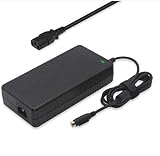
- Output: 19.5V 16.9A 330W DC Plug: 4 Holes Input: 100-240V 50-60Hz (For worldwide use)
- Replacement ADP-330AB DA330A002LA15-330P1A CLEVO P870DM3-G P870DM3 P775DM3 P570WM P570WM3 P370SM-A P375SM-A P377SM-A COMPATIBILITY: MSI GT83VR-6RF-Titan-SLI GT83VR-7RF-Titan-SLI
- COMPATIBILITY: MSI GT83VR-6RF-Titan-SLI GT83VR-7RF-Titan-SLI GT73VR-6RF-Titan-Pro GT73VR-7RF-Titan-Pro Gaming-27-6QE GT80-2QE-Titan-SLI GT80-2QC-Titan-SLI GT80S-6QF-Titan-SLI-Heroes-Special-Edition GT80S-6QE-TITAN-SLI-HEROES-SPECIAL-EDITION GT80S-6QD-TITAN-SLI-HEROES-SPECIAL-EDITION GT80S-6QE-Titan-SLI GT80S-6QD-Titan-SLI GT80S-6QF-TITAN-SLI-29TH-ANNIVERSARY-EDITION Trident-3-Arctic GT73EVR-7RF-Titan-Pro
- What You Get: 1 X 330W 19.5V 16.9A Power AC Adapter 4 Holes, 1 X US Power cord
- connector: 4 holes
Portability, battery life and desk ergonomics
The chassis measures 458 × 339 × 42–69 mm and weighs 5.5 kg before its power supplies. That mass, its 69 mm maximum thickness and the two-adapter bundle make the Titan transportable rather than portable. It can move from a home desk to a studio or LAN event, but it is a poor backpack machine.
The eight-cell battery is rated at 75 Wh. Contemporary coverage criticized battery life, and the Titan’s high-power components make the battery a secondary-use feature rather than a way to game away from an outlet. Plan to use it plugged in.
Upgradeability and connectivity
Upgradeable memory and storage are genuine advantages. MSI specifies support for up to 64 GB of DDR4, and the reviewed machine combined two NVMe SSDs in RAID 0 with a 1 TB hard drive. The chassis also included a Blu-ray drive in Notebookcheck’s configuration. Exact drive bays and installed components vary by suffix, so confirm the internals before ordering replacement parts.
Reviews consistently noted abundant I/O, making the Titan suitable for external displays, peripherals and a fixed gaming setup. Port selection can differ by regional configuration; inspect photographs or the service manual for the unit being offered.
Free tools Windows power users keep installed
One-click scans. No signup required.
Price and value when new
This was an enthusiast luxury machine. Notebookcheck recorded €5,500 for its 7RF review configuration, while Laptop Mag cited $5,099 for a dual-GTX-1080 launch model. Those are historical launch-era prices, not a current used-market valuation.
In 2026, the relevant question is condition and use case rather than its original specification sheet. Legacy drivers, aging batteries, worn keyboard switches, failed storage and missing power supplies can erase the value of an inexpensive listing. A cheaper unit that needs two adapters or major maintenance may cost more than a complete one.
Used-buying checklist
- Confirm the exact GT83VR suffix and verify that both 330 W adapters are included and functional.
- Boot into the operating system and check that both GTX 1080 GPUs are detected, along with the advertised memory and storage.
- Run a display test for dead pixels, backlight problems and brightness consistency.
- Test every mechanical key, backlight zone, trackpad, port and optical drive included in the listing.
- Check battery health and make sure the machine can sustain load without unexpected shutdowns.
- Inspect hinges, chassis panels, cooling vents and screws for damage or previous repair.
- Ask for storage-health information and a return period when buying remotely.
Who should buy the GT83VR Titan?
It still makes sense for
- Collectors and enthusiasts who want an unusual dual-GPU gaming machine.
- Desk users who value a built-in mechanical keyboard and substantial upgrade potential.
- Owners of an external 4K or multi-monitor setup who accept legacy hardware and game-dependent SLI support.
It is a poor fit for
- Anyone who carries a laptop daily or expects meaningful unplugged gaming.
- Players seeking a modern high-refresh internal display.
- Buyers who need predictable performance in every current game.
- People unwilling to transport two large power adapters or budget for replacement parts.
Verdict
The GT83VR Titan remains an impressive example of how far gaming laptops pushed desktop-class hardware in the 2016–2017 era. Dual GTX 1080 SLI, a Cherry MX keyboard, extensive I/O and upgradeable memory/storage are still distinctive. Its 60 Hz 1080p screen, 5.5 kg body, 2.5 kg adapter load, poor battery life and five-thousand-dollar-class original pricing are equally important. Treat it as a legacy desktop replacement for a permanent or semi-permanent desk, not as a practical modern notebook.
Quick Recap
Product prices and availability are accurate as of the date/time indicated and are subject to change. Any price and availability information displayed on Amazon at the time of purchase will apply.
Quick wins for a faster PC:
Clear out junk files and repair common Windows errorsFree Scan →Scan for outdated or missing drivers - takes under a minuteDriver Scan →Repair Windows errors before they cause bigger problemsFix Now →



