Free tools Windows power users keep installed
One-click scans. No signup required.
Alpakka 2 is a gamepad built around gyro-driven mouse input: it is intended to let players aim and move a cursor by rotating a controller rather than reaching for a conventional mouse. Input Labs offers it as either a maker-oriented DIY build or a pre-assembled PRO model; the company says both share the same electronics, firmware and features.
What Alpakka 2 is designed to do
Input Labs describes native mouse emulation as the central idea behind Alpakka 2. That makes it different from a conventional gamepad whose sticks alone handle camera movement: the controller is meant to translate gyro motion into mouse movement, a control approach aimed at mouse-centric PC games. Input Labs’ overview and Hackster’s coverage frame the project in those terms.
The underlying concept has a history. The original Alpakka was released in 2022, and a 2023 Raspberry Pi feature described that earlier open, printable controller using a Raspberry Pi Pico. Alpakka 2 is a distinct iteration: its current specification lists an RP2350 microcontroller, not the original model’s Pico.
How gyro-to-mouse control works
In practical terms, gyro aiming turns the controller itself into the motion input. The earlier Alpakka mouse manual documents one implementation: touch the hexagonal surface to engage mouse mode, rotate the controller to move the cursor, and lift a finger to pause and recenter. It assigns primary and secondary clicks to the right and left triggers. Those are instructions for the earlier Alpakka manual, not confirmation that every Alpakka 2 interaction or mapping is unchanged. See Input Labs’ mouse-emulation manual.
Do these 3 things before closing this tab:
1Fix the driver behind crashes, sound loss and screen glitches2Repair Windows errors before they cause bigger problems3Scan for outdated or missing drivers - takes under a minute#1 Best Overall

- Beautiful LED Arace Game DIY Parts for MAME JAMMA Project!
- 100% Zero Delay USB Encoders and Perfect work for all windows systems!
- Perfect Parts for 2 Player Arcade MAME DIY Project!
- Made with highest quality materials!Heat resistant plastic!
- Perfect LED Kit for Arcade PC Game DIY Project! Easy Install!
That legacy manual also recommends leaving operating-system pointer speed at its default and disabling pointer acceleration. It suggests calibrating so roughly 45 degrees of horizontal controller rotation spans the display width, or turns an in-game camera by 180 degrees. The manual lists presets for 1080p, 1440p and 4K displays. These are vendor recommendations for the earlier Alpakka, not independent measurements or verified Alpakka 2 setup results.
DIY and PRO: what changes
| Aspect | DIY | PRO |
|---|---|---|
| Assembly | Maker-oriented build; the reviewed Alpakka 2 pages do not state exact assembly time, parts list or skill requirements. | Pre-assembled, according to Input Labs. |
| Enclosure | Case and buttons can be 3D-printed from reference designs or community modifications. | Injection-molded enclosure. |
| Electronics, firmware and features | Input Labs says these are shared between the two variants. | |
| Build planning | The reviewed Alpakka 2 pages do not establish a complete bill of materials, build cost, required printer, print material or tool list. | |
The DIY option gives builders room to use printable reference designs or community modifications, but it should not be mistaken for a published turnkey kit with a verified bill of materials. 3D printer filament is relevant to printing the enclosure and buttons, but Input Labs’ reviewed pages do not prescribe a material. The PRO suits buyers who want the assembled, molded version while retaining the same stated platform.
Rank #2

- Exquisite LED arace game DIY MAME parts selection!
- 100% Zero Delay Encoder and USB work perfectly all Windows systems!
- 2 Player Arcade MAME DIY Style Perfect Accessory!
- Use the highest quality materials! Made of high temperature resistant plastic!
- Perfect LED Kit Arcade PC Games DIY Choice! Easy to install!
Controls and device-level output
The Alpakka 2 specification page lists a broader control set than a basic two-stick gamepad: a touch-sensing surface around the face buttons, two thumbsticks, two scrollwheels, two bumpers, swappable triggers, four rear buttons and a cross-shaped D-pad. It also lists HID mouse, keyboard and gamepad/DirectInput output, alongside XInput, and says drivers are not required. That describes the controller’s listed output modes; it does not guarantee identical behavior on every computer, operating system or game.
For compatibility, Input Labs lists Windows 10 and 11, GNU/Linux distributions with xpad, Android with limited or experimental support, Steam Deck and Steam Machine. Its configuration offering is listed as a browser or PWA version of the Ctrl app. The listed configuration features include 12 profile slots, cross-device mappings, long-press and double-press assignments, gyro touch-on/touch-off assignment, steering-wheel and plane-joystick modes, stick deadzone and saturation controls, plus glyphstick and daisywheel typing modes. These are current listed project features, not a guarantee that every game accepts every mapping; the project remains in development. The complete current list appears on Input Labs’ Alpakka 2 specifications page.
Crashes, No Sound, or Screen Glitches?
Random freezes, missing sound and display glitches usually trace back to one bad driver. Find and replace yours safely.Free scan · under a minuteWindows Errors? Fix Them Before They Spread
Repair common Windows errors and clear accumulated junk for a smoother, more stable PC - no reinstall needed.Free scan · no reinstallRank #3

- When receiving the package. Have any questions. Please contact us first
- Perfect Parts for 4 Player Arcade MAME DIY Project!
- Made with highest quality materials!Heat resistant plastic!
- 100% Zero Delay USB Encoders and Perfect work for all windows systems!
- Beautiful LED Arace Game DIY Parts for MAME JAMMA Project!
Published Alpakka 2 specifications
The following are Input Labs specifications on the current page accessed October 4, 2026. The company says specifications may change; these figures are manufacturer claims, not independent test results.
| Item | Input Labs’ published specification |
|---|---|
| Wired polling and latency | 1000 Hz polling; approximately 0.5 ms latency. |
| Wireless | 2.4 GHz dongle; approximately 2 ms latency. |
| Motion sensing | Four high-quality IMU sensors working in parallel. |
| Battery | 1200 mAh rechargeable LiPo. |
| Microcontroller | RP2350. |
These are the figures on Input Labs’ Alpakka 2 page as accessed on that date, not a claim that the company formally published them in calendar year 2026. Consult the specifications page for the latest listing.
Rank #4
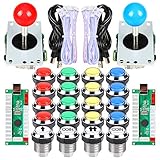
- Beautiful LED Arace Game DIY Parts for MAME JAMMA Project!
- 100% Zero Delay USB Encoders and Perfect work for all windows systems!
- Perfect Parts for 2 Player Arcade MAME DIY Project!
- include: 2x 5Pin Joystick + 2x USB Encoder + 19x Chrome LED Buttons (1Player + 2Player + Coin Buttons)
- Perfect LED Kit for Arcade PC Game DIY Project! Easy Install!
What the available evidence does—and does not—establish
Input Labs’ legacy FAQ discusses the older Alpakka, not Alpakka 2. Its compatibility observations and latency comparisons therefore should not be used as Alpakka 2 test results. The company FAQ also describes gyro as “just an alternative for people not able to use a mouse or keyboard, or playing on a sofa.” That is Input Labs’ framing in its earlier Alpakka documentation, rather than a named individual’s statement. The FAQ is available at Input Labs’ Alpakka FAQ.
For Alpakka 2, the strongest grounded distinction is between an open, printable DIY path and a pre-assembled PRO, with gyro-to-mouse control as the defining use. The reviewed product pages do not settle the DIY build’s exact cost, parts, time or tool requirements, and the published performance figures remain subject to change.
Quick Recap
Best Value
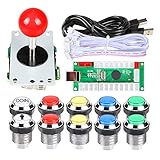
- Perfect LED Kit for Arcade PC Game DIY Project! Easy Install!
- include: 1x 5Pin Joystick + 1x USB Encoder + 10x Chrome LED Buttons (1Player + Coin Buttons)
- Perfect Parts for 2 Player Arcade MAME DIY Project!
- Beautiful LED Arace Game DIY Parts for MAME JAMMA Project!
- 100% Zero Delay USB Encoders and Perfect work for all windows systems!
Product prices and availability are accurate as of the date/time indicated and are subject to change. Any price and availability information displayed on Amazon at the time of purchase will apply.




