Do these 3 things before closing this tab:
1Clear out junk files and repair common Windows errors2Scan for outdated or missing drivers - takes under a minute3Repair Windows errors before they cause bigger problemsNeither format is universally better. Choose a Series X with an optical drive if you own compatible Xbox discs, want to buy or borrow physical copies, or will use its UHD Blu-ray player. Digital suits players who prefer an account-based library and do not want to handle discs. A disc game still installs to console storage, and the disc generally remains its play license. Xbox’s August 2026 disc-to-digital feature adds an option for some titles, but does not make every disc digital.
What changes when you choose discs or digital?
| Decision | Disc-capable Series X and physical games | Digital games |
|---|---|---|
| Existing library | Play compatible Xbox discs; check the specific title, since backward compatibility covers selected games, not every game from every generation. | Access compatible digital titles through your account library. |
| License at play | For compatible disc-based backward-compatible games, keep the disc inserted. It supplies the license even after installation. | Access the game through your account library; account and platform terms apply. |
| Installation | Games install to local storage and run from it. The disc does not replace storage. | Digital games also use local storage. |
| Convenience | Requires handling and storing discs. The optical-drive Series X also plays UHD Blu-ray discs. | No disc handling; games are accessed digitally. |
| Price and resale | Depends on the title, edition, seller, market and condition; resale value is not guaranteed. | Depends on store pricing and promotions. There is no universal price winner. |
Microsoft’s backward-compatibility guidance says a compatible disc game downloads to the hard drive, but the disc must still be in the drive to play. Xbox’s storage primer likewise explains that games run from local storage while the disc provides the license.
Can you use your old Xbox discs on Series X?
Some, but not all. Series X|S supports selected Xbox One, Xbox 360 and original Xbox games. Check the specific title against Xbox’s backward-compatible games list; owning a disc alone does not guarantee it will work. Series S is digital-only and cannot play physical discs.
What does Xbox’s disc-to-digital feature do?
On August 26, 2026, Xbox announced a feature allowing supported Xbox One and Xbox Series X game discs to claim a digital entitlement. Xbox said Insiders could begin testing on August 31, 2026, and that the feature was starting with thousands of titles; not every title would be available at launch. Xbox described the goal as making it easier for existing libraries to move forward with players.
What’s actually slowing this PC down?
Pick the symptom - the matching free tool is one click away.
#1 Best Overall

- Blu-Ray DVD Disc Drive Deck with Laser Lens Module Replacement Compatible with Microsoft Xbox One /One S/One X/Series X /Series S
- Tips: This is Blu-Ray DVD Disc Drive Deck with Laser Lens Module replacement to replace your old one, don't include instructions, please install it by a professional technician.
- Broken your Blu-Ray DVD Disc Drive Deck with Laser Lens Module, don't need to change new machine, just buy this item and replace your damage one, let your Device work again.
- Compatible with: Microsoft Xbox One /One S/One X/Series X /Series S (Please check your machine model before your purchase)
- Product is fragile, easy to be damage during shipping. So if there are any questions, please contact us first, we will try our best to help you.
How to check a disc
- Insert the Xbox One or Series X game disc into a Series X with an optical drive.
- Launch the disc and check whether the console prompts you to accept a digital license. That prompt is Xbox’s stated eligibility check.
- If eligible, follow the console prompt to claim the entitlement. The disc must be inserted and launched to claim it.
The announced feature does not cover Xbox 360 or original Xbox discs. Support and eligible titles may change; check the console prompt and Xbox’s Series X product information for current details. Do not assume an unsupported disc automatically becomes a digital license.
Independent reader supportYour contribution helps us test, update, and keep practical guides available for everyone.Which option should you choose?
Choose the optical-drive Series X if
- You already own compatible Xbox game discs and want to keep using them.
- You buy or borrow physical copies and value having that option.
- You want a UHD Blu-ray Disc player as well as a console.
Choose digital if
- You do not have a physical Xbox library to use.
- You prefer an account-based library and a disc-free routine.
Compare the same game and edition in your market before deciding on price. Physical availability, store promotions and any resale value vary, so neither format is reliably cheaper in every case. Xbox’s Series X product details cover the optical-drive model and UHD Blu-ray playback.
Quick Recap
Best Value

- Brand New
- Easy to install and connect.
- This drive is not plug-and-play
- Model: DG-6M5S-02B
Rank #4
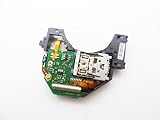
- Blu Ray DVD Drive Laser Lens Module Replacement Compatible with Xbox Series X / Series S Controller
- Tips: This is Blu Ray DVD Drive Laser Lens Module replacement to replace your old damage Blu Ray DVD Drive Laser Lens Module, don't include instructions, please install it by a professional technician.
- Broken your Blu Ray DVD Drive Laser Lens Module, don't need to change new machine, just buy this item and replce your damage Blu Ray DVD Drive Laser Lens Module, let your Device work again again.
- Compatible with: Xbox Series X / Series S Controller (Please check your machine model before your purchase)
- Product is fragile, easy to be damage during shipping. So if there are any questions, please contact the seller first, we will try our best to help you.
Rank #3

- FAST : Portable built in drive optimizes the gaming experience. Fast transfer and low latency.
- REPLACEMENT: Game drive is suitable for replacing the DVD drive repair unit in for One or for One S consoles.
- APPLICABLE : Replacement built in drive can fit for one x DG to 6M5S drives (all) to meet your usage needs.
- SIMPLE AND LIGHTWEIGHT: Portable built in drive has a simple, compact and lightweight design, and is very easy to install and connect.
- ALUMINUM ALLOY: Built in drive is made of aluminum alloy for wear , and durability.
Rank #2

- Blu-Ray DVD-Rom Disc Drive DG-6M5S With Mainboard
- For Microsoft Xbox One S
- When you are experiencing errors, skipping and cannot play a game then this can solve your problem
- This needs professional installation
- All of our parts are factory tested to ensure better quality