Do these 3 things before closing this tab:
1Clear out junk files and repair common Windows errors2Scan for outdated or missing drivers - takes under a minute3Repair Windows errors before they cause bigger problemsStart by choosing the faction and class that suit your taste, then follow the game’s onboarding and story prompts before branching into activities. Learn how movement and manual combat work, try accessible PvE when it becomes available, and improve gear only as needed to take on the next challenge. AION 2 progression is broader than character levels: equipment, class builds, and longer-term character systems all matter.
What should you do first in AION 2?
- Choose a faction and class for the experience you want. NCSOFT’s June 2025 preview described the Elyos and Asmodians as having separate starting regions, and listed eight playable classes. Treat its role descriptions as a preview, not a current ranking: check the live in-game class names and descriptions when you create your character. There is no established objectively best beginner class.
- Follow the onboarding and story prompts. These provide a guided way to learn the game’s systems. NCSOFT described Easy Mode instance dungeons as newcomer-friendly, but the available difficulty options and access conditions may vary by the live build and region; follow the choices shown in your game rather than relying on an assumed unlock level.
- Practice movement and combat as you explore. Flight and underwater exploration were promoted as part of AION 2’s world, while the publisher also highlighted manual combat and hit confirmation. Learn how movement interacts with encounters instead of treating flight only as a travel shortcut.
- Try group PvE when it opens up for you. The official Japan-language site describes Expeditions as dungeons for up to five players. It lists Krao Cave, Urugugu Canyon, Fire Temple, and Draupnir as examples. Use the activities and requirements displayed in your build; the site’s list does not establish a universal unlock level or reward schedule.
- Upgrade with the next activity in mind. A fan beginner guide advises against over-investing in early gear because it may be replaced as you progress. That is cautious advice, not a tested rule for every item or current version: improve enough to handle the content in front of you, and avoid spending scarce resources solely to perfect equipment you expect to outgrow.
How to choose a faction and class
Choose first by the kind of play you enjoy: close or ranged combat, a more supportive role, or a character you can take through content solo. Faction choice is also part of the starting experience: NCSOFT’s June 2025 preview said Elyos and Asmodians began in separate regions. Check the current character-creation screen for the names and details available in your region.
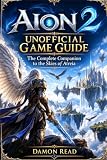


The same preview described Templar as a tank, Spiritmaster as optimized for solo play, Chanter as support, and Sorcerer as a burst-magic damage class. These are historical publisher descriptions from June 2025, not current balance assessments or promises about how a class performs in every activity. A fan guide uses the name Ranger where the publisher preview used Marksman, so rely on the live in-game label rather than assuming those names are interchangeable.
How AION 2 progression fits together
Think of progression as a loop rather than a race to a level: complete activities available to you, collect their rewards, improve what is holding you back, and then try the next suitable challenge. This is a practical framework drawn from an unofficial progression guide, not an official taxonomy or verified optimal route.
The Tool Desk
Outbyte Driver Updater FREEScan for outdated or missing drivers - takes under a minuteDriver Scan →Outbyte PC Repair FREERepair Windows errors before they cause bigger problemsFix Now →| Progression area | What it changes | Beginner’s priority |
|---|---|---|
| Character levels and activity access | Reflects character advancement and, depending on the live build, can relate to which content is available. | Follow the story and the activity requirements shown in-game; no universal unlock-level route is established here. |
| Equipment | Raises immediate combat capability and can help you handle the next activity. | Upgrade to meet the challenge at hand, while considering whether early items are likely to be replaced. |
| Class build | Develops how your character’s abilities and combat approach work together. | Experiment with the options the game presents and adapt to the activity; no current best build is established by the sources here. |
| Longer-term systems and collections | Offer forms of character development beyond a single piece of gear or level. | Learn these systems as they appear, and weigh durable improvements against short-term equipment needs. |
The distinction between immediate equipment upgrades and longer-term build, permanent-stat, or collection development comes from an unofficial fan guide. Use it as a way to organize choices, not as a complete or publisher-confirmed list of every progression system.
Use PvE to learn before optimizing
When group content becomes available, Expeditions provide a concrete PvE option to explore. The official Japan-language site lists Krao Cave, Urugugu Canyon, Fire Temple, and Draupnir, and describes Expeditions as supporting up to five players. Those details are useful examples, but they do not establish that all four are available in every region or current build, or that they share the same requirements.
Rank #2
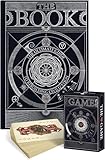
- The book: The Hungry Minds wonder book is about medicine, basic materials and tools used in inventions, mechanisms, military arts, hearth and home, farming, entertainment, musical instruments, and society. Every chapter is a new world to explore!
- Beautiful coffee table book: An informative hardcover encyclopedia of human evolution is a pure art object that would perfectly fit your coffee table. The book is around 13x9 inches and 4.5 pounds, printed with high-quality mat art paper. Open history books for adults on any page and begin your journey into the world of invention.
- Carefully crafted illustrations: The encyclopedia of history is full of high-quality images with the fine details made by our talented team of illustrators. Hand-drawn pictures will create a special atmosphere and take you to the mysterious world of discoveries.
- Playing Cards with a Collectible Value. Whether you’re a casual player or a serious collector, these cards offer a blend of functionality and collectible appeal.
- Adorable Design: The cute and stylish design of these playing cards makes your card games more enjoyable and visually appealing, adding a touch of elegance and fun to your game nights with family and friends.
For an early run, focus on learning encounter patterns, movement, and how your class contributes. The publisher’s emphasis on manual combat and hit confirmation makes practice more useful than assuming that character level or equipment alone will carry every encounter.
Independent reader supportYour contribution helps us test, update, and keep practical guides available for everyone.Launch and availability depend on region
NCSOFT announced a November 19, 2025 launch for Korea and Taiwan. The official Japan-language site lists October 5, 2026 as its launch date. These are separate market-specific notices, not one global launch date; the sources do not establish availability in every region. Check the official AION 2 site for information relevant to your market.
Free tools Windows power users keep installed
One-click scans. No signup required.
Rank #3

- DEVELOPS DEXTERITY, OBSERVATION AND LOGIC: Players use their logic to align the books following the challenge instructions.
- PROGRESSIVE CHALLENGES: Play trough all 40 challenges and solve 4 level of difficulty.
- WOODEN PIECES: Made of chunky wood pieces that are easy to manipulate and develop dexterity at any age! Includes a cute leveler to keep every piece in balance.
- PLAY SOLO OR WITH A FRIEND: Share the challenge with a friend or play as a solo brainteaser
- ANOTHER LOGIC PUZZLE GAME BY FOXMIND: Develop your logic skills even more with our Brainbuilder series that offer more logic puzzles to solve. Starting ages 8 and up!
NCSOFT’s June 2025 preview also advertised over 36 times the area of the original game, over 200 adjustable character-creation features, eight playable classes, and over 200 dungeons. Those are publisher preview figures, not independently verified counts for every live regional build. Treat them as descriptions of the announced scope, not a promise that every item is currently available to every player.
Quick Recap
Best Value
Rank #4
Product prices and availability are accurate as of the date/time indicated and are subject to change. Any price and availability information displayed on Amazon at the time of purchase will apply.




