Quick wins for a faster PC:
Fix the driver behind crashes, sound loss and screen glitchesFind Drivers →Repair Windows errors before they cause bigger problemsFix Now →Scan for outdated or missing drivers - takes under a minuteDriver Scan →AppLovin completed its acquisition of Machine Zone on May 19, 2020, adding the studio behind Game of War: Fire Age and Mobile Strike to its mobile-game portfolio. AppLovin later reported an aggregate acquisition price of $328.6 million in its SEC filing. In 2025, it sold its mobile gaming business, including Machine Zone, to Tripledot Studios.
When did AppLovin acquire Machine Zone?
AppLovin announced a formal agreement on May 14, 2020; the release was distributed through PR TIMES the following day. The announcement said the terms were undisclosed. AppLovin later reported that it completed the acquisition on May 19, 2020, acquiring all outstanding Machine Zone shares and settling Machine Zone debt. AppLovin’s May 2020 announcement · AppLovin’s 2021 Form 10-K
How much did AppLovin pay?
AppLovin’s 2021 fiscal-year Form 10-K, filed in 2022, reported an aggregate acquisition price of $328.6 million. That later filing gives the transaction accounting; it is distinct from the May 2020 announcement, which said terms were undisclosed.
- $287.1 million in cash paid to Machine Zone lenders
- $38.2 million fair value for warrants issued to lenders and preferred stockholders
- $3.3 million to settle preexisting accounts receivable
The components total $328.6 million. The filing also reported that, from May 19 through December 31, 2020, Machine Zone generated $113.8 million in revenue and recorded a pre-tax loss of $89.7 million. Those figures cover only that partial-year period, not a full year of standalone operations. AppLovin’s 2021 Form 10-K
#1 Best Overall

- Why Choose the abxylute M4 Snap-On Phone Controller? Designed exclusively for short quick retro gaming, like Game Boy, NES, SNES and etc. Trusted by 6000+ backers on a tech-focused crowdfunding platform. Pocket-sized play, perfect for your rest time. This compact clip-on controller is compatible with iOS and Android, features a Turbo function—crafted for short bursts of play vertically, horizontally or in detached mode, and ideal for packing in your pocket.
- 【Easy Setup – Power On & Play Instantly!】We recommend attaching the magnetic stickers to a phone case for all phones, rather than using a bare phone. ✅ For Apple MagSafe Models: Snap the magnetic ring onto your MagSafe phone case, power on, and start gaming! ✅ For Non‑MagSafe Models: First attach the included magnetic sticker to your phone case, then snap the magnetic ring onto it. Power on and game right away!
- 【Wide Compatibility – Android & iPhone】Compatible for Android devices, iPhones, and card-size phones (Android devices and iPhone 11/SE and earlier models; iPhone 12/13/14/15/16/17 with MagSafe). Works with all mainstream phones for smooth gaming. Fits iPhone Pro/Pro Max models but may feel top-heavy. Not compatible with foldable phones.
- 【Compact Yet No Loss of Fun】Featuring HID, PS and NS modes, it seamlessly connects to gaming devices via Bluetooth.⚫ HID Mode: Local Games for Android⚫ PS Mode: CODM & PS Remote Play for Android & iOS⚫ NS Mode: All kinds of Emulators
- 【Born for Retro Emulators on Mobile】Designed for retro gaming fans, the M4 Controller works smoothly with top emulators such as Delta, RetroArch and PPSSPP on both iOS and Android.It supports classic games for platforms including Game Boy, NES, SNES,3DS, FC, SFC, SS, N64, GBA, GBC, NDS, and more.
Why did AppLovin buy Machine Zone?
AppLovin described the deal as a way to bring together Machine Zone’s games, people, and technology with AppLovin’s marketing and monetization capabilities, and to develop new mobile games. CEO Adam Foroughi praised Machine Zone’s games and player community. Machine Zone CEO Kristen Dumont said the combination would pair its mid-core expertise with AppLovin’s casual games and marketing platform. These were the companies’ stated aims, not independent proof that the expected product or financial results followed. AppLovin’s May 2020 announcement
What games did Machine Zone make?
Machine Zone says it was founded in 2008 and identifies these titles on its official about page:
Rank #2

- Bluetooth Controller for iPhone & Android: Mocagen mobile gaming controller Compatible with all iPhone models (including 18/17 series) and Android devices. Pairing steps: 1. Turn on Bluetooth on your phone and go to the pairing screen. 2. Press and hold the Home button for 3 sec until LED4 flashes. 3. Find "XBOX Wireless Controller" on your phone and tap to pair. Quick reconnect: After first pairing, simply press the Home button once (with Bluetooth on) to reconnect
- Play Most Controller-Compatible Games: This iPhone game controller supports cloud gaming (e.g., Xb*x Game Pass, GeForce NOW), Xbox Remote Play, emulator games, and native mobile games (e.g., Apple Arcade). Enjoy effortless control and play Fortnite, Call of Duty, Roblox, Genshin Impact, and many more anytime, anywhere. Note: Controller only works with games that support controller input, and does not support PS Remote Play
- 5M-Cycle Lifespan & Zero Drift: MC1 mobile gaming controller features a Hall-effect joystick with a 5M cycle lifespan, 2.5x longer than standard carbon-film sticks. Its innovative electromagnetic induction technology ensures drift-free operation, enabling precise character control in intense games and significantly extending this phone game controller durability
- Ergonomic Grip Design: The handle is ergonomically shaped with a l*ser-engraved texture for anti-slip and enhanced grip, effectively reducing fatigue during long gaming sessions. The scientifically designed joystick and button layout ensures smooth operation. Whether for personal use or as a gift, it delivers a more comfortable and healthier gaming experience
- 7-Color RGB Light Ring & 600mAh Battery: The mobile game controller features a 7-color adjustable light ring on the joystick(ABXY button lights can be turned off, but their colors are not adjustable). The lighting is vibrant yet eye-friendly. The built-in 600mAh battery provides up to 6 hours of battery life in brightness mode — enough for a full day of gaming
- Game of War: Fire Age (2013)
- Mobile Strike (2015)
- Final Fantasy XV: A New Empire (2017)
The studio’s games page describes Game of War: Fire Age as an MMO about building a kingdom and forming alliances, and Mobile Strike as a real-time modern-warfare strategy game. Their strategy focus helps explain why AppLovin described the acquisition as adding capabilities alongside its casual-game and marketing business. The descriptions and dates are Machine Zone’s own account. Machine Zone about page · Machine Zone games page · AppLovin’s May 2020 announcement
Independent reader supportYour contribution helps us test, update, and keep practical guides available for everyone.Who owns Machine Zone now?
AppLovin completed the sale of its mobile gaming business to Tripledot Studios in 2025. The transferred portfolio included Machine Zone among 10 studios. AppLovin CEO Adam Foroughi said the sale would streamline the company around its core business. The reviewed sale announcement does not state a sale price. AppLovin’s 2025 sale announcement
Do these 3 things before closing this tab:
1Scan for outdated or missing drivers - takes under a minute2Repair Windows errors before they cause bigger problems3Fix the driver behind crashes, sound loss and screen glitchesQuick Recap
Best Value
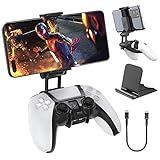
- Note: Not compatible with PS5 Edge controller
- The frugal version of the PS Portal and Backbone, Taking your gaming remotely with this amazing clip!
- Design for PS5 Controller: OIVO mobile phone mount clamp for Playstation 5 controllers attachment is designed for use with Playstation remote play services. to Turn your Controller into a mobile game controller.
- Upgraded Dual Adjustable Valve:The double regulating valve upgrades the adjustable angle from 270 degrees to 320 degrees, providing a larger viewing angle. And the 1.5-inch extension of the double regulating valve increases the more comfortable gaming distance.
- Stable & Durable : The high-quality ABS material and completely closed lock structure can firmly fix the PS5 controllers, without worrying about accidental fall.
Rank #4

- Why Choose the abxylute M4 Snap-On Phone Controller? Designed exclusively for short quick retro gaming, like Game Boy, NES, SNES and etc. Trusted by 6000+ backers on a tech-focused crowdfunding platform. Pocket-sized play, perfect for your rest time. This compact clip-on controller is compatible with iOS and Android, features a Turbo function—crafted for short bursts of play vertically, horizontally or in detached mode, and ideal for packing in your pocket.
- 【Easy Setup – Power On & Play Instantly!】We recommend attaching the magnetic stickers to a phone case for all phones, rather than using a bare phone. ✅ For Apple MagSafe Models: Snap the magnetic ring onto your MagSafe phone case, power on, and start gaming! ✅ For Non‑MagSafe Models: First attach the included magnetic sticker to your phone case, then snap the magnetic ring onto it. Power on and game right away!
- 【Wide Compatibility – Android & iPhone】Compatible for Android devices, iPhones, and card-size phones (Android devices and iPhone 11/SE and earlier models; iPhone 12/13/14/15/16/17 with MagSafe). Works with all mainstream phones for smooth gaming. Fits iPhone Pro/Pro Max models but may feel top-heavy. Not compatible with foldable phones.
- 【Compact Yet No Loss of Fun】Featuring HID, PS and NS modes, it seamlessly connects to gaming devices via Bluetooth.⚫ HID Mode: Local Games for Android⚫ PS Mode: CODM & PS Remote Play for Android & iOS⚫ NS Mode: All kinds of Emulators
- 【Born for Retro Emulators on Mobile】Designed for retro gaming fans, the M4 Controller works smoothly with top emulators such as Delta, RetroArch and PPSSPP on both iOS and Android.It supports classic games for platforms including Game Boy, NES, SNES,3DS, FC, SFC, SS, N64, GBA, GBC, NDS, and more.
Rank #3
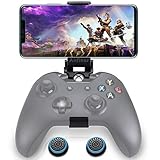
- ▶ Note:Controller and phone not included, Anfiner Supply life time service-platinum quality controller holder+ thumb grips caps
- 10 IN 1: Compatible with Xbox / Xbox one / Xbox Series X / S / Xbox Elite 1 /Series 2 SteelSeries Nimbus /SteelSeries Stratus XL(Android & IOS)/SteelSeries Stratus Duo/Steam Controllers
- Width size range in 1.56- 3.55 inch,can support most of mobile phones(such as: iphone 5/5S/6/6S/7//7plus/8/8plus/X Samsung S7/S8/S9/note7/8/9 Sony LG Huawei Google pixel XiaoMi and so on ) easy to install and remove
- Fully customizable viewing angle and exquisite workmanship.Does not interfere with the ergonomics of the controller
- Easy to attach to your smartphone, no tools or modification necessary.
Product prices and availability are accurate as of the date/time indicated and are subject to change. Any price and availability information displayed on Amazon at the time of purchase will apply.



