
Neither connection is universally better. Choose a wireless Xbox controller when you want freedom to sit anywhere, move around, or avoid a cable across the room. Choose wired when your setup is fixed, you want to avoid battery maintenance, or a direct cable connection suits your play space. The current standard Xbox Wireless Controller supports both approaches, so one controller can cover both situations.
Wired input has a technical advantage in Microsoft’s Xbox Series X explanation: a digital state change is transmitted immediately over USB, while wireless input travels through the Xbox Wireless radio protocol. That description does not establish a guaranteed, noticeable millisecond advantage in every game. Your game’s input handling, console or PC, display, cable quality, and seating position all affect what you actually feel.
As an Amazon Associate I earn from qualifying purchases.
The short answer: match the controller to your setup
For most players, the practical choice is straightforward:
- Pick wireless for sofa gaming, television setups, shared rooms, or any situation where cable reach and cable management are irritating.
- Pick wired for a desk, a nearby console, long sessions where battery interruptions are unwelcome, or a play space where a cable can remain safely routed.
- Use both modes if you own the current standard Xbox Wireless Controller. Microsoft lists Xbox Wireless for Xbox consoles, USB-C wired play, and Bluetooth on compatible Windows, Android, and iOS devices. The controller bundle with a cable includes a 9-foot lead.
Do not buy a wired controller solely because you expect a guaranteed competitive advantage. Microsoft documents a different signal path for wired and wireless input, but the official material does not provide a current, standardized head-to-head latency measurement that applies to every console, PC, game, and display.
#1 Best Overall

- Versatile compatibility: supports Xbox Series X/S, Xbox One X/S consoles and PC Win10 and above (including the game platform Steam).
- Precise control: features Hall joysticks and Hall triggers for a comfortable feeling, long service life and improved game accuracy.
- Plug and Play Convenience: Wired USB connection (removable) for easy setup and instant play without the need for additional drivers.
- Customizable experience: Includes 2 custom backbuttons that allow users to eliminate false triggers and improve their gaming experience.
- Impressive gameplay: Provides a pulsating vibration trigger and an asymmetric vibration grip motor for intense tactile feedback.
What Microsoft actually documents about latency
Wired input is sent when the state changes
In an Xbox Wire explanation of Xbox Series X latency published March 16, 2020, Microsoft says that when a controller is wired, the team implemented a solution in which data is transmitted as soon as a digital state changes. In practical terms, pressing or releasing a button produces a direct USB input event rather than a radio transmission.
Xbox Wireless is designed for low latency
The same explanation describes Xbox Wireless as a low-latency protocol with compatibility, bandwidth, support for up to eight controllers, and audio and voice transmission. Wireless is therefore not presented by Microsoft as an inherently sluggish connection. It is a purpose-built protocol, not simply a claim that every wireless setup will feel identical.
Dynamic Latency Input is only one part of the path
Microsoft’s Dynamic Latency Input documentation explains that the system aligns controller reports with the pattern a game uses to read input. The Microsoft Game Development Kit documentation identifies DLI as available on Xbox console, not PC. Even with DLI, the complete button-to-screen path includes the controller connection, the game’s input-reading and rendering work, the console or PC, and the display’s processing and refresh behavior.
Outdated Drivers Are Slowing You Down
One free scan finds every outdated or missing driver and matches the right update for your exact hardware.Free scan · exact hardware matchWindows Errors? Fix Them Before They Spread
Repair common Windows errors and clear accumulated junk for a smoother, more stable PC - no reinstall needed.Free scan · no reinstallThat is why a technical difference between USB and radio transmission should not be converted into a universal promise such as “wired is always faster.” If you cannot perceive a difference in your own game and display, cable convenience and battery management are more meaningful decision factors.
Wired versus wireless Xbox controllers
| Decision factor | Wired USB connection | Wireless connection |
|---|---|---|
| Input path | On Xbox Series X, Microsoft says a digital state change is transmitted immediately over the wired connection. | Input is transmitted over the Xbox Wireless radio protocol; Microsoft describes that protocol as low latency. |
| Movement | Limited by cable length and the route from the controller to the console or PC. | Lets you sit and move without a cable attached to the device. |
| Battery maintenance | The controller can operate through USB-C while connected. Do not assume that the cable charges every controller’s battery or rechargeable pack. | The standard controller uses AA batteries or a compatible battery solution. Microsoft estimates up to 40 hours from AA batteries, with actual life varying by accessories and usage. |
| Current standard-controller cable | Microsoft’s controller bundle includes a 9-foot USB-C cable. | No cable is needed during play, although a cable may be used for charging or wired operation when supported. |
| Device support | The current standard controller is listed for Xbox Series X|S, Xbox One, Windows 10/11, Android, and iOS, subject to supported device and operating-system versions. | Xbox Wireless is listed for Xbox consoles; Bluetooth is supported on compatible Windows, Android, and iOS devices. |
| Additional wireless capabilities | USB operation is a direct connection; the cited Xbox Wireless feature list does not apply to a USB cable. | Microsoft’s Xbox Wireless description includes support for up to eight controllers and audio and voice transmission. |
Responsiveness: what you will and will not notice
Competitive games
In a tournament-style fighting game, rhythm game, or fast shooter, players reasonably care about every part of the input chain. Wired removes the radio hop and is the simplest way to avoid wondering whether a wireless link is involved. That does not prove that a wired controller will produce a measurable or perceptible win on your particular system. The official sources available for the current controller do not establish a reliable, directly comparable wired-versus-wireless millisecond figure.
Rank #2
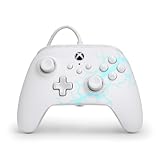
- Now Including Hall Effect Modules – Say goodbye to stick drift with contract-free magnetic sensors in the thumbsticks giving you smoother control, enhanced precision, and increased longevity
- Advanced Gaming Buttons – Get an edge over the competition with two mappable buttons you can program on-the-fly, mid-game—no system settings to configure
- 3-Way Trigger Locks – Set the travel distance of the triggers with three different positions to pull off quicker actions in your favorite FPS games or go full throttle in a high-end race car
- Dual Rumble Motors – Take your gaming experience to the next level, providing tactile feedback and sensations that bring your virtual worlds to life
- Immersive Impulse Triggers – Provides reactive rumble sensations using built-in motors so you can feel the action of the game*
Use the connection that lets you play consistently. If your wireless controller feels immediate and reliable, switching to a cable may change nothing you can perceive. If you are diagnosing a specific delay, change one variable at a time: test the same game, console or PC, display mode, and controller, then compare wired and wireless play under the same conditions.
Television and display processing can dominate
A controller signal is only the first step. Game polling and input-reading schedules, rendering, display processing, and refresh behavior all contribute to the time between a button press and a visible result. A slower television mode can matter more than the difference between two controller links. This is also why a result measured on one setup should not be treated as a specification for every Xbox player.
PC and mobile use
On PC or mobile, the connection method also depends on the device. The current standard controller supports USB-C wired use and Bluetooth on compatible Windows, Android, and iOS devices. Microsoft’s DLI documentation applies to Xbox console, not PC, so do not assume that a console latency feature carries over unchanged to a computer. Check the operating system and game’s controller support before choosing Bluetooth or USB.
Freedom of movement and cable management
When wireless is more comfortable
Wireless is usually the better physical experience for a living-room console. You can sit at the distance your seating requires, hand the controller to another player, and avoid a cable crossing a walkway or brushing a coffee table. It also makes a single controller easier to use with more than one compatible device, provided you follow each device’s connection procedure.
When a cable is an advantage
A cable is useful at a desk or anywhere the console is close enough that the lead can remain slack. It eliminates the need to keep batteries ready and avoids a wireless link as a variable when troubleshooting. The standard Microsoft bundle’s 9-foot cable gives substantial reach, but measure your actual route rather than assuming nine feet will work around furniture.
Rank #3

- No Stick Drift, More Accurate Every Match: Updated Hall Effect sticks deliver ultra-precise control with zero stick drift, zero deadzone, and exceptional recentering, helping you land accurate headshots, smoother movement, and more reliable inputs even after years of intense gaming sessions.
- Adjust Joystick Feel for Every Game in Seconds: Unlike ordinary XBOX controllers, Vader 5S lets you physically adjust joystick tension from 40gf to 100gf on the fly. Use lighter tension for fast FPS aiming and flick shots, or tighten the sticks for smoother steering and precision control in racing and sports games — all without opening software or replacing parts.
- Switch Trigger Response for FPS or Racing Games Instantly: Use micro-click triggers for rapid firing and faster reactions in shooting games, or switch to Hall Effect linear triggers for smoother throttle and braking control in racing games. One controller optimized for multiple genres without needing separate setups.
- Feel Recoil, Acceleration, and Impact More Realistically: 4-motor vibration across both triggers and grips makes shooting, driving, crashing, and combat feel more immersive. Experience stronger recoil feedback in shooters and more realistic acceleration and road feel in racing games.
- Quick In-Game Adjustments Without Interrupting Gameplay: Fine-tune vibration, switch profiles, remap buttons, or adjust volume directly on the controller while gaming. No need to pause the match or open software — perfect for players who constantly switch between FPS, RPG, racing, and multiplayer games.
Physical risks to plan for
- Route the cable where feet, chair wheels, and pets will not catch it.
- Leave enough slack at the controller so the USB-C plug is not pulled sideways during play.
- Do not treat a long cable as permission to sit where the cable is under tension.
- If the controller disconnects when the lead moves, inspect the plug, port, and cable before blaming the game.
Battery life, charging, and the USB-C detail
The 40-hour figure is an estimate, not a guarantee
Microsoft’s current standard-controller specification estimates up to 40 hours from AA batteries. Microsoft also says battery life varies with headsets, accessories, usage, and other factors. A headset, frequent vibration, and high usage can reduce the time you get, so regard 40 hours as a product-page ceiling rather than a promise for every session.
Recommended Free Tools
Wired play avoids an interruption
When the current standard controller is connected by USB-C, Microsoft supports playing in wired mode. That means a depleted AA set does not have to end a session if a suitable cable and USB port are available. The connection is useful even if you normally prefer wireless.
Do not assume every controller charges through its cable
Controller designs differ. Microsoft explicitly supports wired USB-C use for the current standard controller, but you should not generalize that behavior to every Elite model, third-party model, rechargeable pack, or older connector. A USB cable can provide wired input without charging a battery, depending on the controller and battery configuration. Check the exact model’s instructions.
Independent reader supportYour contribution helps us test, update, and keep practical guides available for everyone.Cable and compatibility checks before you buy
Use a cable that carries data
The connector shape alone is not enough. A USB-C cable intended only for power cannot be assumed to carry controller input. Choose a USB-C cable that explicitly supports data, and verify that its plug fits the controller and the console or PC port. The cable supplied with Microsoft’s controller bundle is the simplest supported option for that model.
Confirm the device and operating system
Microsoft lists the current Xbox Wireless Controller for Xbox Series X|S, Xbox One, Windows 10/11, Android, and iOS, subject to supported versions. Xbox Wireless applies to compatible Xbox consoles, while Bluetooth applies to compatible devices. “Works with Xbox” does not mean that every feature, wireless mode, or cable behaves identically on every platform.
Rank #4

- Drift Free Hall Effect Sticks: GameSir T7 uses GameSir's non-contact magnetic Hall effect technology to ensure that the sticks do not wear out throughout their life and provide an ultra life of up to 5 million cycles. This prevents GameSir T7 from drifting the sticks and ensures reliable, long-lasting stick performance for games on Xbox, PC and Steam.
- PRECISION MATCHED ANOG HALL EFFECT TRIGGERS With precisely tuned Hall Effect Triggers for an even, smooth pull, you can race confidently and enjoy a seamless gaming experience like never before.
- REALISTIC & SUPPLY VIBRATION The controller features a total of four rumble motors, with a motor in each handle and trigger that provide immersive and realistic vibration feedback. In addition, the two asymmetric actuators in the handles improve the realism of the vibrations and ensure that you feel every small impact and shot in your hands as if it happened on the spot.
- COMFORTABLE ERGONOMIC DESIGN & TEXTURED SURFACE The ergonomic design combined with the fine laser textured surface of the handles, bumpers and triggers ensures a secure grip and provides a comfortable, stable grip, even during extended gaming sessions.
- 3.5mm Headphone Jack: The 3.5mm audio jack allows you to easily connect a headset for impressive sound and clear communication.
Third-party wired examples need model-level checking
The PowerA Enhanced Wired Controller for Xbox One manual documents a detachable 9.8-foot USB cable and programmable rear buttons. Microsoft’s Designed for Xbox statement from September 2, 2020 says officially licensed Xbox One accessories that connect to the console by USB, wired or wirelessly through USB, work on Xbox Series X. That is a compatibility policy, not a substitute for checking the exact controller model, firmware, and current console support before purchase.
Which type fits your gaming situation?
Choose wireless for couch and television play
Wireless is the natural choice when the console is several feet from the sofa, when multiple people share the room, or when the cable would create a trip hazard. Keep replacement AAs or a supported rechargeable solution available, and remember that the 40-hour estimate changes with accessories and usage.
Choose wired for a fixed desk
A wired controller makes sense when you sit near a console or PC, can route a cable safely, and prefer not to think about batteries. It is also a sensible diagnostic option when you are investigating inconsistent wireless behavior, because it removes the radio connection from the setup.
Choose a dual-mode controller for mixed use
If you alternate between a console and a Windows, Android, or iOS device, a current standard Xbox Wireless Controller with USB-C support covers more situations than a permanently wired model. Use wireless when you need room to move and USB when you want a direct connection or uninterrupted power from the cable. Verify compatibility and the required connection mode for each device.
Do not pay for a latency promise that is not documented
If a product is advertised as “faster” only because it is wired, ask what was measured, on which console or PC, with which game and display, and whether the result is independently comparable. Microsoft’s published material explains the signal paths but does not provide a universal current wired-versus-wireless latency ranking. Comfort, reach, battery policy, and reliable operation are better-supported reasons to choose.
A practical setup and troubleshooting checklist
For wired play
- Identify the controller’s port and use the connector specified for that model. The current standard Xbox Wireless Controller uses USB-C.
- Use a known data-capable cable; the included 9-foot Microsoft cable is an appropriate option for the bundle it ships with.
- Connect the controller directly to the console or PC, then launch or return to the game and confirm that input is recognized.
- Route the cable with slack and keep it away from foot traffic and chair wheels.
- If input is absent or intermittent, test another data-capable cable and another USB port. Inspect both plugs for looseness before changing game settings.
For wireless play
- Install the battery type or rechargeable accessory specified for your controller.
- Use the connection method supported by your platform: Xbox Wireless on a compatible Xbox console, or Bluetooth on a compatible Windows, Android, or iOS device.
- Keep track of battery condition, especially when using a headset or other accessories that increase consumption.
- If you are comparing responsiveness, keep the game, display, and controller unchanged and switch only the connection mode.
- If the wireless experience is unreliable, temporarily use USB. A stable wired result identifies the wireless link as a variable, but it does not by itself identify the cause.
Verdict
Wired Xbox controllers are better when a fixed seat, direct USB input, and freedom from battery changes matter more than mobility. Wireless Xbox controllers are better when room to move, clean cable-free seating, and easy living-room use matter more. Microsoft’s current standard controller makes the decision less permanent by supporting Xbox Wireless, USB-C wired play, and Bluetooth on compatible devices. Treat wired latency as a technical distinction rather than a universal measured victory, then choose the mode that fits your actual room, platform, and habits.
Quick Recap
Product prices and availability are accurate as of the date/time indicated and are subject to change. Any price and availability information displayed on Amazon at the time of purchase will apply.

